



WOODWARD easYview miniSCADA visualization solution
Product Overview
Product positioning: A miniSCADA visualization solution designed specifically for Woodward power management controller controlled generator set fleet. As a ready-made HMI option, it meets the safety remote control, monitoring, and visualization needs of users such as switchgear manufacturers and generator set packagers.
Core advantages:
No need for extensive on-site engineering work, pre-set equipment connections and data structures
Balancing indoor and outdoor use, with a wide operating temperature range, IP66 protection, anti glare treatment, and high brightness display
Support brand personalization, replaceable logo and startup screen
Applicable scenarios: hospitals, data centers, offshore drilling platforms, landfills, leased equipment, wastewater biogas power generation, etc.
Comparison of Model and Key Parameters
Model easyYview-07-030 easyYview-10-060 easyYview-15-150
Display size 7 inches 10.1 inches 15.6 inches
Display type WSVGA TFT LCD WXGA TFT LCD FHD TFT LCD
Maximum resolution 1024 × 600 1280 × 800 1920 × 1080
Brightness (cd/m ²) 425 500 450
Weight 2kg (4.44lb) 3.9kg (8.63lb) 4.1kg (13.15lb)
MiniSCADA Concurrent Data Points (CCD) 30 60 150
Simultaneously, the number of remote HMI connections is 1, 2, and 4
Hardware part number 8446-1071 8446-1072 8446-1073
Hole size (mm) 192.4 × 139.0 (R5.0mm) 274.1 × 193.3 (R5.0mm) 411.9 × 261.2 (R5.0mm)
Core functions and working modes
Dual working mode
MiniSCADA mode:
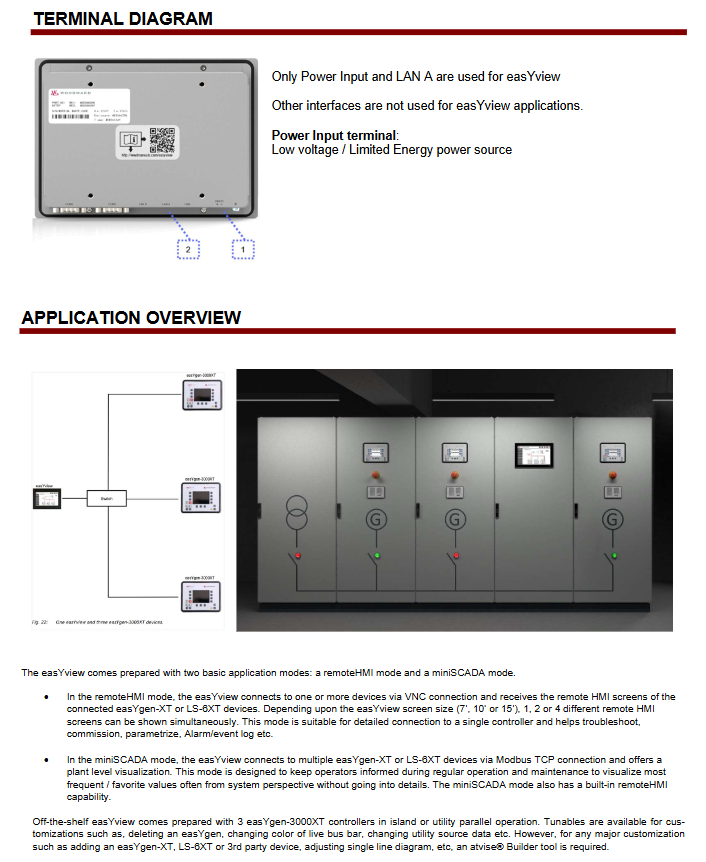
Connection method: Connect multiple easyYgen XT and/or LS-6XT via Modbus TCP
Preset support: Data structure for 3 easyYgen XT+3 LS-6XT devices, a total of 6 devices
Core purpose: System level performance visualization, suitable for viewing high-frequency/commonly used values during routine operation and maintenance
Scalability: Can be achieved through atvisa ® Tools for adding third-party devices, adjusting single line diagrams, etc
Remote HMI mode:
Connection method: Connect to a single controller through VNC
Display capability: Simultaneously display 1/2/4 different remote HMI screens based on screen size
Core uses: debugging, troubleshooting, parameter setting, viewing alarm/event logs
Cascade function: One main easyYview can connect to five controllers, and up to nine secondary easyYviews can connect to the main easyYview
Key Features
Network function: supports device list search and filtering, automatically connects to the last connected device
Customization: Basic customization achieved through parameter tuning, password protected atvisa ® Tool implementation for deep customization
PC mode: Release easyYview hardware authorization, customizable through PC
Multilingual: Supports remote HMI screens connected to controllers in multiple languages
Safety compliance: CE certification, UL certification, FCC A-level certification
Technical specifications
Power and Environment
Power supply: 24Vdc ± 20% (low voltage/limited energy power supply)
Power consumption: typical 9W, maximum 21W
Working temperature: -20~60 ℃ (-4~140 ℉)
Storage temperature: -30~70 ℃ (-22~158 ℉)
Environmental humidity: 95% RH at 40 ℃ (without condensation)
Protection level: Front IP66 (with clamp fastening)
Anti vibration/anti impact: 2Grms random vibration (5-500Hz) during operation, 10G impact within 11ms
hardware configuration
Processor: NXP ® ARM ® Cortex ™- A53 i-MX 8M quad core 1.6GHz processor
Memory: 2GB DDR4 RAM
Storage: 16GB eMMC
Backup memory: 1MB FRAM
Touch screen: Projection Capacitive (P-CAP), 10 point touch, light transmittance ≥ 85%, pencil hardness ≥ 7H
Interface: Only uses power input and LAN A Ethernet interface, other interfaces are not used for easyYview applications
Installation method: Front panel installation and VESA 100 × 100mm installation, including installation kit with 10 fixtures and screws (part number 10-052-842)
software configuration
Operating System: Linux
Application software: atvisa for miniSCADA mode ®, Remote HMI mode using VNC
Customization and Support
Customization related
Basic customization: achieved through tuning parameters and online keyboard (such as deleting easyYgen, changing bus color, etc.)
Deep customization: using atvisa ® SCADA tool (please refer to application note AN # 37949)
Brand personalization: replaceable logo and startup screen (please refer to application note AN # 37946)
Related products and documents
|Product Type | Product Name | Product Specification Number | Technical Manual Number|
|Generator set control | easyYgen-3100XT/3200XT-P1 | 37582 | 37574|
|Generator set control | easyYgen-3400XT/3500XT-P1/P2 | 37583 | 37580/37581|
|Circuit breaker control | easyYgen | LS-6XT | 37913 | 37914|


