REXROTH BTV04.2 Micro Control Panel
REXROTH BTV04.2 Micro Control Panel is a human-machine interaction product suitable for industrial equipment operation and control. It has a 128 × 64 pixel graphic LCD display screen and a 38 key operation panel (including 7 customizable keys), supports RS232/RS485 dual communication interfaces, is equipped with 10 24V inputs/11 24V outputs, has a protection level of IP65 (front), and a working voltage of 24VDC (18-30VDC). It is suitable for automation, packaging, machine tools and other scenarios, and can be adapted to multiple controllers such as MTC200 and Ecodrive3. The first firmware loading needs to be completed through Dolfi software.
Product Overview
Core positioning: BTV04.2 is an industrial grade micro control panel launched by Bosch Rexroth, used for operation control, parameter setting, and operation status display of industrial equipment. It communicates with the controller through dual serial interfaces and is compatible with multi brand industrial control systems.
Core strengths
Easy to operate: 38 key streamlined layout, 7 customizable keys supporting scene based annotation, in line with industrial operation habits.
Wide adaptability: compatible with multiple controllers such as MTC200, ISP200, Ecodrive3, etc., supporting RS232/RS485 dual communication mode.
Reliable protection: IP65 protection on the front, suitable for industrial dust and slight splashing environments. The housing adopts an aluminum alloy front panel, which is sturdy and durable.
Flexible expansion: Comes with 10 24V inputs and 11 24V outputs, which can be directly connected to external sensors or actuators.
Applicable scenarios: automation and handling equipment, packaging and food processing machinery, machine tool equipment, etc. It is prohibited to use them in personnel transportation equipment, medical equipment, nuclear industry and other scenarios.
Key technical parameters
(1) Summary of Basic Parameters
Category specific indicators
Power supply specification 24VDC (18~30VDC), maximum current consumption 400mA
Display system 128 × 64 pixel LCD, black and white graphic display, LED backlight, visible area 68 × 37mm
38 key polyester film keyboard with 7 customizable keys (marked with insert bars)
Communication interfaces RS232 (COM2), RS485 (COM1, no isolation, supports bus connection)
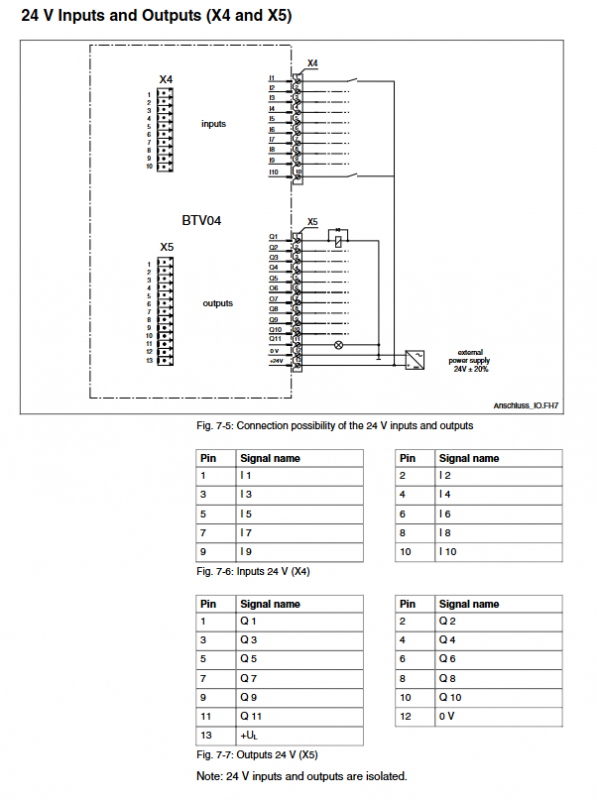
IO interface input: 10 channels of 24V (minimum input current 7mA); Output: 11 channels of 24V (typical output current 200mA)
Environmental parameters: working temperature of 5-45 ℃, storage temperature of -20~60 ℃, temperature gradient ≤ 10K/h (working)/15k/h (storage)
Physical dimensions without frame: 203 × 143 × 45mm; including frame: 203 × 143 × 50mm
(2) Hardware configuration
Core processor: 68000 series microcontroller
Storage capacity: 1MB flash memory (for storing firmware and applications), 512KB RAM (for running cache)
Structural material: The front panel is made of aluminum alloy, the shell is made of engineering plastic, and the color is RAL7035 (light gray)
Connection and adaptation
Communication interface details
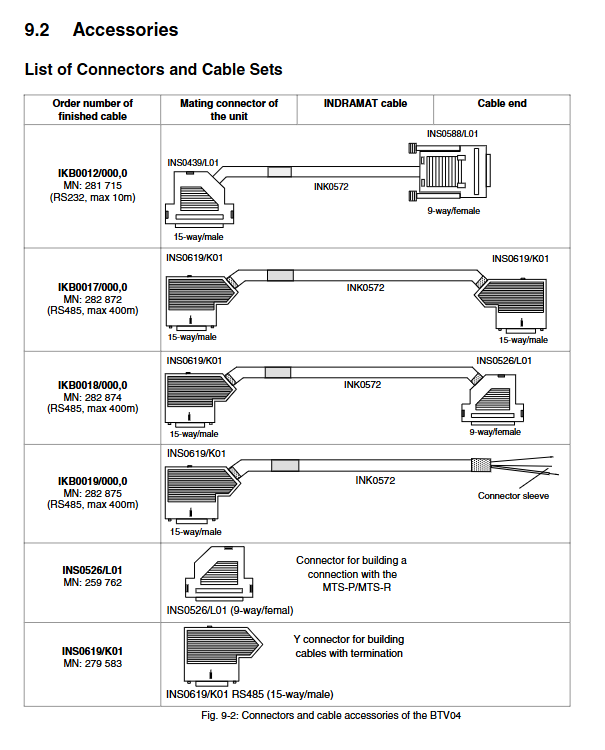
RS485 interface (COM1): Complies with Indramat standards, supports bus topology, and can connect up to 2 BTV04 on a single bus. It requires the use of INS0619/K01 connectors with terminal resistors.
RS232 interface (COM2): Used for connecting with PC, only supports point-to-point communication, mainly used for firmware download and debugging.
Typical adaptive controller
|Controller type | Connection method | Dedicated cable|
|MTC200-P/MTA200-P | RS485 connection X40/X41 interface | IKB0018/19|
|MTC200-R/ISP200-R | RS485 connection X16 or X40/X41 interface | IKB0017/18/19|
|CLC-D | RS485 connection X27/X28 interface | IKB0017/24|
|Ecodrive3/ELC | RS485 connection X2 interface | IKB0017/19|
|PPC-R | RS485 connection X10/X16 interface | IKB0017|
Special cable specifications
|Cable model | Communication type | Maximum length | Two end connectors | Purpose|
|IKB0012 | RS232 | 10m | One end INS0439/L01, one end INS0588/L01 | PC and BTV04 debugging connection|
|IKB0017 | RS485 | 400m | INS0619/K01 at both ends | Controller connected to BTV04|
|IKB0018 | RS485 | 400m | One end INS0619/K01, one end INS0526/L01 | Specific controller adaptation|
|IKB0019 | RS485 | 400m | One end INS0619/K01, one end connection sleeve | Bus expansion or terminal connection|
Debugging and operation process
First debugging preparation
Hardware: BTV04 host, 24V power supply, IKB0012 connection cable, PC (installed with Windows 3.11/95/98/NT).
Software: Dolfi download tool (SWD-DOL * PC-INB-01VRS-MS-C1,44), BTV04 application firmware.
Debugging steps
Connect the RS232 interface (X3) of BTV04 to the COM port of the PC using IKB0012 cable.
Supply power to BTV04 (24VDC) and display IndramatLogo upon power on.
Start the PC Dolfi software, select COM port, baud rate 9600bps, and receive address 03.
Click on “Serial Connect” to establish a connection, and select “Backup” to back up the original firmware (if needed).
Select ‘Serial Send’ to load the new firmware, the progress bar displays the transfer status, and after completion, it prompts’ Programming successful ‘.
Click on ‘Serial Disconnect’ to disconnect, and BTV04 will automatically restart and run the new firmware.
Startup and maintenance mode
Normal startup: After powering on, check the firmware integrity → turn off the LED → start the application.
Maintenance mode: Before starting the application after power on, press the F1 key → display the boot program and firmware version → to perform firmware updates or troubleshooting.
Ordering and accessory instructions
Model coding rules (example: BTV04.2GN-FW)
|Encoding field | Meaning | Optional values/Description|
|1-3 | Product Series | BTV (Micro Control Panel)|
|4-5 | Product Version | 04 (Main Version)|
|6 | Design Version | 2 (Second Edition)|
|7 | Display type | G (graphic display, 128 × 64 pixels)|
|8 | Keyboard Type | N (Standard Keyboard)|
|9-10 | Firmware Identification | FW (firmware needs to be ordered separately)|
Core accessory list
|Accessory Name | Model/Order Number | Purpose|
|RS232 debugging cable | IKB0012 (MN: 281715) | Communication between PC and BTV04, firmware download|
|RS485 connection cable | IKB0017 (MN: 282872) | BTV04 connected to controller RS485|
|RS485 terminal connector | INS0619/K01 (MN: 279583) | Bus terminal matching, including switch|
|Download Tool Software | SWD-DOL * PC-INB-01 | Firmware Loading, Backup, and Update|