HIMA HIMatrix series compact safety controller
Core technical specifications
1. Safety and environmental parameters
Category specifications
Safety certification SIL 3 (IEC 61508/61511/62061), SIL 4 (EN 50126/50128/50129, railway) Cat.4/PL e(EN ISO 13849-1)
Power supply requirement: 24 VDC (-15%~+20%), ripple ≤ 15%, SELV/PELV safe low voltage, external 10A delay fuse
Environmental conditions: working temperature of 0-60 ℃, storage temperature of -40~85 ℃, pollution level II, altitude<2000m, protection level IP20
EMC standard immunity: ESD 6kV contact/8kV air discharge, surge 2kV, emission: EN 55011 Class A
2. Hardware and communication parameters
Category specifications
Hardware layout L2 (basic functions), L3 (extended functions: multitasking/reloading/event recording)
Communication interface 2/4 RJ-45 (10/100BASE Tx), D-sub (PROFIBUS/Modbus)
Communication protocol security protocol: safeEthernet; Standard protocols: Ethernet/IP, Modbus TCP, PROFIBUS DP, SNTP
Diagnostic storage L3 layout: 700 long-term diagnostics and 700 short-term diagnostics for CPU; COM long-term 300, short-term 700
Detailed explanation of core functions
1. Safety related functions
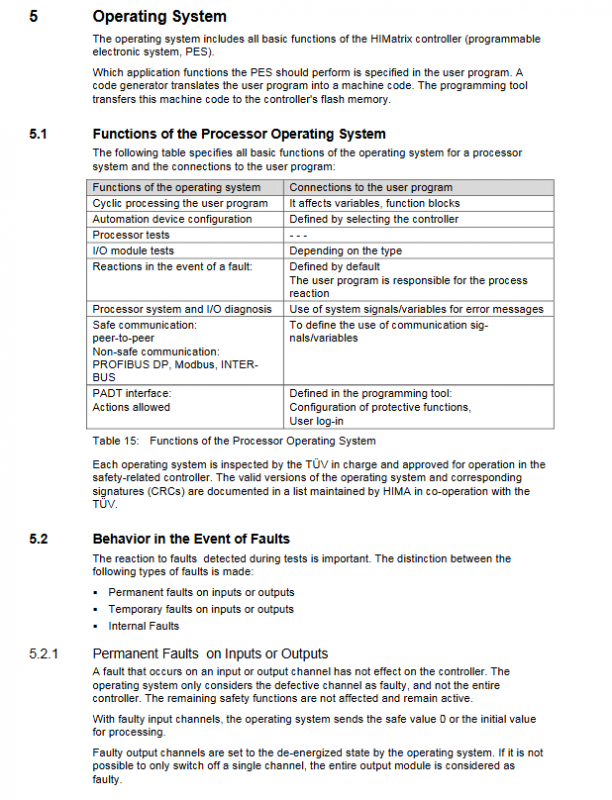
Fault safety shutdown: Following the principle of “power-off tripping”, the input/output switches to a power-off safety state in case of a fault; Supports 4 emergency stop signal inputs, and the controller enters the STOP state after triggering.
Event Recording (SOE) – L3: Supports Boolean (variable state change) and scalar (threshold over limit) event recording, with a buffer capacity of 1000 entries and timestamps, which can be exported through the X-OPC server.
Force operation: supports global/local force variable values, can set time limits (0~unlimited), and automatically cancels force after timeout; L3 layout supports independent forcing of 32 user programs.
2. Operation and extension functions
Multi tasking – L3: Supports up to 32 user programs running in parallel, supporting 3 modes (Mode 1: Shorten cycle; Mode 2: High priority occupies the remaining time; Mode 3: Fixed cycle), program priority can be set (0 is the highest).
Overload Function – L3: User program logic/parameters can be updated during operation without stopping, and sufficient watchdog time needs to be reserved (to avoid exceeding the cycle limit).
I/O Expansion: Supports digital/analog/I/O modules, remote I/O (via safeEthernet connection), and I/O signal allocation requires binding global variables through programming tools.
3. Communication function
SafeEthernet: Based on the IEEE 802.3 standard, it supports SIL 3 secure data transmission and can detect faults such as data corruption, address errors, and timing anomalies. It supports star/linear network topologies and has a maximum communication time slice of 5000ms.
Fieldbus communication: Non secure protocols such as PROFIBUS DP and Modbus are used to connect external devices and require separate configuration of signals and parameters.
Programming and Configuration Process
1. Adaptation of programming tools
Programming tools adapted to OS version core operations
SILworX CPU-OS V7+, COM-OS V12+resource configuration, hardware editing, code generation, online diagnosis
ELOP II Factory CPU-OS V6. x and below, COM-OS V11 and below signal editing, hardware management, code generation, control panel operation
2. Core configuration steps
Resource configuration: Set system ID (1~65535), security time (20~22500ms), watchdog time (8~5000ms), automatic start and other parameters.
I/O signal allocation: Bind global variables and I/O channels in the hardware editor, configure fault response logic (such as error code association).
Code generation: Two rounds of generation and CRC consistency verification are required to ensure that the code is error free (mandatory for security related applications).
Download and start: Download configuration through Ethernet, supporting cold start (initializing variables) and hot start (retaining variable values), and the controller enters RUN state after startup.
3. User permission management
Support project level (SILworX) and controller level permission management, divided into three types of permissions: security administrator (modify permissions), read-write permissions (operate functions), and read-only permissions (view).
Controller level supports up to 10 user accounts, default administrator account (empty password), configurable password complexity and operation permissions.
Installation and maintenance specifications
1. Installation requirements
Mechanical installation: 35mm DIN rail, horizontally installed, with a reserved heat dissipation space of ≥ 100mm above and below, avoiding proximity to heat sources.
Electrical installation:
Grounding: DIN rail grounding or shell grounding screw (2.5mm ² cable), with minimal grounding resistance;
Wiring: Signal cables and power cables are routed in separate slots, and the shielding layer of analog input cables is grounded at one end;
Power supply: Connect the positive and negative poles correctly to avoid reverse connection (with built-in pre fuse protection).
Dangerous area installation: It is necessary to meet the IP54 protective shell, ensure heat dissipation (power consumption of 9-25W), and ensure power supply meets ATEX requirements.
2. Maintenance and troubleshooting
Regular maintenance: Conduct validation testing every 10 years; Battery backup data requires regular check of battery status.
Troubleshooting:
Hardware malfunction: Preliminary diagnosis through LED indicator lights (RUN/ErrOR/AULT), combined with diagnostic logs for localization;
Communication failure: Check the IP address/subnet mask configuration and confirm the connectivity of the SafeEthernet link;
Program malfunction: By forcibly operating the test logic, reloading or re downloading the configuration.
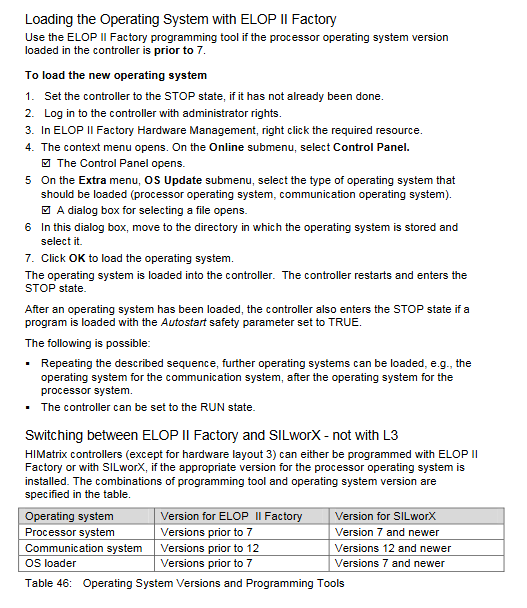
Operating system upgrade: The controller needs to be in STOP state. First upgrade the CPU operating system, then upgrade the COM operating system to avoid interrupting the upgrade process.
Lifecycle Management
Startup: Installation → Wiring → Configuration → Code Generation → Download → Startup → Functional Testing.
Operation: Regularly monitor diagnostic logs and check power/temperature status (if the temperature is greater than 70 ℃, heat dissipation needs to be strengthened).
Shutdown: Power off → Remove cables → Recycle or store (original packaging to prevent ESD).
Disposal: Industrial users are responsible for ecological recycling and can sign a disposal agreement with HIMA.