HIRSCHMANN MS20/MS30 series industrial Ethernet switches
Core Features and Classification of Products
1. Product classification and core differences
Key Differences in Product Series Core Positioning, Transmission Rate, Port Configuration
MS20 non gigabit port modular switch with 10/100 Mbit/s 8/16/24 ports, supporting MB20 expansion modules with only 100Mbps rate, focusing on high port density
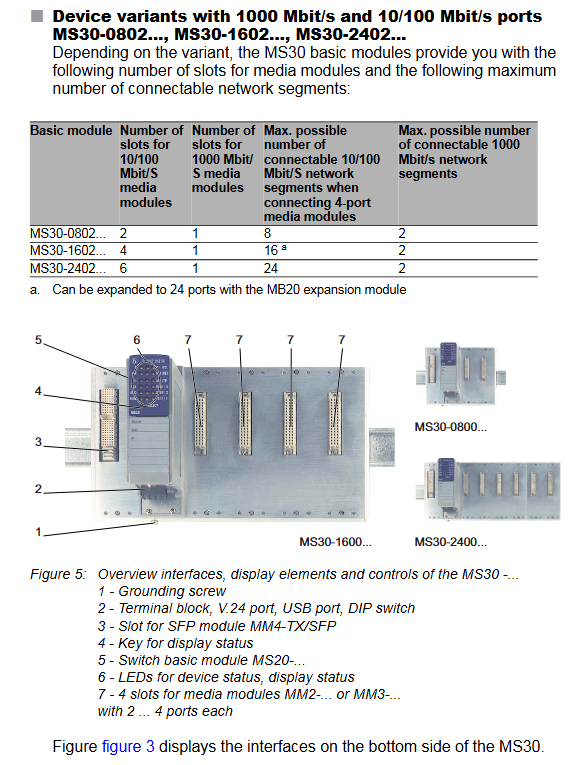
MS30 modular switch with Gigabit ports 10/100 Mbit/s+1000 Mbit/s 8/16/24 100Mbps ports+2 Gigabit ports supporting Gigabit expansion to meet high bandwidth requirements
2. Core industrial grade characteristics
Modular design: Basic module+pluggable media module (MM2/MM3/MM4 series), supports hot plugging, and can flexibly configure interface types such as twisted pair (RJ45/M12), fiber optic (multimode/single-mode), PoE, etc.
Redundancy guarantee:
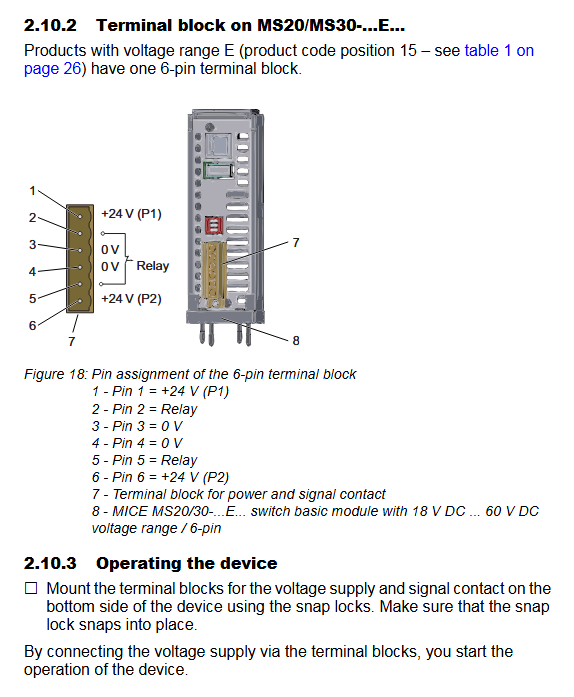
Power supply redundancy: dual 4-pin terminal block input, supporting 18-32V DC (Class A) or 18-60V DC (Class C/E), seamless switching in case of power failure;
Network redundancy: Supports HIPER Ring protocol, fast fault recovery, DIP switch configurable redundancy manager (RM) function.
Wide temperature and environmental adaptability:
Temperature range: Standard type (S) 0~60 ℃, Extended type (T/E) -40~70 ℃ (Class E includes normal coating);
Protection level: IP20, pollution level 2, supports altitude up to 2000m.
Hazardous Area Adaptation: Certified by ATEX, IECEx, UL 508, etc., suitable for Class I, Division 2, Groups A-D hazardous areas, USB/V.24 interface only allows temporary connection in non hazardous areas.
Hardware configuration details
1. Basic module parameters
Model prefix, port quantity, expansion capability, power supply type, weight (approximately)
MS20-0800 8 10/100 Mbit/s supports MB20 extension A/C/E class 610g (Class A)/700g (Class C)
MS20-1600 16 10/100 Mbit/s supports MB20 extension A/C/E class 880g (Class A)/970g (Class C)
MS30-0802 8 x 10/100 Mbit/s+2 x 1000 Mbit/s support MB20 extension A/C/E class 740g (Class A)/830g (Class C)
MS30-2402 24 x 10/100 Mbit/s+2 x 1000 Mbit/s does not support extended A/C/E classes 1160g (Class A)/1250g (Class C)
2. Media module types
Module series, functional types, interface specifications, representative models, key characteristics
MM2 100Mbps basic module RJ45/fiber (multimode/single-mode) MM2-4TX1 (4-port RJ45) 10/100 Mbit/s, supports Auto MDI/MDI-X
MM3 100Mbps Enhancement Module RJ45/M12/Fiber MM3-4TX5 (4-port M12) supports industrial grade M12 interfaces and is vibration resistant
MM4 Gigabit Combination Module RJ45+SFP Slot MM4-4TX/SFP 4-port RJ45 is mutually exclusive with 4 SFP slots and supports Gigabit expansion
MM22 PoE power module 4-port RJ45 PoE MM22-T1T1T1T1 complies with IEEE 802.3af and supports Class 0/3 terminals
MM24 digital I/O module with 4 inputs and 4 outputs. MM24-OIOIOIO can control external actuators and achieve linkage function
3. Key interfaces and power supply
Interface type:
Data interface: RJ45 (10/100/1000 Mbit/s), M12 (industrial grade), SFP slot (fiber optic expansion), AUI port (IEEE 802.3);
Management interface: USB (configuration/upgrade), V.24 (CLI local management, RJ11 interface);
Power interface: 4-pin (Class A/C)/6-pin (Class E) terminal block, supporting redundant power supply.
Power supply parameters:
Class A: 18-32V DC, maximum current 4.0A, power 72W;
C/E class: 18-60V DC, maximum current 1.2A (C class), power 72W;
Safety level: SELV/PELV, North American Class 2 power supply.
Core functions and management methods
1. Core functions
Network redundancy: Supports HIPER Ring network (fast fault recovery) and Rapid Spanning Tree (fast spanning tree) to ensure network continuity;
PoE power supply: The MM22 module supports supplying power to IP phones, cameras, and other terminals through twisted pair cables, using backup wire pairs (pins 4/5, 7/8) for power supply;
Electromagnetic compatibility: Complies with EN 55032 Class A, EN 61000-6-2 standards, anti-static discharge (± 8kV air discharge), fast transient (± 4kV);
Security features: Supports port isolation, VLAN (IEEE 802.1Q), and SNMPv3 encryption management. The default administrator password needs to be changed upon first login.
2. Management and configuration methods
Key Explanation of Applicable Scenarios for Configuration Method and Operation Path
Automatic configuration of DHCP/BOOTP for large-scale deployment, automatic acquisition of IP addresses and configuration
Local Configuration Adapter (ACA) for single machine quick configuration, importing/exporting configurations through USB interface
Manually configure DIP switch redundancy function to quickly enable RM, ring network ports, and other functions
Remote management Web GUI/Telnet/SSH remote maintenance supports browser access and CLI command line operations
Centralized management of Industrial HiVision software for unified configuration, monitoring, and fault diagnosis of multiple device clusters
Installation and maintenance specifications
1. Key installation steps
Installation preparation: Check the packaging contents (equipment, terminal blocks, labels, manuals) to confirm that there is no transportation damage;
Physical installation:
Method: 35mm DIN rail installation (compliant with DIN EN 60715), with a reserved heat dissipation space of ≥ 10cm above and below;
Grounding: grounded through DIN rails or separate grounding screws, with a grounding wire specification not smaller than the power supply wire;
Cable connection:
Twisted pair cable: Cat5e and above, with a maximum length of 100m, maintaining sufficient distance from power cables (recommended to be routed in separate slots);
Fiber optic: Multimode/single-mode fiber optic cables need to be matched with SFP transceivers to avoid end face contamination;
Power supply: Connect according to the terminal definition. DC power supply needs to be grounded to the negative pole, while AC power supply needs to be isolated and grounded;
Startup process: After connecting the power supply, the device automatically self checks (about 60 seconds), and the LED indicator light displays the device status.
2. Maintenance and disassembly
Daily maintenance:
Component replacement: media module SFP transceiver、 The power module supports hot swapping;
Software upgrade: Download the latest firmware via USB or network to avoid power outages and interruptions;
Fault diagnosis: locate the fault through LED indicator lights (power, redundancy, port status) and management software;
Disassembly steps:
Disconnect all cables (data+power) and remove the grounding;
Press the bottom lock of the device and remove it from the DIN rail;
When dismantling the SFP transceiver, first open the lock buckle and remove the protective cap on the back cover.
Key technical specifications
Category parameter details
Environmental parameter temperature: -40~70 ℃ (T/E class), 0~60 ℃ (S class); Humidity: 10-95% RH (no condensation); Altitude: ≤ 2000m
Mechanical parameter dimensions (MS20-0800): 125 × 133 × 100mm (W × H × D); Protection level: IP20; Laser safety: Class 1
Electromagnetic compatibility radiation emission: EN 55032 Class A; Immunity: EN 61000-4-2 (± 8kV air discharge) EN 61000-4-3(10V/m)
Maximum switching voltage of signal contacts: 60V DC/30V AC; Maximum switching current: 1A (≤ 60 ℃)/100mA (60-70 ℃)