Eaton XControl Series Modular PLCs
Product core positioning
Type: Modular fanless PLC, supporting local/remote I/O expansion, suitable for industrial automation control scenarios
Core advantages: modular design, multi protocol compatibility, wide temperature operation, high reliability, support for multitasking and interrupt handling
Prohibited use: Not suitable for personnel/machinery safety protection function, only applicable to equipment control in enclosed spaces
Core hardware specifications
Category XC-104-… XC-204-… XC-303-
Processor NXP CORTEX A7 (800MHz)+M4 (200MHz) NXP CORTEX A7 Dual Core (1GHz)+M4 (200MHz) Freescale CORTEX A7 Dual Core (960MHz)
Memory configuration DDR3L-RAM: 256MB; NVRAM:4KB DDR-RAM:512MB; NVRAM:32KB DDR-RAM:512MB; NVRAM:128KB
Storage medium eMMC-FLASH: 2GB; EMMC FLASH without MicroSD slot: 2GB; Optional MicroSD QSPI-FLASH: 128MB; Support MicroSD
Local I/O without 2-channel digital I/O (configurable as interrupt input) 4-channel digital I/O (configurable as interrupt input)
Communication interface 1 x Ethernet (10/100Mbit/s), USB 2.0 2 x Ethernet (10/100Mbit/s), CAN, RS485, USB 2.0 3 x Ethernet (including 1 gigabit), 2 x CAN, RS485, USB 2.0
Power supply parameters 24V DC (19.2-30V), maximum input current 1A 24V DC (19.2-30V), maximum input current 2.4A 24V DC (18-30V), maximum input current 3.3A
Physical dimensions (H × D × W) 104.7 × 72 × 23mm, weight 0.11kg 104.7 × 72 × 23mm, weight 0.11kg 104.7 × 72 × 50mm, weight 0.3kg
Working temperature -20 ℃~+60 ℃ -20 ℃~+55 ℃ -20 ℃~+60 ℃
Core functions and software configuration
Programming and Development
Programming software: XSOFT-CODESYS-3 (version 3.5.9 and above), supporting IEC standard languages such as Structured Text (ST)
Task management: Supports cyclic tasks (with adjustable cycles), event triggered tasks, priority 0-31 (0 being the highest), and watchdog monitoring (to prevent program dead loops)
Interrupt handling: Local I/O can be configured as rising edge/falling edge/dual edge interrupts, requiring integration with EA_XC303Events.lib library
Program deployment: Supports Boot application creation, batch programming through MicroSD/USB, and can save/restore persistent data
Communication protocol support
|Protocol Type | Core Features|
|Ethernet related | Supports PROFINET, EtherNet/IP, WebVisu (HTTP/HTTPS), OPC UA|
|Fieldbus | CANopen (supporting DS301V4 protocol), EtherCAT (as master station) Modbus TCP/RTU |
|Serial Communication | RS485 (Supports Modbus RTU, baud rate 1200-112200 Bit/s)|
|Configuration Method | Ethernet Default IP: eth0 is 192.168.119. x (e.g. XC-303-… is 192.168.119.248), supports DHCP|
Configuration and Management Tools
Web Config Tool (XC-104/204 only): Supports browser access (port 8375), can configure network, update system, factory reset, set NTP time synchronization
PLC Shell commands: Provides 100+commands for diagnosis (such as canload to view CAN bus load), configuration (setipconfig to set IP), maintenance (factoryreset reset)
XN300 Assist: Used for planning, configuring, and debugging XN300 slicing modules, supports generating INI/EDS files and importing CODESYS
Installation and commissioning process
Installation requirements
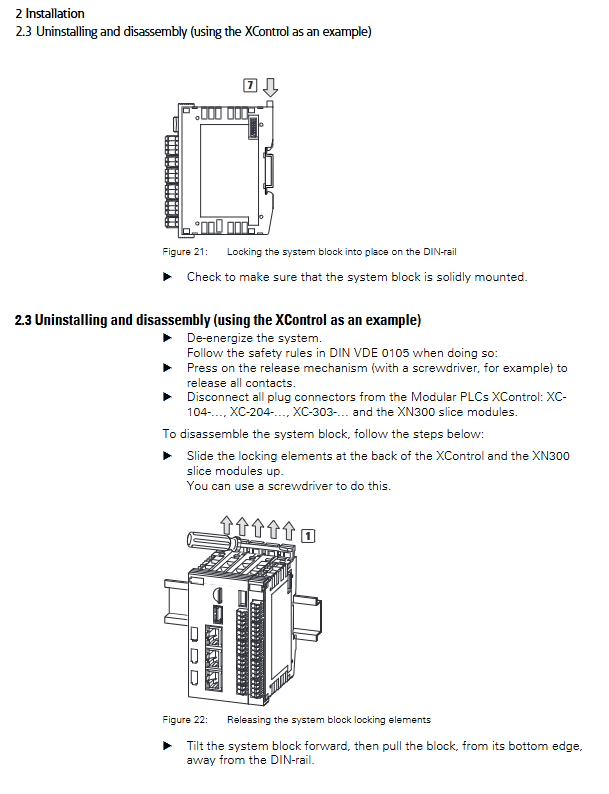
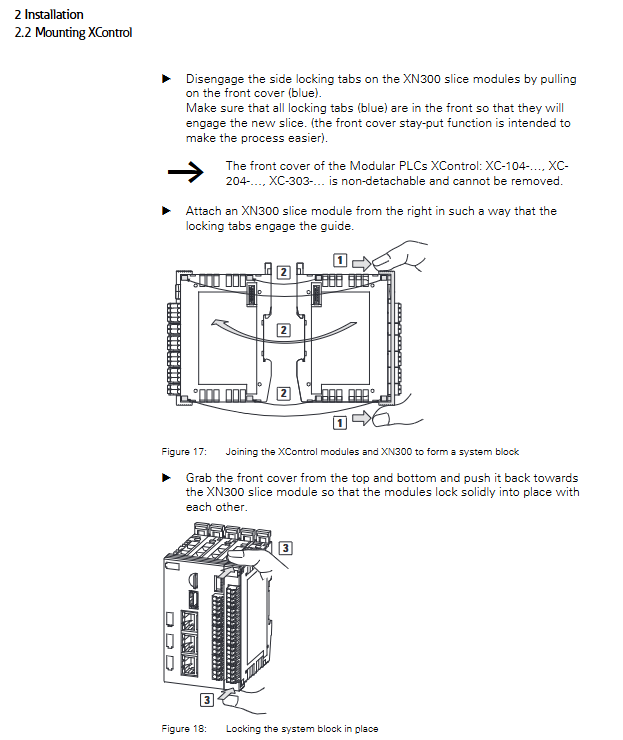
Installation method: DIN rail (IEC EN 60715, 35mm), XC-303-… only supports horizontal installation, XC-104/204 supports horizontal/vertical installation
Environmental requirements: Ventilation gap ≥ 50mm (passive components)/75mm (active components), avoiding UV exposure and condensation
Wiring specifications: Use shielded cables, with a distance of ≥ 10cm between power and signal cables, and a distance of ≥ 30cm between analog signal cables, in compliance with EMC requirements
Debugging key steps
Initial configuration: PC and PLC need to be on the same subnet, default IP can be modified through Web Config Tool or PLC Shell
Program download: Log in to the device → Create Boot application → Download program, persistence variables need to be configured separately
System update: Supports OS/RTS updates through XSOFT-CODESYS-3, Web Config Tool (RAUC package), MicroSD/USB
Factory reset: Method 1 (directly operated by Web Config Tool); Method 2 (Place the factory reset. txt file on the USB storage device)
Maintenance and troubleshooting
routine maintenance
Cleaning and maintenance: Wipe with a soft damp cloth, avoid sharp tools and corrosive cleaning agents, and prevent liquids from entering the equipment
Storage and transportation: Environmental temperature -25 ℃~+70 ℃ (XC-303-… -40 ℃~+80 ℃), avoid severe vibration and UV irradiation
Disposal standard: Dispose of in compliance with local regulations and not dispose of at will
Common troubleshooting
|Fault phenomenon | Possible cause | Solution|
|PLC cannot start | Power not connected/OS version incompatible | Check 24V DC power supply; Install the matching OS version|
|Program cannot be downloaded | IP not in the same subnet/insufficient permissions | Configure PC and PLC to have the same IP in the same network segment; log in with administrator privileges|
|CAN bus communication abnormality | Terminal resistance not activated/baud rate mismatch | Turn on TRSa/TRSb DIP switch; Unified bus baud rate|
|Retention data loss | Long power interruption time/NVRAM failure | Check power stability; Backup data through shell commands|
Certification and Compliance
Core certifications: cUL (UL508), CE (compliant with EU directives), IEC/EN 61131-2 (PLC standard)
Electromagnetic compatibility: compliant with EN 61000 series standards, contact discharge ± 8kV, air discharge ± 15kV
Safety specifications: Pollution level 2, overvoltage category II, protection level IP20 (body)