EATON XV-303/XV-313 series industrial multi touch HMI display
Product core positioning and model differentiation
Core positioning: A human-machine interaction terminal designed specifically for industrial environments, used for monitoring, operating, and controlling machines/systems, supporting PLC function expansion, adapting to control cabinet integration, ship equipment, and other scenarios. It needs to be installed and maintained by qualified electricians;
Model difference:
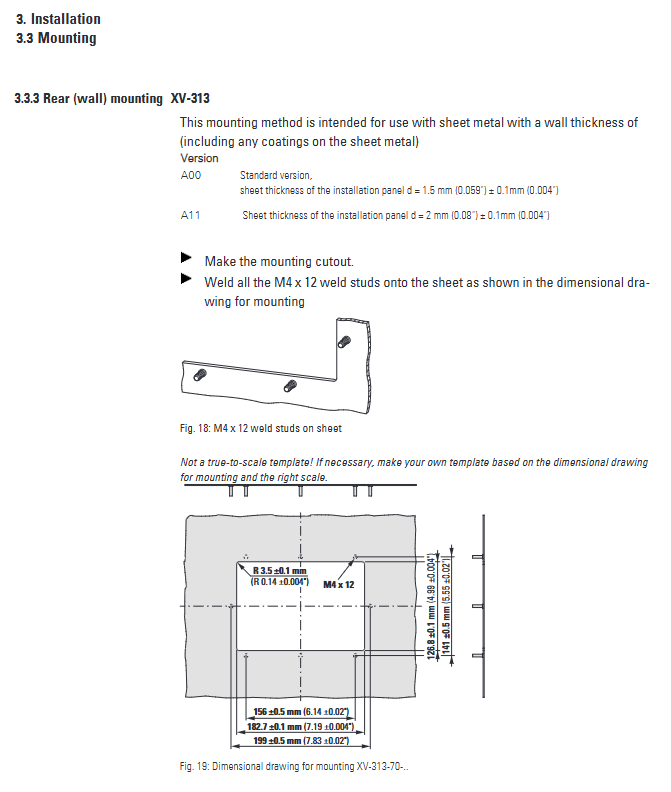
Installation method: XV-303 (front mounted), XV-313 (rear mounted, divided into A00/A11 versions, compatible with 1.5/2mm panels);
Display size: 7.0 “(1024 × 600), 10.1” (1024 × 600), 15.6 “(1366 × 768);
Interface configuration: B00 (single Ethernet), C00 (dual Ethernet);
Function package: 2B (visualization software only), 2C (visualization+PLC function);
Compliance certification: Certified by UL 61010-2-201, CE, DNV GL classification society, compliant with ATEX Zone 22 explosion-proof standard, and electromagnetic compatibility compliant with IEC/EN 61000 series specifications.
Core hardware and technical parameters
(1) Display and Touch System
Parameter category specification details
Display type: Color TFT widescreen, anti glare tempered glass
Resolution 7.0 “/10.1”: 1024 × 600 (WSVGA); 15.6”:1366×768(WXGA)
Color and Brightness 16.7 million colors (24 bit color depth), Brightness 400cd/m ²
Contrast 7.0 “model 850:1; 10.1 “/15.6” model 500:1
Backlight and lifespan LED dimmable, with a lifespan of 50000 hours at 25 ℃
Touch technology Projection Capacitive Touch (PCT), multi touch, supports gesture operation
(2) Core hardware configuration
Specific parameters of hardware modules
Processor 800MHz ARM Cortex-A9
Memory combination: 512MB RAM+1GB SLC flash memory+128KB non-volatile storage
Storage expansion SD/SDHC card slot (supports SDA 2.0 specification, requires original accessories)
Real time clock with built-in lithium battery (Panasonic BR-2330/GNU, 3V), power off backup for 10 years (25 ℃)
Cooling method: passive heat dissipation without fan, natural convection
Protection level: IP65 on the front (dustproof and waterproof), IP20 on the back
Physical weight: 7.0 “model 0.74-0.8kg; 10.1” model 1.13-1.21kg; 15.6 “model 3.25kg
(3) Power supply and environmental parameters
Category key parameters
Supply voltage 24VDC SELV/PELV, allowable range 19.2-30V (effective value), 18-31.2V (with ripple)
Voltage withstand 35V DC (continuous<100ms), voltage drop withstand ≤ 10ms (24V), ≤ 5ms (19.2V)
Power consumption range: 7.0 “/10.1” maximum 18W; 15.6 “maximum 21.6W
Working temperature 0~50 ℃, 15.6 “model with tilt>10 ° ≤ 45 ℃
Storage temperature -20~60 ℃
Humidity and air pressure 10-95% RH (non condensing), working pressure 795-1080hPa (≤ 2000m altitude)
The anti-interference performance complies with IEC/EN 61000-6-2 (anti-interference) and IEC/EN 61000-6-4 (transmitting interference)
Interface configuration and communication capability
(1) Standard interface specifications
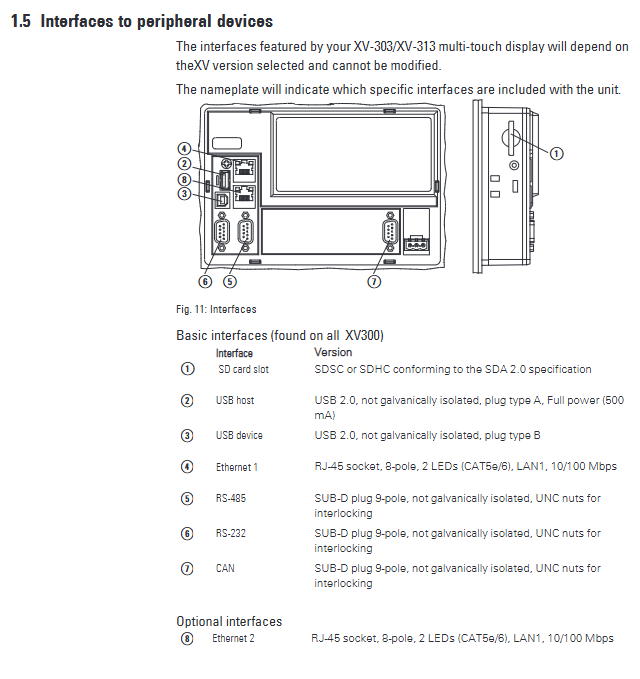
Number of interface types, core parameters
Ethernet 1 (C00 model can be added up to 2) RJ-45, 10/100Mbps, CAT5e/6 cable, with 2 status LEDs
USB host 1 USB 2.0, A-type interface, 500mA power supply, maximum cable length 5m
USB device 1 USB 2.0, B-type interface, used for maintenance and programming
RS-232 (COM1) 9-pin SUB-D interface, no isolation, maximum baud rate 115200Bit/s (2.5m)
RS-485 (COM2) 9-pin SUB-D interface, no isolation, impedance 120 Ω, maximum transmission 1200m
CAN (CAN1) 9-pin SUB-D interface, no isolation, supports CANopen/J1939, maximum cable 5000m (10kBit/s)
(2) Supplementary communication characteristics
RS-232 cable length corresponds to baud rate: 2.5m (115200Bit/s), 30m (9600Bit/s);
RS-485 supports 32 slave devices and requires 120 Ω terminal resistors to be connected at both ends of the bus;
The CAN bus supports 32 nodes with baud rates ranging from 10kBit/s (5000m) to 1000kBit/s (25m).
Installation specifications and requirements
(1) Installation conditions
Panel requirements:
Front installation (XV-303): panel thickness 2-5mm, flatness ≤ 0.5mm, roughness Rz ≤ 120 μ m;
Rear installation (XV-313): A00 version is compatible with 1.5mm ± 0.1mm panels, A11 version is compatible with 2mm ± 0.1mm panels;
Installation space: A ventilation gap of ≥ 30mm should be reserved around the equipment to avoid obstructing heat dissipation;
Installation angle: Normal working tilt ≤ 45 ° (15.6 “model ≤ 10 °, working temperature ≤ 45 ℃ when exceeding the angle);
Grounding requirements: The cross-sectional area of the functional grounding conductor should be ≥ 1.5mm ², the length should be ≤ 350mm, and the tightening torque should be 1.3Nm.
(2) Typical opening size (mm)
Model display size, opening width x height
XV-303-70 7.0” 183×122
XV-303-10 10.1” 255.5×160.5
XV-303-15 15.6” 387×238.5
XV-313-70 7.0” 182.7×126.8
XV-313-10 10.1” 255.7×165.8
Software functions and optional configurations
Basic system: Embedded Linux operating system, no pre installed visualization/PLC software, requires separate installation of authorization package;
Optional feature package:
2B package: GALILEO visualization software operation authorization;
2C package: GALILEO visualization+XSoft CoDeSys 3 PLC function authorization;
Operating features: Supports horizontal and vertical screen installation, precise touch response, can be calibrated through software, adjustable brightness (extends backlight life);
Extended compatibility: Compatible with Eaton XN300 modular I/O system, supporting communication integration with multiple PLCs.
Maintenance and troubleshooting
(1) Daily maintenance
Cleaning requirements: Use a clean, soft, and damp cloth to wipe the touch screen, and avoid sharp objects, solvents, or corrosive cleaning agents;
Touch calibration: When the touch response is abnormal, calibrate it through Linux system tools or visualization software;
Battery maintenance: The built-in lithium battery provides backup power for RTC, with a lifespan of 10 years (25 ℃) and no need for user replacement;
Storage management: SD cards need to be plugged and unplugged when the device is powered off to avoid data loss caused by power failure during writing.
(2) Common fault handling
Possible causes and solutions for the fault phenomenon
The device cannot start without 24V power supply or polarity reversal. Check the power supply line and polarity to ensure that the voltage is between 19.2-30V
Touch unresponsive function: If the grounding is not connected or the contact is poor, reconnect the grounding conductor to ensure that the cross-section is ≥ 1.5mm ² and the length is ≤ 350mm
Display black screen backlight not activated. Enable backlight through system settings or visualization software
Communication failure: The cable is not shielded or the wiring is incorrect. Use shielded cables and check the interface pin definitions according to the manual
Transportation and disposal
Transportation and storage: Original packaging should be used to avoid severe vibration and impact, and the storage environment should be dry and UV free;
Condensation treatment: When the equipment is moved from a low-temperature environment to a high-temperature environment, it needs to be left to adapt to the ambient temperature before starting up;
Disposal: Dispose of according to local environmental regulations. The built-in lithium battery needs to be separately recycled and is prohibited from being discarded at will.