



KUKA KR C2 edition2005 Robot Controller Operation Manual
The KUKA KR C2 edition 2005 Robot Controller Operation Manual covers core content such as product description, technical data, safety specifications, planning, transportation, startup and debugging, operation, maintenance, repair, troubleshooting, and KUKA services. It clarifies that the target users of the controller are personnel with advanced knowledge of electrical and electronic systems, robot controllers, and Windows systems. The core function is to operate KUKA industrial robots, linear units, and locators, emphasizing the need to strictly follow safety specifications and operating procedures to avoid personal injury and equipment damage. At the same time, it provides detailed component information, operating steps, and fault handling solutions.
Product Core Information
composition structure
Industrial robot: composed of manipulator (mechanical arm and electrical device), robot controller, teaching pendant (KCP), connecting cable, software, and optional accessories
Robot controller: including control PC, power unit, KCP, ESC safety logic, KCP coupler (optional), service interface (optional), connection panel
Key component description
Control PC: The core functions include program creation, path planning, driver control, etc., including motherboard, hard disk, MFC3, KVGA and other components, supporting multiple interfaces (USB, Ethernet, serial port, etc.)
Power supply unit: including KPS600 power supply, KPS-27 low-voltage power supply, KSD servo driver, fuse, fan, etc., providing 24V and other voltage outputs
ESC safety logic: dual circuit computer safety system, monitoring emergency stop, enabling devices, etc., including CI3 series cards (Standard/Extended/Bus/Tech)
KCP (Teaching pendant): including mode selection switch, emergency stop button, enable switch, etc., protection level IP54 (top)/IP23 (bottom), weight 1.4kg
Technical data
Category key parameters
Maximum number of axes for basic parameters: 8 axes; Protection level: IP54; Average sound level: 67 dB (A)
Power supply requirements rated voltage: AC 3x400V-3x415V (tolerance ± 10%); Frequency: 49-61Hz; Rated power: Standard 7.3kVA, Heavy load 13.5kVA
Environmental operating temperature:+5~+45 ℃ (without cooling unit)/+5~+55 ℃ (with cooling unit); Storage temperature: -25~+70 ℃ (without battery); Humidity: 3k3 level (no condensation)
Size and gap installation gap: The minimum gap requirement must be followed (see document diagram for details); Cabinet door opening angle: about 180 ° for independent cabinets and about 155 ° for parallel cabinets
Cable length: Motor cable: standard 7m, optional 15/25/35/50m; KCP cable: standard 10m, expandable up to 60m
Safety regulations
core principle
Only allowed for intended use (such as operating KUKA industrial robots), and misuse of personnel/animal transportation, climbing, and hyperparameter operation is prohibited
Compliance with standards such as the EC Machinery Directive (2006/42/EC) and the EMC Directive (2004/108/EC) is required
Personnel Requirements
Operators need to have advanced knowledge of electrical and electronic systems, robot controllers, and Windows systems. It is recommended to attend KUKA College training
The system integrator is responsible for installation, risk assessment, and compliance declaration; Maintenance needs to be carried out by professionally trained personnel
Key safety functions
Operation modes: T1 (manual low speed ≤ 250mm/s), T2 (manual high speed), AUT (automatic), AUT EXT (external automatic)
Safety devices: local/external emergency stop button, dual circuit enable switch, safety door interlock, software limit switch, mechanical terminal block
Stop category: STOP 0 (immediate stop), STOP 1 (path keeping stop), STOP 2 (normal deceleration stop)
Scene security measures
Transportation: The controller needs to be transported upright to avoid vibration and impact; The manipulator needs to be placed in the designated transportation location according to regulations
Startup: Wiring, safety devices, and temperature adaptation need to be checked. The new program needs to be tested in T1 mode first
Maintenance/Repair: Power off and lock, post warning labels, wait for 5 minutes to discharge after power off (some components have residual voltage of 50-600V)
Operation and maintenance
Startup and Debugging
Core steps: Install controller → Connect cables → Connect KCP → Equipotential connection → Connect power supply → Configure X11 interface → Power on → Check fan direction → Safety equipment testing → Software configuration
Key requirements: Ensure no condensation, correct wiring, and avoid errors caused by cable swapping
routine operations
KCP coupler: supports connection/disconnection during operation, which needs to be operated by pressing the request button. After disconnection, KCP needs to be removed to avoid misuse
Startup method: Supports booting from KUKA USB stick, press F10 to select the startup option
Maintenance cycle and tasks | Maintenance cycle | Task content | | — | | | Maximum 2 years | Clean internal and external fans, heat exchangers, and heat sinks; Check the tightness of the components | | 2 years | Replace the battery | | 5 years | Replace the motherboard battery; 3 shift operation requires replacement of PC fan | | 5 years | replacement of internal and external fans | | replacement of filter element when color changes | replacement of pressure relief plug filter element|
Maintenance and troubleshooting
Common maintenance tasks
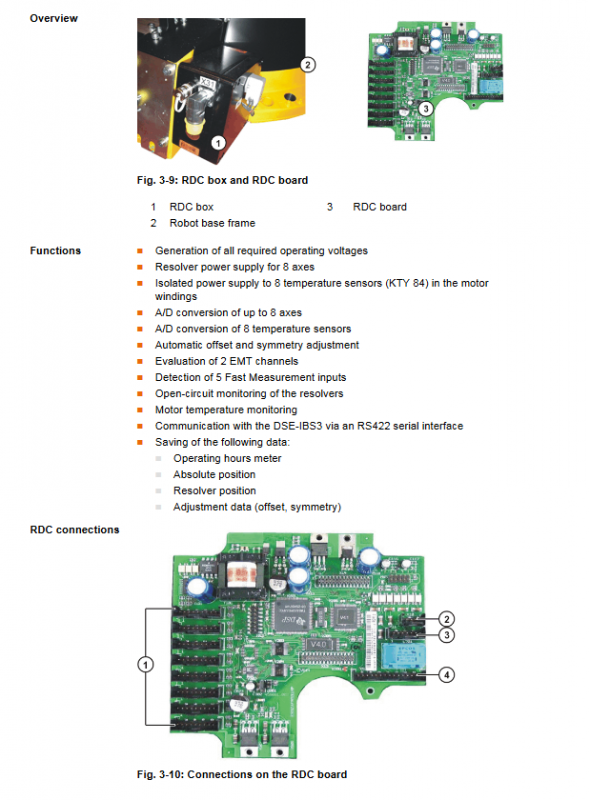
Component replacement: Supports the replacement of control PCs, fans, motherboards, memory, hard drives, CI3 boards, RDC/SafeRDC boards, batteries, etc., and must comply with ESD specifications
Software installation: KUKA System Software (KSS) can be reinstalled
fault diagnosis
Tools: DSE-RDW diagnostic tool (monitoring DSE-RDC communication, drive bus), ESC diagnostic tool (monitoring safety circuit)
Common errors: Control PC startup failure, MFC3 initialization failure, bus communication error, KCP no display, etc. Provide error causes and solutions
Error code: Meaning and handling plan of error codes containing KPS600, KSD and other components (e.g. Pr1 Trip is a checksum error for parameter set 1)


