ABB 800xA for Advant Master Configuration
Product Overview
Product positioning: Process monitoring and control system, used to integrate operation workstations with AC 400 series controllers (including MasterPiece 200/1) in MasterBus 300 control networks.
core functionality
Connect to the control network through the RTA board (real-time accelerator board).
Support online/offline construction of operation workstation control structure.
Customize the reporting and presentation of events and alarms.
Using the TTD history log of AC 400 as the data source, support configuring new TTD logs.
System monitoring and maintenance are achieved through system status, system alarms, and RTA board control functions.
Prerequisite: Please refer to “System 800xA, Installation” (3BSE034678 *) to understand the hardware and software requirements for the operating station.
Core configuration process
(1) System configuration
Library and Object Types
Basic library: AdvantMasterObject Types (defining all Advant Master object types and independent aspects of graphics).
Extension libraries: AdvantMasterObject TypesPG2Ext (for process graphics), AdvantMasterObject TypesVB6Ext (for VB process graphics), supporting activation/deactivation.
Library status: After installation, it defaults to “closed” and can be forcibly set to “open” for custom modification.
RTA board configuration
Key settings: network/node number (MasterBus 300 network), PU410 redundant cable monitoring, time synchronization, character conversion (default English, supports German/Swedish).
Time synchronization mode:
AC 400 controller as clock master: suitable for configurations with only MB 300 control network, “800xA as Clock Master” needs to be turned off.
800xA is the clock master: suitable for the coexistence scenario of AC 400 on MB 300 network and AC 800M on TCP/IP network, “800xA as Clock Master” needs to be enabled and RTA board parameters need to be modified.
Process object locking
Manual locking: Close the panel/click the unlock button/release after timeout (up to 5 minutes) by using the panel lock button.
Automatic locking: configured through the “Graphics Profile Values” aspect in the user structure, supports enabling by user.
Shortcut key configuration
Pre defined shortcut keys: Supports confirmation (CTRL+SHIFT+Q), start/stop (CTRL+SHIFT+1/0), manual/automatic mode switching (CTRL+SHIFT+Y/U), etc., suitable for 16 object types including AI, AO, DI, DO, etc.
(2) Control structure construction
table
Applicable scenarios for setting up mode operation process
Online setup: 1. Create RTA board objects using the configuration wizard; 2. Add a controller node and enter the network/node number; 3. Upload the I/O board and process/system object controllers of the controller through the “From Controller” tag of MB300 Uploader. The controller is already connected to the network and running
Offline setup: 1. Use FCB tool to create and upload source files (. OCD); 2. Copy the file to the 800xA server; 3. Upload through the “From FCB” tag of MB300 Uploader; 4. After the controller is connected to the network, add the physical address of the controller that is not installed or connected to the network through the “From Controller” tag
Test demonstration setup: 1. Build a simulated control structure; 2. Add Property Signal Generator to the object; 3. Configure signal generation rules (sine wave/ramp/random value, etc.); 4. Export node objects for subsequent reuse of product testing and functional demonstrations
(3) Alarm and Event Handling
Event Handling Definition
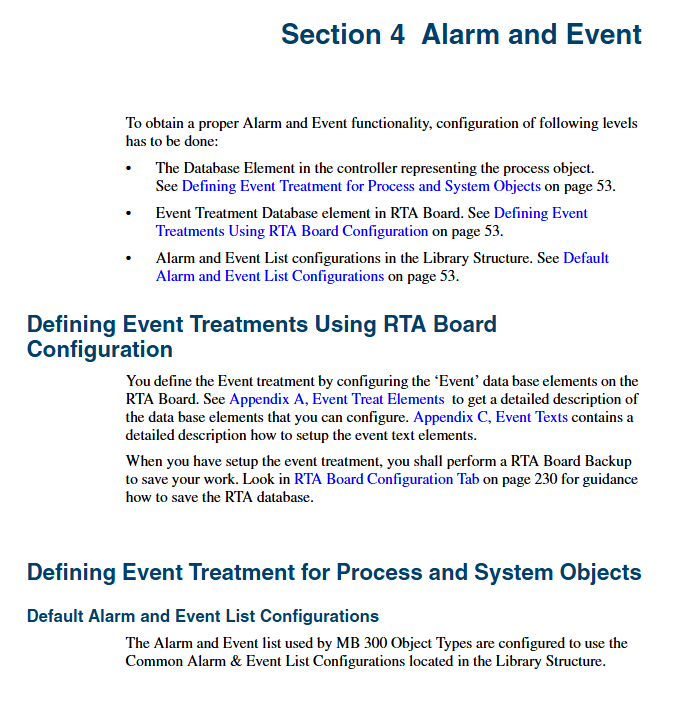
Hierarchy: Controller database elements, RTA board event processing database elements, alarm and event list configuration in the library structure.
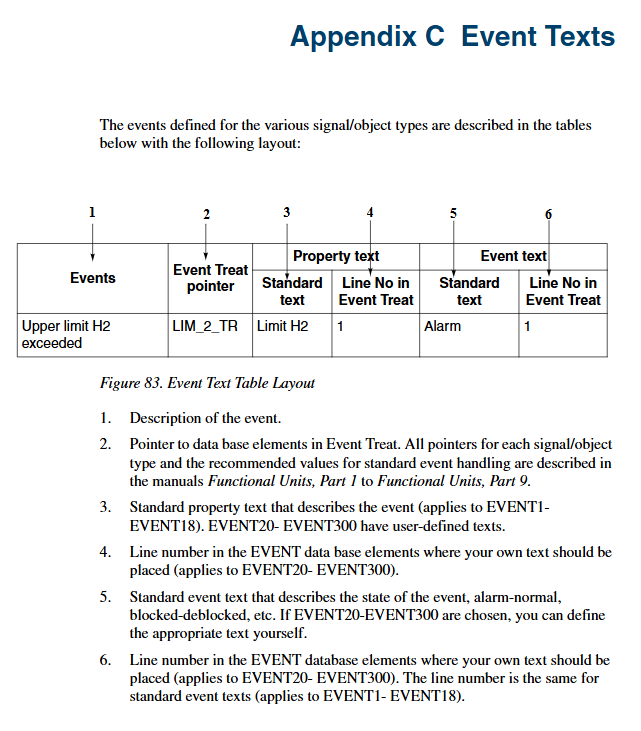
Event handling pointers: 1-18 are predefined by the system (non modifiable), 20-300 support user customization, used to specify alarm priority, sound prompts, text presentation, etc.
Alarm Refresh (Feature Pack Function)
Trigger scenarios: server connection startup, event collector startup, RTA unit startup, controller restart, communication failure recovery.
Configuration: Modify the AdvMbAeOPCServer. csv file to set the RefreshActDef parameter to 1, supporting custom refresh rates (4-200 objects/second, default 20) and delay times (default 10 seconds).
Event filtering: Create a NodeDESCR database element on the RTA board, configure the network number, node number, and filtering status (1=active), and support filtering alarms and events for specific controllers.
(4) Historical log management
TTD log (timestamp data)
Core concepts: Log group (1-15), log index (1-127/log group), storage interval and capacity are common parameters for log groups.
Configuration process: 1 Upload controller TTD configuration; 2. Create a log template (define storage interval and capacity); 3. Add log configuration for objects; 4. Download the configuration to the controller through TTD Node Configuration.
Recommended settings: The minimum log length is 40 minutes, and the synchronization error between 800xA and MB300 network time is ≤ 20 seconds.
OPC direct log
Support interval: 1/3/9 seconds (controller optimization interval) and other custom intervals.
Attention: In case of communication failure, log data will be lost. When directly used as a data source, the sampling time should not be faster than 9 seconds.
(5) System management and maintenance
troubleshooting
Tools: System Status Viewer (Network/Controller/Service Architecture Status), System Alarm List, RTA Board Control Aspect.
Common faults: RTA board communication loss (restart RTA board), controller I/O board failure (check Local Devices display), subscription overload (monitor RTA CPU load, not exceeding 50%).
Backup and Recovery
RTA board configuration backup: By using the “Save Config” button in RTA board control, the backup file storage path is\ ProgramData\ABB\AC400Connect\AdvantBase\Data\RTA\Init。
System backup/restore: Refer to “System 800xA, Maintenance” (3BSE046784 *), backup network configuration and time server settings are required.
Central Backup (Feature Pack Function)
Supporting objects: AC 400, MasterPiece 200/1, Safeguard 400/3000/9000 controllers.
Operation: Create a full backup definition object that supports manual backup and scheduled backup (requires installation of ABB Inform IT Scheduler). When restoring, the controller needs to be set to P2 mode first.
Key technical parameters and limitations
Category key parameter limitations/requirements
Network configuration network number range 11-19, 21-29… 81-89, 91-99, 126-127
Node number range 1-99
OPC subscription loop subscription interval 1/3/9 seconds (recommended 9 seconds)
Maximum number of subscriptions per connected server up to 500 subscriptions with an update rate greater than 10 seconds
RTA board performance PU515A CPU load occupies 0.3% of every MB300 signal/second
PU410 CPU load occupies 0.25% of every MB300 signal/second
Central backup supports controller types AC 400, MasterPiece 200/1, and Safeguard series
Backup file format On line Builder command DUAP format