IbaDAQ-C Compact Device for Independent Data Acquisition
Basic Product Information
Product positioning: ibaDAQ-C is a compact device that integrates complete data acquisition and recording functions. It can operate independently without the need for an additional computer and is designed for space limited scenarios such as industrial control boxes, test benches, and cranes. Its core functions include mobile measurement, equipment startup and debugging, fault diagnosis, and process parameter calculation.
Model difference:
|Order number | Processor | RAM | SSD | Remarks|
| 10.170002 | Intel Atom E3845(1.91GHz) | 4GB | 128GB(SN<500)/512GB(SN≥500) | Basic version|
|10.170032 | Intel Atom E3950 (1.6GHz) | 8GB | 512GB | High spec|
|10.170042 | Intel Atom E3845 (1.91GHz) | 4GB | 512GB | Customized|
Core advantages: Integrated design (CPU/storage/software), dual Ethernet isolation (IT/process network separation), flexible multi configuration methods, support for cloud connectivity and multi protocol compatibility, MTBF of up to 18 years, outstanding stability.
Core Hardware and Functional Characteristics
Hardware Configuration
Category specific parameters
Processor Intel Atom E3845 (1.91GHz) or E3950 (1.6GHz), quad core
Memory and storage RAM: 4GB or 8GB; SSD: 128GB/512GB (solid-state drive, no mechanical components)
Clock and synchronization 3V CR2032 battery backup (hot swappable), supporting NTP, PtP, IEC 1131 time synchronization
Power supply 24V DC ± 10% (without voltage regulation), maximum current 1A; power consumption: maximum 11W per device, maximum 18W with peripherals
Interface Resources
Interface identification type core parameter function
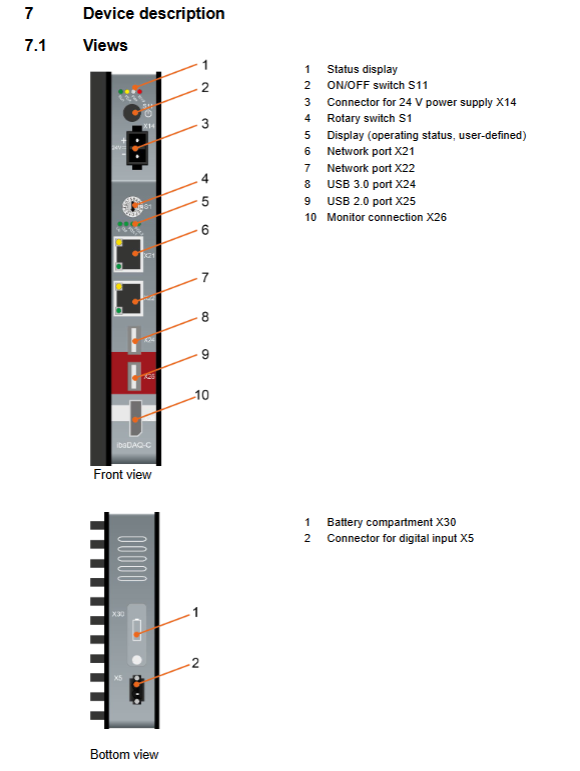
X21/X22 Ethernet 1Gbit/s, RJ45 connector dual independent interface, supports network isolation, can connect to PLC/cloud/client
X24 USB 3.0 up to 5Gbit/s for connecting high-speed storage devices and adapters
X25 USB2.0 480Mbit/s for connecting peripherals such as keyboard and mouse
X26 DisplayPort – connects to a monitor and supports VGA/HDMI/DVI adapters
X5 digital input 1 channel, electrical isolation, ± 60V withstand voltage, switching threshold>4V, receiving UPS trigger signal to achieve safe shutdown
X14 power interface 3-pin spring terminal, Pin1=+24V, Pin2=0V, Pin3=grounded equipment power supply, strict distinction between positive and negative poles is required
X30 battery compartment 3V CR2032 battery clock backup, hot swappable
Core Functions
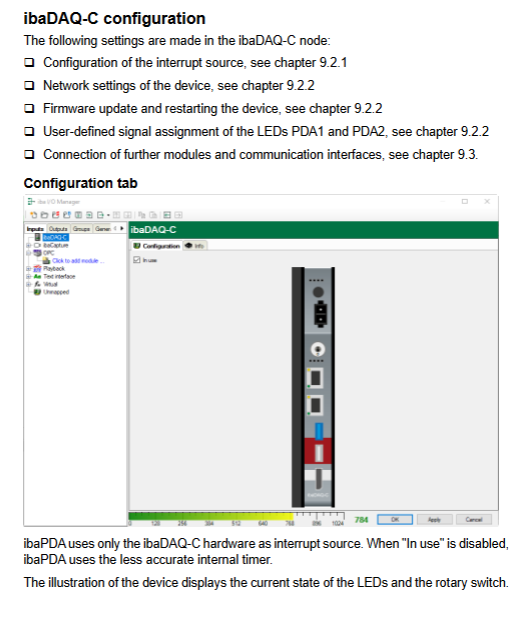
Independent data collection: Built in ibaPDA system, supports 64 channel signal acquisition (expandable to 1024 channels), without relying on external computers;
Dual network isolation: Two Ethernet interfaces can be separately connected to the IT network and process network, achieving separation of data storage and on-site communication;
Cloud connectivity capability: including ibaPDA Data-Store-MindSphere-16 license, supporting direct writing of 16 signals into the MindSphere cloud platform;
Multi protocol compatibility: Built in MQTT protocol license (16 signal streams) OPC UA Server, Compatible with 12 brands of PLC systems (via ibaPDA PLC Xplorer);
Flexible configuration mode: supports three configuration modes: local (monitor+keyboard+mouse), remote desktop (Windows MSTSC), and ibaPDA client.
System Requirements and Installation Specifications
System Requirements
Hardware requirements: When configuring, a monitor (supporting DisplayPort or adapter), keyboard/mouse, or computer with ibaPDA client installed; Optional USB-WLAN/RJ45 adapter for network expansion;
Software requirements: The device should be pre installed with Windows 10 IoT Enterprise LTS system, ibaPDA 8.1.1 and above versions; The client needs to install the corresponding version ibaPDA;
Environmental requirements: working temperature -25~70 ℃, storage temperature -25~70 ℃, humidity 5% -95% (no condensation), protection level IP20, unlimited installation height.
Installation and Disassembly
Installation steps:
Align the DIN rail buckle on the back of the device with the top of the rail and press down to lock it in place (using a screwdriver if necessary);
Connect the power supply with Pin1=+24V, Pin2=0V, and Pin3=grounded to ensure correct polarity;
Connect external cables such as Ethernet and USB, and reserve a heat dissipation space of ≥ 2cm above and below.
Disassembly steps:
Turn off the device power and disconnect all external cables;
Use a screwdriver to pry open the bottom rail buckle, pull the device forward and lift it up to disengage from the rail.
Configuration and Operation Guide
Initial Configuration Method
Applicable scenarios for configuration method operation steps
Local configuration 1. Connect the monitor, keyboard, and mouse;
2. Automatically log in to the “daq” user (password daq) upon startup;
3. Starting ibaPDA from the Windows Start menu without network environment, quick on-site configuration
Remote Desktop 1. Device access to network (DHCP automatically obtains IP);
2. Press “Windows+R” on the client and enter “mstsc”;
3. Enter the host name (daq-c -<serial number>) or IP, log in to the account and password for remote and convenient configuration, without the need for on-site operation
IbaPDA client 1. Install ibaPDA on the client side;
2. After startup, select “Select server” and enter the device IP/hostname;
3. Connect after matching versions and configure professional configurations through I/O Manager, requiring batch management of devices
Network Configuration (Core Operations)
Rotating switch S1 setting:
Position 1 (default): Both X21 and X22 have DHCP enabled, automatically obtaining an IP address;
Position 2: Fixed IP (X21=192.168.1.1, X22=192.168.1.2), only applicable for point-to-point connections;
Position 0: Custom configuration, DHCP/fixed IP for X21/X22 can be set separately in ibaPDA.
Custom network configuration steps:
Set S1 to 1 and connect the device through the ibaPDA client;
Switch S1 to 0 and configure it in the “Info” tab of ibaPDA I/O Manager;
Check ‘Use DHCP’ or manually enter the IP/subnet mask, and click ‘Apply settings’ to take effect.
Status LED Description
LED name, color, status, meaning
Run green flashing device ready
Always on, power on/off in progress
Turn off power or hardware failure
PDA flashing yellow is updating
Always on ibaPDA server running
Error: Hardware malfunction with red constant light (please contact support)
Extinguish without malfunction
Lic green constant light license is normal
The yellow demonstration license is effective
Red without license or abnormal encryption dog
Dat green constant light data record
Yellow waiting for start trigger
Red record interrupt/stop
PDA1/PDA2 green/yellow/red constant light user-defined signal status (configured in ibaPDA)
Software and Protocol Support
Pre installed software and licenses
License Name Function Description
IbaPDA basic license for 64 channel signal acquisition/recording, expandable to 1024 channels
IbaPDA Interface MQTT protocol communication interface
IbaPDA PLC Xplorer is compatible with 12 brands of PLCs (S7/AB/ABB, etc.)
IbaPDA OPC UA Server+Advanced OPC UA Server, supporting all ibaPDA signal access
IbaPDA-Data-Store-MindSphere-16 16 channel signal writing to MindSphere cloud
IbaPDA-Dta-Store-MQTT-16 16 channel signals are transmitted via MQTT streaming
Compatible with PLC system
cover SIMATIC S7、Allen-Bradley、ABB AC 800M/PEC、B&R、Bachmann M1、CODESYS-based、ControlLogix、Mitsubishi MELSEC、OMRON、SIGMATEK、Beckhoff TwinCAT Waiting for 12 mainstream systems.
Summary of Technical Parameters
Category specific indicators
Physical parameter size: 34 × 203 × 141mm; weight: 1.0kg (including packaging/documentation); Installation method: DIN rail vertical
Electrical parameter power supply: 24V DC ± 10%, maximum 1A; power consumption: 11W (single device), 18W (with peripherals)
Number of digital inputs: 1 channel; Isolation level: electrical isolation; Voltage withstand: ± 60V; Switching threshold:>4V; Input current: 1mA constant; Delay: Approximately 50 µ s
Environmental parameters operating temperature: -25~70 ℃; Humidity: 5% -95% (no condensation); Protection level: IP20
Reliability MTBF: 164620 hours (approximately 18 years, according to Telcordia 3 SR232 standard)
Certification standard EMC: IEC 61326-1; FCC:Part 15 Class A