GMW IPP 144-40G Embedded Thermal Printer
Safety regulations (according to EN 61010-1)
Applicable conditions: overvoltage category CAT III (>150V, ≤ 300V), pollution level 2, indoor use, altitude ≤ 2000m;
Working temperature: 0~+45 ℃; Storage -20~+60 ℃; Humidity ≤ 80% (within 31 ℃, no condensation).
Key points for safe operation
Damage/malfunction must be immediately stopped from use; Disconnect all inputs, outputs, and power sources before disassembling the machine;
The equipment must be reliably grounded; Shielded cables for DC models; Communication power supply must be connected to a protective grounding wire;
Attention should be paid to the ground potential difference when connecting external interconnected devices to avoid overvoltage;
Only qualified professionals are allowed to carry out installation, wiring, and maintenance; After opening the cover, it will come into contact with dangerous live parts.
Electromagnetic compatibility: meets EN55022 Class B requirements; Immunity EN61000-4 series.
Product Overview
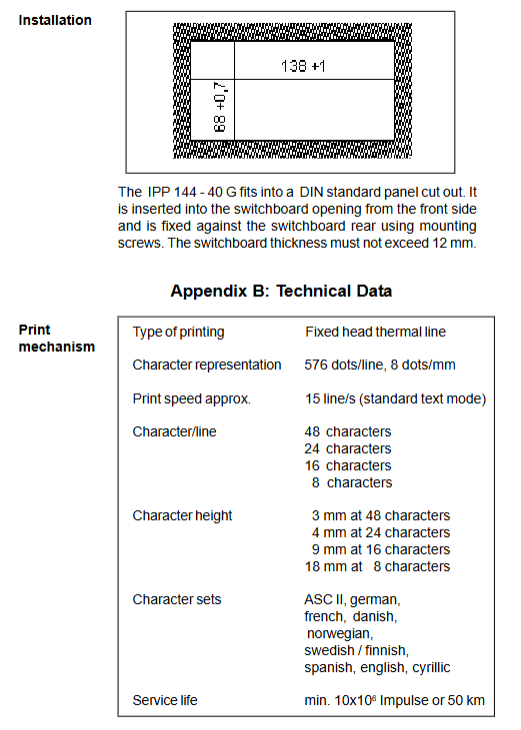
Installation form: DIN panel embedded installation; The opening size is 138 (+1) mm × 68 (+0.7) mm, and the maximum thickness of the compatible panel is 12 mm. The overall appearance of the machine is 144 mm × 72 mm × 159 mm.
Printing technology: Fixed print head thermal line printing, 576 dots/line, 8 dots/mm; maximum printing speed of 15 lines/second.
Paper specification: 80mm document grade thermal paper; The maximum outer diameter of the paper roll is 40mm, the inner diameter is 11.5mm, and the single roll is about 14mm. It can print up to 4600 lines at most;
Storage conditions: Temperature<60 ℃, humidity<80%, and the lifespan of printed documents can reach 10 years.
Input buffer: 16KB large capacity buffer; Support XON/XOFF handshake flow control, automatic flow control for large-scale printing (>100 lines); XOFF will also be triggered to pause receiving when the paper runs out, the door is open, and in menu mode.
Choose one of the two interface hardware options (hardware dialing S101 switching)
RS-232-C/RS-422/RS-485 (default);
TTY 20mA current loop interface.
Buttons and indicator lights
LINE FEED/ENTER: paper feed/confirmation;
MENU/SELECT: Menu/option switching;
ALARM alarm LED: paper depletion alarm;
Internal jumper B: Lock the MENU button to prevent parameters from being mistakenly modified; Jumper A must remain disconnected.
Simulation compatibility: compatible with Siemens PT88; Supports EPSON LQ-580 ESC/P2, TALLY T2024 simulation, and Windows can directly print BMP/JPG/TIF graphics.
Accessories List and Options
Factory standard: manual, installation fixing kit, compatible with Siemens PT88 adapter cable.
table
Option Material Number Usage
Thermal printing paper roll 49234 86910 80mm document thermal paper, 10 rolls/pack
Adapt cable 27866 79461 to Siemens PT88 equipment
IPP-AW automatic paper feeding mechanism 57200 00000 is installed below the printer, and the motor automatically rolls and prints the completed paper; DIN panel installation; Friction clutch can adjust the paper delivery torque
Organic glass protective cover 27863 15940 achieves IP64 protection level
Hardware power specifications
DC power supply option:
DC 10-19 V: about 20 VA, starting current of about 1.2 A; built-in T 3.15 A fuse;
DC 19-36 V: about 18 VA, starting current of about 0.8 A; built-in T2 A fuse;
Communication version: AC 85-265 V, 45-65 Hz, switch mode power supply, power consumption of approximately 15 watts.
Relay alarm output (paper out): Passive normally open contact, maximum 50VAC, 2A.
Menu configuration system
Parameter power-off permanent storage; Automatically exit the menu after 2 minutes without button operation, without saving any modifications; Simultaneously press ENTER+SELECT for about 4 seconds to enter parameter modification mode.
Operation steps: Long press MENU for about 3 seconds → Print current parameters; Press ENTER to confirm and enter the modification process.
Complete list of configurable parameters:
SET INTERVAL: timed printing interval;
BAURDATE baud rate: 110~38400 bps;
DATA FORM: 7/8-bit data bits;
Parity verification: None, Even, Odd MARK、SPACE;
PRINTER EXPRESS printer address;
PRIMT FORM printing format; Inverse printing switch;
CHARACTER/LINE: 48/24/16/8 characters per line;
CHARACTER SET character set: ASCII, German, French, Denmark, Norway, Spain, Cyrillic Russian;
SET INTERFACE interface mode: RS232/simulation mode (EPSON LQ580/TALLY T2024).
Jumper B closed: Lock menu, unable to modify/print parameters; Disconnect jumper B to unlock during maintenance.
S101 dip switch: On the inside of the circuit board, switch between RS232 mode/20mA current loop TTY mode.
Print Control Command Set (Appendix E/F)
Supports complete ESC/P compatible instructions, divided into 5 categories:
Print/feed commands: CR enter, LF line break, FF page change; ESC J, ESC-d n specify n walking paper; Set the initial line spacing.
Character attribute commands: underline, character rotation (90 ° left/right, 180 ° inverted), character zoom in/out, download custom character set; Multi country character set switching.
Printing position: Horizontal tab HT, absolute printing coordinate setting.
Bitmap image commands: column bitmap, raster bitmap, download logo bitmap; Maximum 576 points (per line), data exceeding the width will be discarded directly.
Barcode printing GS series commands: Supports UPC A/E, EAN 13/8, CODE39, ITF, CODABAR, CODE93, CODE128; Barcode height, width, and human readable HRI character position can be set.
Special control characters XON (0x11) and XOFF (0x13) are used for flow control; Built in date and time printing instructions.
Windows graphic printing: Set to EMUL.EPS.LQ580 ESC/P2, use Epson 24 pin LQ560 driver, discard excessively wide parts of the image directly.
Paper exchange operation process
Disconnect hazardous voltage; Turn the buckle to the right to open the front panel;
Lift up the metal bracket and remove the old paper roll; Load a new paper roll and confirm that the paper roll rotates clockwise during printing;
Cut the paper head into a straight cut and feed it under the print head. The roller automatically grabs the paper;
Press the LINE FEED button until the paper extends from the cutting port;
Press the bracket back onto the paper roll and close the panel buckle; The alarm light is off and the printer is ready.
Troubleshooting
Not printing at all: paper runs out (Alarm light on); Wrong paper loading direction; The baud rate/checksum does not match the upper computer; Cable wiring error; Wrong dialing selection for interface mode S101; The upper computer has no data output.
Unjustified output of blank lines: The upper computer sends each line of characters exceeding the set maximum value (48/24 characters); Excess space characters within the line.
Unable to print menu: Check power supply; Press LINE FEED to check if the paper is running. If it is not running, it indicates a hardware malfunction.
Definition of Interface Pins (Appendix D)
Interface I main serial port 9-pin D-SUB; Interface II (E-version model) second serial port;
Provide a detailed wiring comparison table with PC-PG25 pin, PC-PG9 pin, DAA, TD/OP, CP521/524/525 devices;
Definition of TTY 20mA current loop passive interface pins.
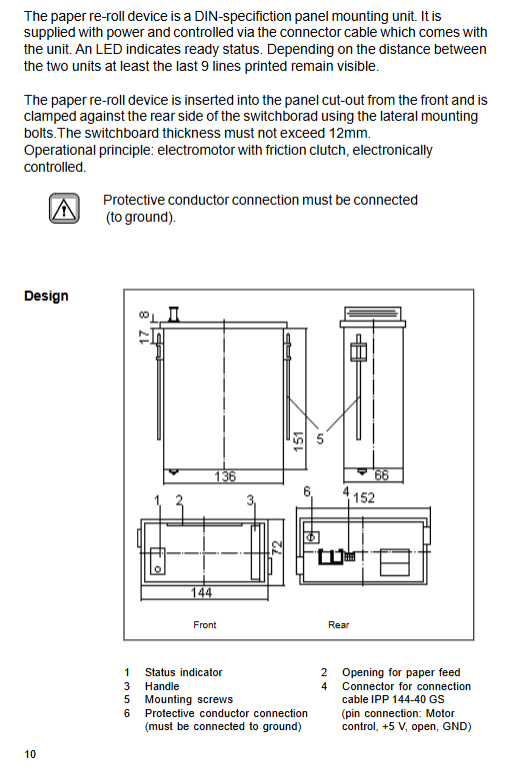
Supplementary Explanation of IPP-AW Automatic Paper Delivery Mechanism
DIN panel opening installation, connected to the host through a dedicated 4-pin MASCON cable;
Motor+friction clutch, the paper delivery torque can be adjusted through the side small hole screw;
Keep the last 9 lines of paper visible at most; The maximum length of paper roll is 15m;
Must be grounded for protection; The maximum thickness of the panel is 12mm.