KONGSBERG Simrad PI50 Catch monitoring system
KONGSBERG Simrad PI50 Fishery Monitoring System Operator Manual (Version Rev. C, Software v1.3.1), aimed at professional fishery users, fully explains the system composition of PI50 host, sensor receiver, hydrophone, and wireless sensor, covering the entire process of power on/off, sensor configuration, depth calibration, display view, alarm setting, log management, supporting bottom contact, fishing catch, depth, height, net opening, geometric posture, temperature, roll/pitch and other measurements, providing signal optimization functions such as filtering, sensitivity adjustment, multi-path suppression, and adapting to various operation modes such as bottom trawl, middle trawl, purse seine, Danish purse seine, etc. It is the core operation guide to ensure fishing efficiency and gear safety in the fishery.
System composition
Component Type/Specification Core Function
Processor unit industrial computer, running PI50 software on Windows 7, data processing and display
Sensor receivers PI50 (6 channels) and PI60 (10 channels) receive acoustic signals from underwater sensors
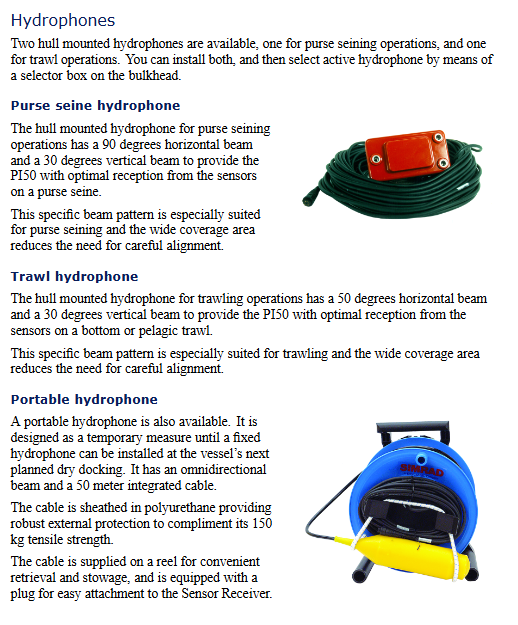
Installation of hydrophones at the bottom of the ship, dedicated for purse seine/trawl/portable underwater signal acquisition, with a maximum cable length of 50m
Sensor PI series, PX multi-sensor for measuring depth, catch, opening, attitude, etc
Display unit color industrial display sensor view, trend chart, system status
Power on/off specifications (mandatory)
boot process
Sensor receiver power on → Display screen power on → Computer power on → Start PI50 software → Select user configuration → System ready
Shutdown process
Click on the software Exit to exit → turn off the host → turn off the display screen → disconnect the power supply of the sensor receiver
Taboo: It is strictly prohibited to directly press the computer power button to shut down, as it may cause software and configuration damage
Core operating procedures
1. Sensor configuration (Setup → Select Sensors)
Select sensor type: bottom contact, catch, depth, height, opening, temperature, geometry, roll, pitch
Set key parameters:
Label ID: Unique Number (1~n)
Update Rate: Update rate (PX fixed Normal)
Channel Number: Channel number (must be consistent with the sensor)
Offset: Offset (automatic depth calibration, manual input of aperture)
Sorting: Adjust the display order of sensor views
2. Depth sensor calibration (essential)
Condition: The sensor is immersed in seawater at a depth of 1m
Step: Setup → Calibration → Start Calibration → Wait for completion → Verify reading is 1m
3. Display and View
Sensor view: real-time values, rate of change, 20 minute historical small graph
Trend View: Historical Curve, Duration 5-1440 Minutes (24 Hours)
Customization: color palette, screen brightness, units, language, menu position
4. Alarm Settings (Setup → Alarm Limits)
Set upper and lower threshold values for each sensor
Enable: Message reminder, sound alarm
Rule: Automatically disabled 20 seconds after triggering, can be triggered repeatedly
Overview of Measurement Functions
Basic measurement
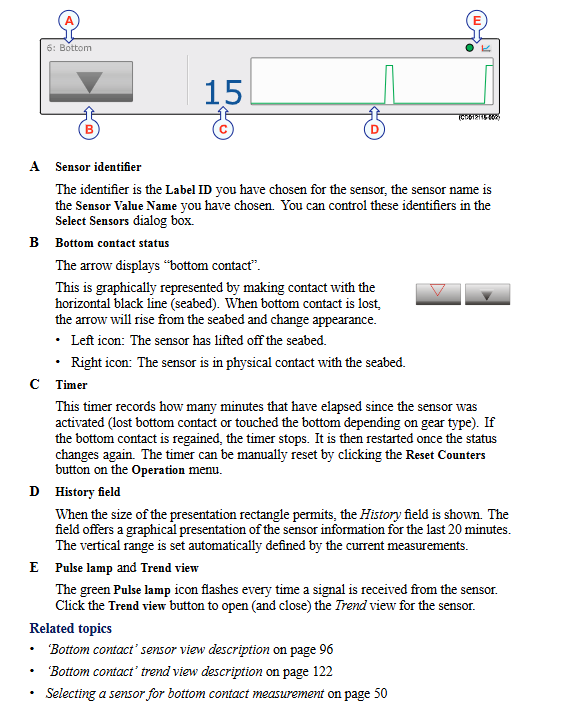
Bottom contact: Monitor whether the fishing gear touches/leaves the bottom
Fishing catch: monitoring the filling degree of the net bag, which can also be used for detecting damaged net clothing
Depth: Three levels of 300/600/1000m, PX fixed at 1000m
Height: The height above the seabed, used to determine the height of the net opening
Opening: Distance between trawl doors, supporting standard/extended XT range
attitude measurement
Roll: The trawl door tilts left and right
Pitch: The trawl door tilts forward and backward
Combination measurement
Height+Depth: Total Water Depth=Depth+Height
Opening+Depth: Vertical Geometric Monitoring
Geometric difference: left-right symmetry of trawl net
Signal optimization (improving stability)
Function setting options function
Fishing/Bottom filtering Off/Weak/Medium/Strong eliminates state jitter, stable display
Sensor filtering Off/weak/medium/strong average received data to improve reception
Multi path filtering On/Off suppresses reflections, spikes, and interference, and is enabled by default
Detection threshold DT 3~14/15~20 default 17, adjust receiving sensitivity
Menu system structure
Main menu: User settings, Range, Start Range
Operation menu: Sensor filtering, Fishing filtering, Multipath filtering, Reset counter
Display menu: color palette, brightness, units, language, trend duration, status display, screenshot
Settings menu: Simulator, Fishing Gear Type, Sensor Selection, Alarm, Calibration, Receiver, Navigation, Installation
Installation menu: I/O configuration, software authorization
Log and fault handling
System messages: Error, system alarm, operation alarm, warning, information, can be confirmed/deleted
Log file: automatically saved, can be copied to a USB drive, used for after-sales diagnosis
Screenshot: One click save, named by date_time
Troubleshooting: If the device is abnormal, please contact the local dealer and do not disassemble it on your own
Key issues
Question 1: What are the core requirements and standard steps for calibrating PI50 depth sensors? What are the impacts of calibration failure?
answer:
Core requirement: The sensor must be placed in 1 meter of deep sea water, with the water surface accurately aligned with the 1-meter mark at the bottom of the sensor.
Step: Setup → Calibration → Start Calibration → Wait for automatic completion → Verify that the reading is 1m.
Impact: Calibration failure will result in all depth measurement deviations, directly affecting fishing gear depth control and operational safety.
Question 2: What are the three filtering functions of PI50 targeting? How should on-site assignments be set up?
answer:
Fishing touch/bottom filtering: to solve state jump jitter, it is recommended to set it to Medium.
Sensor filtering: solve data fluctuations, poor reception, and set as Weak when the signal is poor.
Multipath filtering: suppresses underwater reflections, acoustic interference, and spikes. It is recommended to always turn it on.
Question 3: What fishing gear operations does PI50 support? What are the core sensors corresponding to different assignments?
answer:
Bottom trawl: bottom contact, catch, depth, height, and opening sensors.
Mid level trawl: depth, height, opening, roll, pitch sensors.
Fence: Depth and bottom contact sensors.
Danish fence: bottom contact, depth, geometric sensors.