ABB KPM KB2 paper breakage detector
System composition and working principle
Hardware composition
Sensor head: 316 stainless steel long tube, total length 1500 mm, outer diameter 33.7 mm; there are no electronic components inside the probe, only fiber optic path; Blowing air maintains the cleanliness of the probe window and can withstand temperatures up to 180 ℃.
Fiber optic cable+metal flexible protective conduit: available in three lengths: 6 m/9 m/12 m, to isolate and transmit optical signals between the control cabinet and the high-temperature probe; The minimum bending radius of optical fiber is 50mm, and the maximum tensile force is 50N. Hard pulling is strictly prohibited.
Display unit: Built in RGB (red green blue) or IR infrared LED light source, photoelectric receiver MCU、 Human machine button display screen, relay output; Wall mounted installation in an area far away from the high temperature of the paper machine.
Attachment: Installation fixture/installation rack, position memory ring, optional analog output board, PC debugging software.
Detection principle (reflective optical detection)
The light source emits pulsed RGB three color visible light (switch to IR infrared light source for humid and high steam conditions), and the fiber is sent to the probe to irradiate the surface of the moving paper web.
When the paper web exists, light is reflected, and the reflected light is sent back to the control unit receiver through another optical fiber; When the paper breaks, the reflected light signal changes significantly.
The controller analyzes the light intensity of R/G/B channels, automatically selects the channel with the best discrimination, and triggers the paper break relay to output to the paper machine PLC interlock.
Compressed air (0.5-3.0 bar) is continuously sprayed from the small hole of the probe to blow the instrument. Positive pressure blocks steam and dust from contaminating the optical window, while cooling the probe.
Advantages: RGB multi light source, not affected by paper color or wool color interference; The probe has no electronic components and is resistant to high temperatures.
Key technical specifications
Project parameters
Power supply 90-264 VAC 50-60Hz or+24 VDC
Power consumption of the whole machine is 15 W
Protection level IP66 (Nema 4X)
Probe operating temperature -10-180 ℃; Control Unit -10-60 ℃
Blow and dry instrument air at 0.5-3.0 bar, with a gas consumption of 30-100 L/min
Measure distance (probe to paper web) 10-30 cm (recommended)
Digital output relay paper break output, maintenance alarm output; Dry contact, maximum 250VAC 2A
Paper break output delay ≥ 15ms
Analog output (option board) 3 channels 4-20 mA, maximum load 600 Ω
Fiber length 6 m/9 m/12 m
Installation requirements
1. Probe installation
The distance between the measuring point of the probe and the edge of the paper is about 30 cm; the distance between the probe and the paper web is 10-30 cm; and the small hole of the probe is facing the paper web.
Dry blowing compressed air must be connected; It is prohibited to install multiple fiber optic probes side by side, as it may cause mutual optical interference; Stay away from infrared dryers (which can cause strong light interference).
Position memory ring: lock after debugging is completed; When disassembling, maintaining, and reassembling the probe, ensure that the optical position is fully restored without the need for recalibration.
The probe is a two-stage structure, assembled on site, and the thread is sealed with Loctite 268.
2. Fiber optic cabling
Fiber optic cables are protected by metal conduits, and violent pulling of the fiber optic cables is prohibited. The pulling force can only be applied to the outer sheath.
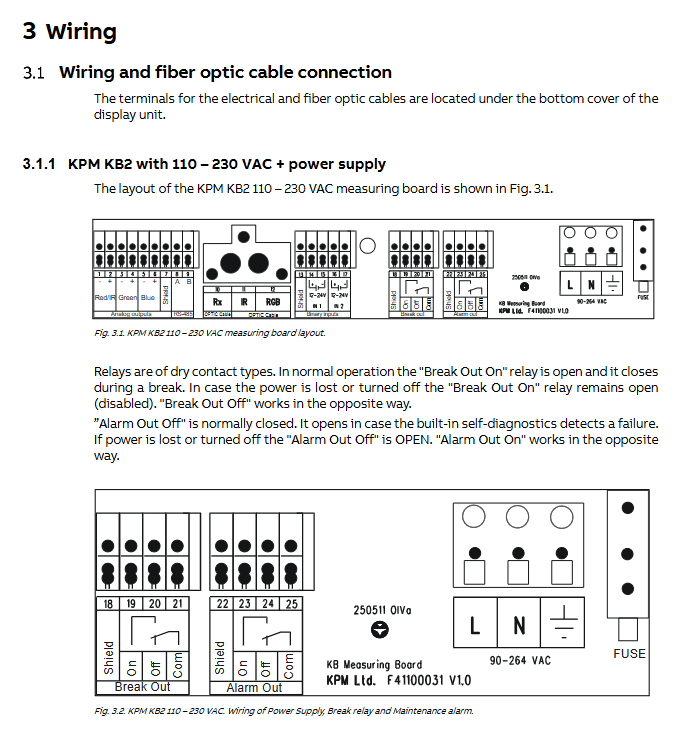
One end is connected to the probe, and the other end enters the optical module of the control unit: one end is connected to the RX receiver, and the other end is connected to RGB (conventional) or IR (steam working condition).
3. Wiring of control unit
Two hardware versions: AC version (90-264VAC) and DC version (+24VDC).
Relay logic:
Break Out (paper break relay): The contact opens when the normal paper web is present; When paper breakage occurs, the contact closes; Keep disconnected when the whole machine loses power.
Alarm Out (maintenance alarm relay): normally closed; When the device self checks for a fault, the contact opens.
Optional simulation board: 3-channel 4-20mA output R/G/B/IR light intensity signals for DCS recording; Output is not mutually isolated, it is recommended to add isolators on the PLC side.
Human computer interface and menu structure
Panel buttons: ON/OFF power, direction arrow, ESC, ENTER, SAMPLE sampling button. Five main menus:
Configuration
Working mode: Detect enabled for normal detection; Maintenance mode (turn off the paper break relay to prevent debugging errors from triggering shutdown).
Auto limit&Auto alarm: Automatically calculate paper breakage threshold and alarm limit (core calibration function).
Measurement configuration: filter detection, measurement cycle, TX light source power, RX receiver gain.
Set up: Light source type RGB/IR, time and date, language, beep/display alarm effect, analog output parameters, password.
Maintenance: online real-time signal, data recording, event logs, alarm information, device firmware version, factory reset.
Key point: The online signal can view the R/G/B/IR raw light intensity and the proportion of ambient light. The ambient light must be less than 60%, otherwise it will interfere with the measurement.
Parameters: Directly modify all parameters of detection threshold, high and low alarms, and drift alarm.
Start debugging and calibration process
It is divided into preliminary simulation debugging and final debugging of real paper machine working conditions. The final debugging must be completed under the operation of the paper machine’s thermal engine and real paper web.
Switch the configuration menu to Maintenance mode (shield paper break relay to avoid accidental shutdown).
Enter maintenance – online signal, rotate the probe, and adjust the reflected signal to maximum; The ambient light must be less than 60%; Excessive ambient light reduces the gain of the RX Gain receiver.
Sampling benchmark:
Simulate paper breakage (paperless), press SAMPLE, and save as Break level (paper breakage reference).
Place the real paper frame, press SAMPLE, and save it as Paper level (with paper reference).
Execute Calculate Auto Limit automatic threshold calculation: The device automatically compares R/G/B channels, selects the channel with the largest difference in paper to paper signal, and generates detection thresholds and trigger directions (Break<Limit/Break>Limit).
Execute Auto Alarm automatic alarm, set low limit, high limit, and drift alarm.
Switch the configuration menu back to Detect enabled and activate the paper break relay; Lock the position memory ring.
Key parameter description
Detect filter: default 3, output paper breakage only after N consecutive measurements meet the conditions to suppress instantaneous interference.
Meas.comycle measurement cycle: 10-60 ms, default 20 ms.
TX Power light source power: Normal/High; Select High when the distance is greater than 20cm.
RX Gain receiver gain; Reduce the gain when the ambient light exceeds the standard.
Drift alarm: Monitoring signal slowly shifts (probe lens dust contamination); Three modes: report only, alarm and lock paper breaking function, and turn off.
Alarm, malfunction and maintenance
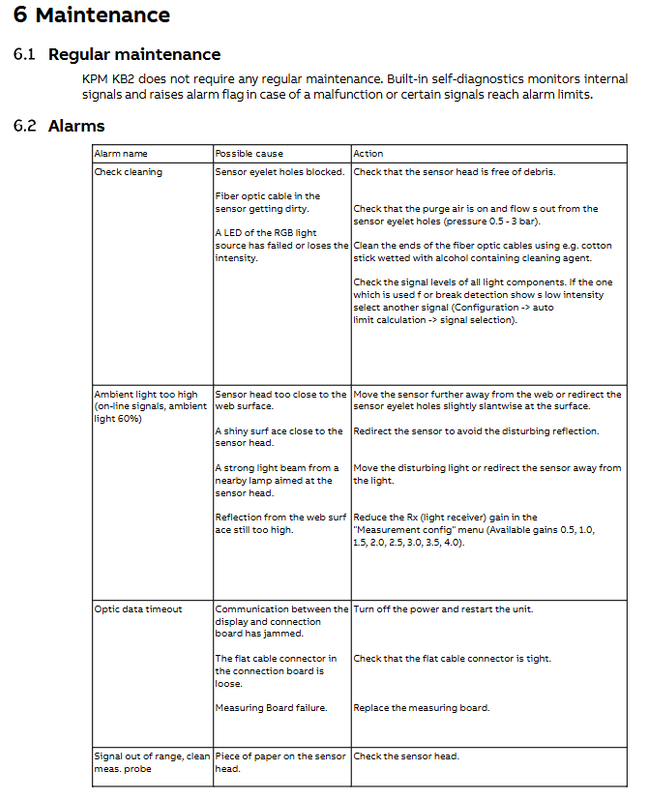
The device comes with self diagnosis, recorded in the event log, and can store up to 250 event records.
Measures for handling alarm triggers
Check for clogged cleaning probe window, ineffective blowing, LED attenuation, and air blowing; Clean the fiber optic lens with alcohol swabs; Replace the detection channel
The ambient light is too high, causing interference from the infrared dryer; Incorrect probe angle/distance reduces RX gain; Adjust the angle and distance of the probe; Install shading accessories
Signal out of range: Paper scraps stick to the probe window for inspection and cleaning
Maintenance Instructions
No mandatory regular maintenance cycle, relying on equipment self diagnosis alarm prompts for maintenance.
Cleaning: Prioritize cleaning the fiber optic lens with a cotton swab from the small hole outside the probe; If necessary, disassemble the probe completely and extract the optical fiber for wiping.
Event log: Record the time of paper breakage occurrence; Multiple paper breaks within 5 minutes will only be recorded once.
Ordering selection and spare parts
Key selection points: fiber length (6/9/12 m); Power supply AC/DC; Do you want to simulate an output board; Is it necessary to install a rack; Is the PosiEye compatible bracket available.
The spare parts list includes: probe tube segments, optical fibers of different lengths, protective conduits, measurement motherboards, analog output boards, display panels, installation fasteners, and the complete part numbers are provided in the document appendix.