HIMA X-DI 64 01 Digital Input Module
Product Description
Module Function
64 channel 24VDC digital input, current injection logic, IEC61131-2 Type3 input type; Receive switch contacts and two-wire proximity switch signals.
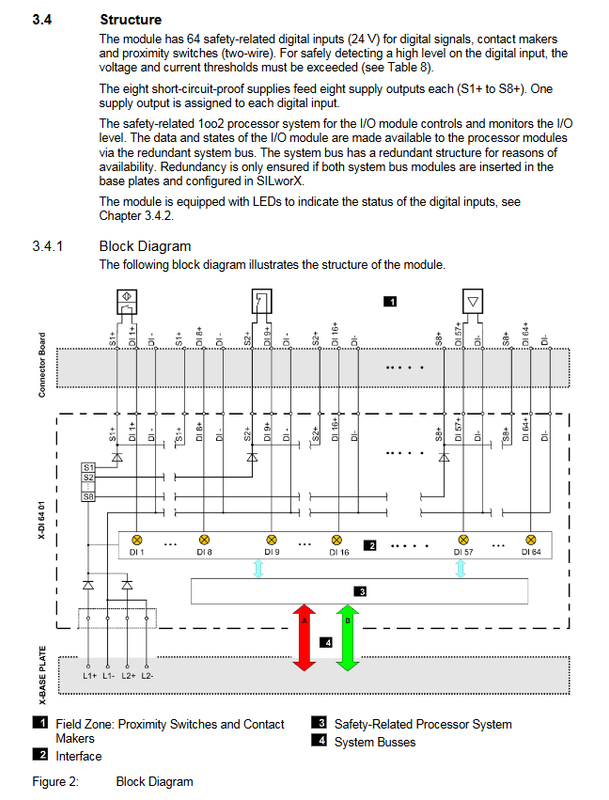
Internally adopting a 1oo2 dual processor security architecture; Interact data with HIMax processor modules through redundant system buses.
Built in 8 sets of short-circuit protection power outputs S1+~S8+, with 8 channels per set for power supply; S1 supplies DI1-DI8, S2 supplies DI9-DI16… S8 supplies DI57-DI64.
Fault behavior: The module has malfunctioned and the input variable is forced to output a default value of 0, causing the Error red light to turn on.
The initial value of fault safety in the user program must be set to 0 to ensure safety.
Scope of supply: Only module body, wiring base plate, system cable, FTA on-site terminal components are not included and need to be purchased separately.
Key hardware parameters
Item | Parameter
Power supply 24VDC, -15%~+20%; Input 400mA~1.5A
Single channel input current maximum 4mA; typical flip threshold 9.4V ± 0.8V
Dimensions (H × W × D) 310 × 29.2 × 230 mm; Weight approximately 1.1kg
Input characteristics: Non isolated single ended DI, common end DI -/L –
8 sets of power output, maximum 100mA per set, short circuit protection; Undervoltage fault detected below 17VDC
LED status indicator light
Divided into three groups of LEDs: module status, system bus SysBus, and I/O channel status, all LEDs perform self check flashing when powered on.
Module status LED
RUN green: constantly on=running; Flashing=Stop/System Download; Extinguish not running
ERROR red: constantly on/flashing=internal fault (hardware, software, power, OS download failure)
STOP yellow: constantly on=stop – configuration is valid; Flashing=Stop – Invalid configuration
Initiat yellow: always on=initialization; Flashing=locked state
System bus A/B (redundant dual bus)
Green constantly on: Physical and logical links are normal; Green flashing: No physical connection; Yellow flashing: Physically connected but without running redundant processors.
I/O channel LED
Channel1-64 yellow: always on channel high level; Flashing 2 indicates channel malfunction; Turn off low level
Field flashing red: At least one field side fault (overcurrent, etc.).
Supporting Wiring Board Connector Board (X-CB006 Series)
The module must be compatible with the base plate to receive on-site signals. The base plate has mechanical coding to prevent errors and prevent incorrect insertion of I/O modules.
Model Description
X-CB006-01 ordinary, screw terminal
X-CB006-02 redundancy, screw terminal
X-CB006-03 ordinary, cable plug
X-CB006-04 redundancy, cable plug
Screw terminal: wire 0.2-1.5mm ², torque 0.2-0.25Nm.
Cable plug version: Paired with X-CA003 system cable (80 core+additional wire, 8/15/30m optional, DIN47100 color coded), can be externally assembled with FTA on-site terminals.
The base plate can be left alone on the rack, and the modules support hot swappable replacement without the need to reconnect on-site wiring.
Start up, installation, and wiring
Mechanical installation
Install the base plate onto the base plate rack first; The bottom plate can be disassembled and assembled separately.
The module supports hot plugging (disassembly and assembly under live operation of the system); When disassembling, try to keep the fan rack cover open for as short as possible, no more than 10 minutes, to avoid insufficient heat dissipation.
The installation environment must ensure IP20 protection; A system fan component is required.
Unused input channel: Input can be suspended without termination; It is prohibited to connect suspended cables to terminals on site to prevent short circuits caused by ignition.
Multiple wiring schemes
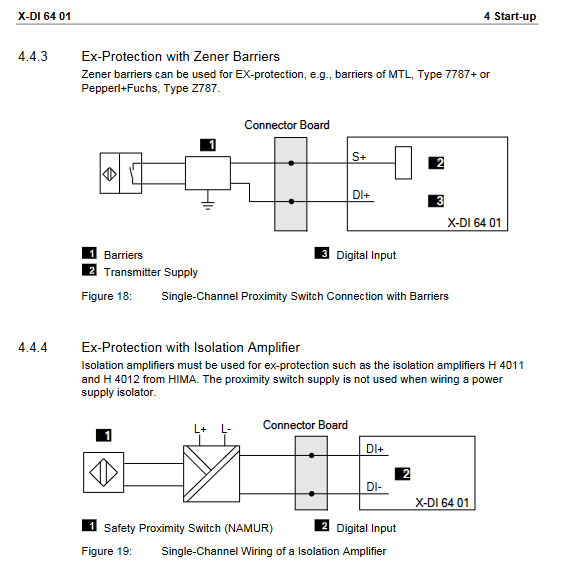
Ordinary single module wiring: two-wire proximity switch, contact switch; External isolated signal source, non isolated signal source.
Redundant wiring: Two X-DI64-01 are used in conjunction with the redundant backplane X-CB006-02/04 to achieve channel redundant acquisition.
Transfer via FTA on-site terminal assembly X-FTA003-02.
Explosion proof Ex application solutions: two methods: Zener safety barrier and isolation amplifier.
Attention: Non isolated signal sources cannot directly connect the signal ground to module DI -, as it may cause overcurrent damage.
SILworX software configuration
In the SILworX hardware editor configuration module, global variables can be assigned to status words for user security program reading diagnostics.
1) Module tab
Module OK Boolean: Overall fault status of the module;
Module Status (WORD): Bit encoding module failure (overheating, L1+/L2+power failure, internal voltage failure, module disconnection);
Timestamp: DI sampling time (microseconds+seconds);
Noise Blanking for noise suppression; Spare Module Backup Module Settings.
2) I/O submodule DI64_01 label
Submodule OK submodule status; Submodule Status WORD submodule fault bitmap (hardware faults, overheating, overcurrent, reference voltage faults, etc.)
Supply1-OK~Supply8-OK: undervoltage diagnosis status of 8-channel on-site power supply;
Diagnostic Request/Diagnostic Response/Diagnostic Status: Read and write diagnostic IDs, read temperature, voltage, and channel faults.
3) Channels channel parameters (each channel can be independently set)
Channel Value: Enter a Boolean value; Channel OK channel effectiveness;
Ton (µ s): Input rising edge stabilization delay; Toff (µ s): Falling edge stabilization;
Test Suppression: Suppress short pulse interference, maximum 500 µ s;
Sup.used: Enable the onboard Sx+power supply corresponding to this channel;
Redund: To enable channel redundancy, a redundant hardware backplane is required.
Note: The maximum suppression time of the module is determined by the maximum suppression parameter in all channels, which will prolong the I/O cycle.
Operation and diagnosis
Operation: The module is installed on the HIMax backplane and is mainly operated through the SILworX PADT tool, such as forced input;
Diagnostic source: panel LED; SILworX reads status DWORs and diagnostic history records;
Partial fault prompts during the power on initialization phase are considered normal, and the true fault is only determined if the error persists after operation.
Maintenance, retirement, transportation, and disposal
Repair: Users are not allowed to repair on their own. The faulty module should be replaced with the same model.
OS firmware upgrade: During system shutdown, download a new version of the operating system and the module needs to be in STOP state.
Proof Test verification testing: Safety proof testing must be performed every 10 years, refer to the HIMax Safety Manual.
Retirement: The module is directly removed from the rack; Transportation must use original factory anti-static packaging; Scrap according to the environmental protection disposal of industrial electronic waste.