Mitsubishi language hardware manual for Mitsubishi FX0/FX0N series PLC
Product series and models
1. Host model (AC/DC version)
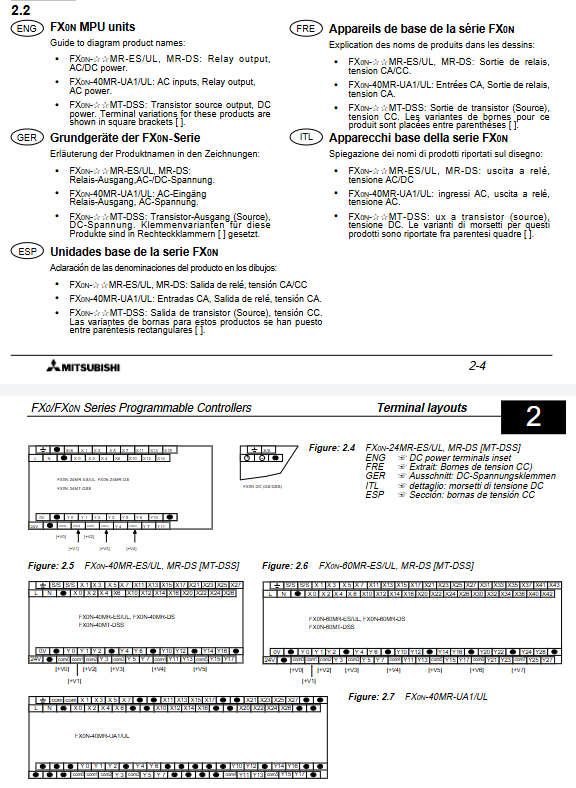
Series models, I/O points, output types, power supply
FX0 FX0-14M 6-in/8-out relay/transistor AC100-240V/DC24V
FX0-20M 8-in/12 out relay/transistor AC100-240V/DC24V
FX0-30M 14 in/16 out relay/transistor AC100-240V/DC24V
FX0N FX0N-24M 14 in/10 out relay/transistor AC100-240V/DC24V
FX0N-40M 16 in/24 out relay/transistor AC100-240V/DC24V
FX0N-60M 24 in/36 out relay/transistor AC100-240V/DC24V
2. Expansion module
Input: FX0N-8EX, FX0N-16EX
Output: FX0N-8EYR/EYT, FX0N-16EYR/EYT
Mixing: FX0N-8ER (4 in/4 out)
Special: FX0N-3A (analog), FX0N-232ADP/485ADP (communication)
3. Expansion rules
FX0: Non extensible
FX0N: Maximum expansion of 2 special modules+32 point I/O
System maximum I/O: 128 points
Installation specifications
Installation method
Installation of 35mm DIN rail buckle
Direct screw fixation (M4 screw)
It must be installed horizontally and inverted up and down is prohibited
Environmental Requirements
Working temperature: 0~55 ℃
Humidity: 35-85% RH, no condensation
Altitude: ≤ 2000m
Pollution level: 2
safety clearance
Distance from strong electrical equipment ≥ 50mm
Stay away from corrosive gases, dust, and vibration sources
Power supply and grounding
1. Power supply specifications
Type voltage range allows fluctuation of impulse current
AC power supply 100~240V AC ± 15% AC maximum 50A/5ms
DC power supply 24V DC ± 15% DC maximum 60A/1.5ms
2. Grounding requirements
Ground wire cross-section: ≥ 2mm ² (AWG14)
Grounding resistance:<100 Ω (Class 3)
Prohibit sharing ground with power circuit
Input/output circuit
1. Enter specifications
Voltage: DC24V/AC110V (FX0N-UA1)
Current: 7mA/5mA
Isolation: Optocoupler isolation
Response time: 10ms (adjustable)
Connection method: Source/Sink
2. Output specifications
Type Rated current Response time Load type
Relay 2A/Point 10ms AC/DC Universal
Transistor 0.5A/point 0.2ms DC load
Terminals and wiring
Terminal type: screw terminal
Torque: 5-8kg · cm
wiring rules
Separate strong and weak electricity routing
I/O line is not in the same slot as the power line
Long distance transmission needs to consider voltage drop
Fault diagnosis
1. Indicator light status
Lamp meaning: Reason for malfunction
POWER power indicator shows no power, fuse blown
RUN operation indicator mode switch, program error
ROG. E program syntax, circuit, parameter errors
CPU. E hardware error CPU, memory, ground fault
2. Error codes
D8061: Hardware error (6101-RAM error)
D8063: Communication error
D8065: Grammar Error
D8066: Program Error
3. Battery replacement (FX0N)
Battery model: FX0N-40B
Lifespan: 4 years
Replacement requirement: Complete within 20 seconds of power outage
Authentication and Security
Certification: UL, CE, ABS, DNV, RINA
Compliant with: EU Machinery Directive, Low Voltage Directive, EMC Directive
Safety level: Class I, must be grounded
Key issues
Question 1: What are the core differences in scalability between FX0 and FX0N?
Answer: FX0 does not support extensions at all and can only be used standalone; FX0N supports expansion and can accommodate up to 2 special function modules+32 I/O expansion points. The maximum number of I/O points in the system can reach 128.
Question 2: What are the mandatory grounding requirements for FX0N series PLCs? What will happen if you don’t comply?
Answer: * * ≥ 2mm ² copper wire must be used, with a grounding resistance of<100 Ω * *, and it should be grounded separately and not shared with the power circuit; Failure to comply can lead to increased interference, communication abnormalities, CPU error alarms, and device malfunctions.
Question 3: What faults do the ROG. E and CPU. E lights represent respectively? How to quickly investigate?
answer:
ROG. E flashing: Program error, check syntax, circuit, parameters, and download the program again.
CPU-E constantly on: Hardware failure. Restart and check the grounding and memory card first. If it is still abnormal, it is a CPU/motherboard failure and needs to be repaired.