Atlas Copco Tensor STB Wireless Tightening Tool
Composition of the entire system
Hardware
Tensor-STB tool ontology; Replaceable lithium battery (18V/30V); Battery charger; Docking dock (USB debugging, firmware configuration)
Controller side: Power Focus 3100/4000, equipped with RBU authorized encryption dongle; Serial Port Adapter (exclusive for IRC-B version)
software
PF controller firmware; Tensor-STB tool firmware; ToolsTalk Service (for wireless tool configuration and debugging)
System data flow: The controller issues the tightening program Pset to the wireless tool; Tool locally executes tightening; The tightening result is transmitted back to the PF controller.
Security restriction: The wireless version does not support remote start function.
Tool body indicator lights and buttons
Meaning of LED lights
Blue connection LED and controller wireless link status
Green Batch LED Batch Tightening Completed
Yellow battery LED low battery/empty battery alarm
Red Alarm LED overheating, fault alarm
Function buttons on the directional ring: can be configured as digital inputs; Distinguish between clockwise CW and counterclockwise CCW triggering.
The tool comes with a built-in buzzer; Tool bus interface, capable of external optional accessories.
Key technical specifications
Local storage: The tool can save up to 25 tightening results locally; When the wireless connection is disconnected, it can continue to execute and automatically upload data after the connection is restored. After tightening more than 25 times, the tool will lock.
Lithium battery: 75% capacity remaining after 500 charge and discharge cycles; Charging 18V battery for 60 minutes, charging 30V for 90 minutes; The number of tightening times is affected by the softness and hardness of the joint, as well as the tightening angle.
Two wireless IRC solutions (2.4GHz ISM band)
Project IRC – B IRC – W
AFH Adaptive Frequency Hopping (Similar to Bluetooth) WiFi Standard 802.11 b/g/n
79 1MHz channels, no IT planning required for 13 22MHz fixed channels, IT planning required for WiFi network
Anti interference/multi-path high school, etc
Low and high power consumption
The maximum transmission distance in open areas is 100 meters, which is affected by the on-site WiFi environment
IRC – B requires a serial port adapter and antenna, and the antenna must ensure unobstructed visibility of the tool’s line of sight. IRC-W supports multiple encryption methods such as WEP/WPA-PSK/LEAP.
Three working modes
1. IRC-B wireless pairing mode (frequency hopping scheme)
Hardware wiring: Power off the PF, connect the serial adapter to the RS232 port of PF, and provide power to the adapter; Adjust the antenna to ensure line of sight.
PF software settings: On the tool configuration page, select IRC-B as the main tool and Serial 2 as the serial port; Save and restart the controller.
Pairing operation: Remove the battery → Press and hold the trigger to reinstall the battery → Turn off the LED and release the trigger; Press the trigger again, the LED will flash, and pairing will be initiated on the PF side within 30 seconds; Pairing success event code E559. Pairing information is saved, and battery replacement does not require reconfiguration; Replacing the tool/adapter requires re pairing.
2. IRC-W WiFi wireless mode
Docking dock is required, insert tools into the dock, and run ToolsTalk Service software on the PC to configure WiFi parameters (IP, subnet, gateway, encryption key, PF remote IP port default 6677).
After completing the configuration, remove the base, install the battery, and the tool automatically connects to the PF controller.
3. Stand alone offline mode (running away from the controller)
It can be enabled after pre pairing is completed.
Set Use standalone in ToolsTalk PF; Optional accessories/ST selector sleeve selector/GPIO peripherals.
Up to 4 sets of Pset tightening programs can be preset and executed locally by the tool; The flashing blue connection LED indicates the activation of independent mode.
When data needs to be returned, re pair and connect the controller to automatically upload all tightening records.
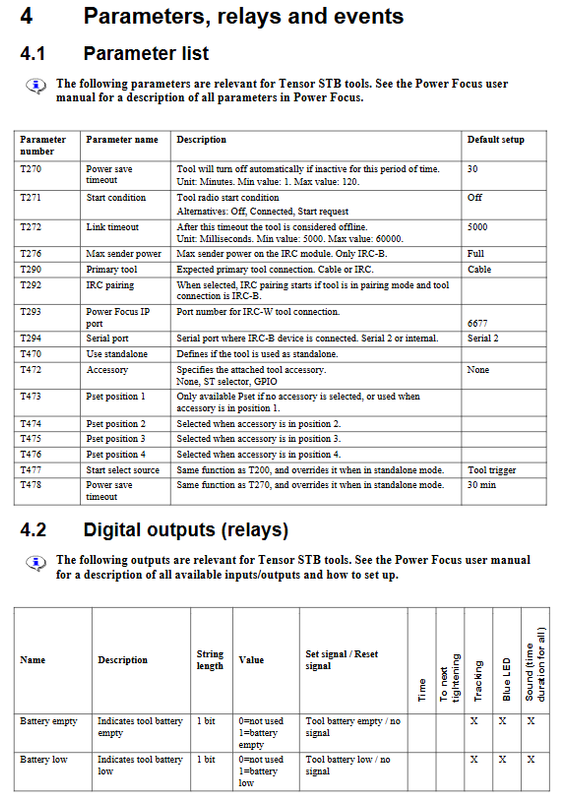
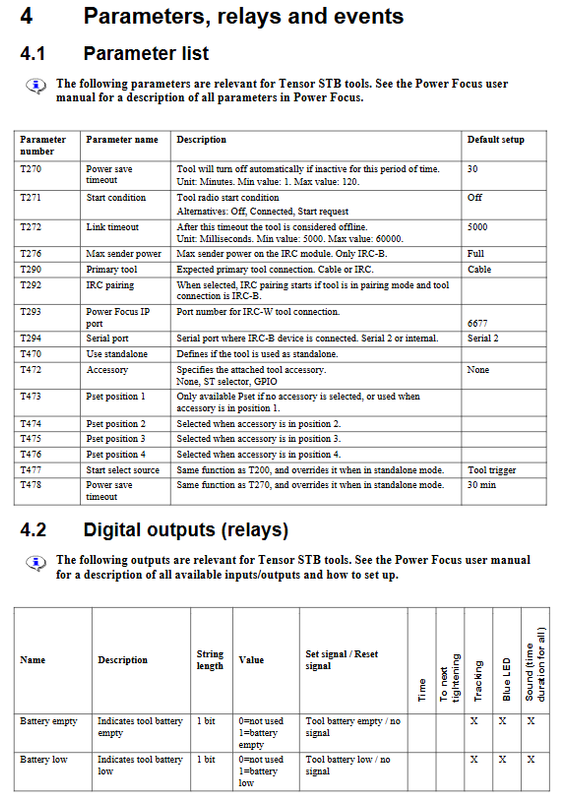
Important parameters and event codes
Core parameters
T270 power-saving timeout: no operation, automatic sleep mode, range 1-120 minutes, default 30 minutes; Press the trigger to wake up.
T271 startup conditions: None (maximum 25 tightening allowed for disconnection)/Connected (link must be online)/Start request: Confirm the link for each tightening.
T272 link timeout; T290 main tool types: Cable/IRC-B/IRC-W.
Critical Fault Event
E550: Wireless connection establishment; E551: Wireless link loss
E553: Pairing failed; E556 battery low; E557 Battery Depletion Tool Lock
E558: Controller and tool firmware versions do not match, firmware upgrade required
E601 system voltage too low, E620 motor stalling, E721 tool internal malfunction requiring repair
Docking dock installation (required for IRC-W configuration)
Connect the base to a power source and USB to a Windows computer; Install FT232R USB-UUART driver;
ToolsTalk Service software selects the communication port; Insert the tool into the base to complete the read-write configuration.
Cross network cable direct connection configuration
No factory LAN environment, PC and PF controllers directly use cross Ethernet cables; Manually set PC static IP, ping controller IP to complete communication, used for ToolsTalk PF debugging.
Common FAQ Key Points
Disconnect wireless connection: up to 25 tightening cycles are allowed, after which the tool will lock; Return to the wireless coverage area and pull the trigger to automatically reconnect and upload data.
Communication distance: 100m in open space, adjustable transmission power, but cannot guarantee workstation range limitations.
Compatibility: Power Focus3100 requires firmware version ≥ 7.4.