Omron F160 Vision Sensor
Omron F160 Vision Sensor Expert Menu Operation Manual (Z173-E1-02A), fully explains all the operations of Expert Menu advanced mode, provides 17 measurement methods, supports single/dual cameras, up to 32 measurement areas, 32 scene switching, can complete positioning, size, defect OCR、 Full functional visual inspection including classification, counting, and angle, covering the entire process of startup operation, menu structure, parameter setting, calibration, position compensation, result output, system settings, and troubleshooting. It is an authoritative guidance document for advanced debugging and deployment of F160 visual systems.
Core Architecture and Patterns
F160 adopts patterned operation, with the following core modes:
Mode Usage
SET parameter setting, image adjustment, measurement area drawing
MON monitoring test, results are not output to the public
RUN is officially running, and the results are output to the outside world
SYS system settings, camera, communication, display
TOOL data backup, storage card operation
SAVE saves configuration to flash memory
Hardware and configuration capabilities
Camera support
Single camera/dual camera (Camera0+Camera1)
Synchronous imaging, anti light interference, segmented field of view measurement
Scene Management
Built in: 32 scenes
Memory card: up to 1024 scenarios
measurement area
Maximum: 32 regions/scenes
Dual cameras: Camera0 (0~15), Camera1 (16~31)
17 measurement methods (core)
There are a total of 17 types of professional testing, covering all needs of industrial vision:
Area (Var. Box) adaptive box area
Defect (Var. Box) adaptive box defect
Gravity and Area Center of Gravity and Area
Gravity and Axis Center of Gravity and Angle
OCR for 1 Character Single Character Recognition
Classification detection
Defect surface defect
Density Data Brightness Data
Edge Pitch edge spacing
Edge Position
Edge Width
Gray Search
Precise Search sub-pixel precision search
Flexible Search Multi Model Flexible Search
Labeling label count
Relative Search: Relative Position Search
Rotation Search
Key operational procedures
1. Power on and startup
Power on → Select menu → Expert menus
Select camera (single/dual) → enter settings
2. Test the 7-step standard process
Enter SET mode
Image adjustment (shutter, light source, filtering, background suppression)
Position offset compensation
Draw measurement area+select algorithm
Set judgment threshold
Set output expression
MON test → RUN run → SAVE save
3. Calibration
Function: Pixel → Millimeter/Micron Physical Unit
Supports 4 ways:
Sampling calibration
Standardizing Point Calibration
Standardizing Axis Coordinate Axis Calibration
Parameter Input: Directly input parameters
4. Position offset compensation
Solution: Product position/angle deviation
Principle: First find the benchmark → automatically correct the measurement area
Support the vast majority of measurement methods
5. Output and Display
Expression: Supports operations, logic, and variables
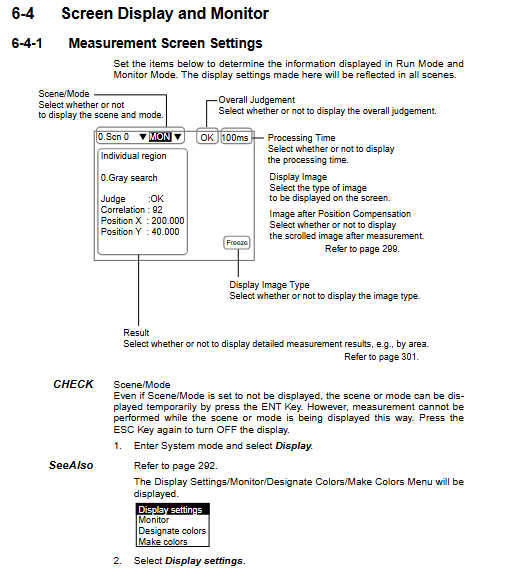
Display customization: text, graphics, judgment, coordinates
Store NG images: up to 35, clear in case of power failure
System Settings (SYS)
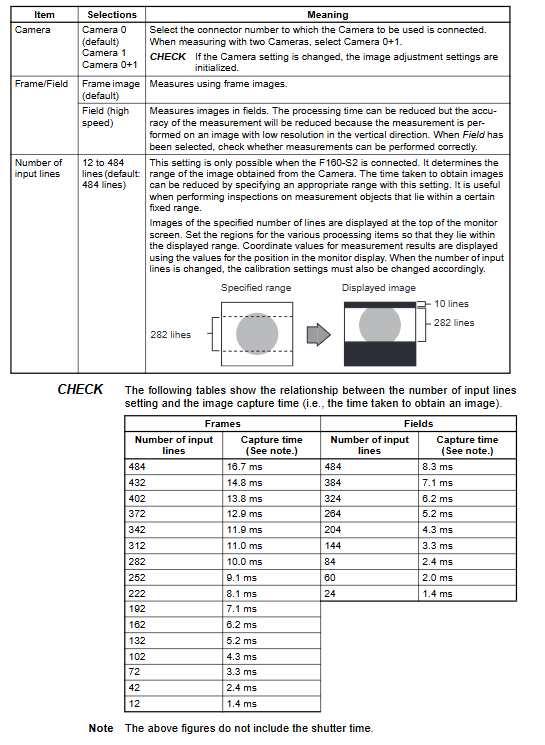
Camera parameters, shutter speed, light source
Communication: serial port, parallel port HostLink
Display color scheme, shortcut keys, password
Power on mode, date and time
System information, version, capacity
Appendix Content
Glossary
Character encoding table
Fault diagnosis (indicator lights, error messages)
Frequently Asked Questions (FAQ)
Key issues
Question 1: How many measurement methods does the F160 expert menu offer? What are the most commonly used methods for positioning, sizing, and defect detection?
Answer: There are a total of 17 measurement methods.
Location matching: Gray Search/Precise Search/Flexible Search
Size measurement: Edge Position/Edge Width/Edge Pitch
Surface defect: Defect/Defect (Var. Box)
Question 2: What are the advantages of dual camera mode (Camera0+1) compared to single camera? What are the restrictions on configuration?
Answer: Advantages:
Bidirectional synchronous detection to improve detection coverage
Large field of view segmentation, suitable for large-sized workpieces
Intelligent light source without mutual interference
Limitations:
The measurement area is divided into 0-15 (Camera0) and 16-31 (Camera1)
Calibration and compensation need to be configured separately
Question 3: What is the purpose of calibration? What are the four calibration methods? What are the effects of not opening it?
Answer: The function is to convert pixel values into physical units (mm/μ m) to achieve precise size measurement. Four methods: sampling calibration, point calibration, coordinate axis calibration, and parameter input. If not turned on, the output will be pixel coordinates, and the true size cannot be obtained. All size detection is invalid.