Reliance Electric GV3000/SE AC Inverter
The software startup and reference manual for Reliance Electric GV3000/SE AC frequency converter V6.06 covers two control modes: V/Hz control and vector control (FVC/SVC), providing a complete process for power on debugging, keyboard operation, parameter programming, and fault diagnosis; The frequency converter supports local/remote/network multi-source control, equipped with two-level parameter menu, password protection, electronic thermal overload, automatic reset and other functions. It can be flexibly configured through digital/analog input, preset speed, S-curve acceleration and deceleration, and defines in detail three types of parameters: P universal, H V/Hz, and U vector, as well as alarm/fault/fatal fault code system. It is the authoritative operating basis for GV3000/SE drive installation, debugging, and operation.
Two major start-up processes
1. V/Hz control startup steps
Hardware installation completed, record motor nameplate voltage, current, and fundamental frequency
Power on and perform self-test (display SELF)
Enter programming mode and configure primary parameters:
P. 000 Control Source (default LOCL local)
P. 001/P.002 Acceleration and deceleration time (default 20.0s)
P. 003/P.004 minimum/maximum speed
P. 005 current limiting
Enter password 107 to enter the secondary menu
Configure H parameters (motor nameplate, torque boost, V/Hz curve)
Check the motor direction, test run and monitor the voltage/current/frequency
2. Vector control startup steps
Enter password 107 to unlock the secondary menu
P. 048 is set as UEC switching vector mode
Configure basic parameters P.000~P.005
Configure U parameters: encoder PPR, number of poles, nameplate current/voltage/speed
Set the maximum speed of the motor to U.017
Perform self-tuning (set U.008 to ON) and run the motor without load
Verify steering, adjust speed operation, optimize speed loop PI parameters
Keyboard and Display Operations
1. Two working modes
Monitoring mode (default): Display speed, voltage, current, frequency, power, torque (vector)
Programming mode: modify parameters, view fault logs
2. Core button functions
Program: Switching modes
ENTER: Confirm/Page Up
START/STOP: Start, Stop, Reset
AUTO/MAN: Automatic/Manual Reference Source Switching
FORWARD/REVERSE: Direction switching (local mode is valid)
3. LED status description
Meaning of LED
Running in progress
Remote Control
Program mode
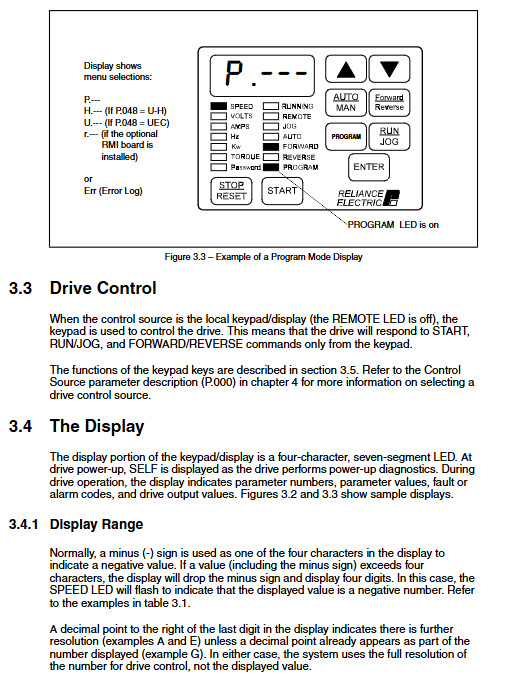
PASSWORD parameter locked
Parameter system (core)
1. Menu structure
First level menu: P.000~P.006, no password required
Secondary menu: Unlock with password 107, including:
P. 007~P.099: General Parameters
H. 000~H.022: V/Hz dedicated
U. 000~U.048: Vector specific
r. Xxx: RMI interface dedicated
Err: Fault log
2. Quick overview of key parameters
Parameter function value/default
P. 000 Control source LOCL/rE/OP/SErL
P. 001 Acceleration time 1 1~999.9s, default 20s
P. 048 control mode U-H (V/Hz)/UEC (vector)
P. 006 Level 2 Menu Password 107
P. 051 Programming Prohibited Password 26
H. 000 motor nameplate voltage 100~690V
U. 008 Vector self-tuning ON/OFF
Protection and fault function
1. Core protection
Electronic thermal overload (OL): P.040 enabled, protected by motor current
Overcurrent (OC), Overvoltage (HU), Undervoltage (LU)
Phase loss protection (OPL), ground fault (EC)
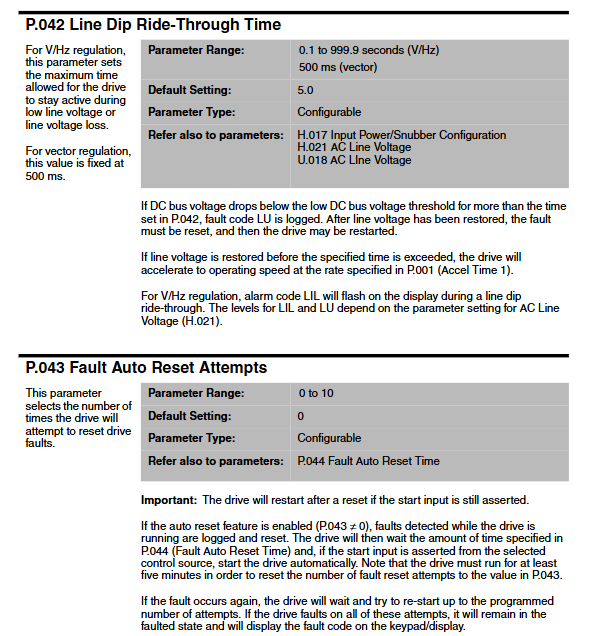
Overload automatic reset: P.043 setting times (0~10)
2. Fault classification
Alarm: Warning, do not stop the machine
Fault: Shutdown, resettable
Fatal malfunction: It is necessary to shut down the power for troubleshooting
3. Fault handling
View fault log (Err)
Locate the cause according to the code, eliminate it and reset it
Self setting fault display SF, needs to be reset
Key questions and answers
Question 1: What are the passwords for entering the secondary parameter menu and unlocking the parameters for GV3000/SE? What scenarios are they used for?
answer:
Secondary menu password: 107, used to unlock all P/H/U/r parameters and fault logs.
Programming prohibition password: 26, used to unlock keyboard parameter modification permission (entered when the PASSWORD light is on).
Question 2: What is the core difference between the start-up process of V/Hz control and vector control? What loads are they applicable to?
answer:
Core difference: Vector control requires inputting the full parameters of the motor nameplate and performing self-tuning (U.008), while V/Hz only requires configuring the basic nameplate and torque boost.
Applicable scenarios: V/Hz is suitable for general loads such as fans and pumps; Vectors are suitable for machine tools, tension control and other equipment that require high-precision speed regulation/torque control.
Question 3: What are the control sources P.000 for GV3000/SE? What is the core difference between local and remote modes?
answer:
There are four types of control sources: LOCL (local keyboard), rE (terminal), OP (network), and SErL (serial port).
Core difference: The local mode is directly started, stopped, and adjusted by the keyboard; The remote mode is controlled by an external terminal/network, and the keyboard can only monitor and emergency reset.