ABB NextMove ESB-2 (NSB20x series) motion controller
Basic information, security warnings, and model differentiation
Copyright and Security Points
Programming language: Mint language, similar to Basic, specifically designed for motion control;
Personnel requirements: Only qualified electricians/motion control engineers are allowed to operate; Static sensitive devices must be operated with anti-static measures;
Important safety: Stopping the input of the controller cannot be the only means of safe shutdown, and must be accompanied by hardware safety measures such as driver enable and motor brake; Rotating mechanisms pose a risk of accidental injury; Personnel with pacemakers/implanted devices should stay away from motors and power cables;
Compliance: CE, EMC, WEEE directives.
Hardware model (NSB20xx)
There are a total of 6 models, with core differences including the number of servo axes, electrical type of stepper output (differential RS422/open collector), and serial port type RS232/RS485
Model: Servo Axis, Stepper Axis, Additional Encoder, Serial Port Type, Stepper Output Hardware
NSB202-501 3 4 2 RS232 differential RS-422
NSB202-502 3 4 2 RS485 differential RS-422
NSB203-501 3 4 2 RS232 collector open circuit
NSB203-502 3 4 2 RS485 collector open circuit
NSB204-501 4 4 1 RS232 differential RS-422
NSB204-502 4 4 1 RS485 differential RS-422
NSB205-501 4 4 1 RS232 collector open circuit
NSB205-502 4 4 1 RS485 collector open circuit
Ability Overview: Up to 4 servo axes+4 stepper axes; Support point motion, electronic cam, and electronic gear following (master-slave following).
Mechanical installation
Power supply requirements: DC+24V, continuous 2A, recommended 4A fuse, independent power supply.
Installation environment
Indoor vertical wall mounted installation; Environmental temperature 0-45 ℃; Humidity ≤ 80% @ 31 ℃, linearly decreases to 50% @ 45 ℃, condensation is prohibited; Pollution level 2; Stay away from heat sources, dust, and corrosive gases.
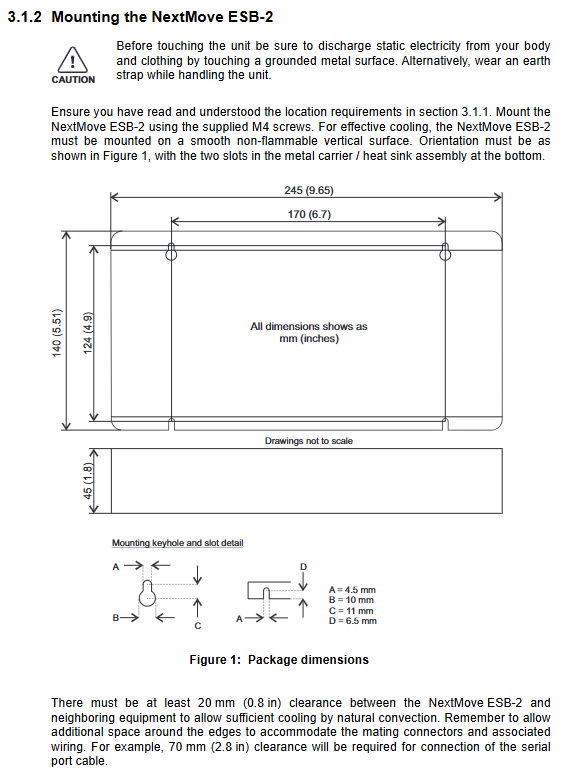
Secure the shell with M4 screws; Reserve ≥ 20mm convective heat dissipation space around the perimeter; Reserve 70mm of wiring space on the serial cable side.
Minimum PC configuration: 1GHz CPU, 512MB memory, 2GB hard drive; Windows XP and above 32/64 bit system; USB or serial port.
Overall dimensions: 245 mm × 140 mm × 45 mm.
Detailed description of all I/O interfaces
The controller terminals include: analog IO, digital input/output, step pulse output, 5-way encoder feedback, relays USB、 Serial port RS232/485, CAN bus.
3.1 Analog I/O
Analog input X12: 2-channel differential 12 bit, ± 10V; input impedance 120k Ω; maximum sampling 4kHz; Second order low-pass filtering at 1kHz.
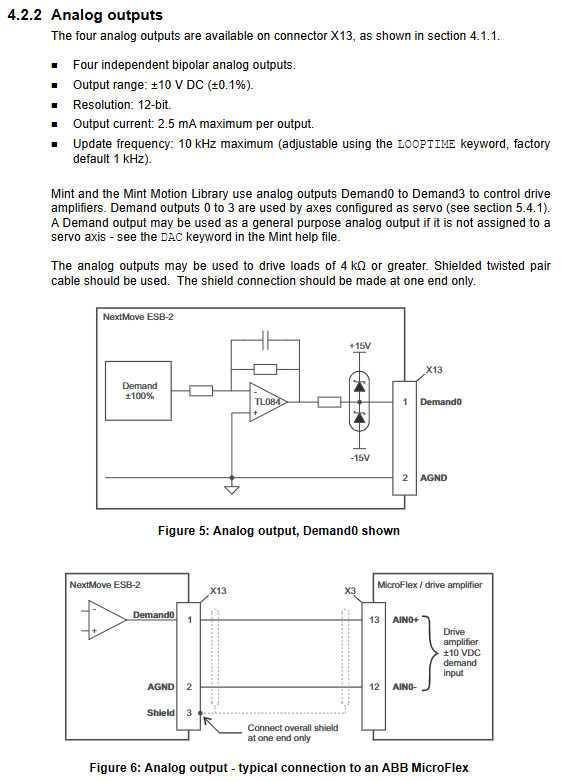
Analog output X13 (Demand0-3): 4-channel bipolar ± 10V, 12 bit; Maximum 2.5mA per channel; used for servo speed/torque setting; When the servo axis is not assigned, it can be used for general analog output; Cable shielding with single ended grounding.
Typical usage: Output directly to MicroFlex/FlexDrive series servo drives to simulate a given input.
3.2 Digital Input DIN0-DIN19 (20 channels in total, optocoupler isolated)
DIN0-DIN3: High speed interrupt input, supports hardware position locking, with a delay of only 1 μ s; Attention: Do not directly connect the mechanical switch as it may shake and trigger incorrectly;
DIN4-11, DIN12-19: Universal digital input, 1kHz sampling; Divided into three independent public end CREF0/CREF1/CREF2, each group can independently configure high/low effectiveness;
DIN17-19 can be reused as a simple auxiliary encoder (step/dir/Z) with a maximum frequency of 15kHz;
Mint keyword INX reading status; Can be assigned as origin, positive limit, negative limit, stop, and fault input.
3.3 Digital outputs DOUT0-DOUT11 (12 channels in total)
UDN2987 driver, external 24V power supply;
DOUT0-7: The maximum total current is 500mA, and the maximum single channel current is 350mA;
DOUT8-11: Total current maximum 500mA, single channel maximum 350mA;
Inductive loads (relays) must be connected in parallel with freewheeling diodes; Can be configured as driver enabled and global fault output.
3.4 Step Output (4-axis STEP/DIR)
NSB202/204: DS26LS31 differential RS422 output, 0-500kHz;
NSB203/205: ULN2803 collector open circuit output, 0-500kHz;
Support STEPPERDLAY setting pulse direction delay 0-4.25 μ s; The total output current upper limit of the 5V encoder is 1.85A. All encoders and stepper drivers share this 5V power supply and cannot be overloaded.
3.5 Encoder input (ENC0-ENC4, a total of 5 RS422 differential incremental encoders)
X5-X7 and X14-X15 are 9-pin D-SUBs; A/B/Z differential signal; Provide 5V to the encoder;
ENC0-3 is used for servo axis feedback; ENC4 is an independent auxiliary main encoder used for electronic gear and cam master-slave tracking;
Theoretical maximum orthogonal count is 10Mcount/s; The longer the cable, the lower the maximum frequency allowed; Recommended maximum cable length is 30.5m;
The Mint keyword distinguishes between the regular encoder ENCODER (x) and the auxiliary encoder AUXENCODER (x).
3.6 Relay output X12
Single channel isolation relay; When there is no fault, COM-NO conducts normally; Power failure/malfunction COM-NC conduction; Can be configured as a global fault output.
3.7 Communication Interface
USB1.1 (Type-B): Used for connecting to PCs, with a maximum cable length of 5m; self powered device, compatible with USB2.0/3.0 physical ports, maintaining USB1.1 speed.
Serial port (RS232/RS485-422, model determines hardware)
RS232: default 57600 baud, hardware flow control RTS/CTS; Point-to-point;
RS485/422 supports multi node bus, with 120 Ω terminal resistors at both ends of the bus; Can connect to Baldor series HMI operation panel.
CAN bus (RJ45 interface)
The hardware only has one CAN channel, firmware can choose one, CANopen and Baldor CAN cannot run simultaneously.
① CANopen (CiA DS-301): Can interface with third-party DS-401 IO modules and DS-403 human-machine interface; Can serve as a CANopen management master station, with a maximum of 126 nodes;
② Baldor CAN (ABB proprietary protocol): Only supports proprietary IO nodes and old button panels, with a maximum of 63 nodes;
CAN requires an external 12-24V power supply to isolate the CAN circuit; The terminal resistors at both ends of the bus are 120 Ω, and the JP1 jumper on the board enables internal termination; The baud rate is strongly correlated with the maximum bus length.
3.8 Minimum System Wiring
Controller 24V power supply+PC communication+one servo drive: simulate given demand, driver enable (relay/DOUT), encoder feedback, complete minimum system wiring diagram on pages 4-28 of the manual.
Software and Operation Debugging
The software runs on Windows and is used for scanning devices, axis configuration, parameter tuning, Mint programming, debugging monitoring, and waveform recording.
Mint Machine Center (MMC): A network scanning tool that scans all motion controllers on USB/serial/CAN, double-click to open Mint WorkBench directly.
Mint WorkBench core functions:
The driver has two modes: current (torque mode) and speed mode; The tuning process is different;
Servo loop gain: KPROP ratio, KVEL speed feedback damping, KDERIV differentiation, KINT integration to eliminate static error; Forward KVELFF speed feedforward, KACCEL acceleration feedforward;
Distinguish between under damping (overshoot oscillation), critical damping, and over damping; The software comes with a Fine tuning fine-tuning panel and captures waveform curves;
Axis Configuration Wizard: Set Axis Types Servo/Stepper/Virtual Virtual Axis;
SCALEFACTOR scaling factor: Convert the encoder count value to user units (mm, circle, etc.);
IO configuration: digital input/output, driver enable allocation (DOUT or relay);
Step axis debugging: JOG jog, STOP stop, open-loop, no need for tuning;
Servo closed-loop debugging (key)
Parameter saving/loading: Controller parameters are saved inside the controller and can be backed up to a PC;
Directly execute Mint instructions in the command window; F1 retrieves the complete Mint keyword help document.
Requirements before powering on: disconnect the load from the motor; Check the grounding and wiring; The first time you turn on the power and check the status digital display, the flashing decimal point indicates a fault.
Troubleshooting
The status digital display shows 0-7 with flashing decimal points, representing different fault codes;
Communication troubleshooting: USB, serial port, CAN, CANopen/Baldur CAN provide troubleshooting points respectively;
The SupportMe tool can export diagnostic logs for technical support.