AN-X2-AB DHRIO Allen Bradley Remote I/O Adapter
Product Overview and Core Competence
Positioning: As an adapter device on the RIO network, with a single RIO channel; Connect to ControlLogix (RSLogix5000 platform).
Main Functions
Active (active/simulation rack): Module simulation RIO rack; ControlLogix writes RIO inputs and reads RIO outputs.
Monitor (monitoring rack): only collects existing RIO network data; All I/O is mapped to ControlLogix input labels.
Simulate one or more RIO racks; Rack number octal 0-76.
Supports all RIO baud rates: 57.6k, 115.2k, 230.4kbaud; Supports partial rack mode.
Support Block Transfer block read and write; Can simultaneously monitor discrete I/O and block transmission messages.
Complete all I/O data exchange through Ethernet Scheduled connection; Support unicast and multicast; Supports multiple ‘Listen Only’ connections.
Two rack operating modes:
Supporting software: Windows tool AnxAbRioCfgAdpt, completes RIO network configuration, I/O mapping, upload and download configuration, monitoring and diagnosis; The firmware version requires V4 or higher.
Web built-in web services: browser access, viewing logs, modifying network parameters, upgrading firmware, system management.
Hardware Features
1) Interface and indicator lights
RJ45 Ethernet 10/100M; LED: 100 speed light, Link/ACT chain street light.
SYS LED: module internal status, communication status with ControlLogix.
NET LED: RIO remote I/O bus communication status.
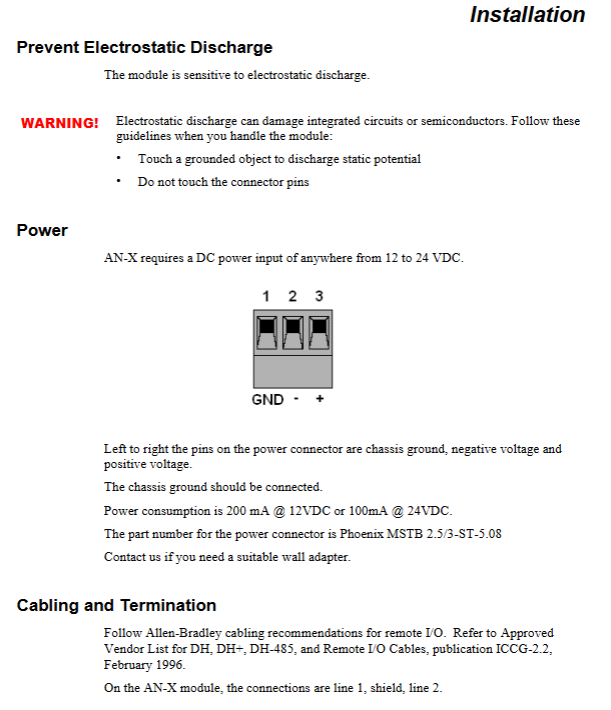
Power terminal: Phoenix 3-pin, 12-24 VDC power supply; Pin sequence: chassis ground, negative, positive; power waste: 12VDC@200mA / 24VDC@100mA .
Network Phoenix terminal connected to RIO bus: Line 1, shielded Line2。
Micro SD card slot: stores firmware and configuration file config. txt in FAT16/FAT32 format; It is strictly prohibited to remove the card during operation.
Hardware watchdog; Jabber suppresses the timer and forcibly shuts down the transmitter to enter a safe fault state when the bus is abnormal.
2) Packaging List
AN-X2-AB DHRIO host; MicroSD-SSD adapter card; Software documentation CD; desktop rubber foot pad.
3) Differences between AN-X2 and the old model AN-X
Increase microSD storage; No longer need AnxInit tool, configuration can be completed on the web or directly modified to SD card config. txt.
There are only two modes: maintenance mode and production mode.
Minimum firmware V4; diagnostic counters and label definitions updated.
Use Listen Only connection, support multiple listening connections, and rely on the master to own the connection; Supports unicast connections.
4) Two operating modes
Maintenance mode: Power on to run diagnostics (memory testing, etc.), load SD card changes, jump to production mode after no errors.
Production mode: Normal on-site operation mode.
Install wiring
Electrostatic protection
Modules are sensitive to static electricity; Before operation, contact a grounded object to release static electricity, and do not touch the connector pins.
RIO bus wiring and terminal matching
Following Allen Bradley RIO wiring specifications:
Terminal resistors must be connected at both ends of the bus, and there can only be 2 terminators in the entire network.
82 Ω: 230.4k baud, or 57.6/115.2k and does not include old adapters such as 1771-AS/AS-B; Up to 32 devices.
150 Ω: The network has outdated adapters or 57.6/115.2k, with ≤ 16 devices.
Baud rate – maximum cable length:
Maximum cable length for baud rate
57.6 k 10000 ft
115.2 k 5000 ft
230.4 k 2500 ft
Ethernet cabling
Connect the switch/router with a straight through Ethernet cable; The computer direct connection module requires a crossover network cable.
CE compliant installation
Ethernet, power, and RIO cables need to be equipped with designated magnetic rings to suppress EMI interference.
software installation
Uninstall the old version and run AnxAbRioSetup. MSI to install the configuration tool. Version 4. x or above is compatible with AN-X2.
Ethernet IP configuration
Factory default link local address: 169.254.42.84; Computers must be on the same subnet and cannot be accessed across routers.
Three IP modes:
DHCP: Obtain IP from DHCP; DHCP failure fallback to link local address, SYS red light flashing three times alarm.
Static IP: manually fill in IP, mask, gateway; Priority recommendation for industrial projects.
Link Local: Fixed 169.254.42.84.
Configuration method: 1) Modify the web interface of the webpage, and the module will restart and take effect after submission. 2) SD card emergency recovery: When the module network is inaccessible, remove the SD card and edit the config. txt text configuration file; Keywords IP, Netmask, DefGtwy, Hostname, Firmware.
Multi module configuration: Connect configurations one by one to avoid IP conflicts.
RIO Network Configuration Process (AnxAbRioCfgAdpt Tool)
Overall steps: Set baud rate → Configure rack (manual/automatic discovery) → Add block transfer module → I/O mapping → Download configuration to module.
Baud rate setting: 57k/115k/230k/Auto automatic detection.
There are two ways to configure the rack
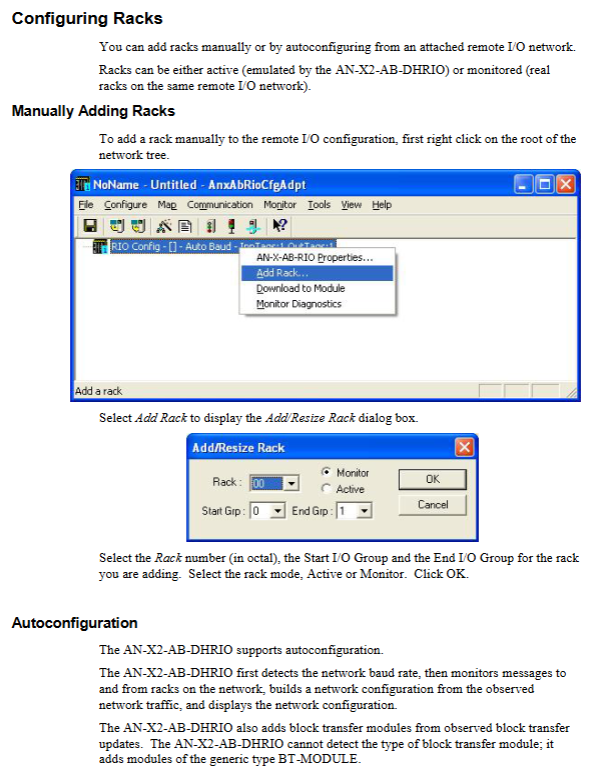
Manually add rack: specify octal rack number, I/O group start and end, and select Active/Monitor mode; Support resizing and deleting racks.
Auto configure automatic discovery: online monitoring of RIO bus traffic, automatic identification of racks; The block transmission module is recognized as a universal BT-Module and cannot identify the specific module model.
Block Transfer Module
Active active rack: Only compatible with BT-Module, configured with BTR read length and BTW write length.
Monitor monitoring rack: You can select the corresponding AB module template and fill in the read-write and configuration length.
I/O Data Mapping (Key Logic)
After modifying the mapping, it is necessary to clear the ControlLogix output table to prevent erroneous writing of output.
Active rack: RIO input mapping → CLX output label; RIO output mapping → CLX input label.
Monitor monitoring rack: RIO input and output all mapped → CLX input label.
Auto map: Automatically allocate plan label addresses to unallocated I/O; Keep the manually mapped parts.
Manual map: Specify the ControlLogix plan block and offset.
Support clearing all mappings or single rack mappings.
Configuration management: Save project files, archive templates, export RSLogix5000 alias Alias; Can upload/download configurations to the module.
Ghost mode, Scanner configuration export function.
RSLogix5000 End Configuration
Add AN-X2 module to the Logix project and connect it using a scheduled connection; Supports multiple Listen Only connections, but there must be an owner primary connection.
Import the alias Alias exported by the configuration tool to simplify label management.
Use ControlLogix logs to view module events and error messages.
Run operation
Monitor monitoring rack: CLX reads the input, output, block transfer read and write of real racks on the RIO network, all of which enter the input label.
Active simulation rack: CLX output labels are issued as RIO inputs; CLX input label receives RIO output feedback; Processing block transmission BTR/BTW.
Can read rack status, diagnostic counters, and module logs.
Provide a template instruction document for block transfer module, defining read-write length, parameters, and aliases.
Web page interface functionality
Log logs: ControlLogix logs, system information logs, all log browsing.
Administration menu: IP configuration, DHCP/static IP, hostname, firmware selection, configuration archiving, firmware upgrade, module restart.
Troubleshooting page.
Troubleshooting (LED status)
Ethernet LED: Indicates speed and link status.
SYS system LED, NET network LED: startup sequence, running status, fault code flashing.
The phenomenon of “Railroad”: SYS and NET alternate with flashing green lights during the module startup phase (when not connected to the network cable).
Fatal error: LED output specific flashing code, refer to the fault table in the manual.
Firmware upgrade
The upgrade can be completed by selecting the firmware file in the SD card through the web interface.