IbaFOB io ExpressCard fiber optic interface card
Basic Product Information
Product positioning: ibaFOB-ioExpressCard is a laptop specific model of iba FOB-D series fiber optic interface card, designed for mobile measurement scenarios, providing high-speed fiber optic communication interface, which can replace the traditional ibaCom-PCMCIA-F+FO adapter combination and benchmark the performance of ibaFOB-io-D desktop card.
Model difference:
IbaFOB io ExpressCard/54 (order number 11.117000): compatible with ExpressCard/54 slot, size 126 × 54 × 5/20mm;
IbaFOB io ExpressCard/34 (order number 11.117001): compatible with ExpressCard/34 or 54 slots, size 126 × 34 × 5/2mm;
The two have completely identical functions, only differing in physical dimensions.
Core advantages: Supports hot plugging and plug and play, reduces CPU usage through DMA technology, is compatible with new and old IBA field devices, and meets the high mobility and precision requirements of industrial mobile measurement.
Core Technical Characteristics
Communication Protocol and Transmission Performance
Protocol type, transmission rate, maximum number of signals, minimum sampling time, typical application equipment
IbaNet 2Mbit/s 2Mbit/s 32INT+32 digits ≥ 1ms old ibaPADU16/32 (S/N<1000)
IbaNet 3.3Mbit/s 3.3Mbit/s 64INT/REAL+64 digits ≥ 1ms ibaPADU8/16/32, ibaLink-SM-64-i-o
IbaNet 5Mbit/s 5Mbit/s 8INT+8 digits ≥ 40 µ s ibaPADU-8-M/ICP, SIMATIC TDC LO5
IbaNet 32Mbit/s 32Mbit/s 128INT+128 digits/512REAL+512 digits ≥ 50 µ s/≥ 800 µ s SIMATIC TDC LO6, ABB AC 800PEC
32Mbit Flex variable rate 72 bytes (25 µ s)/3147 bytes (1ms) ≥ 10 µ s ibaPADU-S-IT series
Core Functions
DMA technology: direct memory access, measuring data skips the CPU and is directly written into computer memory, significantly reducing CPU load and improving data transfer efficiency;
Protocol automatic recognition: The card can automatically detect the ibaNet protocol version of the fiber input data stream without manual configuration;
Status monitoring: 4 LEDs display real-time card operation status, link protocol type, signal reception status, and fault information;
Watchdog function: If data collection is interrupted for more than 2 seconds after activation, an alarm message will be generated, all output values will be set to 0, and a red LED will light up to prompt.
System Requirements
Hardware Requirements
Category specific requirements
Laptop configuration: IBM compatible laptop, Pentium IV 3GHz and above processor, 512MB and above memory
Slot specifications ExpressCard/34 or 54 slots (34mm model compatible with both types of slots, 54mm only compatible with 54mm slots)
Fiber optic requirement 62.5/125 µ m fiber optic, ST connector duplex fiber optic cable
Other items require sufficient heat dissipation space to avoid overheating of the card
Software Requirements
Operating systems: Windows XP, Vista, 7, Server 2003, Server 2008 (only supports 32-bit versions);
Supporting software: ibaPDA-V6 (≥ 6.24.0 version, core configuration and data acquisition software), ibaLogic-V4 (control software);
Driver: Installed with ibaPDA-V6, supports plug and play automatic recognition.
Installation and Disassembly
Installation steps
Install ibaPDA-V6 (≥ 6.24.0) or ibaLogic-V4 in advance, ensuring that the driver has been deployed;
When the laptop is turned on, insert the card smoothly into the ExpressCard slot until you hear the snap lock sound;
The system automatically recognizes the new hardware and pops up the “Add Hardware Wizard”. Follow the prompts to complete the driver installation (if it does not pop up, you can manually start the wizard through the control panel);
After the driver installation is successful, the green Run LED starts flashing. Connect the fiber optic cable (RX to the field device TX, TX to the field device RX);
Open the Device Manager and confirm that the “ibaFOB io ExpressCard” is properly recognized without any yellow exclamation marks.
Disassembly steps
Disconnect the fiber optic cables at both ends to avoid cable pulling and damaging the interface;
Press the unlock button on the ExpressCard slot, and the card will automatically pop out;
Gently unplug the card without turning off the laptop power (supports hot swapping).
Configuration and Operation
Configuration Process (ibaPDA-V6)
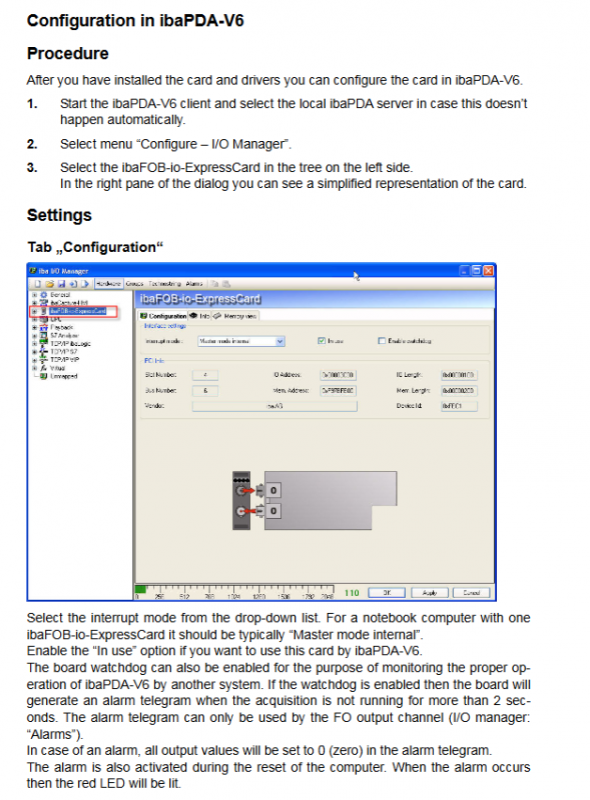
Start the ibaPDA-V6 client and automatically connect to the local ibaPDA server;
Select the menu “Configure – I/O Manager” and choose “ibaFOB io ExpressCard” from the device tree on the left;
Configuration options:
Configuration “tab: Select the interrupt mode (recommended for single card laptops as” Master mode internal “), check” In use “to enable the card, and enable the watchdog as needed;
Info “tag: View card hardware information, firmware version, support FPGA reload and firmware update (consult technical support);
Link 0 Info “tag: View real-time data such as link communication status, detected protocols, message counters, FO signal strength, etc.
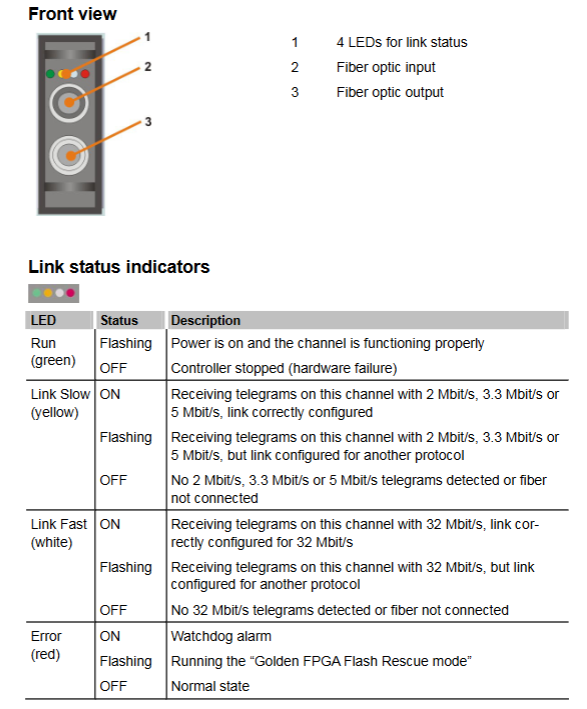
Status LED Description
LED name, color, status, meaning
Run green flashing power on, card working normally
Turn off the controller and stop (hardware failure)
Link Slow yellow constant light receives 2/3.3/5Mbit/s messages, matched link configuration
Flashing reception of 2/3.3/5Mbit/s messages, link configuration mismatch
Extinguish no 2/3.3/5Mbit/s message detected or fiber not connected
Link Fast white constant light receives 32Mbit/s messages, link configuration matches
Flashing reception of 32Mbit/s message, link configuration mismatch
Extinguish: No 32Mbit/s message detected or fiber optic cable not connected
Error red constant on watchdog alarm
Flashing Run “Golden FPGA Flash Rescue Mode”
Extinguish normal state, no malfunction
Compatible devices and application scenarios
Compatible with IBA field devices
IbaPADU series: ibaPADU-8/16/32, ibaPADU-8-M/ICP, ibaPADU-S-IT;
IbaBM series: ibaBM-DPM-S, ibaBM eCAT, ibaBM Silink, ibaBM-COL-8i-o, etc;
Other devices: ibaNet750-BM, ibaPACO-4, ibaLink SM series, ibaDIG-40, etc.
Application Scenarios
Industrial mobile measurement: Portable data collection of on-site equipment is achieved by combining laptops with cards;
Data logging: Recording the operational data of automated systems for subsequent analysis;
On site equipment debugging: Connect IBA series sensors and controllers for parameter configuration and status monitoring;
Automated communication: serving as a high-speed fiber optic communication bridge between laptops and industrial field equipment.
Technical Parameters
Category specific indicators
Physical parameter dimensions: 34mm model (126 × 34 × 5/2mm), 54mm model (126 × 54 × 5/2mm); Weight: Approximately 200g (including packaging/documentation)
Electrical parameter power supply: 3.3V (ExpressCard slot power supply); Power consumption: typical 1.5W; bus specification: PCI Express 1x (2.5Gbit/s)
Environmental parameters Operating temperature: 0~50 ℃; Storage/transportation temperature: -25~70 ℃; No requirement for condensation
Interface parameters: Fiber optic interface: 2 channels (RX input/TX output), ST connector; Fiber type: 62.5/125 µ m