Lauer EPC Series Industrial Embedded Human Computer Integrated PC User Guide
Product Hardware Description
The whole machine is a panel mounted industrial embedded touch PC, divided into three visible surfaces:
Front of operation: color TFT resistive touch screen; Specifications: 6.4 “, 10.4”, 12 “;
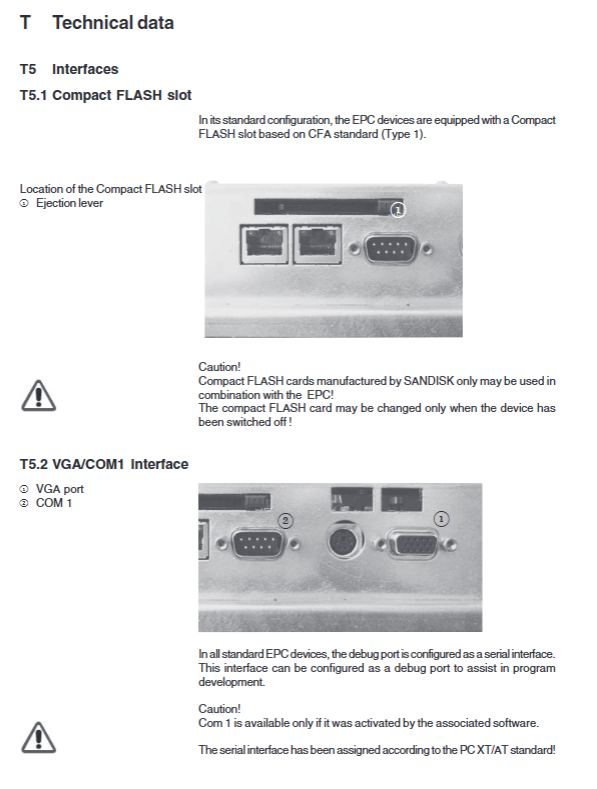
Slot side (rear interface panel)
24 VDC power terminal;
Dual Ethernet ports LAN1 and LAN2 (10/100M RJ45);
RS232(COM1); PS/2 keyboard and mouse interface; VGA external monitor;
Two USB 1.0 ports; Type-I CompactFlash (CF card) slot; PC104 expansion slot, capable of installing MPI, Profibus DP, RS232 TTY, RS422-485 communication modules;
Equipment back shell: nameplate, status indicator lights (PWR, ERR, S1, S2, RUN), reset RES button.
Debugging, Installation, and Power on
3.1 Power Supply Requirements
Power supply:+24 VDC ± 20%, compliant with EN60950 safety ultra-low voltage, transformer meets EN60742;
0V is connected to the device casing with low impedance; The power supply interface is a Phoenix MST BT 2.5/2 connector; Before powering on, check the voltage on the label and complete all cable inspections.
3.2 Grounding specifications (EMC anti-interference key)
Connect the equipment and control cabinet to the same central grounding point, with the wiring as short and low inductance as possible;
All data cables must use shielded cables, with both ends of the shielding layer grounded;
Protect the grounding yellow green cable with a cross-sectional area of ≥ 4 mm ² to avoid transient high currents caused by potential differences.
3.3 Mechanical Installation
Installed inside the metal anti-interference control cabinet, a ventilation gap of 100mm must be reserved around the equipment for heat dissipation;
Use hexagonal nut fasteners for panel opening installation;
Only when the sealing gasket of the front cover plate is correctly assembled, can the protection level of the front panel be guaranteed to be IP65; The protection level of the interface side on the back of the device is only IP20.
3.4 Startup
Connect the 24V power supply, and the device will automatically boot Windows CE NET 4.1 operating system.
EPC Manager
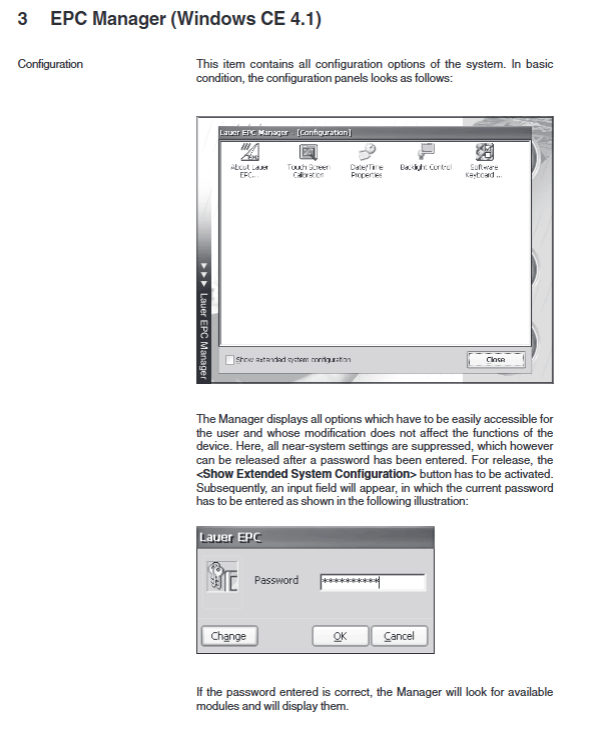
EPC Manager is a customized graphical configuration interface for Lauer, which automatically starts when the device is powered on with an external CF card; It can also be manually started through the resource manager or the reset switch on the back of the device, and the interface language is only English. ⚠️ Data loss due to power failure of RAM folder in Windows CE system: My Documents, Program Files, Temp, Windows, etc. are all memory disks and cannot store persistent projects; Persistent storage relies on CompactFlash cards.
4.1 Storage medium allocation
Storage Card (external CF card): stores user projects and registry;
Storage Card2 (built-in CF): stores the operating system, system libraries, and EPC Manager program;
The root directory path of the web page is: \ Lauer EPC \ www \ wwwpub.
Warning: CF drive letter dynamic allocation, try to avoid writing dead absolute paths in the project.
4.2 Manager main interface three major buttons
Runtime: Start the runtime program (such as zenOn configuration visualization software), confirm with a pop-up window, and execute the registered running program;
Configuration: System configuration; Extended advanced configuration mode with normal mode and password unlocking (factory password free, customizable password);
Exit: Exit the EPC Manager.
4.3 Configuration Module (Normal Mode)
About Lauer EPC: View hardware serial number, firmware image version, module version;
Touch Screen Calibration: Touch Screen Calibration;
Date/Time Properties: System date and time settings;
Backlight Control: Backlight control (not supported by some hardware models), setting automatic backlight off delay and brightness;
Software Keyboard: Screen soft keyboard settings (automatic pop up/manual call up/off; two sets of keyboard layouts for size).
4.4 Advanced Expansion Module after Password Unlocking
Serial Module Configuration: PC104 Extended Communication Module Identification and Switching for Serial Module Configuration;
S1 module: choose one of RS232/TTY;
S2 module: choose one of RS422/RS485; The module change settings take effect immediately and are saved. Restarting will still retain them.
AutoStart Editor is set to automatically run EXE programs upon startup; You can check whether to automatically start EPC-Manager, and it is recommended to keep it checked.
Implement synchronous debugging between the upper computer and EPC files using Microsoft ActiveSync 3.7 via serial port/USB connection; Provide the sequence of the cross serial cable; Used for eMbedded Visual C++4.0 development and debugging.
EVC Remote Tools Connection (TCP/IP Remote Tools) uses Ethernet TCP-IP port 5000, without the need for a serial port, to achieve upper computer Platform Manager, remote screenshot, remote file browsing and debugging.
ZenOn Runtime Management for ZenOn configuration software: select the startup project, set self startup, and set startup delay; Can enable transmission service.
Network and Connections Network Settings
Important note: Network parameters must be modified using EPC Manager. The IP parameters set directly in the Windows CE control panel will not be saved after restarting.
Reboot System: Restart the device, save all configurations, and perform a soft reset; The backplane RESET switch can also be used.
Windows CE Console/Control Panel: Call the native CE console and control panel.
Device built-in server
Factory login account: admin/password: admin (system control panel modification, note: password is independent of EPC Manager configuration)
FTP server: TCP21 port; Used for uploading and downloading project files; Passive FTP mode needs to be turned off when connecting to IE browser;
HTTP (WEB) server port 80: stores ASP/JSCcript/VBScript web pages, web page root directory \ Storage Card2 \ Lauer EPC \ www \ wwwpub;
Telnet server: Command line remote login, file management, program startup;
RDP remote display (cerdisp/cerhost): Network remote capture of EPC screen images, and remote operation of devices through cerhost software on the upper computer.
5.1 Microsoft Network Sharing Access
Windows CE requires manual mapping of local network Windows shared folders and network printers using the command line net view and net use; Copy files to the virtual folder of the printer to directly complete printing; Support batch processing scripts to automatically map network resources upon startup.
Technical Data Sheet
6.1 Mechanical dimensions (four models)
Model: Front panel size, hole size, installation depth, weight
EPC640 211 × 156 mm 197 × 142 mm 70 mm ≈1 kg
EPC1000 318 × 244 mm 303 × 228 mm 77 mm ≈2.8 kg
EPC1200 364 × 296 mm 345 × 277 mm 77 mm ≈2.8 kg
EPC1500 452 × 357 mm 429 × 334 mm 66~94 mm ≈3.5 kg
All use panel buckle nuts for installation; Reserve 50-100mm heat dissipation space around the installation area; The manual is accompanied by drawings of the two-dimensional appearance, openings, and backplane interfaces of each model.
6.2 Electrical Hardware Parameters
CPU:National Geode GX‑1 300 MHz;
RAM memory: 64 MB SDRAM, expandable up to a maximum of 256 MB;
System storage: Built in 32MB Type-I CompactFlash; Support external CF cards; Only Sandisk branded CF cards can be used, and power must be turned off when inserting or unplugging;
Screen: resistive touch screen; Resolution 640 × 480/800 × 600; 16 bit color depth;
Power supply: DC24V ± 20%; Fuse 2.5A slow melting;
Interface List:
2 x RJ45 Ethernet 10/100M;
RS232 COM1 debugging serial port;
PS/2 keyboard mouse; VGA external monitor;
2-channel USB 1.0, maximum output of 100 mA per port, high-power USB peripherals must come with their own power supply;
PC104 expansion slot, can be equipped with fieldbus communication cards (MPI, Profibus DP, CAN, RS485, etc.).
6.3 Environmental conditions
Working temperature: 0~45 ℃ for vertical installation; The upper temperature limit for inclined/horizontal installation is reduced; Storage temperature -20~60 ℃;
Humidity: No condensation during operation at 10-75%, no condensation during storage at 10-95%;
Vibration shock: sine 2g (10-500Hz), shock 15g 11ms; The packaging can be freely dropped from 1 meter;
Protection: front panel IP65, back interface IP20;
EMC: Meets EN61000-6-2 anti-interference, EN55022 radiated emission, CE certification.