SIEMENS SIMATIC HMI Touch Panel TP 170A, TP 170B Operator Panel OP 170B
The SIMATIC HMI TP 170A, TP 170B Touch Screen, and OP 170B Operation Panel User Manual (Order Number 6AV6591-1DC11-2AB0) is a full process guide for three low-level industrial human-machine interface devices. The core covers four modules: installation configuration, functional operation, system settings, and maintenance upgrades. It supports ProTool CS configuration software (V5.2 and above versions), adapts to multiple brands of PLCs such as SIMATIC S5/S7, has 320-768 kByte configuration memory, a 320 × 240 resolution display screen, supports ASCII/RTU transmission, password protection, formula management, trend view, and other core functions. The protection level reaches IP65 (front), and is suitable for machine monitoring and operation in industrial sites.
Comparison of core characteristics of equipment
Equipment model core parameter differentiation function
TP 170A (touch screen) with 320 kByte of memory, 4-color display (320 × 240 resolution), single RS232/RS422 interface basic functions: input/output, status button, bar graph, no recipe/trend function
TP 170B (touch screen) with 768 kByte of memory, 4/16 color display, dual communication interfaces and CF card expansion enhancement features: recipe management, trend view, print output, and multiple languages (5 types)
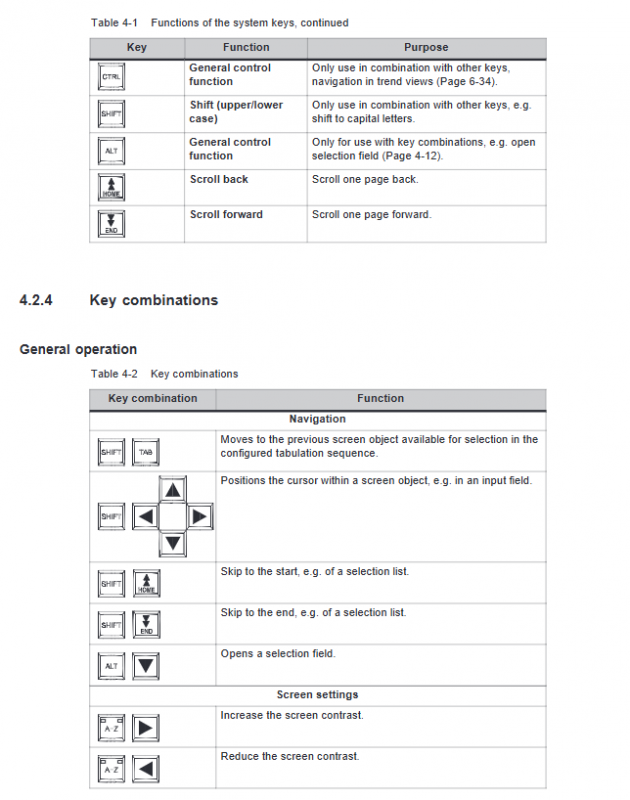
OP 170B (operation panel) configuration memory 768 kByte, 4-color display, integrated membrane keyboard (35 keys)+CF card expansion enhancement functions: soft key customization, batch message confirmation, keyboard shortcut operation
Key hardware specifications
Category specific parameter notes
Display feature resolution 320 × 240, effective display area 116 × 87 mm, CCFL backlight (lifespan 50000 hours) TP 170B/OP 170B supports 16 color display
Communication interface RS232 (9-pin), RS422/RS485 (MPI/PROFIBUS-DP) TP 170A only has a single interface, TP 170B/OP 170B supports dual interface redundancy
Storage expansion TP 170B/OP 170B supports CF card (Compact Flash) for recipe backup and configuration storage
Protection level: IP65 on the front and IP20 on the back, in compliance with NEMA 4 standard (with protective cover)
The power requirement is 24 V DC (18.0-30.0 V DC), with a typical power consumption of 0.24-0.29 A and reverse polarity protection
Environmental adaptation working temperature 0-60 ℃, humidity 5% -95% (no condensation), anti vibration/electrostatic interference in accordance with EN 61000 electromagnetic compatibility standard
Core operating procedures
1. Installation and connection
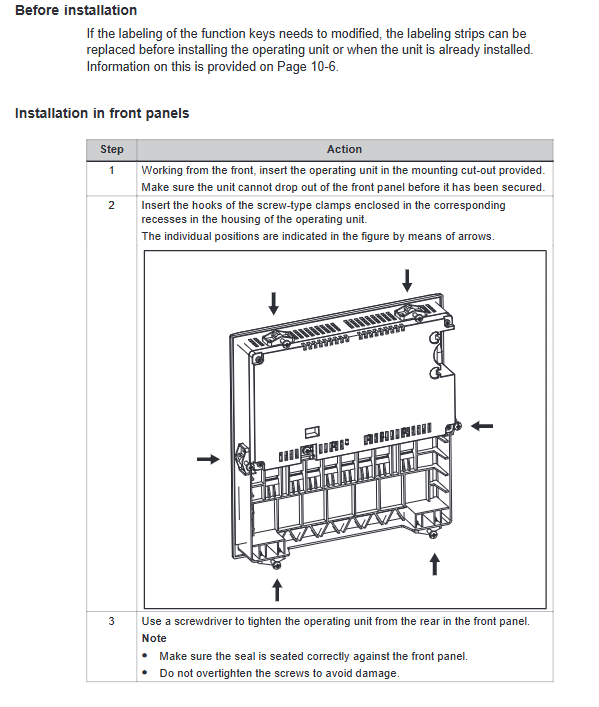
Mechanical installation
Panel opening size: TP 170A/TP 170B is 198 × 142 mm, OP 170B is 229 × 241 mm
Installation requirements: Panel thickness ≤ 6mm, reserved heat dissipation space (up and down 50mm, left and right 15-70mm)
Fixing method: TP 170A/TP 170B is fastened with side screws, OP 170B supports replacement of function key label strips
Electrical connection:
Power connection: 2-core terminal (+24 V DC/GND), wire cross-section ≤ 2.5 mm ²
PLC connection: Supports RS232 (point-to-point), MPI/PROFIBUS-DP (bus), requires shielded cable
Peripheral Connection: TP 170B/OP 170B can be connected to a serial printer (RS232 9600-57600 bps)
2. Configuration and Debugging
Project configuration:
Software requirements: ProTool CS (V5.2+SP2 and above, TP 170B/OP 170B requires V6.0+)
Configuration process: Create project → Design screen object → Set communication parameters → Download to device
Support functions: multilingual (up to 5 types), password protection (levels 0-9), message alarm (up to 2000 messages)
Download and Upload:
Download methods: manual trigger (startup phase), automatic trigger (runtime phase), supports RS232/SPI interface
Upload restriction: Only TP 170B/OP 170B supports project upload, “Upload option” needs to be enabled
Test modes: offline testing (without PLC connection), online testing (PLC communication verification)
3. Core Function Operations
Key points for operating functional modules and equipment support status
Formula Management (TP 170B/OP 170B) supports 200 formulas/200 data records, can import/export CSV files. TP 170A does not support this
Trend View (TP 170B/OP 170B) can display up to 50 trend curves simultaneously, supporting reading lines and limit value markers. TP 170A does not support this feature
Message alarm supports event messages/alarm messages, 16 confirmation groups, and message buffer storage. All three devices support this feature
Password protection for up to 50 passwords, 0-9 level permissions, automatic logout upon timeout supported by all three devices
Print output (TP 170B/OP 170B) supports screen hard copy and message log printing, but is compatible with EPSON/HP printers. TP 170A does not support it
4. System setup and maintenance
System parameter settings:
Display settings: contrast adjustment, screen calibration (TP series), screen saver (5-minute – permanently turned off)
Language settings: Supports German/English/French/Italian/Spanish, etc., with up to 5 language switches available
Date and Time: Supports synchronization with PLC (S7_CATE-AND_TIME format)
Maintenance and Upgrade:
Daily maintenance: screen cleaning (wet cloth+neutral cleaner), scratch protection (optional protective film)
Backup and recovery: ProSave tool supports Flash memory/CF card backup and batch recovery of configurations
System upgrade: Use PTUpdate tool to update the operating system through RS232 interface (resolve compatibility conflicts)
Fault handling and technical specifications
1. Common faults and solutions
Core causes of fault phenomena and solutions
Project download failed due to communication parameter mismatch and compatibility conflict. Check baud rate/interface settings and upgrade operating system (Chapter 13)
Touch screen unresponsive, uncalibrated, electrostatic interference, screen calibration (Windows CE control panel), grounding treatment
PLC communication interruption cable fault, interface configuration error check shielded cable connection, reconfigure MPI/PROFIBUS-DP parameters
The formula cannot be saved when the storage medium is full. Write protection is required to clear the CF card space and turn off the write protection switch
System message error: Illegal parameters and insufficient memory. Refer to Appendix C System Message Table (error codes 10000-320014) for troubleshooting
2. Key technical specifications
Configuration restrictions:
Number of tags: TP 170A up to 500, TP 170B/OP 170B up to 1000
Number of messages: Up to 2000 event and alarm messages, message buffering supports 64 events
Formula capacity: Up to 200 data records per formula, with a maximum of 60 entries per record
Communication parameters:
Transmission rate: 19200-57600 bps (printer), 1.5-12 MBaud (MPI/PROFIBUS-DP)
Data format: 8-bit data bit, 1-bit stop bit, no checksum (default)
Safety regulations:
Only qualified personnel are allowed to operate, and the power supply must comply with SELV safety ultra-low voltage standards
When used in hazardous areas, turn off the power and then plug and unplug the connector