Instructions for Using NJ/NX Series CPU Unit OPC UA
The dedicated user manual for the OPC UA server function of Omron NJ/NX series CPU units specifies the NX701/NX502/NX102/NJ501 controllers as applicable models, specifies firmware and Sysmac Studio version requirements, and focuses on six core processes of OPC UA server settings, startup and operation, security authentication, variable reading and writing, logging, and troubleshooting. It defines key parameters such as up to 5 sessions, 100000 publishable variables, and default port 4840, standardizes the triple security mechanism of certificates, users, and roles, provides task design and fault handling specifications, and ensures safe and stable communication between controllers and OPC UA clients such as SCADA/MES.
Basic Overview
Function description of OPC UA server for Omron NJ/NX series CPU units, aimed at FA system design, installation, and maintenance personnel, requiring mastery of IEC 61131-3 programming specifications.
Applicable models:
NX701-1 □□□: Firmware V1.24+
NX502-1 □ 00: Firmware V1.60+
NX102- □□□□: Firmware V1.30+
NJ501-1 □ 00: Firmware V1.17+
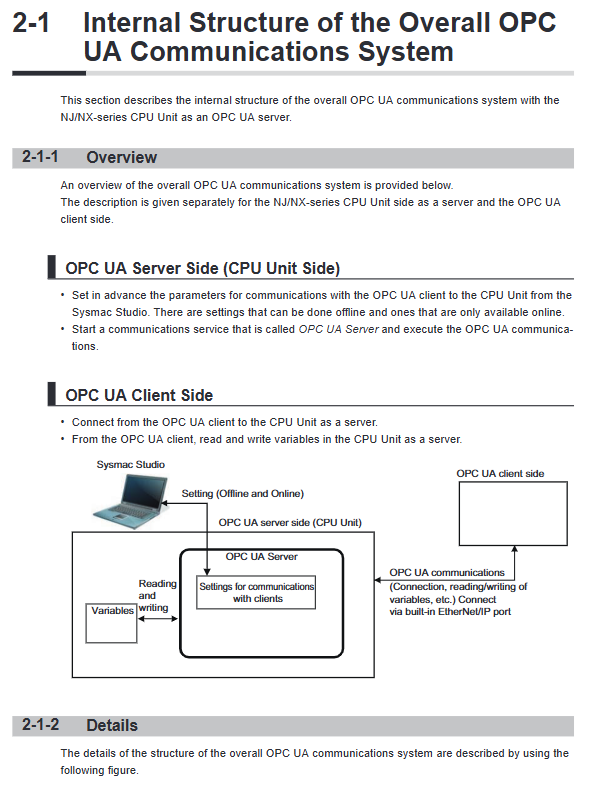
Core purpose: To enable direct Ethernet communication between the controller and OPC UA client (SCADA/MES) without the need for computer transfer.
Communication port: Only supports built-in EtherNet/IP port 1, which can be used simultaneously with EtherNet/IP.
Core specification parameters
Parameter item specification value
Default endpoint URL opc.tcp://[IP]: 4840/
Maximum number of sessions 5
Maximum monitoring item NX701:20000; Other: 2000
Maximum publishable variable NX701: 100000; Other: 10000
Single variable size limit ≤ 60KB
The limit for the number of structural definitions is ≤ 100
32 trust certificate stores (32 client/CA certificates each)
Configuration process
Basic Configuration
Set a fixed IP address for the built-in EtherNet/IP port and disable DHCP to avoid certificate invalidation.
Enable OPC UA Server in Sysmac Studio, configure ports, execution logs, and node extensions.
Variable release
Global variable: Set the Network Publish property to Publish Only/Input/Output.
Function block variable: Specify namespace/instance publication.
Supporting specification variables: Supports PackML specification variable publishing.
Certificate configuration
Server certificate: After the IP change, it must be regenerated and exported to import into the client.
Client certificate: added to the trust list, supports self signed/CA signed certificates.
security configuration
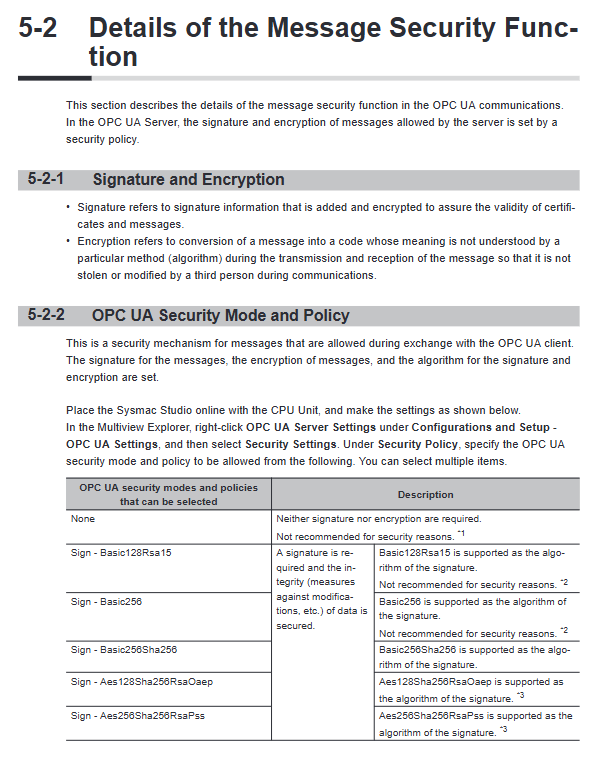
User authentication: Configure username and password, support anonymous login (disabled by default).
Role permissions: 5 types of role hierarchical control, anonymous users are equivalent to observers.
Security policy: Recommend high-level encryption such as Aes256Sha256, and disable weak policies such as Basic128Rsa15.
Operation and monitoring
Start Stop
Startup: After configuring the download, restart the controller to automatically run.
Stop: Execute the OPCUA_Shutdown command or shut down the Sysmac Studio software.
Status Inquiry
Status types: initialization, preparation, running, fault, shutdown.
Query methods: Sysmac Studio status page, event logs, execution logs.
execution log
Storage: SD memory card, configurable file count (2-100), single file record count (100-65536).
Content: Server status, authentication results, variable publishing, certificate operation.
Backup and maintenance
Backup scope: OPC UA configuration, client certificates, and security policies can be backed up; The server certificate is not backed up.
Replace controller: After restoring the configuration, regenerate the server certificate and import the client again.
Clear memory: You can choose whether to clear certificates and security configurations.
Limitations and Regulations
Variable publishing restrictions
Multi dimensional arrays, nested structures exceeding 3 layers, and union variables are not supported.
Reserved words (DeviceStatus, GlobalVars, etc.) cannot be used as variable names.
Task design requirements
NJ501 controller system service execution rate ≥ 20% to avoid response delay.
The OPC UA service will pause during download, recovery, and CPU failure.
Troubleshooting
Common Faults
Certificate mismatch: The certificate was not regenerated after the IP change.
Connection failure: Certificate not trusted, security policy mismatch, session timeout.
Variable not visible: exceeds the publishing quantity limit, variable format not supported.
Troubleshooting methods: Controller event logs, OPC UA execution logs, client error messages.
Appendix Functions
Special instruction: OPCUA_Shutdown, safely shut down the service and save logs.
Specification support: Supports OPC UA for PackML 1.01, suitable for the packaging industry.
Version correspondence: High version firmware supports OPC UA 1.04 standard and is compatible with more security policies.