HMS Airbus X-gateway Industrial Protocol Gateway
Product Overview
The Anybus X-gateway is an industrial gateway developed by HMS based on patented Anybus technology
Internally composed of two Anybus-S network interface cards and an intelligent core board
Supports any combination of two industrial networks, providing master/slave/Ethernet versions
Bidirectional data forwarding without built-in synchronization mechanism, only ensuring data consistency
Hardware Structure and Installation
1. Appearance and interface
Front: Dual network status LED (green=running, red=fault, flashing=board fault)
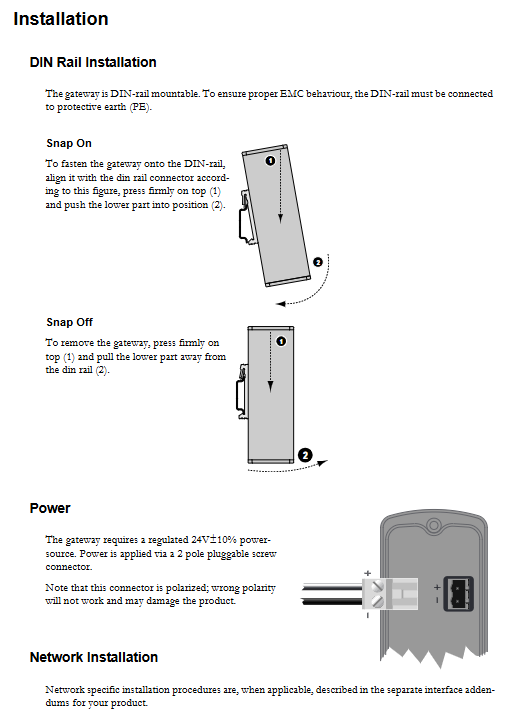
Top: 2P power terminal (24V DC)
Bottom: DB9 RS232 configuration interface
Network interface: Top and bottom layout, different models and positions
2. Installation specifications
Method: Standard DIN rail buckle installation
Grounding: DIN rails must be grounded to a protective earth (PE) to ensure EMC performance
Power supply: 24V DC ± 10%, polarity protection, incorrect connection may damage the equipment
Basic operating mechanism
1. Data exchange
Each network interface has a dual buffer for sending and receiving
Maximum transmission capacity: 512 bytes/direction
Data type:
I/O Data: Periodic real-time data
Parameter Data: Non periodic parameter data
Forwarding mechanism: Asynchronous forwarding, without clock synchronization
2. Status and Diagnosis
Status word (default off): 16 bits, including:
Gateway cycle counter (4-digit):+1 for each successful forwarding
Universal error counter (4 bits):+1 for forwarding over 100ms
Initialization bit: Whether the other party’s network has completed initialization
Running position: Whether the other party’s network is online or not
Main station mode bit (only for main station models)
Live List (only for main site models):
Monitor up to 64 slave station statuses
Each bit corresponds to 1 slave station: 1=online, 0=offline
3. Network control
Control word (default off):
Reset bit: Write 1 to restart the gateway and reinitialize the dual network
Main station mode: Set the main station operation mode
After activation, the mode must be configured to initiate data exchange
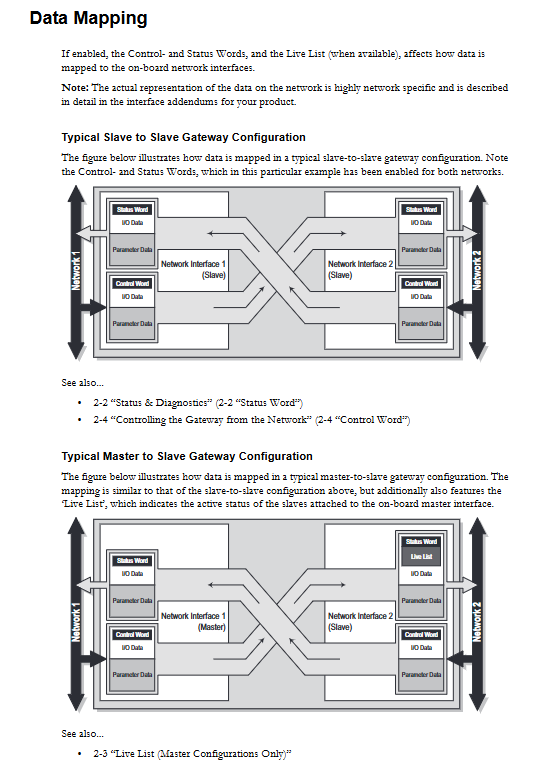
4. Data Mapping
Slave Station – Slave Station: Status Word+I/O+Parameter Data
Master Slave: Add Live List Slave Status Mapping
5. Exception handling
When the network drops, two strategies are supported (configurable):
Freeze: Keep data before disconnection
Clear: Data reset to zero
Configure interface (RS232)
1. Communication parameters
Baud rate: 57600
Data bits: 8
Verification: None
Stop position: 1
Flow control: None
2. Configure entrance
Connection: Direct to null modem cable
Software: Hyperterminal/Any Serial Port Tool
Enter: After powering on and starting, press ESC to enter the main menu
3. Main menu function
Menu function
1. View gateway system information (version, serial number)
2. View dual network interface information
3. Check the gateway system configuration
4. View network I/O configuration
5 Real time operating status
6. Modify configuration (I/O length, disconnection strategy, control word)
7 Ymodem upload/download configuration file (config. cfg)
8. Restart the gateway
9. Switching between main station modes (only for main station)
Administrator mode (manufacturer specific)
4. Key configuration items
I/O data length: number of input/output bytes
Offline options: Freeze/Clear
Control/Status Word: Enable/Disable
Live List: Enable/Disable (Main Site)
Offline restart: enable/disable
Interface and wiring
1. Power interface
Pin signal
– GND
+ 24V DC
2. RS232 configuration port (DB9)
Pin signal
2 RxD reception
3 TxD transmission
5 GND signal ground
Shell shielding grounding
3. Direct wiring
2-3, 3-2, 5-5 cross connection
Technical specifications
Project parameters
Power supply 24V DC ± 10%, max 300mA
Working temperature: 0~+65 ℃
Storage temperature -40~+85 ℃
Humidity 5~95% without condensation
EMC Class A,EN61000-6-4 / -6-2
Electrostatic protection ESD sensitive devices
Maximum data capacity of 512 bytes per direction
Configure interface RS232 57600 8N1
Key issues (3 questions, different emphasis)
Question 1: What is the core working mechanism of the Anybus X-gateway? What are the maximum capacity and limitations for data exchange?
answer:
The core is asynchronous transparent data forwarding with dual network interfaces, and the gateway only handles data without clock synchronization.
Unidirectional maximum data length: 512 bytes
Actual capacity is limited by specific industrial network protocols
Data is divided into periodic I/O (real-time) and non periodic parameters (low-speed)
Question 2: How to enter the X-gateway configuration menu? What are the fixed parameters for configuring serial ports?
answer:
Connect the computer DB9 to the gateway configuration port using a null modem direct cable
Serial port software settings: 57600 baud rate, 8 data bits, no checksum, 1 stop bit, no flow control
Power on the gateway, press the ESC key after startup to enter the main menu
Question 3: What are the functions of status words, control words, and Live List? In what scenarios are they enabled?
answer:
Status word: Provides gateway operation, errors, and the online status of the other party’s network for remote diagnosis
Control word: supports remote reset, switching master station mode, and initiating data exchange, used for remote control
Live List: Only for main station models, providing feedback on the online status of up to 64 slave stations for main station topology monitoring
All three are turned off by default and need to be manually enabled in the configuration menu.