MITSUBISHI ELECTRIC GT27 series high-end multi touch advanced HMI (touch screen)
Product positioning
The GT27 series is Mitsubishi’s top tier graphic operating terminal (GOT), with dimensions ranging from 5.7 to 15 inches and resolution support for XGA/SVGA/VGA. It features multi touch and gesture operation, providing a tablet like operating experience and suitable for various high-end devices and production lines.
Key Benefits
Gesture/Multi Touch (Industry First)
Support gesture operations such as zooming and sliding, intuitive and efficient, improving visibility and operational efficiency.
flexible configuration
It can be freely combined with communication, multimedia, and wireless functions, and customized according to needs.
maintenance platform
Built in system information, PDF/video homework instructions, ladder diagram/CNC monitoring, program backup/recovery.
Remote Connection (GOT Mobile)
Equipped with a built-in web server, mobile/tablet/PC can remotely monitor and operate in real-time through a browser.
MES docking capability
Multiple communication interfaces can serve as a powerful MES gateway.
Front dual USB
Support program transmission, data recording, external mouse/keyboard/barcode scanner/RFID.
Human body sensing
Automatically detect personnel approaching and wake up the screen.
High-capacity storage
ROM:57MB; RAM:128MB。
Detailed explanation of key functions
GOT Mobile
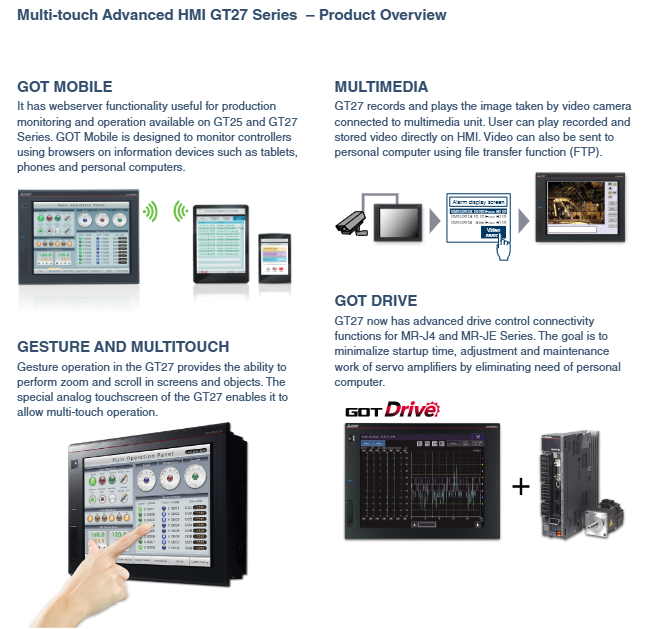
Built in web server, remote monitoring and control of controllers can be achieved through mobile/tablet/PC browsers.
Gestures and Multi Touch
Dedicated analog touch screen, supporting screen/component zooming and scrolling.
Multimedia function
Can connect to a camera for recording and playing videos, supports FTP upload to PC.
GOT Drive (servo debugging)
Directly connect MR-J4/MR-JE servo, without the need for a computer to complete startup, adjustment, and maintenance, greatly reducing debugging time.
Engineering Application and Selection Suggestions
Comparison with other GOT series
Features GT27 GT25 GT23
Multi touch support is not supported
Gesture operation is not supported
The built-in web server is a partial model
Recording/playback requires multimedia unit, but multimedia unit is not supported
GOT Drive supports MR-J4/JE, some models are not supported
Is there a human body sensor
ROM capacity 57 MB 32 MB 15 MB
RAM capacity 128 MB 128 MB 64 MB
Selection steps
Determine screen size and resolution: 5.7 inches (VGA) is suitable for small device panels; 8.4 inches (SVGA) is a universal choice; 10.4-inch (VGA/SVGA) suitable for medium to complex images; 15 inches (XGA) for large control centers.
Evaluate whether multi touch is needed: If the user interface requires zooming in and out of the map or scrolling through lists, GT27 should be selected; Otherwise, GT25 is more economical.
Confirm communication protocol: Check if the PLC, servo, and frequency converter that need to be connected are in the support list of GT27.
Considering the environment: If there is oil or moisture in the usage environment, it is necessary to choose a protective cover or select an IP67F front panel model (some models).
Additional features: If remote access is required, ensure that the selected model supports GOT Mobile (all GT27 models support it). If recording is required, a multimedia unit must be ordered.
Common problems and solutions for on-site debugging
Problem 1: No response from multi touch
Check if gesture functionality is enabled in GT Designer 3 and if gesture events are bound to related objects.
Confirm that the firmware version supports multi touch (which can be viewed through GOT system information).
Calibrate touch screen: Enter maintenance mode of GOT and perform touch calibration (special parameters need to be calibrated for multi touch).
Problem 2: GOT Mobile cannot be accessed
Confirm that the Ethernet settings of GOT are on the same network segment as the local area network, and that the subnet mask is correct.
Check if the Windows firewall or enterprise security policy is blocking the HTTP port (80).
In the web server settings of GOT, ensure that ‘Enable GOT Mobile’ is checked and set the correct user permissions.
Problem 3: Video recording cannot be saved
Confirm that the multimedia unit has been installed correctly and the camera is recognized by GOT (which can be viewed on the system monitoring screen).
Check if the storage medium (USB flash drive or SD card) is formatted and has sufficient remaining space.
Whether the conditions for triggering video recording are met (such as PLC being ON).
Problem 4: Unable to write servo parameters
Confirm that the communication cable between GOT and servo is connected correctly, and that the servo power supply is connected.
In the GOT project, assign the correct station number (such as CC Link station number or network node address) to the servo drive.
Some servo parameters need to be powered off and restarted before they can take effect. Please pay attention to the confirmation prompt for writing GOT.
Maintenance and spare parts strategy
Since its launch, Mitsubishi Electric has continuously provided supply and technical support for the GT27 series. Given the lifecycle of electronic products, it is recommended that users:
Regularly backup the engineering files and system data of GT27 and save them to the server or USB drive.
For critical workstations, prepare spare parts (at least one GT27 of the same model) to prevent prolonged downtime caused by sudden failures.
When GT27 experiences hardware malfunctions (such as touch failure or backlight aging), you can contact Mitsubishi authorized repair centers for repair or replacement.
If the GT27 is discontinued in the future, it may be considered to upgrade to subsequent models (such as the GT30 series, if available) or keep the GT27 as a spare parts inventory.