ADLINK NuDAM-65xx Communication Module
Introduction to System Fundamentals
NuDAM system concept
The PC only requires one serial port, which can be connected to the RS-485 bus through a conversion module to remotely control all modules on the bus; The module comes with a watchdog that supports outputting a safe status after the host crashes; The module has photoelectric isolation and resistance to industrial noise; PCB has a three proof coating to adapt to harsh environments such as humidity and salt spray.
Key points of RS-485 bus
NuDAM uses a half duplex two-wire system (DATA+, DATA -); Up to 128 NuDAM devices per segment;
The two physical terminals of the bus must be connected to a 120 Ω terminal matching resistor to suppress signal reflection;
Recommend shielded twisted pair cables, with multiple protective grounding points on the shielding layer; Different module power supply ground potential differences can pose interference risks;
Baud rate: 1200-115200bps; 115.2Kbps requires firmware version A1.2 or higher.
Verification and calculation rules
When enabling verification, sum the ASCII codes of all characters in the command to modulo 0x100, and attach a 2-digit hexadecimal verification code for use in industrial high interference environments. The command ends with carriage return 0x0D.
NuDAM-6000 Product Overview
Communication module: 6510 relay, 6520 RS232 to 485, 6530 USB to 485, 6521 addressable protocol conversion;
Analog input, analog output, digital IO modules (such as ND-6050/6052/6060, etc., refer to the previous manual).
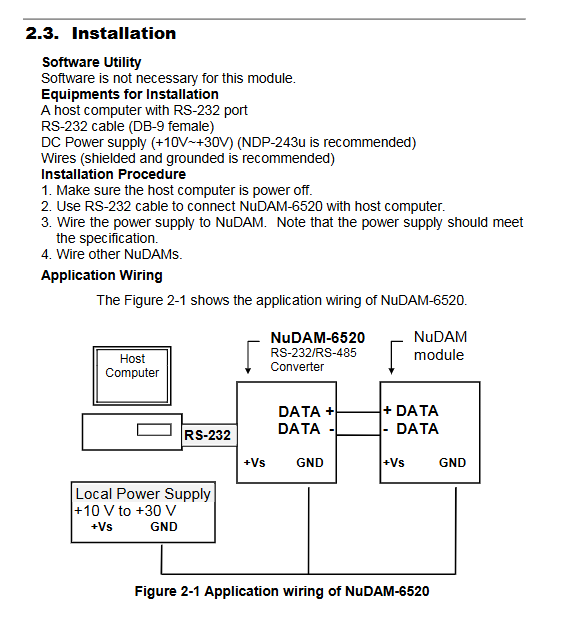
NuDAM-6520 (RS-232 to RS-422/485 Converter)
Function positioning: ordinary PC serial port DB9-RS232, converted to industrial RS-485/422, used as a host to connect to NuDAM bus. 5000Vrms optoelectronic isolation; Power supply+10~+30VDC, power consumption 0.95W.
hardware interface
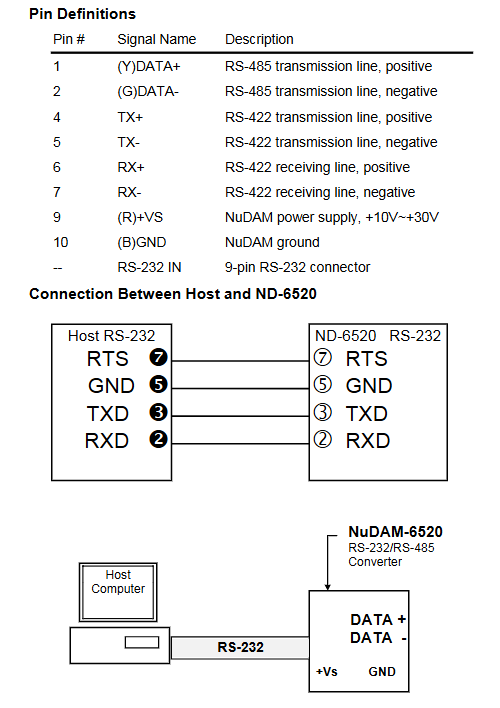
DB9 female port connected to PC RS-232 (TXD/RXD/RTS/GND);
Terminal: DATA+/DATA – (RS-485 two-wire); TX+/TX -, RX+/RX – (RS-422 four wire full duplex); +Vs, GND power supply.
Dial switch SW1/SW2
Set the baud rate for SW1; SW2 sets the serial port frame format (start bit, data bit, stop bit, checksum);
Hardware versions C1 and later cancel dialing and support automatic baud rate and frame format recognition.
Default factory configuration: 9600bps, 1 start -8 data -1 stop – no verification.
Note: 6520 is a transparent converter without module address and does not require programming. It can be used by configuring hardware dialing.
NuDAM-6510 (RS-422/RS-485 Signal Repeater)
Usage Scenarios
Single segment bus module>128 units;
Bus cable length>1200m;
Used for isolating and regenerating signals, expanding RS-485 network segmentation, and bidirectional signal forwarding.
Specification: Power supply+10-30VDC, power consumption 0.9W; also supports RS-485 two-wire and RS-422 four wire; Each side of the bus can have a maximum of 128 NuDAMs.
Interface: Two completely independent RS-485/422 terminals, each connected to two bus segments; Dial code to set baud rate and frame format; New version C1 automatic baud rate.
Both are transparent hardware relays, with no addresses and no need for software programming.
NuDAM-6530 (USB to RS-232/422/485 Converter)
Positioning: For laptops without physical serial ports, generate virtual COM ports using USB; USB 1.1 bus power supply, no external power supply required; Isolate 2500Vrms.
DIP small switch selection working mode: RS-485 (default)/RS-422/RS-232.
The system supports Win98 and Windows 2000; After installing the driver, the device manager displays a virtual COM port, which can be directly opened by ordinary serial software, completely transparent to upper level software.
Terminals: TX+/TX -, RX+/RX -, RTS, CTS, FGND; LED: Always on USB power supply, flashing represents data transmission and reception.
Transparent conversion, no module address, no programming required.
NuDAM-6521 (Addressable RS-485/422 → RS-232 Converter)
Unlike the other three, the 6521 is an intelligent conversion module with addresses that supports the complete NuDAM command set, rather than a simple transparent converter.
core competency
It can be used as a regular transparent converter (ND-6520 compatible mode, non addressing mode);
It can also serve as a slave device with an ID, receiving NuDAM standard ASCII commands on the RS-485 side and forwarding data to local RS-232 peripherals, enabling traditional RS232 devices to be connected to the RS-485 multipoint bus.
The baud rates on both sides of RS-232 and RS-485 can be independently set.
Hardware: Power supply+10~+30VDC; DB9 RS‑232; The RS-485 terminal includes a DEFILT pin.
Short circuit GND on the DEFAULT pin to enter default configuration mode: Address 00, baud rate 9600; Used to modify ID, baud rate, and verification; It is strictly prohibited to connect to the power supply.
Initialization process
1) DEFAULT pin short GND power on;
2) The upper computer uses 6520/65309600 baud;
3) Use management software to set new ID, baud rate, and verification;
4) Disconnect DEFAULT-GND and connect to the existing RS-485 network.
Complete command set (compatible with NuDAM protocol)
Command Function Description
%Configure commands to set new and old addresses, baud rates, parity, and modes; Modification of baud rate/verification must be DEFAULT grounded
$Addr2 reads module configuration parameters
$AddrM reads model (returns 6521)
$AddrF reads firmware version
$AddrRS software soft reset module
Addr5 reads the reset status and checks if the module has been restarted
Read/write RTS/CTS control, read RS-232 handshake signal level
Data Pass transparent transmission forwards the data received on the bus directly to the backend RS-232 peripheral
Data gate switch switching: addressable mode ↔ Transparent (6520 compatible) mode
The host watchdog supports 100ms-25.5s, and the host enters a safe state after timeout; Broadcast dog feeding command~* *, no response
Modifying the boot code can modify the first character of the command, but it is strongly not recommended in the manual as it may cause communication failures
NuDAM Administration Management Tool Software
Installation environment: Windows 3.1/95/98/NT, at least 2MB hard drive; Used to configure and debug all NuDAM series modules.
Main functions
Modify local COM port parameters (baud rate, checksum, data bits, stop bits)
Full network scan: Scan address 00-FF to automatically search for all online NuDAM modules on the bus
Terminal emulator: manually send ASCII commands, check responses, debug communication
Configuration: Modify module address, baud rate, watchdog and other parameters in the graphical interface
Monitor real-time monitoring of IO status; Diagnostic hardware diagnosis; Calibration of analog module;
Run the batch script and save the configuration list of the printing module.
Troubleshooting and Maintenance
Meaning of LED indicator light
Extinguish: No power supply;
Red light constantly on: normal reception;
Blinking: Sending data.
Common fault handling
Not working at all: check the power supply and terminal wiring; Confirm the baud rate mode of the dip/switch, and ensure that the baud rate and verification of the entire network are completely consistent;
Unstable communication: Confirm the terminal resistance of 120 Ω at both ends of the bus; Do not connect DATA+and DATA – in reverse; Use shielded twisted pair cables; Try to minimize the number of branches in the bus topology;
Failed to modify address/baud rate: Confirm that the DEFAULT pin is short circuited to GND at the power on moment.