ADLINK NEON-2000-ONO series AI intelligent camera
Product Overview and Main Features
Core computing unit: Jetson Orin Nano 4GB
CPU: 6-core Arm Cortex-A78AE;
GPU: Ampere architecture, 512 CUDA cores, 16 Tensor cores, supporting AI inference;
Memory: 4GB LPDDR5; Onboard 128GB SSD local storage;
Operating system: Ubuntu, direct use of NVIDIA official images for flashing is prohibited. Linghua customized firmware must be used, and system replacement requires contacting the manufacturer.
Comparison of Sensor Parameters for Four Subdivision Models
Model Resolution Frame Rate Shutter Type Sensor Trigger Mode
NEON-202B-ONO 1600 × 1200 (1.9M) 60fps global shutter e2v EV76C570 hardware triggered, software triggered, free running
NEON-203B-ONO 1920 × 1080 (2M) 30fps rolling shutter Onsemi MT9P031 software triggered, free running
NEON-201A-ONO 1920 × 1200 (2M) 60fps global shutter Onsemi AR0234 hardware triggered, software triggered, free running
NEON-202A-ONO 3840 × 2160 (8M) 30fps rolling shutter Sony IMX334 software triggered, free running
Image acquisition software: Model B uses Basler Pylon; The A model uses V4L2+GStreamer.
Power consumption and environmental conditions
Whole machine power consumption:<40W;
Working temperature: B series 0~45 ℃; A-series 0~55 ℃ (all require 0.6 m/s airflow, 10W working condition); Storage -20~70 ℃;
Humidity 40-75% without condensation;
Anti vibration 5Grms (three-axis 5-500Hz); 30G shock resistance; ESD contact ± 4kV, air ± 8kV;
Certification: CE/FCC Class A, UL/CB safety certification.
mechanical parameters
Dimensions: 123.3 × 77.5 × 66.81 mm; Weight<700g (excluding lens);
Lens interface: C-Mount; Light source installation thread M60 × 1.5mm;
M4 installation hole position, supports both front and back wall mounting fixation.
Definition of complete machine interface
The whole machine is divided into three areas: bottom IO, top IO, and front lens surface.
2.1 Bottom panel (external working interface)
DC Jack power port: 12-24VDC DC input, power>30W; use Linghua dedicated adapter 31-62156-1000-A0.
USB-C with lock buckle:
Power supply (20V PD);
USB3.2 Gen1(5Gbps);
DP Alt Mode video output, maximum 1080P@30fps ;
Note: If powered by a DC Jack, the maximum output power of Type-C is only 3W and cannot drive high-power peripherals.
GbE Gigabit Ethernet port: 10/100/1000Mbps, used for network communication.
15 pin D-Sub I/O interface (DB15): digital IO, serial UART, non isolated.
Pin Function Description
1 UART‑TX
9 UART‑RX
7 UART‑GND
11 DI0/External trigger input (programmable, hardware camera triggered)
3 DO0/strobe light Strobe output (programmable, synchronized lighting)
12‑14 DI1‑DI3
4‑6 DO1‑DO3
2,10 DI/O GND
DI specification: Input 0-30VDC, maximum 10KHz; Low level<0.8V, high level 2-5V;
DO open electrode: maximum charging current of 100mA.
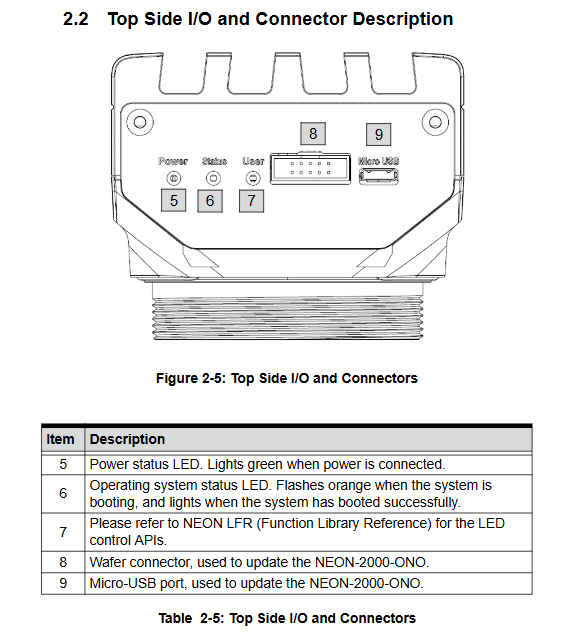
2.2 Top panel (debugging, status indicator lights, burning interface)
LED indicator light
Power: Power light, green and constantly on when powered on;
Status: System status, flashing orange during startup process, constantly on after startup completion;
User: Custom LED that can be controlled through API.
Wafer cable socket, Micro USB: only used for system recovery, firmware burning and debugging, not for normal operation.
Wafer includes RECORDY, system reset, and GND pins; Flashing firmware requires short circuiting RECORDY.
2.3 Front panel
C-mount lens mount; Image sensor window; M60 × 1.5 external thread, used for external ring light source/strobe light source.
List of original supporting accessories
Accessory model and purpose
30-01284-0030-A0 with lock buckle Type-C for public wire 1.8m
31-62156-1000-A0 DC Jack power adapter 12V5A
92-99090-1010 USB-C PD Adapter/Hub
30-01332-0010-A0 DB15-DB37 3-meter IO cable
91-14025-1020 DIN 37D-01 IO expansion terminal board, DIN rail installation
92-15731-0010 8mm C-mount lens F1.4
Quickly get started with installation and use
4.1 Mechanical Installation
Use M4 screws to support fixed installation on the front or back of the camera;
Install C-mount lens; The front M60 thread can directly lock the industrial light source.
4.2 IO wiring points
DI/DO is a non isolated circuit; DI supports external sensor input; DO maximum 100mA;
DI0 multiplexing hardware camera trigger input; DO0 reuse strobe output to achieve typical machine vision timing of “external sensor triggered photography+synchronized lighting of light source”.
4.3 Two power supply modes
DC Jack power supply (recommended for industrial sites): 12-24V DC, Type-C port can only output 3W to peripherals;
Type-C PD power supply: simultaneous power supply, display screen output, and USB peripheral connection.
4.4 System login
Default account: adlink
Default password: adlink
4.5 Image acquisition and trigger control
Sample code storage path: Desktop Neon_Samples; The latest sample can be downloaded from the GitHub repository.
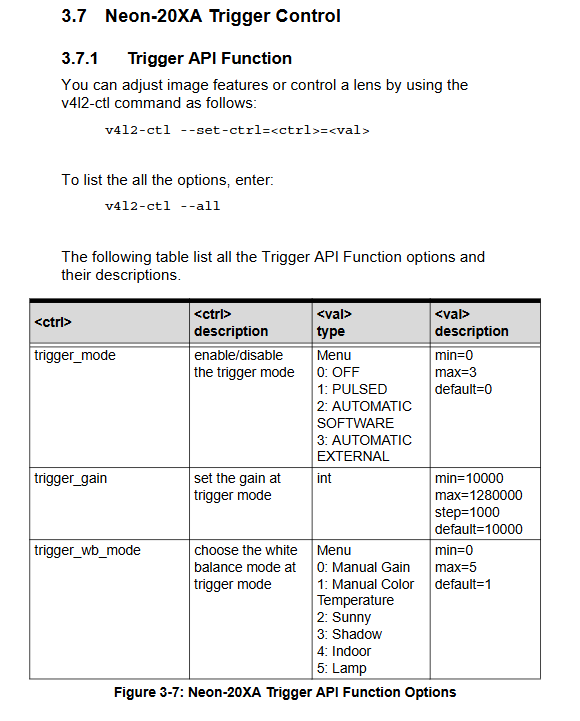
The A-series camera uses the V4L2 control interface, and the V4L2-ctl command line controls sensor parameters:
bash
v4l2‑ctl –set‑ctrl=<ctrl>=<val>
V4l2 ctl — all # View all parameters
Trigger mode trigger mode parameter
0: Close (free running);
1: Pulse PULSED (hardware/software single trigger);
2: Automatic software continuous triggering;
3: Automatic external hardware continuous triggering.
Example: Pulse mode hardware trigger
bash
v4l2‑ctl –set‑ctrl=trigger_mode=1
v4l2‑ctl –set‑ctrl=low_latency_mode=1
GStreamer Preview Example Command
bash
gst‑launch‑1.0 v4l2src io‑mode=4 device=/dev/video0 do‑timestamp=true ! ‘video/x‑raw, width=1920, height=1080,framerate=60/1, format=UYVY’ ! xvimagesink sync=false&
Important safety and operational warnings
Before disassembling or wiring, the power must be completely disconnected; The equipment casing may experience high temperatures during operation. Avoid direct contact and disassemble after cooling.
Linghua recommended power adapter must be used; When powered by DC Jack, the Type-C port cannot drive high-power USB devices.
It is strictly prohibited to use NVIDIA’s official Jetson image, and only customized firmware from Linghua can be used; If you need to reinstall the system, please contact technical support.
There are lithium batteries inside, and there is a risk of explosion if the wrong model is replaced. The discarded batteries are being recycled in compliance with regulations.
It is recommended to install the equipment in a restricted access industrial computer room and only authorize personnel to operate it; The power socket must be reliably grounded.
In case of water ingress, falling, or damage to the power cord, it should be repaired by an authorized engineer and self disassembly is prohibited.