OMRON FQ2 series integrated intelligent visual sensor
Product basic positioning
The FQ2 series is an Omron integrated intelligent visual sensor (intelligent camera) that integrates the lens, light source, controller, and image processing algorithm into one, used for high-precision visual inspection and recognition in industrial automation production lines.
Model system (core classification)
Series positioning pixel core capability
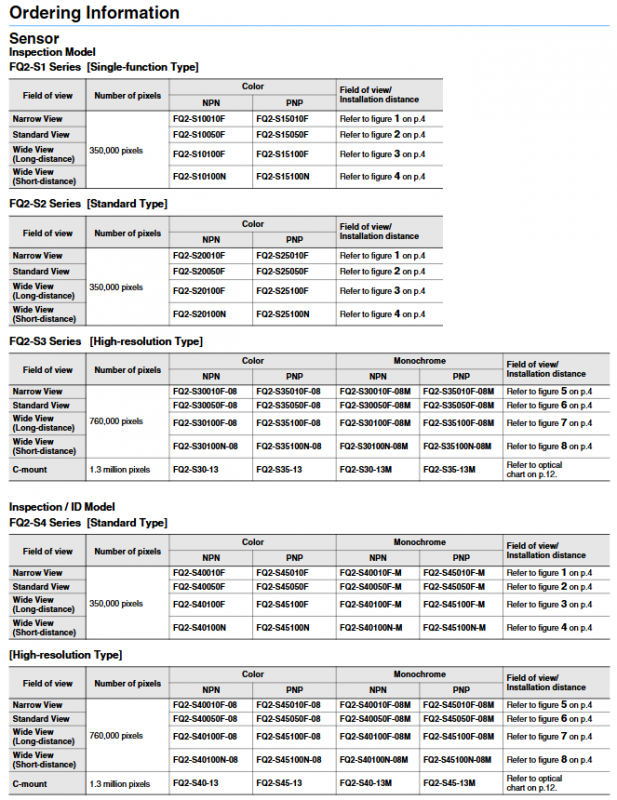
FQ2-S1 single function type 350000 basic visual inspection
FQ2-S2 Standard 350000 Routine Visual Inspection
FQ2-S3 high-resolution type 760000/1.3 million high-precision detection
FQ2-S4 detection+ID type 350000/760000/1.3 million detection+OCR/barcode/QR code
Classified by field of view: narrow field of view, standard field of view, long range wide angle, short range wide angle
Divided by output: NPN/PNP
Classified by color: Color/Black and White (suffix M)
System composition and connection
Host: FQ2-S1/S2/S3/S4 visual sensor
Operating end:
FQ2-D30 (DC touch screen)
FQ2-D31 (AC/DC/battery touch screen)
PC software (TouchFinder for PC)
Network: A single touch device can manage up to 32 sensors and display 8 screens simultaneously
Communication method:
Ethernet: 100Base TX/10Base TX
Protocol: EtherNet/IP, PROFINET, PLC Link, no protocol
Serial port: RS-232C (via data unit)
Expansion unit (only supported by S3/S4):
FQ-SDU1: Parallel Interface Unit
FQ-SDU2: RS-232C interface unit
Core performance parameters
1. Electrical specifications
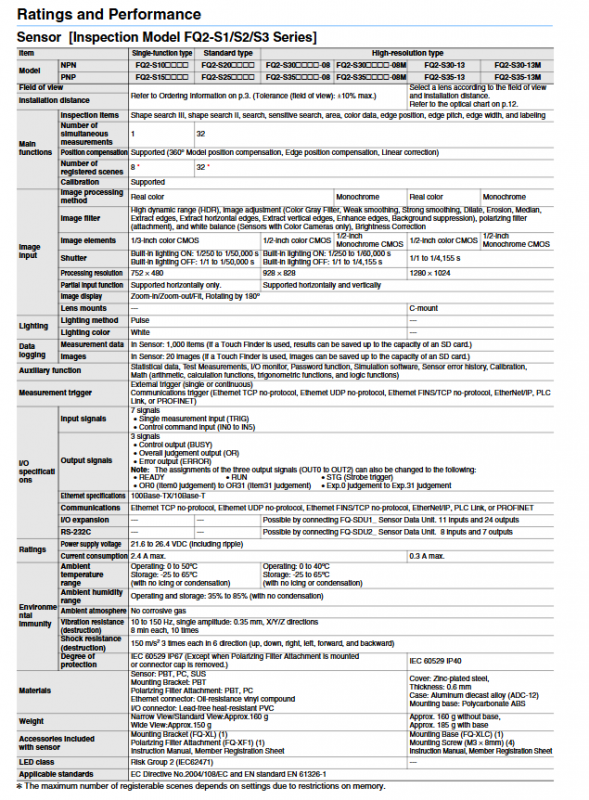
Power supply: 21.6-26.4VDC
Maximum current: 2.4A
Protection level: IP67 (no filter/no cover)
Working temperature: 0-50 ℃ (S3/S4 is 0-40 ℃)
Storage temperature: -25-65 ℃
2. Image and Processing
Sensor: CMOS
Resolution: 752 × 480/928 × 828/1280 × 1024
Shutter: Built in light source on 1/250-1/60000s
Simultaneous measurement: 32 items
Registration scenario: 32 groups
Position compensation: 360 ° in all directions
3. I/O specifications
Input: 7 channels (TRIG+IN0-IN5)
Output: 3 channels (BUSY/OR/ERROR, customizable)
Extended I/O: Parallel unit with 11 inputs and 24 outputs, serial unit with 8 inputs and 7 outputs
4. Storage and Logging
Local sensor: 1000 measurement data and 20 images
Touch screen/PC: SD card maximum storage capacity
Support: statistics, historical errors, calibration, mathematical operations
Detection and recognition function
Basic testing
Shape search, sensitive search, area, color data
Edge position, spacing, width, mark detection
ID recognition (S4 only)
OCR character recognition
Read one-dimensional barcode, two-dimensional code, and DMP code
Advanced features
HDR high dynamic, image filtering, white balance, brightness correction
Polarization filter, retry mechanism, simulation software
Accessory system
Cable: Ethernet cable FQ-WN, I/O cable FQ-WD, data unit cable FQ-WU
Installation: bracket FQ-XL, high-precision bracket FQ-XL2, C-interface base FQ-XLC
Optics: C-Mount fixed focus lens (6-100mm), expansion tube
Power supply: AC adapter FQ-AC, battery FQ-BAT1 (1.5h battery life)
Network: Industrial Switch W4S1-03B/05B
Safety and usage regulations
The product is not intended for personal safety protection scenarios
Warranty: 12 months from sale
Applicable standards: EC Directive, EN 61326-1
LED risk level: Risk Group 2
Key issues
Question 1: What is the core difference between the four models of the FQ2 series (S1/S2/S3/S4)?
Answer: S1/S2 is the basic detection type (350000 pixels, only for visual detection); S3 is a high-resolution type (760000/1.3 million pixels, high-precision detection); S4 is a detection+ID model that adds OCR, barcode, and QR code recognition capabilities on top of S3. It is the only model that supports character and code reading.
Question 2: How many sensors can be connected to the FQ2 vision system at most? How many screens can be displayed simultaneously on a touch screen?
Answer: A single touch display or PC software can connect and manage up to 32 FQ2 sensors, and display real-time images of up to 8 sensors simultaneously on the screen.
Question 3: How to expand the I/O of the FQ2 sensor? How many inputs and outputs can be achieved after expansion?
Answer: Expanding through data units:
Connect FQ-SDU1 parallel unit: Implement 11 inputs and 24 outputs
Connect FQ-SDU2 RS-232C unit: achieve 8 inputs and 7 outputs
Only S3 and S4 models support expansion units.