OMRON SYSMAC CJ Series CJ2 CPU Unit Hardware
Positioning and Applicable Scope
Type: CJ2 CPU Unit Hardware User Manual (Reference W472-E1-162023 Revision)
Target audience: Electrical engineers, FA system design/installation/maintenance personnel
Applicable models:
CJ2H series: CJ2H-CPU6 □ – EIP, CJ2H-CPU6 □
CJ2M series: CJ2M-CPU3 □, CJ2M-CPU1 □
Core Performance Specifications
Project CJ2H CJ2M
Basic instruction speed 0.016 μ s 0.04 μ s
Program capacity 50K~400K steps 5K~60K steps
Data area DM 32K+EM 25 banks DM 32K+EM 4 banks
Maximum I/O points 2560 points 2560 points
Interrupt tasks start as fast as 17 μ s and start as fast as 31 μ s
EtherNet/IP built-in (some models) built-in (CPU 3 □)
Pulse I/O without up to 4 axes (module expansion)
System configuration rules
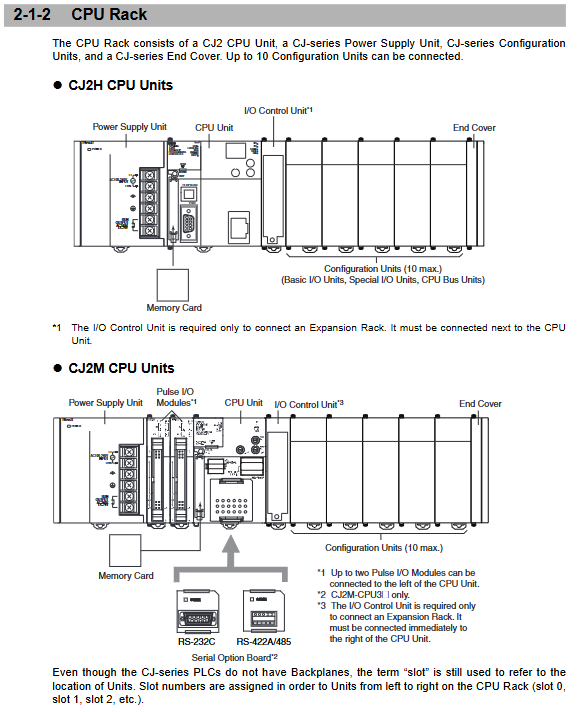
Rack structure
1 CPU rack+up to 3 expansion racks
Each rack can install a maximum of 10 units
The maximum number of system units is 40
Unit Type
Basic I/O Unit: Input/Output/Hybrid
Special I/O units: analog, temperature control, positioning
CPU bus unit: Ethernet DeviceNet、Controller Link
Expand Connection
I/O control unit and I/O interface unit need to be configured
The longest connecting cable is 12m
Hardware composition and interfaces
CPU unit panel
Indicator lights: RUN, ERR/ALM, INH, PRPHL, BKUP
Switch: DIP 8-bit switch, memory card switch
Interface: USB, RS-232C, EtherNet/IP (optional)
Expansion accessories
Pulse I/O module (CJ2M dedicated): up to 2 pieces, supporting 4-axis pulse
Serial port expansion board (CJ2M-CPU3 □): RS-32C/RS-422A/485
Memory card: 128/256/512MB, used for program backup
power unit
Model: CJ1W-PA205R/PD025, etc
Output: 5V 0.2~5A, 24V 0.4~0.8A
Protection: Overload, short circuit, overheating protection
Installation and wiring specifications
Installation requirements
Environmental temperature: 0~55 ℃, humidity 10%~90%
Installation method: DIN rail or panel installation
Heat dissipation: Leave enough space up and down, install vertically
Key points of wiring
Power supply: AC100~240V or DC24V, strictly distinguish between live/neutral/grounded wires
Grounding: Grounding resistance ≤ 100 Ω, GR and LG separated
Communication: USB up to 5m, Ethernet CAT5e up to 100m
I/O: Terminal torque specifications prohibit direct connection with bare wires
Software and Communication
support software
Core: CX One, CX Programmer
Function: Programming, debugging, monitoring, data tracking, I/O table configuration
connection method
USB: Plug and play, requires driver installation
RS-232C: baud rate 0.3~115.2kbps
EtherNet/IP:10/100Mbps, Support FINS and Tag data links
Tag Access
Support tag name direct access to variables without address mapping
Applicable models: CJ2H (Ver1.6+), CJ2M (Ver2.2+)
Maintenance and Backup
battery maintenance
Model: CJ1W-BAT01, with a lifespan of 5 years (25 ℃)
Replacement: Complete within 5 minutes of power outage
data backup
Simple backup: One click backup to storage card
Computer backup: using CX One full backup program+parameters+data
regular inspection
Terminal fastening, heat dissipation, grounding, and indicator light status
Fault diagnosis
Misclassification
Fatal error: CPU stopped, all outputs turned off
Non fatal error: Continue running, alarm prompt
Common Faults
Unit configuration error: I/O table does not match reality
Communication error: EtherNet/IP, serial port connection exception
Battery error: Data retention failure
Troubleshooting methods
Panel indicator light+7-segment code display
Error log+auxiliary area flag
Key issues
Question 1: What are the core differences and selection criteria between CJ2H and CJ2M CPUs?
answer:
Performance: CJ2H instruction is faster and has a larger capacity, suitable for medium and large systems; CJ2M has high cost-effectiveness and is suitable for small/compact systems.
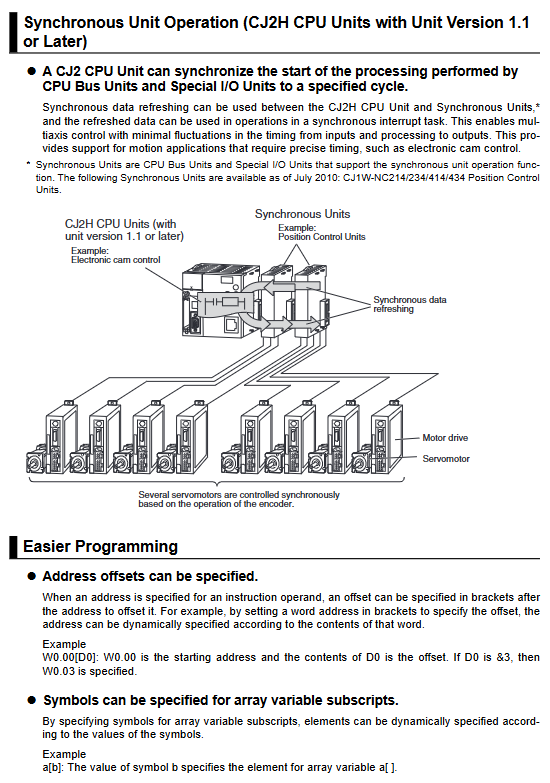
Function: CJ2H supports synchronous unit operation; CJ2M supports pulse I/O modules (up to 4 axes) and serial port expansion boards.
Network: Both high-end versions have built-in EtherNet/IP, CJ2M-CPU1 □ has no network port.
Selection: CJ2M needs to be selected for multi axis positioning; CJ2H is required for high-performance and multi unit expansion.
Question 2: How to use the simple backup function of the CJ2 CPU’s storage card? What are the precautions?
answer:
Usage: Set DIP switch SW7 to ON, press and hold the power button on the memory card for 3 seconds to start backup; The BKUP light stays on during backup, do not turn off the power.
Backup content: all data of programs, parameters, and I/O memory.
Notes:
Do not turn off the power during backup/recovery, otherwise the data will be damaged.
After recovery, it is necessary to power on again to switch the operating mode.
Prioritize the use of Omron dedicated memory cards to ensure compatibility.
Question 3: How to set up and quickly troubleshoot communication faults on the EtherNet/IP port of CJ2 CPU?
answer
Setting method: Set the unit number (0-F) and node number (01~FE) by rotating the switch; The default IP is 192.168.250 Node number.
Quick investigation:
Check the indicator light: If the MS/NS green light is constantly on, it is normal, and if the red light is faulty.
Look at the 7-segment code: displays the IP address and error code, such as d6 indicating a connection failure.
Check settings: Node numbers are not duplicated, network cables are normal, and IP network segments are consistent.
Software verification: CX integrator online search, testing FINS communication.