Beckhoff CX20x0 Series Embedded Industrial Control Computer Manual
Product positioning
CX2020/CX2030/CX2040 are modular DIN rail mounted embedded industrial control systems, combined with CX2100 power modules to form a complete controller. They can expand EtherCAT/K bus terminals and rely on TwinCAT to achieve integrated control of PLC, multi axis motion control, and visual HMI, supporting microsecond level XFC high-speed control.
Differences in hardware of three CPU cores
Model: CPU Configuration, Memory Cooling, Standard Configuration, Storage Core Performance
CX2020 Celeron 1.4GHz Single Core 2GB DDR3 Fanless Full Mute 8GB CFast Small Single Machine, Easy Sports
CX2030 i7 1.5GHz Dual Core 2GB DDR3 Fanless 8GB CFast Medium Axis, Multi tasking
CX2040 i7 2.1GHz quad core 4GB DDR3 ball temperature control fan 8GB CFast multi axis, 3D interpolation, complex HMI
Universal standard hardware:
Onboard 128KB NOVRAM (power-off persistent storage, no need for UPS);
Dual independent Gigabit RJ45 Ethernet ports, 4-channel USB 2.0, DVI-I-video output;
Expandable module slot, factory pre installed optional serial/fieldbus (PROFIBUS/CANopen/PROFINET/EtherCAT slave station, etc., cannot be installed later);
Front mounted CR2032 button battery (clock cache), front mounted pluggable CFast flash drive;
Up to 4 expansion modules can be connected in series, supporting the formation of RAID with multiple CFast cards.
Supporting power supply CX2100 three major versions
CX2100-0004: Basic E/K bus power supply, automatic switching;
CX2100-0904: Built in capacitor UPS, short-term power-off protection;
CX2100-0914: External battery rechargeable long-term UPS;
The power supply comes with two 16 character LCD screens that can display system status and custom program text.
Optional onboard fieldbus interface (factory pre installed)
RS232/RS422/485, EtherCAT slave, PROFIBUS master/slave, CANopen master/slave, PROFINET controller/device, EtherNet/IP slave.
System software architecture
Equipped with Windows Embedded Standard 7 system, paired with TwinCAT runtime, supporting IEC61131-3 PLC, electronic gears, electronic camshafts, flying saws, 3D path interpolation, a single controller can control up to 256 axes, and multi-core CPU supports task core allocation to improve real-time performance.
Storage and battery accessories
CFast Industrial Flash Memory: Only recommended for Beifu original wide temperature industrial cards, which can be front hot swappable (must be powered off) and support multi disk RAID; Spare parts model CX2900 series;
Clock battery: Panasonic CR2032 3V button battery, replaced every 5 years, there is a risk of explosion when installed upside down, and it is not rechargeable.
Model coding rule CX20xx-01xx
Last digit definition: CPU model, operating system (WinCE/Win7 32/64 bits), TwinCAT runtime (only PLC/PLC+PTP/NC interpolation).
Installation and wiring
Unpacking and transportation standards
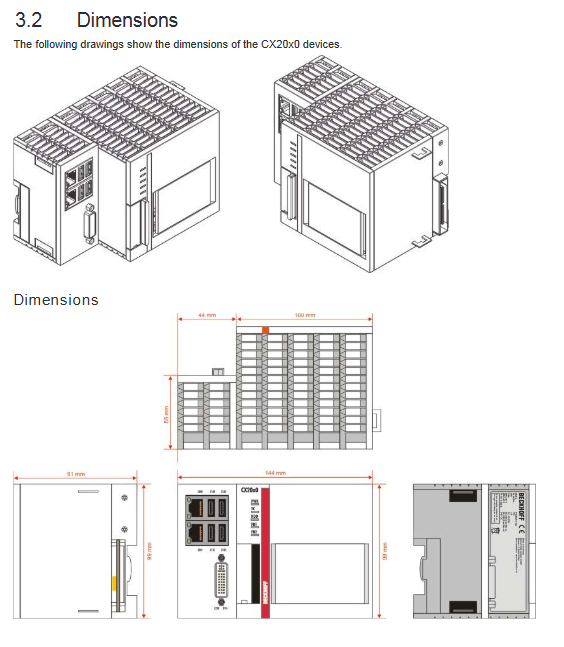
The overall size of the machine is 144 × 100 × 91mm, with a weight of 1.16~1.23kg;
Transportation must be packaged in the original factory, and internal condensation after high and low temperature transportation must be allowed to settle for 12 hours before being powered on;
Unpack and check the accessories, keep the packaging and documents, and contact after-sales immediately if there is any damage during transportation.
Rigid requirements for DIN rail installation
Only horizontal installation is allowed; Vertical and side mounted heat dissipation ducts are blocked, causing CPU overheating fault;
Reserve a 30mm ventilation gap above and below the module;
Module buckle splicing, can be equipped with fixed locking plates to prevent loosening under vibration conditions;
Passive EtherCAT terminals must not be arranged tightly against the CX2100 power module.
24V power supply specification
Input voltage: DC24V, tolerance -15%~+20%, total system requirement 4A;
Spring terminals are compatible with 0.5-2.5mm ² cables, with a stripping length of 9mm;
Dual LED power supply: Us (CPU power supply green), Up (terminal bus power supply green), lit up indicates normal power supply;
PE protection ground cannot reuse other potentials.
External interface definition
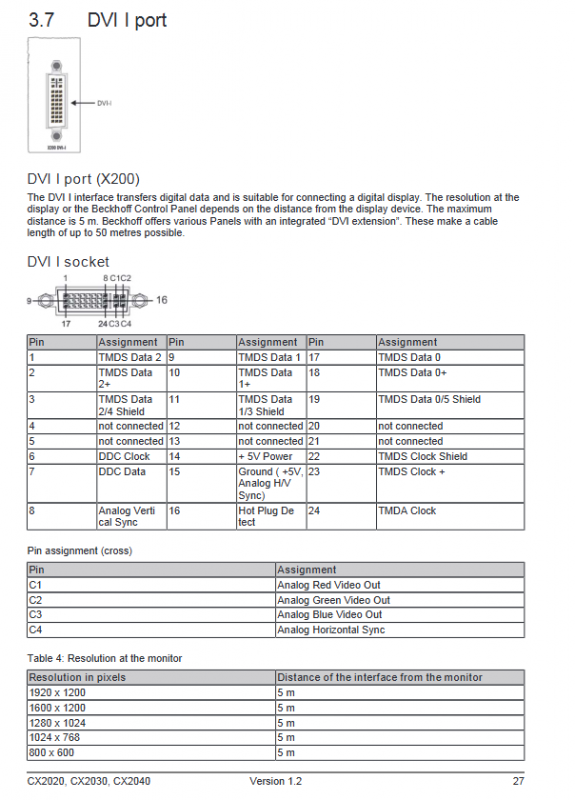
DVI-I: Maximum transmission distance of 5 meters, supports a maximum resolution of 1920 × 1200, and can be extended up to 50 meters with a multiplier panel; Simultaneously compatible with analog VGA signals;
USB 2.0 (4-channel Type A) single port maximum output 500mA, external touch screen, keyboard and mouse, USB flash drive;
Dual Gigabit LAN (X000/X001) completely independent without built-in switches, factory X000 upper IT network X001 EtherCAT; LED: yellow=link, green=100MB, red=Gigabit; Support EtherCAT cable redundancy;
RS232 (9-pin D-Sub) standard serial port, up to 115200 baud;
RS422/485 (optional N031) offers multiple terminal impedance and echo configuration models to choose from.
Debugging and configuration
EtherCAT cable redundancy function
Hardware requirements: dual network ports, EK1100/EK1110 couplers;
Software: Install TcEcRedundancy plugin+authorization, TwinCAT EtherCAT advanced settings second network card as redundant channel;
Only supports cable fault redundancy, and cannot tolerate terminal damage; Automatic switching for single disconnection in the ring network, normal operation of nodes at both ends of two disconnections, and TwinCAT displaying LNK_MIS fault identification.
Power on/off operation
Power on: CX2100 automatically starts the system upon power supply;
Shutdown: The software must shut down the operating system normally and cut off the 24V power supply; Do not cut off power directly, as flash memory is highly susceptible to damage.
Fault handling and diagnosis
Meaning of the whole machine LED indicator light
PWR (green): Power supply is normal;
TC: Green=TwinCAT running, red=stop, blue=configuration mode;
HDD (flashing red): CFast read and write;
FB1/FB2: Extended fieldbus status;
I/O ERR (flashing red): The K/E bus terminal is faulty. The fault code is distinguished by the number of flashing pulses, and the fault terminal serial number is located.
Common fault repair information
To contact after-sales service, complete equipment model, serial number, software and hardware versions, interface configuration, TwinCAT version, and fault symptoms must be provided.
Dismantling and scrapping
Dismantling process: Software shutdown → Cut off 24V → Remove all cables → Remove the entire machine from the DIN rail → Separate modules;
Scrap: Disassemble the entire machine, recycle circuit boards and electronic components according to local electronic waste regulations, and classify and recycle metal shells.