BECKHOFF CP6700-0001-0050/0060 Integrated Machine Manual
Product Hardware Overview
Core hardware configuration of the whole machine
Architecture: 3.5-inch industrial control motherboard, Intel processor, DDR4 memory, single channel CFast solid-state storage, 24VDC power supply; 10.1-inch touch screen.
Optional features:
C9900-G072/G073 front button extension (only available for aluminum alloy front cover models, not optional for stainless steel models);
C9900-U214 is equipped with a 1-second capacitor UPS;
C9900-Fxxx stainless steel front panel;
Original factory touch protection film (short-term dust-proof and scratch resistant).
Installation structure: Rear buckle pressure rod, embedded installation in the cabinet; All external interfaces are uniformly arranged at the bottom.
Back interface differentiation (two sub models)
The overall machine interface is concentrated in the bottom wiring area, including X101 power supply, dual network ports, multiple USB, DVI output:
X101 2 × 2-pin 24V power supply interface
Pin definitions: 1=PC-ON start stop signal, 2=power status output, 3=0V, 4=24V;
The maximum cable area is 1.5mm ², with a preference for long cables. The voltage drop is smaller at 1.5mm ², and the minimum voltage at the equipment end must be ≥ 22V;
Matching plug order number C9900-P943, rated at 8A.
PC-ON logic: 0V startup, 24V shutdown; Power Status outputs a load capacity of 0.5A and can be linked to external contactors.
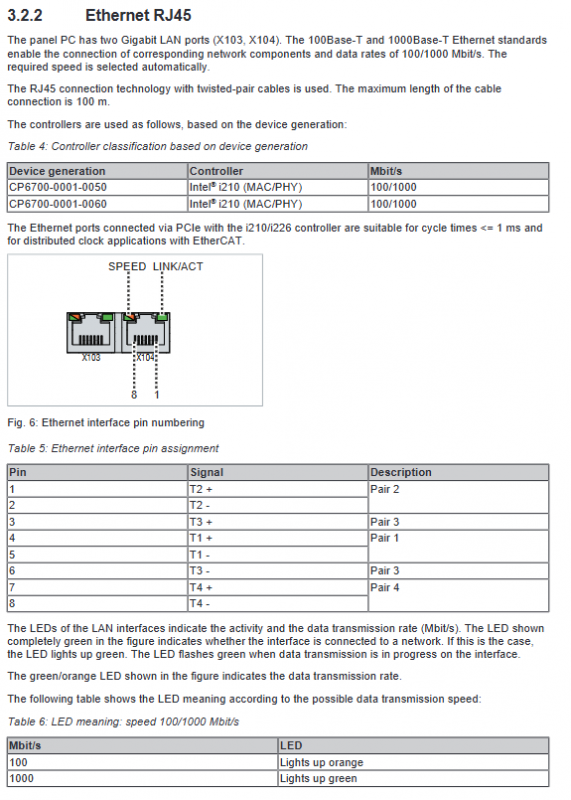
X103/X104 Dual Gigabit RJ45 Ethernet Ports (Intel i210)
Support 100/1000M adaptive, compatible with EtherCAT distributed clock (cycle ≤ 1ms); Dual LEDs display link connectivity/data flashing, rate (orange=100Mbps, green=1G).
USB interface differences
CP6700-0001-0050: 4-channel USB 2.0 (X105~X108);
CP6700-0001-0060:2×USB2.0 + 2×USB3.0;
Single port maximum 500mA, with built-in short-circuit electronic protection.
X109 DVI digital video output: only transmits digital images, with a complete definition of 24 standard DVI pins.
Tri color device status indicator light
FB (fieldbus): Red always on=TwinCAT stopped; Blue=configuration; Green=Running; Flashing indicates a bus fault;
HDD red: constantly on/flashing represents CFast read/write;
PWR green constant light: The whole machine is powered on and running.
Built in 1-second capacitor UPS (optional C9900-U214)
Function: After power failure, it only maintains power supply for about 1 second and is used for TwinCAT to automatically save small persistent data of ≤ 1MB;
Adaptation systems: WinCE7, WES7, Win10 IoT;
The PLC control function block FB_S-UPS_SAPI can be found in the programming manual on the official website;
Risk Warning: Exceeding the storage size may result in direct file damage and data loss.
TwinCAT Minimum Adaptation Version
0050:TC2.11 build2254 / TC3.1 build4020;
0060: Minimum TC3.1 build 4024.7;
The official recommendation is to continuously upgrade to the latest TwinCAT to obtain complete hardware functionality.
Body nameplate
The nameplate indicates the model, serial number, production date CPU、 All hardware information including memory, CFast capacity, screen, dual network MAC, 24V power supply, interface identification, CE/FCC certification, grounding, battery compartment, storage compartment, etc.
Equipment debugging and power on
Transportation and unpacking
Due to limited seismic resistance, original packaging and transportation are required; A large temperature difference can easily cause internal condensation, and if condensation occurs, it needs to be left to stand for 12 hours before powering on;
Unpack and check the accessories, visually inspect for damage, contact after-sales for any abnormalities, and keep the original packaging for future use.
Installation Specification for Cabinet Openings
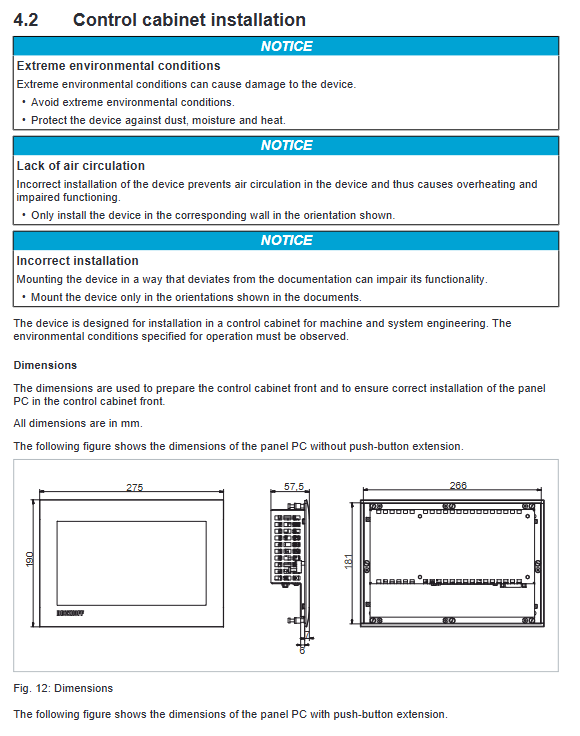
The thickness of the cabinet board is 1-5mm, and two sets of machine opening sizes are distinguished for button expansion;
Installation space requirements: Reserve a 5cm heat dissipation gap above and below the device, avoiding direct sunlight and screen reflection positions;
Installation steps: Insert into the cabinet opening → Turn the 2.5mm hex wrench outward to press the rod 90 ° → Lock and fix; Disassemble in reverse operation.
Grounding and Wiring Mandatory Process (Irreversible)
Grounding requirements: PE grounding bolt for the body, grounding wire ≥ 4mm ²; The power supply inside the cabinet has a potential of 0V and PE, which complies with the EN60204-1 PELV low voltage specification; Functionally causing EMC interference, touch jumping, and hardware damage;
Wiring sequence: first connect the protective ground → then connect all data cables → finally connect the 24V power supply;
Power supply requirements: isolated 24V DC power supply, with a maximum 4A fuse at the front end.
Operation specifications for power on/off
Prohibit power outage during operation: The system and TwinCAT continue to read and write CFast, and forced power outage can easily cause image and program damage; The software must be shut down normally before cutting off 24V;
PC-ON remote start stop logic: Equipped with an external switch, it can achieve remote soft shutdown of the whole machine, and the Power Status signal can be linked to disconnect the power circuit of the whole machine;
The Beckhoff Device Manager will automatically start upon initial startup, and external devices require manual installation of drivers.
Touch screen operation specifications
Only operate with bare hands or gloves without hard debris; You can activate the cleaning mode for 5-120 seconds through the Display Control Tool to prevent accidental wiping; The steps for attaching/removing the original factory protective film.
5 Beckhoff Device Manager
Built in system diagnostic tool, automatically starts upon startup, supports local browser localhost/config and remote web access;
Default account: Administrator, password 1, when turned on, a security wizard will pop up to forcibly change the high-strength password (≥ 10 characters, case+number+symbol);
Function: Real time hardware monitoring (temperature, load, storage), remote configuration, fault warning, machine information reading;
Security requirements: BIOS, system, and device manager all need to set independent passwords and rotate them regularly.
Equipment retirement, dismantling and scrapping
Power off and disassembly sequence: software shutdown → cut off 24V → unplug the power plug → record all cable labels, remove data cables → disconnect grounding; No plugging or unplugging during thunderstorms;
Cabinet disassembly: Release the pressure rod, retract the buckle, and remove the entire machine;
Scrap classification processing: Plastic and metal are separately recycled; Circuit boards and fans should be disposed of in accordance with electronic waste regulations; After applying insulation tape to both poles of the CR2032 battery on the motherboard, the battery will be recycled separately.
Maintenance and upkeep
Screen cleaning rules
Permitted cleaning agents: alcohol, glass water, gasoline; Prohibit grinding cleaning agents, high-pressure water guns, steam, and compressed air blowing; Wiping must activate the cleaning mode to remove water stains on the edges of the glass and prevent touch short circuits.
Regular replacement cycle of consumables
Suggested replacement cycle for components
Built in UPS energy storage for 5 years
Motherboard CR2032 battery for 5 years
Fan for 7 years
CFast/SSD storage disk for 10 years
2.5/3.5 mechanical hard drive for 5 years
Two self replaceable components
Motherboard CR2032 button battery
Remove and replace the M3 screw on the bottom cover plate, with the negative pole facing upwards; It is strictly prohibited to charge, disassemble, or burn batteries; Separate recycling of waste; Battery failure can cause system time imbalance.
CFast Solid State Drive
Press the pop-up structure and use Beckhoff Service Tool (BST) to backup the entire machine image before replacement; Disk scrapping requires physical destruction of data.
ESD anti-static mandatory requirements
Disassembly and assembly of storage, battery, and motherboard accessories must be equipped with anti-static wristbands and countertops. Without protection, circuit boards are prone to static electricity breakdown; Regularly check for leaks and contact after-sales service for replacement of silicone gaskets for stainless steel models.
Troubleshooting
Root cause treatment plan for fault phenomenon
The whole machine is completely unresponsive, with no 24V power supply and cable open circuit. Check the power supply wiring and report it as invalid for repair
Unable to fully boot BIOS due to incorrect settings, hardware failure, BIOS default recovery, still malfunctioning. Please contact Beifu
The system is normal, TwinCAT control abnormal program/external device failure. Contact the machine tool and software manufacturer for troubleshooting
Black screen, sometimes no backlight damage on screen, internal hardware failure, directly sent for repair
USB communication error, TwinCAT cycle 10ms too short, modify cycle cycle 50-80ms
Core technical parameters
Power supply: 22-30VDC (nominal 24V); The total weight of the machine is 1.8kg;
Protection: standard front IP54/stainless steel front IP65, back unified IP20;
Temperature and humidity: operating at 0-55 ℃; Storage and transportation -20~65 ℃; Humidity ≤ 95% without condensation;
Anti vibration impact: Complies with EN60068 standard, 5G impact 30ms;
EMC: anti-interference EN61000-6-2, radiated emission EN61000-6-4;
Security chip: 0050, turn off fTPM2.0; 0060/0070 enable fTPM2.0;
Refer to the official website download center data table for power consumption parameters.
Chemical resistance of stainless steel models
Tolerance: Most alcohols, weak acids, dilute alkalis, cutting oils, diesel, household detergents, vinegar, oil stains, etc., long-term immersion without corrosion;
Intolerance to strong organic solvents such as concentrated strong acids, concentrated strong bases, high-temperature and high-pressure steam, DMF/tetrahydrofuran, etc;
The maximum temperature of contact with liquid is ≤ 45 ℃, and slight long-term contact may cause surface gloss loss.