ADLINK NuPRO-590/591/592 series Socket7 full-length industrial SBC
Chapter 1 Product Overview (Complete Hardware Specifications)
Core computing platform
CPU slot: Socket7 ZIF socket, supports 166-400MHz processors: Intel low-power Pentium MMX, AMD K6-2/K6-3, Cyrix MII; On board 512KB L2 cache.
Chipset: Intel 430TX Northbridge+PIIX4E Southbridge; Super I/O Winbond W83977EF; Hardware monitoring W83781D.
Front end bus 66MHz; Memory: 2 168 pin SDRAM DIMM slots, maximum 256MB (16/32/64/128MB per slot).
Display system (only available on 590/591)
C&T 69000 graphics chip with built-in 2MB onboard memory; CRT+LCD dual screen synchronous output: rear 15 pin VGA, onboard 50 pin LCD pin, supports DSTN/TFT industrial LCD screens, up to 1280 × 10 ^ 4 1024@8bit Color; Supports switching between 16 panel specifications in BIOS.
Network (NuPRO-590 only)
Intel 82559 PCI 100Mbps Ethernet, 10/100M adaptive, full duplex, WOL remote boot, PXE network boot, RJ45 dual indicator lights distinguish speed/link status.
Storage interface
Dual channel Ultra DMA33 IDE (up to 4 IDE hard drives/optical drives)
Single 34 pin floppy drive FDC
DiskoChip solid-state flash memory slot (2-72MB embedded storage, jumper switching address range)
Serial port parallel port I/O
COM1: Fixed RS232 (16550 UART)
COM2: BIOS/jumper switch RS232/422/485, 2KV ESD protection
1st ECP/EPP/SPP highway junction, 4KV electrostatic protection
Dual USB 1.0 onboard pins, independent overcurrent protection
IrDA infrared wireless communication pin
PS/2 keyboard mouse composite interface
Industrial exclusive functions
Programmable watchdog WDT: 0~255 seconds/minute timeout, IO port 3F0/3F1 configuration, timeout machine hard reset, providing DOS low-level assembly example;
Whole machine hardware monitoring: CPU temperature, onboard external temperature sensor, CPU/chassis dual fan speed,+3.3/+5/+12/-12V full voltage monitoring; Chassis lid opening alarm detection; High temperature automatic shutdown can be set;
Power management: APM/ACEI energy-saving, modem ringing startup, WOL network card startup, Y2K millennium compatible BIOS;
Power supply compatibility: Supports both old-fashioned AT power supplies and ATX wide width power supplies.
Environment and Machinery
Size: Standard total length 338mm × 122mm;
Power consumption:+5V maximum 17.5A,+12V 50mA;
Working temperature range: 0~70 ℃, humidity 5%~95%, no condensation;
Compliant with PICMG industrial backboard specifications.
Factory standard materials
NuPRO single board, IDE ribbon cable, floppy drive ribbon cable, dual serial and parallel port blocking cable, user manual, driver CD (IDE/VGA/network card/monitoring tool); 591/592 does not include network card matching cables.
Chapter 2: Hardware Installation, Jumpers, and Connectors
2.1 CPU and Memory Installation Specification
Socket7 ZIF operation: Lift the pressure rod to align with the CPU triangle mark, and after locking, adjust the multiplier S1 dip switch and core voltage JP5/S3 jumper according to the CPU model;
Memory: 168 pin SDRAM dual slots, maximum capacity of 128MB per line, total capacity limit of 256MB, no dual channels;
Forced cooling: It must be equipped with a dedicated Socket 7 heat sink. If the CPU overheats, it will trigger monitoring alarms and system crashes.
2.2 Core jumper and dialing function
S1 DIP: CPU multiplier selection, compatible with different processors such as Pentium, AMD, and Cyrix;
JP5+S3: CPU core voltage switching (1.9V low-power Pentium/2.2V K6-2/2.4V K6-3/2.8V Pentium MII);
JP3/JP4: CPU IO voltage switching between 2.5V/3.3V;
JP6: Clear CMOS (1-2 normal/2-3 short circuit to clear BIOS);
JP7: Selection of Disk On Chip Flash Address Segment;
JP1801/JP1802/JP1803: Switching between COM2 serial port mode and RS232/422/485.
2.3 Definition of pins for full board connectors
CN12 20 pin chassis front pins: power button, reset, power LED, hard disk LED, chassis speaker, keyboard lock;
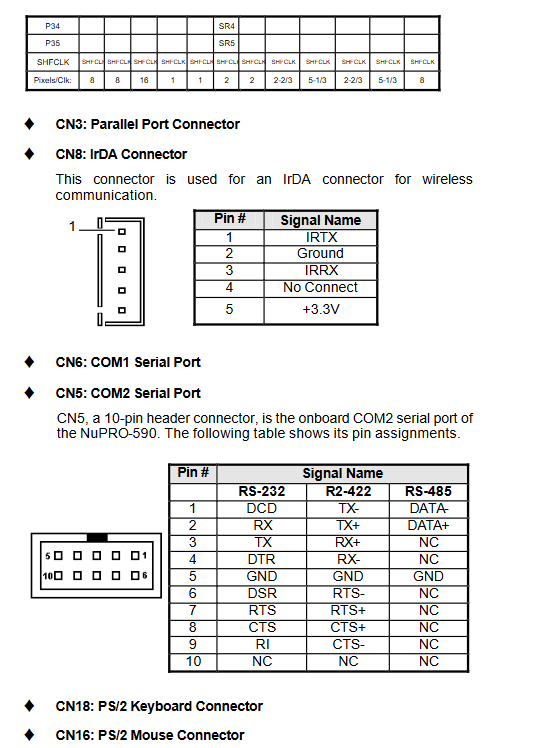
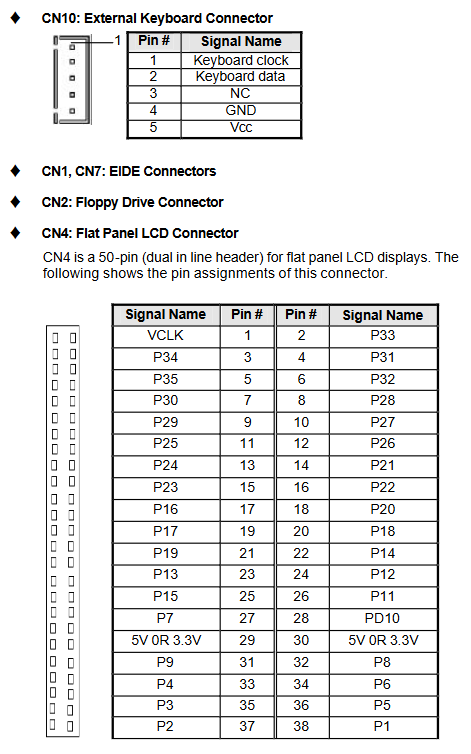
CN4: 50 pin LCD large screen output (complete TFT/STN timing pins, supporting 12/18/24 bit color depth);
CN5 (COM2)/CN6 (COM1): DB9 serial port pin, complete definition of 485 differential signal;
CN1/CN7: Dual channel IDE; CN2 floppy drive;
FN1: CPU 3-pin speed measuring fan; CN13 chassis open cover detection; CN15 external temperature probe;
CN9 dual USB, CN8 infrared, CN14 Ethernet port RJ45, CN11 VGA, CN18/16 PS/2 keyboard and mouse.
2.4 Watchdog Hardware Configuration
IO address 3F0/3F1 read-write register, supports 0-255 timing units (seconds/minute optional); Provide complete DOS assembly operation code, with Windows 95/98/NT calling routines included on the CD.
Award Pn BIOS Complete Setup (Enter Del upon Startup)
The BIOS is an old-fashioned Phoenix Ward, divided into nine main menus, supporting F6 fault default, F7 performance optimal default, and F10 save exit.
3.1 Standard CMOS (Standard Basic Configuration)
System time, 4-channel IDE hard disk automatic recognition, floppy drive type, boot failure shutdown options, memory capacity display; Can manually customize hard disk cylinder/head parameters, supports LBA large hard disk mode; Dual display output can be set (CRT only/LCD only/dual screen at the same time).
3.2 BIOS Features (Advanced Fundamentals)
Virus boot sector protection, CPU internal and external cache switch, fast POST self-test, boot sequence (floppy disk/hard disk/optical drive/network), NumLock boot status, password grading (Setup/boot global password), ISA memory hole 15M-16M enabled.
3.3 Chipset Features
SDRAM timing, AGP/ISA memory reservation, power type AT/ATX switching, CPU high temperature alarm threshold, system automatic shutdown temperature, fan speed monitoring switch, spread spectrum EMI suppression.
3.4 Power Management
ACPI/APM switch, Doze/Standby/Suspend multi-level sleep, hard disk timed sleep, CPU down duty cycle, WOL network card startup, modem ringing wake-up, ATX long press 4-second shutdown settings.
3.5 PnP/PCI resource configuration
Manually allocate IRQ/DMA to legacy ISA cards, reset the plug and play resource table, and lock interrupts from being occupied by PCI.
3.6 Integrated Peripherals
Enable/disable IDE, FDC, dual serial port, parallel port, USB keyboard, onboard network card/graphics card; COM2 serial port mode RS232/422/485 switching; Parallel SPP/EPP/ECP mode.
3.7 Hardware Monitoring Page (PC Health)
Read only real-time data: CPU/motherboard temperature, CPU fan speed, various DC voltages, over threshold pop-up beep alarm.
3.8 Password setting, loading default, saving and exiting
The administrator password can modify all parameters, and users can only view them; Support loading fault conservative default and factory optimal performance default.
Driver Installation Guide
4 Intel PIIX IDE bus driver
Compatible with Windows 95, enable Ultra DMA33 high-speed hard drive transfer after installation; Step: Close the real mode disk driver, run Setup installation, and restart the system to recognize the PCI IDE controller.
5 C&T 69000 graphics card driver (590/591 dedicated)
Support Win95/98/NT4.0; NT needs to install the SP5 patch package first, and then enable LCD/CRT dual display and custom resolution color depth.
6 Intel 82559 Network Card Driver (NuPRO-590 only)
Compatible with Win95/98/NT, NetWare, Linux, DOS packet drivers; The CD comes with a network card diagnostic tool that can test the link, speed, and packet transmission and reception, and supports PCIe boot configuration.
Hardware Doctor Hardware Monitoring Tool
Visual monitoring software for Windows (bilingual in Chinese and English), equipped with W83781D chip:
Real time monitoring: Vcore/3.3V/5V/12V-12V voltage, CPU temperature, CPU fan speed;
Customize upper and lower threshold values, with a pop-up window and beep dual alarm for exceeding the limit;
Chassis lid opening detection switch, continuous alarm for lid opening;
Configure save/restore function, support logging hardware exceptions;
In fanless scenarios, the fan monitoring option can be turned off to avoid false alarms.