ADLINK PCIe U300 series USB3 Vision image acquisition host card
Product Model and Core Overview
Model USB 3.0 port configuration bandwidth instructions
PCIe U304 4 baffles Type A ports 4 ports independent bandwidth, each port can reach 5Gbps
PCIe U308 8 baffles Type-A ports 4 groups of controllers, shared port bandwidth
PCIe U312 has 8 baffle ports and 4 expansion ports (external sub baffles), with 12 total ports and the last 4 expansion ports
Core Hardware
PCIe bus: PCIe Gen2 x4 (5GT/s), compatible with x4/x8/x16 slots;
USB controller: 4 independent Fresco FL1100 xHCI USB3.1 Gen1 (USB3.0) controllers;
Speed: SuperSpeed 5Gbps/HighSpeed 480Mbps/FullSpeed 12Mbps/LowSpeed 1.5Mbps;
Operating systems: Windows 7, Windows 10, Linux; Windows 7 requires manual installation of VNet 033929 patch (DataMv1.11);
SDK: AVS-SDK is used for USB port power management; FLUSB3.0 is the underlying driver for USB controllers;
Multi card support: One host can install multiple cards at the same time, distinguished by Card ID dialing.
Typical Applications
Machine vision inspection, factory automation, quality inspection, compatible with USB3 Vision standard industrial cameras.
Electrical specifications
USB port power supply
Port current upper limit
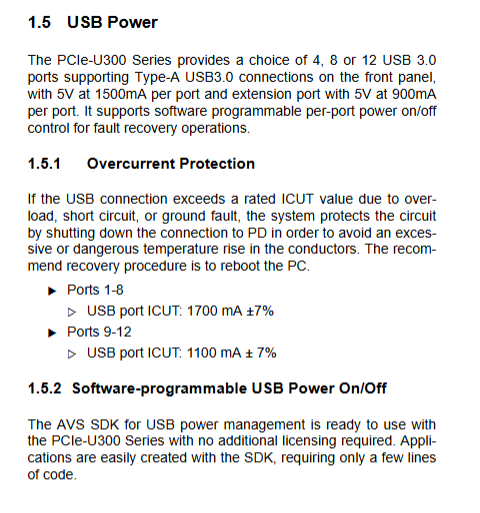
Port 1-8: maximum 1700mA ± 7%;
Port9-12 (U312 expansion port): maximum 1100mA ± 7%;
Output 5V ± 5%.
Total power supply capacity
Power supply source U304 U308 U312
Only PCIe slot power supply maximum 20W USB output maximum 20W USB output maximum 20W USB output
Plus 4-pin Molex 12V auxiliary power supply, maximum 30W, maximum 60W, maximum 78W
When the total power consumption of the camera exceeds 20W, a 4-pin 12V auxiliary power supply must be connected, otherwise it will trigger protection and damage the system. The auxiliary power supply only supplies power to USB devices, and the board itself is still powered by the PCIe slot.
protection mechanism
Equipped with hardware protection against overvoltage, overcurrent, and short circuit; Port overload and short circuit will automatically cut off the power supply to the port; After the malfunction, it is recommended to restart the PC to complete the recovery process; The SDK supports software to individually switch the 5V power supply of each USB port for fault reset.
Physics and Environment
Size: 167.65mm × 111.15 mm standard full height PCIe board;
Working temperature: 0-60 ℃; Storage -40~85 ℃; Humidity 5-90% without condensation;
Certification: CE/FCC Class-A.
Board connector, DIP and LED
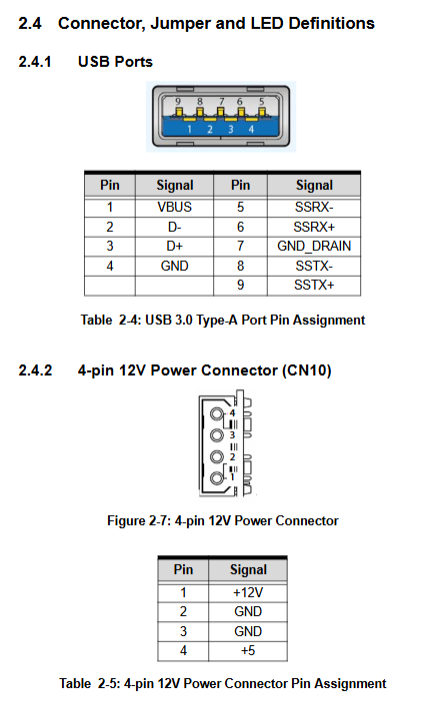
USB Type-A interface
U304: 4-port baffle; U308: 8-port baffle; U312: Block with 8 ports and onboard 20 pin internal socket, connected to the expansion sub block leading out Port 9-12.
CN10: 4-pin Molex 12V auxiliary power interface
Pin: 1:+12V, 2: GND, 3: GND, 4:+5V; Used to increase the total output power of USB.
SW1 Card ID 4-digit DIP dip switch
ON=1,OFF=0; Value 0-15; Factory default all ON, i.e. ID=15; Each card ID in the multi card system must be unique, and the software identifies different cards through the ID.
Status LED indicator light
Meaning of LED
LED1/3/4/5 corresponds to the upstream links of 4 USB controllers; Normally on, but abnormally off
LED2/6/7/8 PCIe switch chip downlink; Always on normally; Flashing indicates insufficient bandwidth
LED9 is turned off normally; Lighting up indicates an abnormal error in the PCIe switch chip
Hardware installation steps
Static protection operation, power off the entire computer, open the chassis;
Insert the board into the vacant PCIe x4/x8/x16 slot and tighten the baffle screws;
PCIe U312 specific: Connect the 20 pin ribbon cable to the onboard internal socket and the extended USB sub board, and fix the sub board to the idle slot of the chassis;
If the total power consumption of the USB camera is greater than 20W, a 4-pin Molex 12V auxiliary power cord must be connected;
USB camera connected to Type-A port;
Close the computer case and turn it on; Install AVS SDK and FLUSB3.0 driver; Windows 7 must install system patch ∝033929.
Attention: Do not install in PCIe slots with a physical width less than 13.25mm, as some consumer grade motherboard short slots may not be compatible.
Software Key Points
Windows 7 relies on the VNet 033929 patch, otherwise the driver cannot be loaded; Windows 10/Linux does not require this patch.
AVS-SDK provides an API that allows software to independently switch the 5V power supply of each USB port for fault recovery, without the need for additional authorization.
After the port hardware protection triggers the power cut-off, the hardware will not automatically recover and requires software to be powered on or the entire machine to be restarted.
Safety instructions
Disassembling and assembling hardware must be powered off; The equipment has good ventilation and heat dissipation, and the radiator is at a high temperature. Avoid direct contact to prevent burns.
When the total USB power consumption exceeds the limit, an auxiliary power supply must be connected instead of relying solely on PCIe slots to carry heavy loads.
Do not disassemble or repair on your own; Built in lithium battery, there is a risk of explosion if the wrong model is replaced. Waste batteries should be recycled according to local regulations.
Comparison Table of Series Models
Project PCIe U304 PCIe U308 PCIe U312
USB ports on the baffle, 4-way, 8-way, 8-way
Expanding USB ports without 4 channels (onboard 20 pin ribbon cable)
Port independent bandwidth 4 ports independent 5Gbps 4 groups shared bandwidth 4 groups shared bandwidth
Port 1-8 single port current 1700mA 1700mA 1700mA
Port 9-12 current -1100mA
Maximum USB output power (with 4pin power supply) 30W 60W 78W
Briefly distinguish it from other visual boards before
Characteristics of Board Interface Standards
PCIe CPL64V Camera Link dedicated Camera Link camera with encoder and isolated IO
PCIe – GIE74/GIE74V GigE Vision network port acquisition card, PoE power supply for camera
PCIe U300 series USB3 Vision USB3.0 industrial camera host card, onboard controllable 5V power supply