BECKHOFF CX52x0 Series Embedded Industrial PC Hardware Manual
The Beifu CX52x0 series embedded industrial PC hardware manual is aimed at professional technical personnel in the fields of automation and industrial control. It comprehensively introduces the product hardware specifications, interfaces, installation and debugging, system configuration, fault maintenance, certification and after-sales service, and compares and distinguishes software and hardware selection, main line types and functional characteristics. The following text modularizes the core information by chapter.
Transportation and Storage
Environmental requirements: Condensation is prone to occur during transportation and temperature changes. If condensation occurs, it must be left to stand for 12 hours before being powered on; The equipment is resistant to vibration but needs to avoid severe impact. It is recommended to use the original packaging for transportation.
Physical parameters: The overall size is 142 × 100 × 92 mm, and the weight is approximately 1195g.
Storage specification: When stored for a long time and the temperature exceeds 60 ℃, the onboard battery needs to be removed and stored separately in a dry environment of 0-30 ℃ (removing the battery will lose the system clock).
Product Overview
3.1 Product positioning and hardware architecture
CX52x0 is a high-performance DIN rail embedded PC equipped with Intel Atom x5-E series processors, available in two models:
CX5230: Dual core x5-E3930, clock speed of 1.3GHz, 4GB DDR4 memory;
CX5240: quad core x5-E3940, clock speed of 1.6GHz, 8GB DDR4 memory;
The memory is not expandable and comes with an Intel HD Graphics 500 graphics card.
Core standard configuration: CFast card slot, microSD card slot, 4-channel USB 3.0, 2-channel independent Gigabit Ethernet, 1-channel DVI-D; Integrated 1-second UPS supercapacitor (capable of storing up to 1MB of persistent data in case of power failure), supporting E-Bus (EtherCAT) and K-Bus terminal buses, with automatic recognition of bus interfaces.
3.2 Software and Model Naming
Optional operating system (pre installed at the factory, cannot be modified on-site)
No system;
Windows 10 IoT Enterprise 2019/2021 LTSC (requires at least 40GB CFast card);
TwinCAT/BSD (requires at least 20GB CFast card).
Running software: Equipped with TwinCAT 3 as standard, it supports complex processes such as PLC, multi axis motion control, electronic gears, and flying saws, and is compatible with ADS and OPC communication.
stretched form
Factory optional interfaces: DVI-D/DisplayPort/Audio/RS232/RS42-485/EtherCAT master-slave station/PROFIBUS/CANopen/PROFINET RT, all of which cannot be installed on-site;
External Expansion Module: One CX2500 series expansion module (Ethernet, PoE, USB, various fieldbus) can be externally connected to the left side.
3.3 Body and nameplate
Body partition: integrated power terminal, bus interface, status LED, storage card compartment, battery compartment, and various peripheral interfaces.
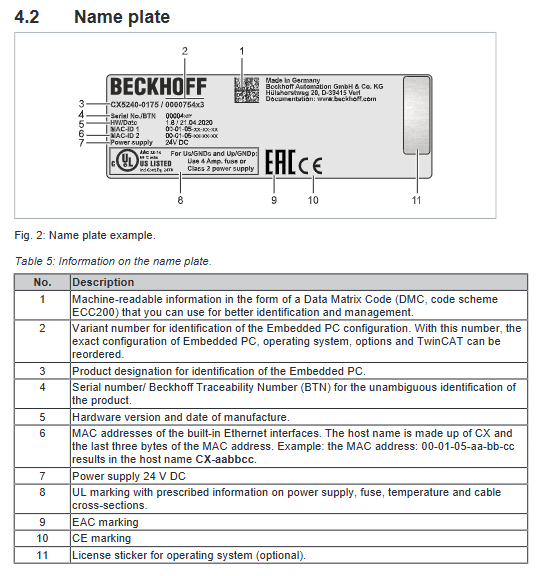
Nameplate information: including product model, serial number (BTN), hardware version, production date, network port MAC, power supply parameters, UL/EMC/CE certification mark, system authorization label; The host name is generated from the last three digits of the MAC.
Full interface detailed description
All interfaces are labeled with pin definitions, electrical parameters, and transmission specifications. The core interface classifications are as follows:
4.1 Standard Basic Interface
USB 3.0 (X100~X103): 4-channel Type-A interface, 5Gbps speed, maximum output of 900mA/4.5W per port, standard 9-pin definition.
Gigabit Ethernet (X000/X001): 2 independent network ports (without built-in switches), 10/100/1000Mbps adaptive; LED distinguishes links/rates (green=100M, red=1000M, off=10M), defined by standard 8-pin Ethernet.
DVI-D (X200): Pure digital video interface, with a maximum cable length of 5m, supporting a maximum resolution of 1920 × 1200.
4.2 Factory optional interfaces (N/M/B series)
Video Category
N010: Additional DVI-D interface, supporting split screen/copy display;
N011:DisplayPort 1.1a, Up to 2560 x 1600@60Hz Can be converted to DVI/HDMI.
Audio (N020): 3.5mm interface, including line input, microphone input, line output, stereo design.
serial port
N030:RS232, 9-pin D-Sub, up to 115kbaud;
N031:RS422/RS485, 9-pin D-Sub, supporting terminal resistance and feedback configuration, with factory set parameters that cannot be modified on-site.
Fieldbus
M112: EtherCAT master station; B110: EtherCAT slave station;
M310/B310: PROFIBUS master/slave, 9-pin interface, speed 9.6k~12Mbaud;
M510/B510: CANopen master/slave station;
M930/B930: PROFINET RT controller/device with dual network ports and switch.
Installation, wiring, and start stop operation
5.1 Mechanical Installation
Installation requirements: Only allow horizontal installation on TS35 standard DIN rails; A 30mm ventilation gap should be reserved above and below the equipment, with a working environment temperature of -25~60 ℃.
Guide rail fixation: Pull the bottom buckle into the guide rail and reset it after installation; Vibration scenes require additional reinforcement.
Memory card replacement: CFast and microSD cards are both press to eject and must be powered off. Only use Beifu industrial grade memory cards to avoid data damage.
EtherCAT terminal installation: Passive EtherCAT terminals should not be directly attached to the power terminal to avoid abnormal bus signals.
5.2 Power Wiring
Power supply specifications: standard 24V DC (fluctuation -15%/+20%), maximum power consumption of the whole machine is 16-18W, and full load charging can reach 34W.
Terminal partition
Us terminal: Provides power to embedded PC+bus, requires 4A fuse (UL standard) or NEC Class2 power supply;
Up terminal: Provides power to external terminals/sensors, maximum 10A, equipped with 10A slow melting fuse.
Wiring specifications: The cable diameter is 0.5~2.5mm ², and the stripping length is 8~9mm; it is forbidden to only disconnect 0V, and the 24V positive pole must be disconnected.
UL compliance: Cannot connect to infinite current power supply, strictly follow UL label requirements.
5.3 Start stop operation
Power on: After confirming that the module, wiring, and installation are correct, connect 24V and the device will automatically start and load the system.
Power off: Standard procedure: Close all programs → Normal shutdown → Cut off 24V power supply; Prohibit direct power outage during operation to prevent data damage to the storage card.
System configuration
6.1 Beckhoff Device Manager
Remote device configuration through browser, default account Administrator, password 1; The new version uses HTTPS (port 443), while the old version uses HTTP (port 80), requiring the same network segment and firewall port to be released.
6.2 TPM Security Module
Onboard fTPM 2.0, used for data encryption and tamper proof; It needs to be enabled in BIOS (with security devices enabled in UEFI mode) and is only compatible with Windows 10 1809 and above 64 bit systems.
6.3 Windows Network Configuration
Network port recognition: The two network ports in Device Manager are named TwinCAT Intel Gigabit Network Card # 1/# 2.
Jumbo Frames: Requires installation of the original Intel network card driver (which will uninstall the Beifu real-time driver), supporting 4088/9014 byte jumbo frames.
NIC Teaming: The original driver is also required, and network card redundancy and fault switching can be configured.
Real time driver recovery: Use TcRteinstall.exe to reinstall the real-time driver of Beifu Ethernet and restore the real-time performance of TwinCAT.
6.4 TwinCAT 3 configuration
Engineering view: Distinguish between E-Bus (EtherCAT) and K-Bus (bus terminal) topologies, and the tree view automatically identifies couplers and terminals.
Device search and scanning: Search for target devices within the same network segment using IP/hostname, automatically identify I/O and bus modules through scanning, and complete project mounting.
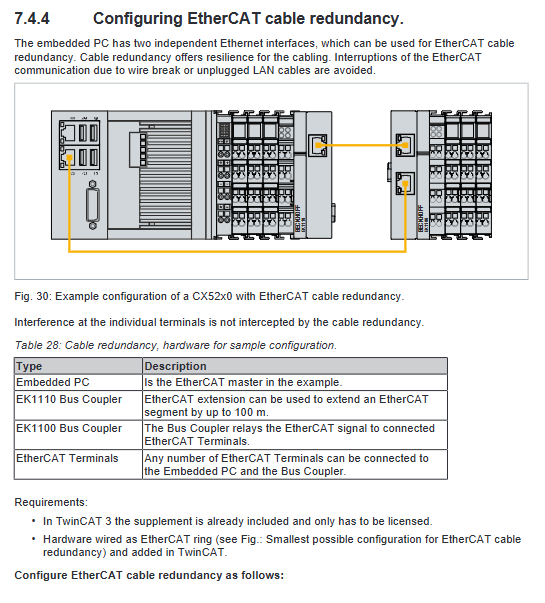
EtherCAT cable redundancy: Using dual network ports to build a ring network, single line disconnection does not affect communication, and the redundancy function is enabled in TwinCAT advanced settings.
Hardware watchdog: Call the FB-PcWatchdog-BAPI function block to automatically restart the device when the PLC freezes/loops. It is recommended to shut it down during debugging.
1-second UPS function
Principle: Built in supercapacitor, provides short-term power supply after power failure, stores up to 1MB of persistent data, and protects PLC data from loss during power failure; Not supplying power to the peripheral bus.
configuration process
BIOS enables UPS function, sets delay and power supply parameters;
Configure Windows Unified Write Filter (UWF) and add a read-write exception directory;
Declare the VAR PERSISTENT persistent variable in the PLC and call the FB_S-UPS_SAPI function block.
Working mode: supports four modes: “data storage+quick shutdown”, “data only”, “direct shutdown”, and “status detection only”; The data is saved by default in the Port_85x.bootdata file on the CFast card.
Status monitoring: View data loading and system operation status through the PlcAppSystemInfo structure.
Fault diagnosis
8.1 Status LED indicator light
Indicator light status description
PWR evergreen=normal power supply; Red/yellow short light during startup phase
TC green=TwinCAT running, red=stop, yellow=PLC fault/crash
HDD red/flashing=read/write CFast card
FB1/FB2 fieldbus status indicator light
8.2 Bus Diagnosis
K-Bus
Hardware LED: K-BUS RUN green=normal, K-BUS ERR red flashing=fault; Using “flash+two-stage slow flash” encoding to distinguish fault codes and fault terminal positions;
Software diagnosis: Read the State variable in TwinCAT, identify bus errors, configuration changes, watchdog issues, etc. through bit definitions, and reset the bus through function blocks.
E-Bus (EtherCAT): L/A light off=not connected, constantly on=no data connected, flashing=normal communication.
Common faults and solutions: The whole machine has no response. Check the power supply/fuse; Unable to start checking storage card BIOS; Controller abnormality troubleshooting software and external devices.
Maintenance, disassembly, and scrapping
9.1 Regular maintenance recommendations
Component replacement cycle
Onboard battery, UPS battery pack for 5 years
Fan for 5 years
CFast/microSD/flash storage for 10 years
Mechanical hard drive for 5 years (shortened cycle in high temperature environment)
9.2 Battery Replacement
Use CR2032 3V button battery, replace after power failure; After replacement, the system clock needs to be recalibrated and insulated tools should be used to prevent short circuits.
9.3 Cleaning Requirements
Wipe the outer shell with a soft damp cloth after power failure; Prohibit the use of corrosive agents, solvents, and hard tools, and strictly prohibit the use of compressed air to blow ventilation holes.
9.4 Disassembly and scrapping
Disassembly: First turn off the power, remove all cables, release the rail buckle to remove the equipment, and then disassemble the module.
Scrap: The entire machine and electronic components are strictly recycled and disposed of in accordance with local electronic waste regulations.
Technical parameters, accessories, and after-sales service
10.1 Core Technical Parameters
Power supply: 24V DC, maximum current of 2A at I/O terminals, maximum 10A at power contacts;
Insulation withstand voltage: 500V rms;
Temperature and humidity: working -25~60 ℃, storage -40~85 ℃, humidity ≤ 95% (no condensation);
Anti vibration, anti impact, EMC all comply with EU standards, with protection of IP20;
K-Bus has a maximum of 64 terminals (255 after expansion), while EtherCAT supports up to 65534 terminals.
10.2 Original Accessories
Contains specialized spare parts such as microSD/CFast industrial memory cards of different capacities, shell buckles, cover plates, identification strips, etc.