Beckhoff CP39xx series industrial touch control panel
Product positioning and overall characteristics
Product purpose and core capabilities
CP39xx is an industrial cantilever mounted multi touch panel, mainly used as a field operation and visualization terminal for mechanical equipment and automation systems, for parameter monitoring, command operation, and status display. According to the interface scheme, it is divided into two main models:
CP39xx-0000: equipped with DVI+USB extension interface, with a maximum signal transmission distance of 50m;
CP39xx-0010: Equipped with CP Link 4 bus interface, the maximum transmission distance can reach 100m.
Screen and configuration selection
The entire series adopts PCT projection type multi touch glass panel, aluminum alloy body+front glass design, with an overall front protection of IP65, which can resist water spray and dust intrusion in any direction. We offer multiple sizes and resolution specifications, covering different application scenarios: 7-inch (800 × 480), 12 inch (800 × 600), 12.1-inch (1280 × 800), 15 inch (1024 × 768), 15.6-inch (1366 × 768), 18.5-inch (1366 × 768), 19 inch (1280 × 1024), 21.5-inch/24 inch Full HD (1920 × 1080), supporting both horizontal and vertical installation display modes.
Optional extension accessories
Button Expansion Module: Multiple models can be pre installed with C9900-G02x/C9900-G05x series button expansion units, suitable for physical button+touch combination operation needs;
Mechanical accessories: tool tray (for placing keyboards and tools), aluminum alloy handle, all of which are original factory optional components;
Cantilever adapter: compatible with Rittal and Rolec standard 48mm cantilever tubes, supporting rotation and pitch adjustment;
External USB interface, dedicated connection cable, adapter box and other supporting accessories to meet the needs of peripheral expansion.
airframe structure
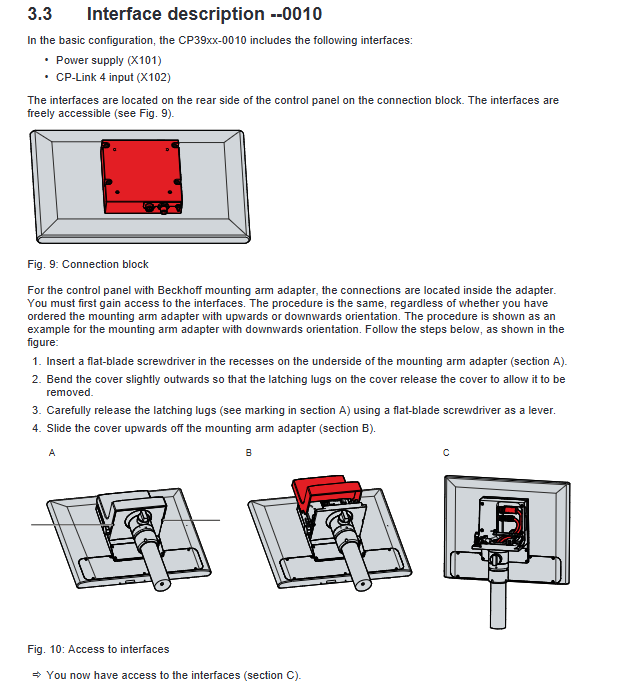
The whole machine has a front touch display screen, integrated interface module on the back, cantilever installation position, and optional expansion interface; The interface area is equipped with a detachable cover plate, and cantilevered cables can be stored in pipes and cable trays, with neat wiring and protection against cable bending and wear.
Detailed interface definition and communication scheme
CP39xx is divided into two major hardware versions, with clear distinctions in interface configuration, wiring rules, and transmission schemes. At the same time, it is uniformly equipped with a 24VDC power supply interface.
Universal power supply interface (shared across the entire system)
Adopting a 4-core M12 circular socket, pin 1/4 is+24V, 2/3 is GND, and the rated current of the interface is 16A. The maximum compatible cable diameter is 4 × 0.75mm ²; The voltage drop of the circuit must be strictly controlled, and the input voltage of the panel must not be lower than 22VDC, otherwise abnormal operation may occur. The power supply circuit must be equipped with UL248 standard, maximum 4A fuse, and the power supply must be NEC Class 2 isolated 24V DC power supply.
CP39xx-0000 (DVI+USB Extended Edition)
DVI Extended Interface: a dedicated extended video interface with a built-in signal restoration chip to compensate for signal attenuation caused by long-distance transmission. It can be transmitted up to 50m with a dedicated cable and defines complete TMDS signal, DDC, 5V power supply, hot plug detection, and other pins;
USB Extended Interface: A dedicated interface for USB signal extension, based on Class 5 cable transmission, without network protocol, cannot be connected to external switches/hubs, with a maximum transmission distance of 50m, enabling long-distance extension of USB peripheral signals such as keyboard and mouse.
CP39xx-0010 (CP Link Version 4)
Equipped with an 8-core M12 specification CP Link 4 interface, this bus can simultaneously transmit DVI video and USB 2.0 signals, with a maximum transmission distance of 100m. It provides two switching solutions:
CU8802 adapter box: dual cable solution, the adapter box and panel are independently powered, and the panel must be connected to an external 24V power supply;
CU8803 adapter box: single cable power supply+signal integration solution. It is strictly prohibited to connect external power to the panel, otherwise it will cause hardware burnout.
Optional external USB interface
IP65 protection waterproof USB-A interface, with anti loss screw cap, supports USB 2.0 protocol, can be connected to external devices such as USB flash drives, keyboards, mice, printers, etc. It is available in two installation forms: adapter integrated and body side mounted.
Equipment nameplate
The nameplate indicates the equipment model, version, serial number, production date, screen specifications, touch model, power supply parameters, and CE, FCC, UKCA certification information. The serial number is an important basis for equipment after-sales and spare parts matching.
Installation, wiring and wiring specifications
Transportation and Storage
The internal screen and touch components of the device have weak resistance to impact and temperature difference, and must be transported in original factory packaging; After transportation across temperature zones, it is necessary to let it stand at room temperature. If condensation occurs, it must wait for more than 12 hours before powering on. Storage temperature range -20 ℃~+65 ℃, working environment humidity ≤ 95% RH (no condensation).
Installation requirements for cantilever
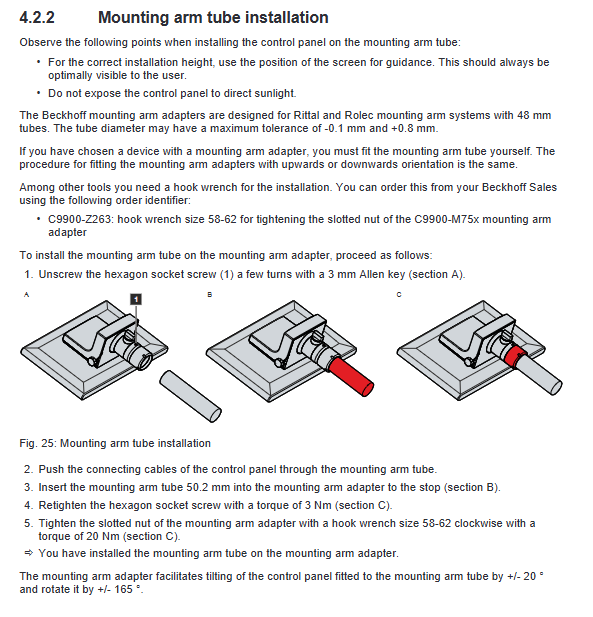
Suitable for standard 48mm cantilever pipes, with a diameter tolerance range of -0.1mm to+0.8mm for the pipe body;
The cantilever adapter supports ± 165 ° rotation and ± 20 ° pitch adjustment, with clear torque requirements for installation screws (M6 screw 6Nm, pipe body fastening screw 3Nm, slotted nut 20Nm);
The installation position should avoid direct sunlight to ensure the viewing angle of the screen and device heat dissipation.
Cable wiring rules
The cables need to be threaded into cantilever tubes and dedicated cable trays, and the power and signal lines should be arranged in different zones. They should be fixed with zip ties to prevent the cables from being pulled or worn out when the equipment rotates or tilts;
Models with button expansion, the button cables are connected to the cable tray through M20 gland or 19 pin connectors, and the two wiring methods correspond to different accessory models;
All cable bending angles should not be too large, and bending resistant cables should be preferred for long-term moving parts.
Grounding specifications
The equipment must be equipped with both protective grounding and functional grounding, with a recommended grounding wire diameter of ≥ 4mm ². The PE on the cabinet side should maintain an equal potential with the power supply at 0V, in accordance with EN 60204-1 standard. Good grounding can prevent electric shock, suppress electromagnetic interference, and ensure EMC performance (in accordance with EN 61000-6-2/EN 61000-4 series standards).
Wiring and power on process
Strictly follow the sequence of wiring first, then connecting data lines, and finally connecting power supply; Do not plug or unplug any interfaces during thunderstorms. When connecting external devices with power supply, it is necessary to ensure that both parties have a potential of 0V and PE to avoid potential difference damage to the interface.
Operation, maintenance and upkeep
Guidelines for using touch screens
Only operate with bare hands or dust-free soft gloves, and do not touch the screen with hard objects; Special dust-proof and scratch resistant protective film can be pasted, and the film should be operated in a dust-free environment to avoid bubbles and impurities. The device comes with a built-in cleaning mode that can be activated using the Beckhoff Display Control tool (lasting 5-120 seconds). Once activated, it can be touch locked for easy screen cleaning.
Daily cleaning
Allow the use of glass cleaners, alcohol, and light solvents;
It is strictly prohibited to use abrasives, corrosive cleaning agents, high-pressure water guns, compressed air, and steam cleaning to avoid damaging the IP65 protective layer and touch glass;
During cleaning, the device can be kept powered on by simply locking the touch function.
Regular operation and maintenance
Regularly check the cable fixing status and cantilever fastening screws to prevent loosening;
Check the integrity of the interface waterproof cap and sealing strip to ensure the protection level;
A small number of bad pixels on the screen are within the normal production range and cannot be used as a basis for malfunction.
Dismantling and scrapping treatment
Power off and disassembly: First cut off the external 24V power supply, remove the power and data cables in sequence, loosen the cable tie and cable tray cover, and then disassemble the cantilever tube and adapter; When disassembling the cantilever nut, it is necessary to take protective measures to prevent the panel from falling.
Accessory disassembly: Tool trays, handles, and other accessories can be disassembled and assembled using the bottom M5 screws.
Scrap requirements: Strictly follow local electronic waste recycling regulations, classify and dispose of metal, plastic, circuit boards and other components.
Troubleshooting
Manual compilation of typical fault phenomena, causes, and corresponding solutions:
The device is completely inactive: priority should be given to checking the 24V power supply, fuses, and power cord connections. If there are still abnormalities, contact Beifu after-sales service;
Screen black/intermittent lighting: Check for backlight components and internal hardware faults, need to return to the factory for maintenance;
Touch malfunction: Focus on checking whether the grounding function is reliable. Operators need to wear regular shoes and socks to ensure normal grounding of the human body;
USB communication abnormality (TwinCAT environment): Adjusting the system task cycle from the default 10ms to 50-80ms can solve it.
Core technical parameters
Power supply: 22-30VDC (nominal 24VDC, NEC Class 2);
Protection level: The front panel is IP65, and the interface area is sealed and protected by a cover plate;
Mechanical performance: Vibration complies with EN 60068-2-6, impact 5G/30ms (EN 60068-2-27);
Environmental temperature: working 0 ℃~+55 ℃, storage -20 ℃~+65 ℃;
Humidity: Maximum 95% RH, no condensation;
EMC: Radiation and anti-interference comply with EN 61000-6-4 and EN 61000-6-2 respectively;
Machine weight: Divided by screen size, ranging from 1.8kg for small screens to 8.4kg for large screens;
Certification: Standard CE and FCC, some models come with EAC, UKCA and other certifications.