Beckhoff CU8800-0010 USB transmitter extender (TX)
Product Overview
1. Core functions and positioning
CU8800-0010 is an industrial grade USB transmitter extension, used in conjunction with the receiver CU8850/CU8860; The maximum length of a standard USB cable is only 5m, and this module can expand the USB transmission distance to a maximum of 50m, designed specifically for long-distance transmission of USB signals in industrial sites.
2. Main characteristics
Power supply method: Powered by USB 5V bus, no need for external independent power supply;
Protocol compatibility: Supports USB 1.1 standard, compatible with 12 Mbps (full speed) and 1.5 Mbps (low speed) rates;
Transmission medium: Universal CAT5 Category 5 Ethernet cable is used for long-distance transmission;
Installation form: Integrated DIN rail buckle, compatible with standard industrial rails;
Structure: Compact industrial design, compact size.
3. Interface definition
The device has two sets of physical interfaces with complete pin definitions:
X10: USB-B female port (upstream input)
Standard USB-B interface, used to connect industrial PC hosts, pins: 1=VCC, 2=Data -, 3=Data+, 4=GND, with shielding layer.
X20: RJ45 Ethernet port (extended output)
Used for connecting CAT5 Ethernet cable to remote USB receiver module, 8-pin pin definition: 1/7=15V USB power supply, 2/8= GND、3=USB Rx+、4=USB Tx+、5=USB Tx-、6=USB Rx-。
4. LED status indicator lights (5 in total)
table
Indicator light status description
P10 (power) off=no power supply; Evergreen=USB 5V power supply is normal
P20 (USB running) off=USB working normally; Constant red=USB enters suspend mode
P21 (USB-E power supply) off=15V output not activated; Evergreen=normal external 15V power supply
P22 off=no external device; Evergreen=Connect 12Mbps full speed USB devices
P23 off=no external device; Evergreen=Connect 1.5Mbps low-speed USB devices
Installation and wiring
1. Transportation and unboxing
Transportation: The equipment has average vibration resistance and must be packaged in the original factory to avoid strong impact and severe temperature differences.
Condensation requirement: After transportation in a low temperature/large temperature difference environment, it needs to be allowed to stand at room temperature; If condensation occurs, let it stand for 12 hours before powering on.
Open box inspection: Count the goods, inspect the appearance for damage, retain the original packaging for secondary transportation, and properly keep the supporting documents; Contact Beifu after-sales immediately if there is a problem.
2. Installation/removal of guide rails
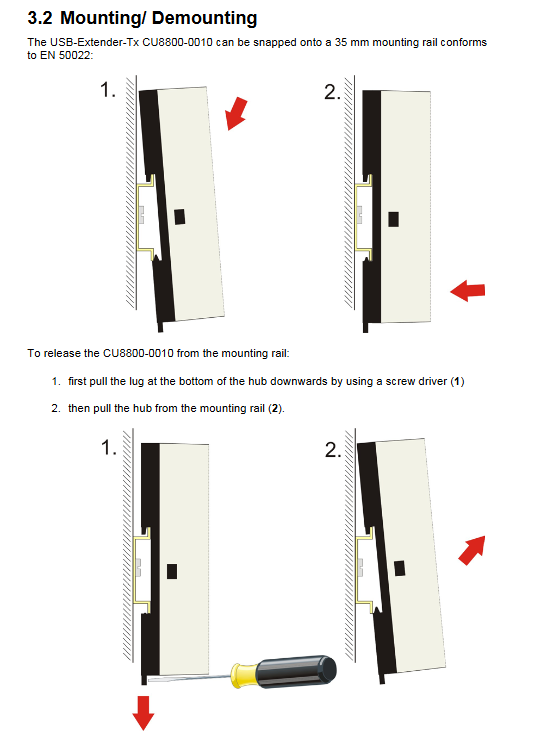
Installation: The module comes with a built-in buckle, which can be directly mounted on the EN 50022 standard 35mm DIN rail.
Disassembly: Use a Phillips screwdriver to press down on the bottom buckle, and then remove the module from the guide rail.
3. Wiring specifications and sequence
Pre requirement: First turn off all connected devices, disconnect all power sources, and then connect the cables.
Wiring sequence: First connect USB-B port (to industrial PC) → then connect RJ45 network port (connect CAT5 network cable to the receiving end).
Important reminder: The USB cable must be plugged in before starting the industrial PC, otherwise an overcurrent alarm will be triggered.
UL compliance requirement: This module cannot be connected to an unlimited power USB power supply.
Operating Architecture and Usage
1. Typical application topology and distance limitations
The module needs to be paired with CU8850/CU8860 receiving terminals to form a complete USB extension system, which can be configured in two common ways, while specifying the total length limit of the wiring:
Configuration 1 (connect USB hub after extension cable)
PC to this module: ≤ 1m; CAT5 extension cable: ≤ 50m; extension end to USB device: ≤ 5m; total maximum length 56m.
Restriction: Only one USB hub is allowed to be connected in the entire link, and no more can be cascaded due to USB timing limitations.
Configuration 2 (Directly connected to Beifu CP69xx/CP79xx series control panel)
PC to this module: ≤ 1m; CAT5 extension cable: ≤ 50m; total maximum length of 51m, no additional hub in this scenario.
2. Daily maintenance and cleaning
Cleaning operation: Be sure to disconnect all power sources first and wipe with a soft damp cloth; Corrosive cleaning agents, diluents, and hard scraping tools are strictly prohibited.
Equipment body: It belongs to maintenance free design and does not require regular maintenance.
3. Shutdown and scrapping
Shutdown: sequentially shut down backend devices, disconnect network cables, and unplug USB cables.
Scrap: Follow local electronic waste regulations for classified recycling; The shell is made of polycarbonate/PA6.6 plastic and can be recycled. Metal parts and circuit boards are disposed of according to electronic waste regulations.
Mechanical and Electrical Technical Parameters
Basic Specifications
Interface: 1 USB-B input, 1 RJ45 extended output;
Supporting protocol: USB 1.1, speed of 12 Mbps/1.5 Mbps;
Whole machine weight: approximately 95g;
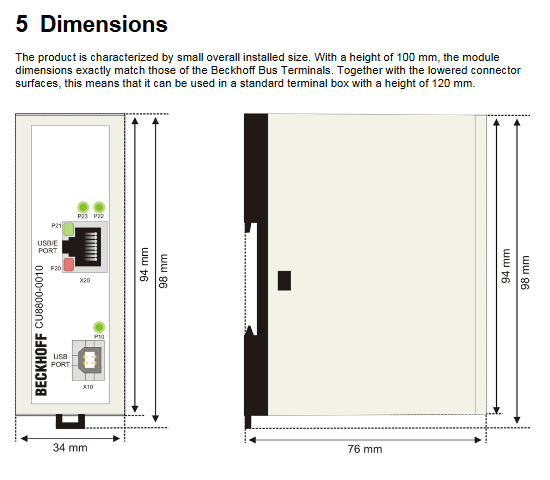
Dimensions: Width 34mm x Height 100mm x Depth 76mm.
Electrical parameters
Input power supply: USB 5V DC, maximum input current 500mA;
Whole machine power consumption: maximum 25mA;
Remote output: RJ45 terminal outputs 15V DC, maximum 150mA;
Cable restrictions: Local USB cable ≤ 1m, CAT5 extension cable ≤ 50m.
environmental conditions
Working temperature: 0 ℃~+55 ℃;
Storage and transportation temperature: -25 ℃~+70 ℃;
Relative humidity: 5%~95%, no condensation.
Performance and Protection
Protection level: IP20 (for cabinet use only);
Anti interference/mechanical performance: comply with EN 60000-6-2, EN 60000-6-4, EN 60068 vibration/impact standards;
Installation method: Standard 35mm DIN rail, unlimited installation direction.
Compliance Certification
Having CE and UL certifications;
Compliant with FCC Class A industrial digital equipment standards in the United States/Canada, compliant in commercial environments, and prone to radio frequency interference in civilian environments;
Tip: Unauthorized hardware modifications may result in FCC certification being invalidated.