Beckhoff CP77xx Series Industrial Panel PC Installation and Operation Manual
Product Introduction
1. Product positioning and prohibited scenarios
CP77xx is an integrated industrial panel PC with an aluminum alloy body, integrated industrial control host, TFT LCD, and optional touch screen/film buttons; Install through 4 mounting holes on the back panel or optional cantilever bracket.
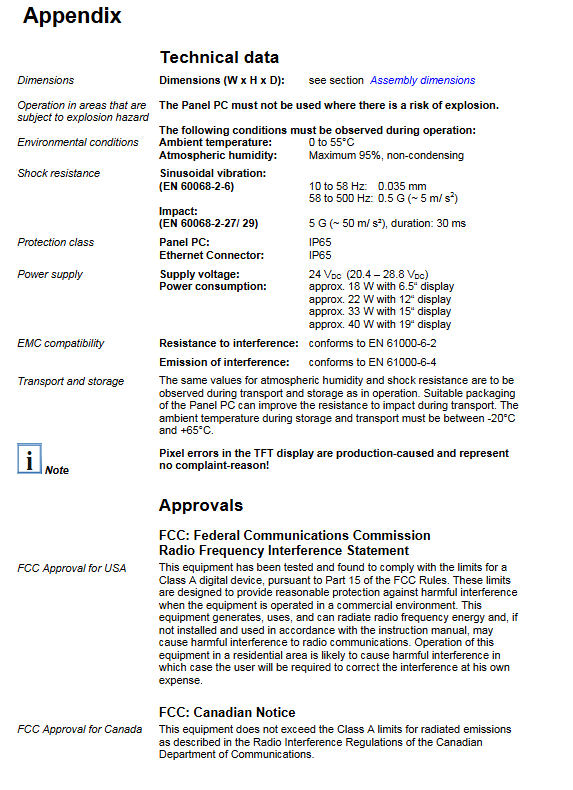
It is strictly prohibited to use in explosion-proof hazardous areas.
2. Rear all interfaces (IP67 industrial waterproof circular interface)
Interface Number, Interface Type, Specification, Pin Definition, and Purpose
X100 RS232 serial port 12 core M16 circular IP67 socket, matched with C9900-K234 to DB9 cable for connecting serial peripherals
X101 24V power supply 4-core M12 IP67 socket, 1-pin+24V, 3-pin GND power supply for the whole machine (20.4~28.8VDC)
X102/X103 dual Ethernet port RJ45 IP67 industrial interface, 10/100M adaptive EtherCAT/ordinary industrial network communication
Grounding: The grounding bolt behind the equipment provides low resistance protective grounding;
3. List of supporting cables
Standard configuration: RS232 conversion cable, 4-core power plug;
Optional CAT5 industrial Ethernet cable (5~50m models C9900-K605~K610), IP65 RJ45 assembly connector C9900-K557.
4. Product model classification (divided into four major series according to screen size)
CP7709/7719/7729: 6.5 inches;
CP7701/7711/7721/7731:12 inches;
CP7702/7712/7722/7732:15 inches;
CP7703/7713/7723/7733:19 inches;
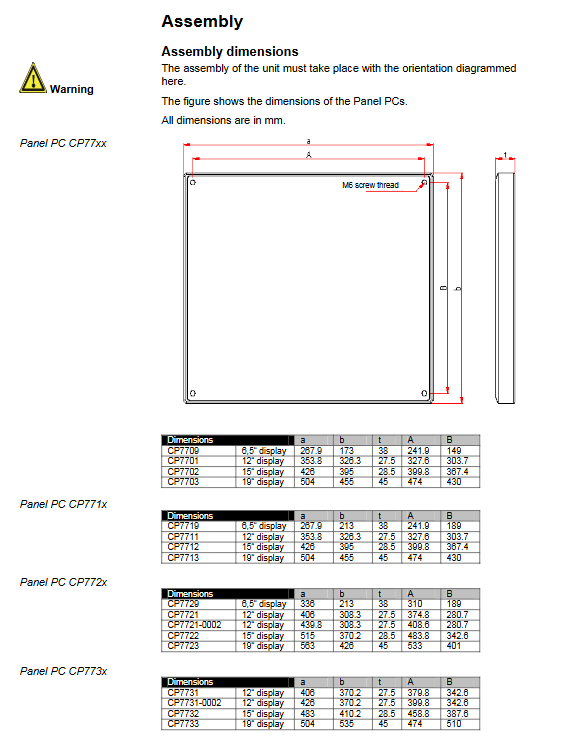
Each model is labeled with the dimensions of the installation holes for the length, width, and thickness of the entire machine (in millimeters).
Installation instructions
1. Transportation and unpacking standards
Transportation: The equipment is resistant to vibration but not to severe impact, and must be packaged in its original form; Condensation is prone to occur after high and low temperature transportation, and it needs to be allowed to stand for 12 hours to remove moisture before being powered on.
Steps for unpacking: Remove the packaging → Keep the original packaging box → Check the accessories → Save the documents → Check for transportation damage. If there is any damage, immediately contact Beifu service.
2. Mandatory wiring process
Environmental restrictions: It is prohibited to plug or unplug interfaces in explosion-proof areas; Cables cannot be plugged or unplugged during thunderstorms; Plug and unplug only by grabbing the plug, do not pull or tug on the wire.
Standard wiring sequence: Power off the entire machine → Connect all peripheral cables → Tighten all connector threads → Restore power supply;
Grounding: The rear grounding bolt of the fuselage must be reliably connected to the protective grounding wire.
3. Installation dimensions
The manual provides a complete list of panel openings and installation parameters for different sizes of screens in the CP770x/771x/772x/773x series, all of which use M6 threaded mounting holes.
Operating instructions
1. Power on/off logic
The whole machine has no physical power switch and automatically starts up when connected to 24V DC; Shutdown must follow the software shutdown process within the system, and wait for at least 10 seconds after turning off the power before powering it back on.
2. Input device operation specifications
Thin film buttons: can only be pressed with fingertips, touch pens, hard objects, and gloves with metal debris are prohibited from operation;
Touch screen: fingertip/dedicated stylus operation, allowing gloves without hard impurities to be used.
3. Key Function Description
Includes directional keys, Home/End, PgUp/PgDn, Tab, Del/Ins, Print, Enter, Windows function keys, F1~F12 function keys; The orange LED above the screen provides custom shortcut keys for functions defined by industrial control software.
4. CF storage card (system disk)
Location: Inside the back cover of the device, the operating system and programs are stored, and an industrial wide temperature CF card must be used;
Disassembly and assembly steps: Power off → Unscrew the four screws on the back cover → Remove/insert the memory card, and violent operation is strictly prohibited to damage the pins; When installing the back cover, the sealing gasket must be tightly attached.
5. Maintenance and upkeep
Cleaning: Turn off the power of the whole machine, wipe the front panel with a soft damp cloth, and use no thinner or abrasive cleaner; The main body of the aircraft is maintenance free;
Motherboard button battery: 3V 2032 lithium battery, located next to the CF card, used for clock data caching, can be replaced by oneself;
Backlight tube (consumable): 12/15 inch screen tube can be replaced, providing corresponding lamp group order numbers C9900-L364 (12 inches) and C9900-L366 (15 inches). Replacement requires partial disassembly of the screen.
6. Emergency and scrapping
Fire extinguishing: Use dry powder and nitrogen fire extinguishers;
Scrap: Disassemble the entire machine, recycle the metal casing, and dispose of the circuit board and lamp tube in compliance with electronic waste regulations.
Troubleshooting
Only three typical types of faults and corresponding solutions:
The whole machine is completely unresponsive: there is no 24V power supply/the power cord is loose. After checking the power supply, if it is still abnormal, please contact Beifu after-sales service;
Normal startup, control software unable to run: The fault is in the supporting program or external device. Contact the device manufacturer;
3. Black screen/intermittent display abnormality: Backlight tube aging and replacement, hardware failure, contact after-sales service;
Additional note: The pixel deviation of TFT screens at the factory is not considered a device malfunction and does not support returns or exchanges.