BECKHOFF CP29xx Cabinet Mounted Industrial Touch Panel Official Operation Manual
Product Overview
Basic Hardware Characteristics
Screen specifications: covering multiple sizes ranging from 7 to 24 inches, supporting landscape/portrait display, with resolutions ranging from 800 × 480 to 1920 × 1080 full HD; Standard configuration includes 10 point capacitive multi touch, and also supports single touch scenarios.
airframe structure
Standard model: Aluminum alloy insulated shell, glass front screen; Stainless steel front cover is optional (suitable for high hygiene level scenarios, corresponding to independent ordering codes);
Cabinet installation: Rear buckle pressure rod, quick fixing without scattered accessories;
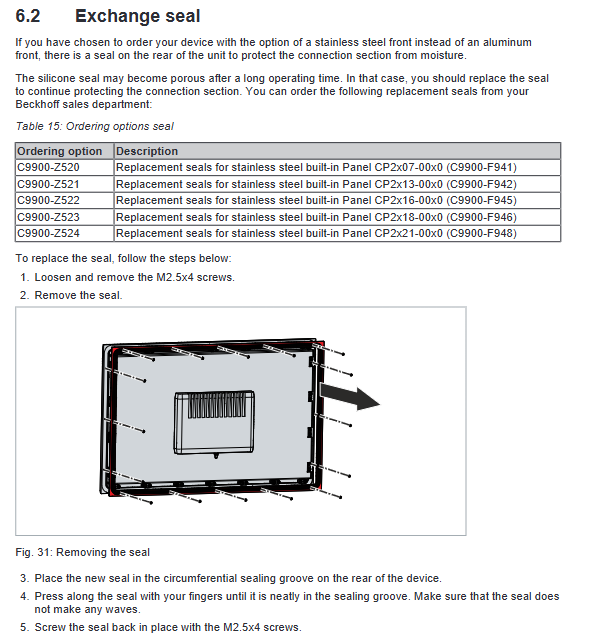
Standard silicone gasket (exclusively for stainless steel version, to isolate moisture from entering the back interface).
Optional front button extension: Multiple sizes (CP2912/13/15/16/18/19/21/24) can be pre installed with the C9900-G0xx button module from the factory, accompanied by an independent installation manual.
Front mounted optional USB (C9900-E268)
IP65 protection USB-A port, USB2.0; Hidden flip structure;
Restrictions: Cannot be selected together with button expansion and stainless steel front cover.
Differentiation of Back Interfaces between the Two Core Models
(1) CP29xx-0000 (50m DVI+USB extension plan)
Back interface X101~X106:
X101 24V power supply 5-pin socket: 3-pin PE protective ground, 4-pin 24V negative pole, 5-pin 24V positive pole, 1/2 pin empty; Equipped with C9900-P927 five pin plug, compatible with 1.5mm ² cable, minimum input voltage of 22V to avoid fluctuation shutdown, rated at 16A;
X102/X103 USB-A output (peripheral keyboard and mouse): USB3.0 ≤ 3m, USB2.0>3m;
X104 USB-B input (directly connected to industrial computer): USB3.0 ≤ 3m, USB2.0 ≤ 5m;
X105 RJ45 USB Extended: Non Ethernet port, CAT5 Ethernet cable can transmit USB 2.0 signals up to 50m away, paired with CU8801 converter;
X106 DVI Extended Input: 50m long distance transmission of industrial computer images, built-in signal repair chip to offset long line signal attenuation.
(2) CP29xx-0010 (100m CP Link 4-line scheme)
The back interface is simplified to X101, X102/X103, X104:
The definition of X101 power supply interface is consistent with -0000;
X102/X103 USB output only supports USB 2.0;
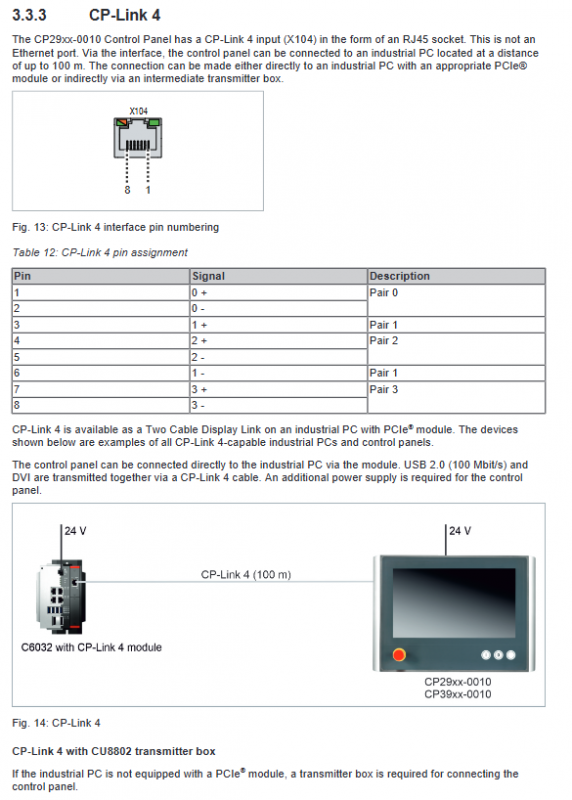
X104 RJ45 CP Link 4 (non Ethernet port): simultaneously transmits DVI video and USB2.0 signal, up to 100m; divided into two adapter box solutions:
CU8802 (dual line scheme): The panel must be connected to an external 24V power supply;
CU8803 (single line power supply scheme): The cable synchronously transmits 24V, and it is strictly prohibited to connect external power to the panel, otherwise the hardware will be burned;
The adapter box is available in two ordering models: DVI input version and DP to DVI version.
Equipment nameplate
Core information indicated on the nameplate: model (last four digits distinguish version), serial number, production date, screen specifications, touch type, 24V Class2 power supply, interface configuration, grounding identification, CE/FCC certification, German origin.
Debugging and installation (Chapter 4, unboxing → cabinet fixing → wiring and grounding)
Transportation and unpacking
Storage temperature: -20 ℃~+65 ℃; To prevent severe vibration and impact during transportation, it is recommended to keep the original factory packaging;
Condensation risk protection: After low-temperature transportation, it must be left to stand for 12 hours until the body temperature and environment are balanced before being powered on;
Unboxing process: Check for packaging damage → Count accessories → Visually inspect for hardware damage → Contact Beifu after-sales immediately for any abnormalities.
Installation of Cabinet Openings
Cabinet requirements: Plate thickness of 1-5mm, hole size refer to the technical drawings on the official website; Reserve 5cm of heat dissipation space above and below the device to avoid direct sunlight and light source reflection;
Installation tool: Use a 3.0mm hex wrench to operate the back pressure bar;
Installation steps: Insert the panel into the cabinet opening → Rotate the pressure rod outward by 90 ° → Lock and fix it; Reverse disassembly operation;
Heat dissipation requirements: It is forbidden to close or cover the back of the equipment to avoid overheating faults.
Wiring and Grounding Standards (Core Safety Chapter)
Power supply requirements: isolated 24V DC power supply, maximum 4A fuse, cable 1.5mm ²; The PE and power supply inside the cabinet have an equal potential of 0V and comply with the EN 60204-1 standard PELV safety low voltage specification;
Assembly of power plug: Strip 8-9mm of wire, assemble 5-pin terminal+stress relief cable buckle;
Double grounding requirement
Protective location: PE pin of power socket to prevent electric shock;
Functional grounding (EMC anti-interference): Independent grounding bolt on the back, connected to the main grounding bar of the cabinet with ≥ 4mm ² wire. Missing it can cause touch failure, electromagnetic interference, and hardware damage;
Wiring sequence (irreversible): First connect the functional ground → then connect all data cables → finally connect the 24V power supply; The disassembly sequence of power-off is reversed;
It is recommended to connect the remote adapter box (CU880x) to the industrial computer UPS power supply to improve stability.
Shutdown, power outage, and dismantling for scrapping (Chapter 5)
Power off operation: The system shuts down normally → cuts off the 24V main power supply → unplugges the power plug → records the cable label and removes the data cable → finally disconnects the grounding; When using CU8803, the power supply of the adapter box must be turned off before unplugging CP Link 4, otherwise the device will be burned; Do not plug or unplug cables during thunderstorms.
Cabinet disassembly: Release the pressure rod → retract the pressure rod → remove the panel;
Scrap disposal: comply with local electronic waste regulations; Classification and recycling of plastics, metals, and circuit boards; After wrapping the insulation tape of the CR2032 battery on the motherboard, the battery will be recycled separately.
Maintenance and upkeep
Screen Cleaning
Before cleaning, the cleaning mode must be turned on through the Display Control Tool (5-120 seconds optional) to prevent accidental touch;
Permitted cleaning agents: alcohol, glass water, gasoline; Steel wire balls, grinding and cleaning agents, high-pressure water guns, steam cleaning, and compressed air blowing are strictly prohibited;
Pay attention to water stains on the edge of the glass, which may cause touch short circuits and trigger false alarms. The frame must be completely wiped clean;
Optional factory protective film, short-term dust-proof and scratch resistant, dust-free environment for installation.
Silicone gasket replacement (only for stainless steel front cover models)
Silicone gel has aged and leaked water over a long period of use. Please place an independent order for replacement seals according to the corresponding size; Replacement steps: Remove M2.5 × 4 screws → Remove the old rubber ring → Insert the new sealing ring smoothly → Tighten the screws evenly to avoid wrinkling and water leakage of the rubber ring.
Maintenance Rules
Only Beifu official after-sales service can repair it; Screen dead pixels are within the allowable production range and do not belong to faults; The operating environment temperature ranges from 0 to 55 ℃ (the upper limit of -0010 model is 50 ℃).
Troubleshooting
Root cause treatment plan for fault phenomenon
The whole machine has no response, there is no 24V power supply, and the power supply circuit is damaged. Check the wiring and voltage; Contact Beifu after-sales service
Black screen/on/off backlight damage, internal hardware malfunction reported for repair directly
Frequent touch failure, jumping and lack of functional grounding; Operator shoe sole insulation; TwinCAT USB cycle is too short. 1. Improve device grounding; 2. The operator touches the ground; 3. Adjust the TwinCAT cycle from 10ms to 50-80ms
Core Technical Parameters
Power supply: 22-30V DC (nominal 24V NEC Class2);
Protection: front IP65, rear IP20;
Temperature and humidity:
CP29xx-0000 operation: 0~+55 ℃;
CP29xx-0010 operation: 0~+50 ℃;
Transportation and storage: -20~+65 ℃; Humidity ≤ 95% without condensation;
Environmental resistance: sinusoidal vibration and impact comply with EN 60068; EMC anti-interference EN61000-6-2, emission EN61000-6-4;
Weight: Depending on size, the weight of the aluminum alloy/stainless steel front cover varies (starting from 1.5kg for 7 inches and 7.2kg for 24 inches);
Power consumption: Refer to the official website download center for the power consumption curve.