ADLINK AmITX-SL-G Mini ITX Embedded Motherboard
Product Overview
Processor Support List
LGA1151 single desktop CPU, distinguishing between standard 65W and low-power 35TE series:
i7:6700(65W)/6700TE(35W)
i5:6500/6500TE
i3:6100/7101E/7101TE
Pentium G4400, Celeron G3900 series
The full CPU is equipped with the 9th generation Gen9 graphics card, with hardware decoding of H.265/VP9 and support for DX12 and OpenGL 4.4.
Core differences between the two major chipsets
Parameter Q170 version H110 version
Remote management supports Intel AMT 11.0 and vPro without AMT
USB configuration 7 x USB 3.0+4 x USB 2.0 4 x USB 3.0+7 x USB 2.0
TPM supports TPM 1.2/2.0 (A3 hardware version) and optional TPM 1.2
RAID SATA RAID0/1/5/10 only AHCI, no array
Remote out of band management of enterprise functions, TXT trusted execution without commercial enterprise features
Core system hardware
Memory: Double layer stacked SODIMM dual channel DDR4 1866/2133MHz, maximum 32GB, non ECC, two memory modules must be of the same specification.
BIOS:16MB SPI AMI UEFI, Dual BIOS fault redundancy, BIOS write protection, serial remote console, and PXE diskless boot.
Management Unit: Onboard SEMA independent BMC controller, which does not rely on the operating system to achieve hardware monitoring, watchdog, and fault logging.
Security hardware: onboard TPM slot (optional Atmel 1.2/Infineon 2.0 encryption chip).
Full board IO and expansion resources
1) Display output (three independent screens)
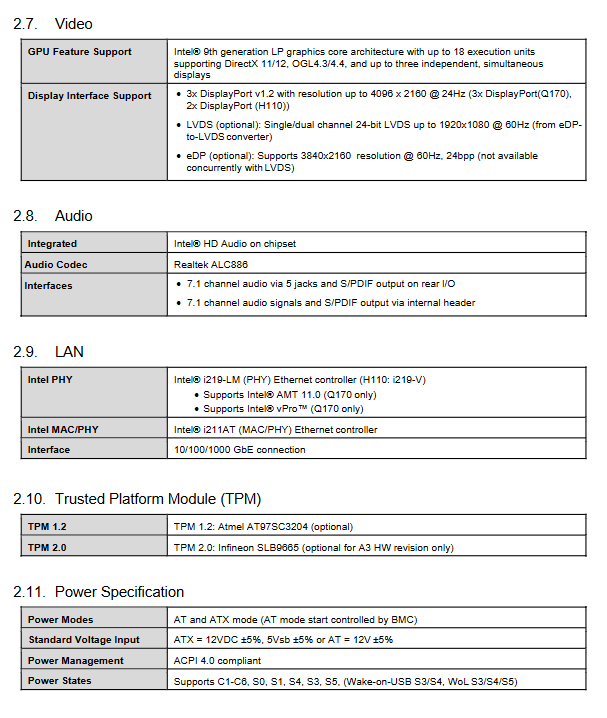
Rear 3 × DP1.2 (highest single channel) 4K@24Hz ); Onboard supports single/dual channel LVDS (18/24 bit), eDP LCD interface, backlight PWM adjustment, and 3.3V/5V/12V screen power switching.
2) Network
Dual Intel Gigabit Ethernet cards: LAN1 i219LM (Q170 supports AMT/WOL remote wake-up) LAN2 i211AT, Both ports support PXE and jumbo frames.
3) Storage
3-channel SATA 6Gbps high-speed interface; The lower level Mini PCIe slot can be jumper switched to mSATA solid-state drive; SATA1/2 supports DOM electronic disk 3.3V/5V power output.
4) Serial port (4 channels)
COM1: RS232/422/485 adjustable, jumper provides 0/5/12V peripheral power supply; COM2/3/4 are only standard RS232, with all onboard pins leading out.
5) Expansion slot
1 x PCIe 3.0 x16 dedicated graphics slot, 1 x PCIe 2.0 x1, half height Mini PCIe (wireless network card), full height Mini PCIe (wireless/mSATA optional).
6) Audio
Realtek ALC886 HD audio, with 5 rear audio sockets for 7.1 channels, matched with onboard audio pin for front output.
7) Universal peripherals
PS/2 keyboard and mouse composite pin, 10 GPIO, I2C/SMBus industrial bus, front panel pin (power on/off/reset/hard disk light), two 4pin speed regulating fan sockets.
8) USB differentiated configuration
Rear 4 USB 3.0 ports; The remaining USB ports are led out through onboard pins, Q170 has an additional 3-channel USB3 expansion, and H110 only has USB2 expansion.
Power supply and power consumption
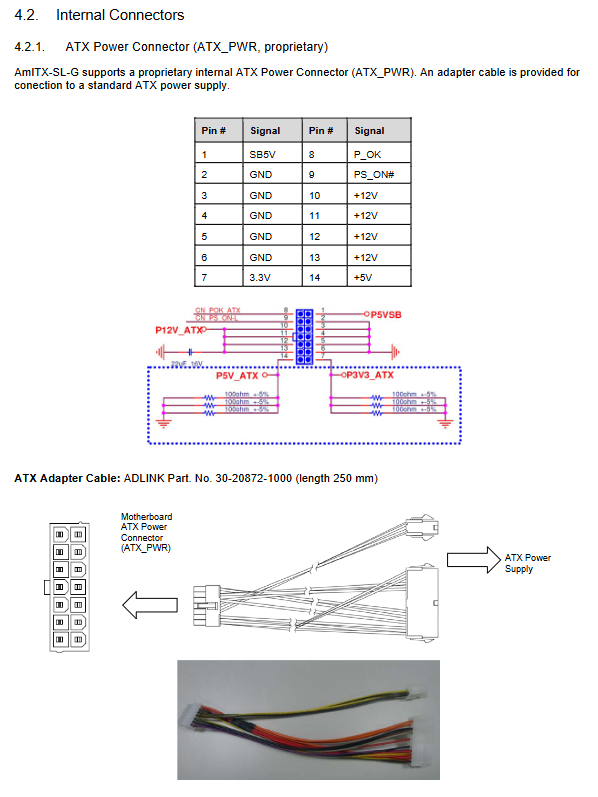
Power supply specifications: Dedicated 14Pin ATX internal power supply, only supports 12V main input, compatible with both AT constant power supply and ATX standard power on/off modes; Standby 5VS B-ultrasound with low power consumption.
Tested power consumption (Windows system)
Standby (EIST enabled): 7.56-7.92W (low-power TE CPU)
Typical load: 40-87W range
CPU full load: 52~123W (65W standard i7 peak)
S3 sleep: only 0.45W; S5 shutdown 0.3-0.35W (no standby when energy-saving mode is turned off)
Environment and Certification
Standard working temperature range: 0-60 ℃; Storage -40~85 ℃
Seismic impact resistance meets IEC industry standards and has passed HALT accelerated aging testing
System support: Win7/8.1/Win10 64 bit, Linux, VxWorks (BSP optional)
Mechanical Layout and Heat Dissipation
Size: Standard Mini ITX 170mm × 170mm, board thickness 1.6mm, overall height 35.33mm (excluding radiator).
Component layout: front labeled with CPU, dual memory slots, all expansion slots, fan, LVDS/serial/audio pins; The back pad side is equipped with DB40 debugging cable and has no exposed components.
Official heat dissipation kit: Provides 4 LGA1151 heat sinks, with a height of 30/46/50/61mm, suitable for CPUs with different power consumption of 45W/95W.
Complete Definition of Connectors and Jumpers
Rear exposed IO
From top to bottom: 3 x DP video, dual RJ45 Ethernet ports, 4 x USB 3.0, 7.1 channel audio jack; The document provides complete definitions of DP, Ethernet ports, USB pins, and indicator light logic.
Internal onboard connectors (core interface)
14Pin dedicated ATX power supply: Only compatible with the original factory adapter to connect to the standard power supply, distinguishing 12V, 5V, 3.3V standby.
SATA interface: SATA1/2 supports jumper output of 3.3V/5V to DOM disk, SATA3 standard has no additional power supply.
LVDS/eDP matching pins: 30pin screen signal+10pin backlight assist, switchable backlight 5V/12V, high and low level enable.
4-channel serial port: COM1 switches 232/422/485 through dialing, and selects the external power supply voltage through jumper.
Feature extension pins: 10 GPIO, chassis cover opening detection SMBus/I2C、 Temperature simulation acquisition and system status output.
DB40 debugging cable: 40Pin multifunctional debugging port, used for BIOS burning, POST fault code reading, BMC low-level debugging, and power testing points.
Key Jumper/DIP Function Table
Default setting for jumper numbering function
JPATX AT/ATX power supply mode ATX (1-2)
CMOS clearing BIOS/system time 1-2 is normal, short 2-3 clears to zero
JPMSATA Lower Layer Mini PCIe/mSATA Switch Mini PCIe Wireless Mode
SWS1M COM1 serial protocol switching to RS232
JPL4 LV backlight power supply 5V/12V 5V
JPL5 backlight enables high and low levels, and low levels are effective
JPL6/JPL8 LVDS screen power supply 3.3V/5V/12V 3.3V
JPL9/JPL10 SPI BIOS write protection BMC controlled shutdown protection
JPL11 SATA1/2 DOM power supply with no output
SW2 Dual BIOS Switch Main BIOS Startup
Driver Installation
All drivers can be downloaded from the Linghua official website product page, and the installation sequence is fixed:
Intel chipset INF driver
SATA AHCI/RAID storage driver
Gen9 integrated graphics card driver
Dual Gigabit Network Card Driver
HD audio driver
AMT management tool (Q170 only)
TPM security driver (optional chip)
SEMA monitoring upper computer software (watchdog, temperature reading)
SEMA Intelligent Embedded Management BMC (Industrial Core Features)
On board independent microcontroller, basic hardware information can still be collected even when the whole machine is powered off, without the need for operating system intervention:
Hardware acquisition: real-time temperature of CPU/motherboard, various voltages (Vcore/memory/12V/5VSB), input current of the whole machine, dual fan speed, record the highest/lowest temperature.
Log statistics: total number of power ups, cumulative running time, single boot timing, restart fault tracing (power-off/watchdog/hardware reset/BIOS damage classification tag).
Watchdog WDT: BIOS/system dual level timeout timer, automatically hard reset upon timeout, supports automatic power on, software configurable duration, and dog feeding operation.
Dual BIOS redundancy: When the main BIOS is damaged, the BMC automatically switches to a faulty backup BIOS to prevent bricking; Support SPI firmware read-write protection jumper.
Alarm mechanism: When hardware overheating, undervoltage, or power failure occurs, the blue status light outputs a fault code, and software can read the abnormal code for troubleshooting.
Storage partition: 1KB customer customized Flash, 128 byte encrypted protected partition, capable of storing serial numbers and keys.
Supporting tools: Windows/Linux upper computer, underlying API library, supporting reading monitoring, controlling backlight, and configuring watchdog.
Mapping of System Bottom Hardware Resources
Complete table for driver/embedded secondary development:
System memory address range (high-order BIOS, APIC, ISA reserved holes)
Hexadecimal allocation table for all hardware IO ports
PIC/APIC two interrupt modes IRQ resource occupation
PCI/PCIe bus topology (bus/device/function number)
PCI interrupt routing mapping, SMBus device from address (memory, BMC, GPIO extension)
AMI UE BIOS Complete Menu
Press Del to enter the startup menu, which is divided into 6 main menus and supports serial remote control console (COM1~4):
Main Page
Read only motherboard serial number, SEMA firmware, CPU/memory hardware information; The system time can be modified to view real-time temperature/voltage/fan speed, power on statistics, and watchdog status.
Advanced (Industrial Control Core Configuration)
CPU settings: Hyper threading, VT-x/VT-d virtualization, Turbo Boost, C-State energy-saving, power limit lock
SATA: IDE/AHCI/RAID mode switching, array switch
Graphics: Multi screen output, LVDS resolution, backlight brightness, core display memory allocation
USB: USB3/2 switch, traditional DOS compatible support
Super IO: 4-channel serial port address IRQ、 communication parameters
Network: AMT remote management, PXE network card boot, WOL wake-up
Security: TPM 1.2/2.0 switch, Intel TXT trusted execution
Power management: Power off recovery logic, RTC timed power on, various levels of sleep settings
Serial port redirection: No display remote debugging BIOS POST interface
Security Menu
Administrator/user two-level boot password, Secure boot configuration, TPM clearing operation
Boot Start Menu
Priority of device startup, CSM compatibility mode, fast self-test, network startup switch
Save & Exit
Save/discard modifications, restore factory defaults, single temporary boot items