ADLINK MVP-5200 series fanless industrial computer
Product positioning and core advantages
MVP-5200 is a Linghua economical single-sided full interface fanless industrial embedded host, continuing the MXE/MXC robust industrial architecture, targeting machine vision, motion control, factory edge gateway, and intelligent device monitoring scenarios:
Computing power upgrade: equipped with 12th generation Core Alder Lake LGA1700 processor, R680E chip, DDR5 large memory, 4-channel independent 4K display;
Industrial network: 3 channels of 2.5G Intel I225 network ports, native support for TSN time sensitive networks, adapted for industrial real-time communication;
Wireless expansion: Three M.2 slots+6 external antennas, supporting WiFi/5G modules, dual SIM cards;
Wide voltage power supply: 9-32V ultra wide DC input, suitable for vehicle mounted and multi voltage industrial sites;
Fanless sealed heat dissipation: Fully finned passive heat dissipation, no dust or noise interference, greatly improving MTBF;
Single side centralized I/O, easy to disassemble and maintain on site, standard wall mounted installation.
Differentiation of hardware specifications across the entire series
(1) Differences in processor models
Model CPU Model Core/Power Consumption
MVP-5209 i9-12900E 16 core, 65W high power consumption
MVP-5207 i7-12700E 12 core, 65W high power consumption
MVP-5207T i7-12700TE 12 core, 35W low power consumption
MVP-5205T i5-12500TE 6-core, 35W low-power consumption
One R680E chip for the entire system, supporting vPro/AMT remote management and TPM 2.0 hardware encryption.
(2) Memory and Storage
Memory: 4 DDR5 SO-DIMM slots, 3600MHz, maximum expansion up to 128GB;
Storage expansion (three-way M.2+dual SATA)
M. 2 M Key 2280: PCIe3 x4 NVMe high-speed solid-state;
M. 2B Key 3042/3052:4G/5G cellular module;
M. 2 E Key 2230: WiFi6 wireless network card;
Built in 2 SATA 6Gbps hard drive slots, supporting 2.5-inch SSD/HDD;
Dual Micro SIM card slots, corresponding to cellular module switching operator.
(3) External I/O interface (front mounted on one side of the whole machine)
MVP-5200 overall appearance
Display output (4-screen independent output)
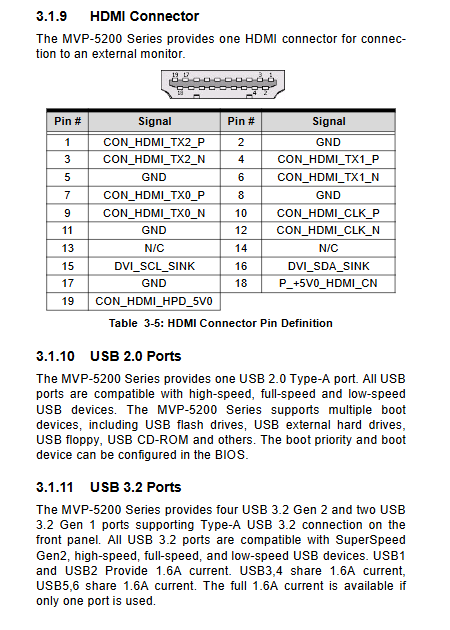
2 x DP++(up to 4096 x) 2304@60Hz )+ 2×HDMI2.0( 4K@60Hz ); H310 competitors only support 2 screens, and this series has a native quad screen display with obvious visual device advantages.
industrial network
3 × 2.5G Intel I225 LAN, supporting TSN, IEEE1588 precise clock, jumbo frame, WOL remote wake-up, and PXE diskless boot; The dual color lights on the Ethernet port distinguish between 10/100M (green), 2.5G (orange), and link flashing status.
USB
4 x USB 3.2 Gen2 (high-speed 10Gbps)+2 x USB 3.2 Gen2; Single port maximum power supply of 1.6A, suitable for direct supply of industrial cameras and sensors; The motherboard has a built-in USB 2.0 pin.
Serial port (4 DB9 channels, reserved 2 built-in COM5/6 channels)
COM1/2: BIOS switch RS232/422/485; COM3/4 fixed RS232, compatible with frequency converters and PLC docking.
Digital IO (26Pin DB interface)
8-channel non isolated DI (input 2~5.25V)+8-channel open drain MOS DO (built-in 200 Ω pull-up, maximum 24mA per channel), with complete circuit schematic for input and output.
Wireless antenna
The whole machine has 6 SMA antenna bases: ANT1-4 is compatible with 5G modules, and ANT5-6 is compatible with WiFi.
Audio: Mic input, line output (TEMPO 92HD91 audio chip).
Control and indicator lights
Key: Power button (blue light flashing during sleep), hardware reset button, external remote power on/off pin;
Status lights: WD watchdog yellow light, HD hard drive read-write orange light, DG memory/storage fault green light, 3-channel user-defined programmable green light.
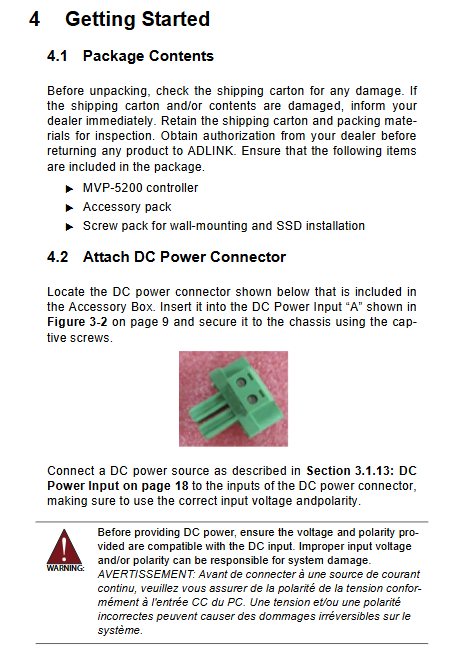
Power supply terminal: 9-32VDC wide voltage DC, V+/V – locking terminal, reverse connection will permanently damage the hardware.
(4) Mechanical, environmental, and power consumption parameters
Size and weight: 210 (W) × 240 (D) × 86 (H) mm, with a total weight of 4.9kg; only supports wall mounted installation, with matching brackets and screws.
temperature range
35W T series low-power models: standard 0~60 ℃, industrial wide temperature range -20~60 ℃ (equipped with industrial SSD);
65W E high-power model: standard 0~50 ℃, industrial wide temperature range -20~50 ℃;
Storage temperature: -40~85 ℃ (excluding storage medium);
Environmental resistance: 95% no condensation at 40 ℃; SSD working condition: 5Grms three-axis vibration, 50G impact; ESD contact ± 4KV, air ± 8KV;
Power consumption reference (24V full load, taking i9 top configuration MVP-5209 as an example)
Standby 3.7W, no-load 59.4W, CPU full load 101W, whole machine full load 147W; standard 280W original adapter.
Overall hardware structure layout
1. Front/side panel I/O layout
Complete drawings indicate all interface partitions: grounding screw, DC power supply, dual DP, dual HDMI, 6-way USB, 3-way Ethernet port, 4-way serial port DI/O、 Audio, 6-antenna, buttons, status lights, and matching interface function comparison table.
2. All front and back sides of the motherboard are equipped with built-in connectors
Top level point of motherboard
Bottom layer points of motherboard
Top layer of motherboard (CPU/memory/video/network port)
CPU LGA1700 slot, 4 DDR5 memory slots, M.2 M NVMe slot, HDMI/DP video channel, three 2.5G network ports, debugging and burning interface.
Bottom layer of motherboard (storage/wireless/peripheral pins)
Dual SATA hard drive holder M.2 B(5G)、M.2 E(WiFi)、 Dual SIM card, RTC lithium battery, 4-pin temperature control fan pin, remote power on/off/reset pin, two-way I2C sensor interface, COM5/6 expansion cable, DI/O audio cable, MXM graphics card auxiliary 12V power supply, board to board expansion board bus, DB40 debugging port.
3. Functional block diagram of the whole machine
Complete display of R680E PCH and 12th generation CPU bus topology: DMI4 processor bus, PCIe channel allocated to M.2/network port, SATA storage link, LPC mounted TPM2.0 and NCT6126D super IO, eSPI serial/digital IO, HDA audio, fan temperature control, 9-32V power management link.
Quick Installation Operation Chapter
1. List of unboxing accessories
Standard configuration: MVP-5200 host, wall bracket, complete set of fixing screws, DC power terminal; Optional accessories: 280W 24V AC-DC adapter, 5G/WiFi M.2 module, external cooling fan.
2. Hardware step-by-step assembly (with actual photos attached)
SSD installation: Remove the bottom cover, remove the hard drive bracket, fix the 2.5-inch SSD with M3 screws, and then reinstall it;
DDR5 memory: Paste the thermal pad and align it with the slot to clamp 4 SO-DIMMs;
WiFi/5G module: Install into E/B Key M.2 slots respectively, tighten the fixing screws, and connect to SMA antenna;
Wall bracket: Remove the bottom foot pad and fix the bracket with 6 M4 screws. The wall can be fixed with a keyhole or threaded hole;
3. Power wiring specifications
Lock the matching terminals V+/V – and strictly distinguish between positive and negative poles; The power supply must meet the safety standards of LPS/SELV and have a maximum working altitude of 2000 meters;
4. Driver acquisition
Windows drivers, development libraries, and sample programs can be downloaded from the MVP-5200 product page on Linghua’s official website. Essential drivers include chipset, core graphics, 2.5G network card, audio, DI/O, and AMT management drivers.
Appendix B: Complete BIOS Setup Manual
Press DEL to enter BIOS during startup, then press F7 to bring up the one-time startup menu, which includes 7 major settings pages:
Main page: BIOS version, CPU/memory hardware information, system time and date;
Advanced (Core Configuration)
CPU settings: kernel size switch, hyper threading, VT virtualization, SpeedStep/Shift temperature control, TCC temperature offset;
Power management: power restoration after power failure, RTC timed power on, PCIe port wake-up;
Serial port redirection, USB device switch, TPM 2.0 security configuration;
Onboard peripherals: serial RS232/485 mode switching, three-way 2.5G network port switch;
Hardware monitoring: CPU/motherboard temperature, fan three speed regulation (manual/automatic/SMART four speed temperature control);
BIOS hardware watchdog, UEFI network stack, network card UEFI parameters;
Chipset chipset: memory timing, core graphics memory allocation, SATA/NVMe/VMD disk array, security lock;
Security: administrator/boot password, Secure secure boot key management;
Boot start: device priority, quick start, digital lock switch;
Save&Exit: Save/Discard modifications, Factory restore, EFI Shell startup;
MEBx: Intel AMT remote management switch and parameter configuration;
Comes with clear CMOS operation instructions, short-circuit jumper to restore default BIOS in case of malfunction.
Development Tool Appendix (C/DOS/Linux Dual Adaptation)
Appendix C: Watchdog WDT Development Library
Hardware watchdog is used to automatically restart programs when they freeze, providing two development solutions:
Windows C/C++API: initialization, setting seconds/minutes timeout, start/feed/stop complete set of functions and header files;
DOS/Linux underlying register source code, directly operate NCT6126D IO register configuration watchdog.
Appendix D: Digital DI/O Development Library
Windows specific C interface function, supports single channel reading of DI level, setting of DO output, suitable for industrial control program development of relays and sensors.
Safety regulations
Forced power-off during disassembly, maintenance must restore the chassis cover before powering on;
The heat dissipation of the body fins is high, and there is a risk of burns if touched after cooling down;
Built in RTC lithium battery, there is a risk of explosion when replacing the wrong model, and the recycling of waste lithium batteries is compliant;
Environmental restrictions: limited to controlled industrial computer rooms only, prohibited for household and children’s activity areas;
Prohibit blocking the heat dissipation duct and keep away from liquid, high humidity, and corrosive environments;
The power terminal is only compatible with copper wires, with a tightening torque of 5.3 pound inches, and the equipment casing must be grounded;
Fault handling: If there is water ingress, damage from falling, or cable breakage, immediately turn off the power and only authorize engineers to repair.