ADLINK MVP-5100 series fanless industrial computer
Product positioning and core features
MVP-5100 is an economical single-sided full interface fanless embedded industrial control platform that inherits the MXE/MXC industrial robust architecture and is designed for industrial automation, machine vision, and equipment monitoring scenarios; The whole machine has no cooling fan, avoiding dust and noise problems, greatly improving the MTBF mean time between failures.
Processor platform: 8th/9th generation LGA1151 Core i3/i5/i7, Celeron processor, optional H310 basic chipset or C246 commercial grade chipset;
Core advantages: single-sided centralized I/O for easy on-site maintenance, multiple display outputs, 3-channel gigabit network, multiple serial ports+8DI/8DO, rich local storage expansion, wide voltage DC power supply, wall mounted installation;
Applicable scenarios: factory motion control, visual inspection, intelligent monitoring, IoT edge collection.
Differentiation of hardware specifications across the entire series
1. Processor configuration by model
Model CPU Specification Power Consumption
MVP-510A i7-9700E 8-core 65W
MVP-5101 i7-9700TE 8-core 35W
MVP-5102 Celeron G4900T 2-core 35W
MVP-5103 i5-9500TE 6-core 35W
MVP-5104 i3-9100TE 4-core 35W
Unified configuration: H310 standard, optional C246 (supports vPro/AMT, RAID, more PCIe bandwidth); Onboard TPM2.0 hardware encryption.
2. Memory and storage
Memory: 2-channel DDR4 SO-DIMM, maximum 16GB per unit, maximum 32GB for the whole machine, 2400MHz;
Storage Expansion:
2 built-in SATA 6Gbps 2.5-inch hard drive slots (C246 supports RAID);
Front mounted Type II CFast high-speed storage card slot;
M. 2 B+M Key 2280 (PCIe x1/SATA/USB, C246 can reach PCIe x2);
Full size Mini PCIe slot, paired with 2 SIM card slots (4G/5G wireless module).
3. External I/O interface (single-sided front of the whole machine)
Display output: 2 x DP++, 1 x DVI-D, 1 x VGA;
H310 chipset: up to 2 independent output screens; C246: 3-screen independent output; DP up to 4096 × 2304@60Hz , DVI/VGA up to 1080P;
Network port: 3-channel Gigabit Ethernet (2 × I211AT+I219), supporting IEEE1588 precise clock VLAN、 Giant frames WOL、PXE; Equipped with dual color indicator lights for link/speed;
USB: Front end 3 x USB 3.1, 3 x USB 2.0; The motherboard has one built-in USB 2.0 pin; C246 model USB3.1 can run Gen2;
Serial port: 4-channel DB9 COM; Switching between RS232/422/485 for COM1/2 BIOS, RS232 only for COM3/4, optional extension of COM5/6 (reusing DI/O resources); Complete DB9 multi-mode pin definition;
Digital IO: 26Pin interface, 8-channel non isolated DI (2~5.25V high level)+8-channel open drain MOS DO (built-in 200 Ω pull-up, single channel 24mA), with input/output circuit schematic attached;
Audio: Mic in, Line out, optional speaker output;
Control buttons: power button (with blue indicator light), reset button, external remote power switch pin;
Indicator lights: WD watchdog yellow light, HD storage orange light, DG diagnostic green light, corresponding to hardware failure/read-write status;
Power supply: 12-24V wide voltage DC input (± 10% tolerance), terminal block V+/V – wiring; Standard 160W/optional 220W 24V DC adapter.
4. Mechanical and environmental parameters
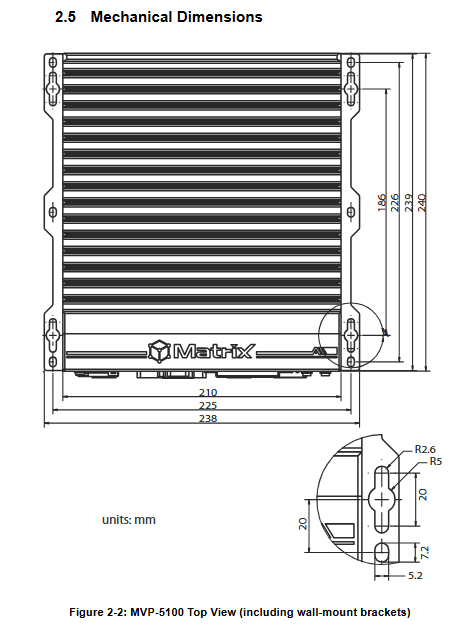
Size and weight: 210 (W) × 240 (D) × 86 (H) mm, total weight 4.1kg; only supports wall mounted installation;
Environmental tolerance:
Standard operating temperature: 0-50 ℃ (0.6m/s airflow); The wide temperature industrial disk can reach -20~60 ℃;
Storage: -40~85 ℃; 95% no condensation at humidity of 40 ℃;
Vibration: 5Grms for SSD models, 0.5Grms for mechanical hard drives; Impact 100G 11ms;
ESD: Contact ± 4KV, air ± 8KV;
Safety certification: UL/cUL, CCC, CB, EMC CE/FCC Class A.
5. Power consumption reference (24V full load test)
The Saiyang model has a full load of about 69W; i3 has a full load of 85W; i5 has a full load of 94W; low-power i7 has a full load of 97W; and 65W high-power i7 has a full load of 144W;
Power selection: 160W adapter is recommended for the entire series, while 220W is required for high-power i7.
Overall hardware structure layout
1. Front panel I/O layout
The drawings are fully labeled with DC power supply, dual DP, DVI, VGA, 6-way USB, 3 Ethernet ports, 4 serial ports DI/O、CFast、 Audio, power/reset buttons, three-way status LED positions, with a comparison table for each interface function.
2. Built in slots and pins on the motherboard
All internal connectors are labeled on both sides of the motherboard, and the core onboard resources are:
Storage: Dual SATA, M.2, Mini PCIe, CFast backplane interface;
Peripherals: Dual I2C sensor pins, GPS 5V power supply, 4-pin temperature control fan pins (12V PWM speed regulation), RTC lithium battery holder, Clear CMOS dust removal jumper;
Expansion: Remote power on/off/reset pin, audio/serial/DI/O cable socket, MXM expansion card 12V auxiliary power supply;
Debugging: Internal USB 2.0, board to expansion board interface.
3. Functional block diagram of the whole machine
Complete display of CPU, H310/C246 chipset bus topology: DMI processor bus, PCIe allocation to Ethernet/M.2/Mini PCIe, SATA storage channel, LPC connection to TPM/Super I/O (NCT6106D), I2S audio, GPIO digital IO, UART serial port, fan temperature control link.
Getting Started quick installation operation
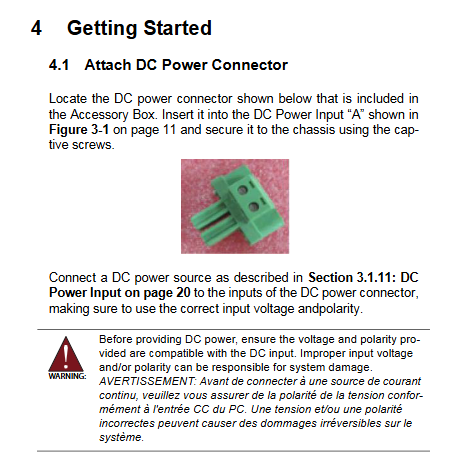
DC power assembly: Use the accessory kit to match the terminals, lock the chassis fixing screws, strictly check the positive and negative poles before powering on, reverse connection will burn the hardware; The power supply must meet the safety standards of LPS/SELV, with a maximum working altitude of 2000m;
Wall mounted installation steps:
Fix the bracket to the chassis with 6 M4 × 6mm screws;
Wall fixing can use brackets with 6 threaded holes or 4 keyholes without screw hanging holes;
Installation requirements: The I/O side should face outward and should not be inverted or obstruct the heat dissipation fins;
Driver installation: Windows drivers can be downloaded from the product page of Linghua’s official website. Required drivers include chipset, graphics card, audio, network card, Intel ME, DI/O drivers.
Appendix Core Function Manual
Appendix B: BIOS Complete Setup Guide
Press DEL to enter BIOS during startup, then press F7 to bring up the one-time startup menu. The six major menus are fully explained:
Main: Basic hardware information, system time and date;
Advanced (core configuration): CPU hyper threading/virtualization SpeedStep、 Power wake-up, serial port redirection, USB storage, TPM2.0, AMT remote management, onboard serial port mode, hardware temperature control fan (manual/automatic/SMART four stage speed regulation), watchdog NVMe、 Network stack;
Chipset: memory parameters, allocation of core graphics memory, SATA/audio/M.2 channel configuration;
Security: administrator/boot password, secure boot;
Boot: Start sequence, quick start, digital lock switch;
Save&Exit: Save/discard settings, factory reset, EFI Shell startup;
Additional CMOS jumper operation: Short circuit for 3 seconds to restore BIOS default and solve startup faults.
Appendix C: Watchdog WDT Development Library
Hardware watchdog is used for automatic restart when programs get stuck, providing Windows C/C++API (initialization, setting second/minute timeout, start stop, feed dog function), DOS/LPC underlying register operation source code, suitable for industrial program fault-tolerant development.
Appendix D: DI/O Digital IO Development Library
Provide Windows read-write 8-in-8-out channel API interface, supporting the development of industrial sensor and relay switch control.
Safety regulations
Mandatory operation requirement: completely power off before disassembly and assembly, restore the chassis cover after maintenance;
Environmental restrictions: Keep away from liquids, high temperature and humidity, and do not cover the heat dissipation fins; High temperature of the body’s heat sink, touch again after cooling down (burn warning);
Battery safety: Equipped with RTC lithium battery, there is a risk of explosion if the model is replaced incorrectly. Waste batteries should be recycled according to lithium metal standards;
Venue: limited to computer rooms/controlled industrial areas only, not suitable for household use, public places, children’s activity areas;
Maintenance restriction: Only authorized engineers are authorized to carry out repairs; Immediately cut off power and stop using if water enters, falls or cables are damaged;
Wiring standard: The power terminal must be tightened according to the specifications, and the equipment casing must be grounded.
Packaging and Accessories Selection
Standard packing: MVP-5100 host, DC power terminal, wall bracket, complete set of screw kit;
Optional accessories: 160W/220W 24V AC-DC power adapter, external temperature control fan module, wireless 4G/5G Mini PCIe/M.2 module.