OMRON NS Series Programmable Terminal Web Interface User Manual
Operating environment (essential conditions)
Category requirements
Applicable PT models NS12-TS01-V2, NS10-TV01-V2, NS8-TV01-V2, NS5 series V2
System program version ≥ 8.0
Network 10Base-T/100Base TX Ethernet
Browser IE6/IE7
System language is not Japanese
NS Web Interface Core Features
Remote monitoring: Real time viewing of PT current screen by browser, not operable
Remote operation: view+mouse click to simulate PT touch, can call the system menu
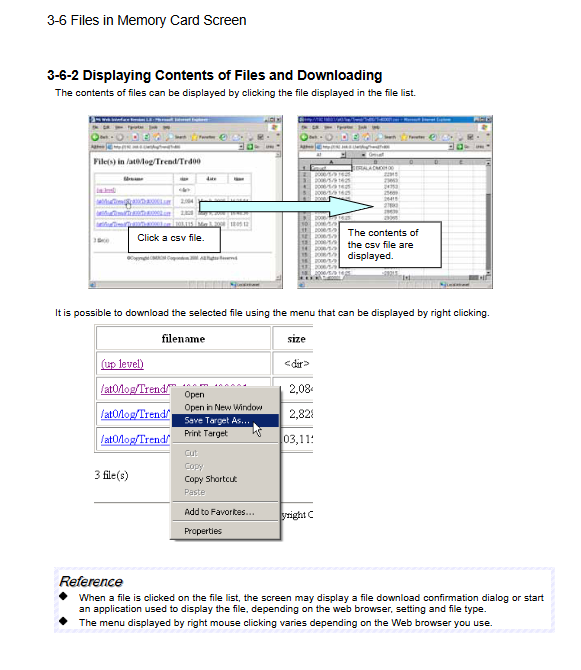
Memory card file management: browsing file lists, viewing content, downloading CSV/BMP files
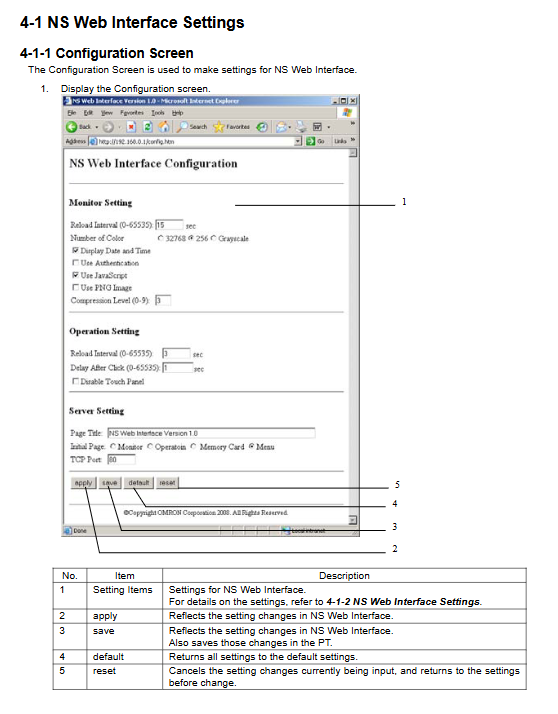
Parameter configuration: refresh interval, color, authentication, port and other settings
Connection and usage steps
PT end configuration
Power on and enter RUN mode, press the four corners of the touch screen to bring up the system menu
Enter the communication page: Enable Ethernet, Enable FTP/Web
Set IP/subnet mask, save and restart PT
Browser connection
Input http://PT The IP address/
Login: default username, default password
Enter the menu page and jump to the monitoring/operation/file/configuration page
Directly access the page URL
|Page | URL|
|Monitoring |/monitor. html|
|32768 color monitoring |/monitor 32k. html|
|256 color monitoring |/monitor 256. html|
|16 level grayscale |/monitor 16.html|
|Operation |/operability. html|
|Memory card |/memcard.exe|
|Configuration |/config.html|
|Menu |/menu.html|
Function interface details
Menu page: Unified entrance, jumping to four major functional pages
Monitoring Page
Auto refresh: default 15 seconds
Color: 32768/256 colors, 16 gray levels
Support displaying/hiding screenshot time
Operation page
Auto refresh: default 3 seconds
Click delay: default 1 second
PT local touch can be disabled to prevent conflicts
Support one click access to system menu
Memory card page
Root directory:/at0
Support viewing files, clicking preview, and right clicking download
Configuration Page
|Category | Key Settings | Default Values|
|Monitoring | Refresh interval, color, authentication, PNG compression | 15s, 256 colors, compression 3|
|Operation | Refresh interval, click delay, disable touch | 3s, 1s, do not disable|
|Service | Page Title, Initial Page, TCP Port | NS Web Interface, Menu, 80|
Apply: temporarily effective; Save: permanently saved; Default: Restore default
Fault and error handling
Solution to Error Information Causes
401 Authorization Required Account/Password Incorrect input default/default
403 Forbidden Memory Card Not Inserted/Damaged Check Memory Card
404 Not Found URL Error Check Address
Function unavailable System<8.0, FTP/Web closed, Japanese system update version, enable function, switch language
Key issues
What are the four hardware and system conditions that must be met to use NS Web Interface?
Answer: ① The terminal is the NS series V2 model; ② System program version * * ≥ 8.0 * *; ③ Enable Ethernet and FTP/Web; ④ The system language is not Japanese.
What are the default refresh intervals for monitoring screens and operation screens? How to choose a more efficient color mode?
Answer: The default monitoring time is 15 seconds, and the default operation time is 3 seconds; Choose 16 levels of grayscale for speed, 32768 colors for image quality, and fixed 32768 colors in PNG format.
How to prohibit on-site personnel from operating on PT and only allow remote control on the web?
Answer: Go to the configuration page Operation Setting, check Disable Touch Panel, click save to disable local touch.