Beckhoff CX50x0 series DIN rail embedded industrial PC
Product Overview
Product positioning and application
CX50x0 is an ultra compact DIN rail mounted embedded PC with no built-in fan, designed specifically for lightweight deployment in control cabinets. Native integration of EtherCAT bus, combined with TwinCAT software, can achieve functions such as PLC, motion control, human-machine visualization, IoT data processing, etc. It is widely used in mechanical automation, process control, and distributed IO systems. The interface of the device itself is not expandable, but various communication and IO modules can be expanded through bus terminals.
Core hardware specifications
The series is divided into two main models: CX5010 (1.1GHz Intel Atom Z510) and CX5020 (1.6GHz Intel Atom Z530), with unified hardware basic parameters:
Memory: Standard 512MB DDR2, CX5020 optional 1GB;
Storage: Comes with a standard 128MB CF card (CompactFlash) as the system and program boot medium, supporting expansion;
Motherboard chipset: Intel SCH US15W, integrated GMA 500 graphics card;
Power supply: nominal 24VDC, allowable voltage range 20.4V~28.8V (-15%/+20%), maximum output of power module 4A;
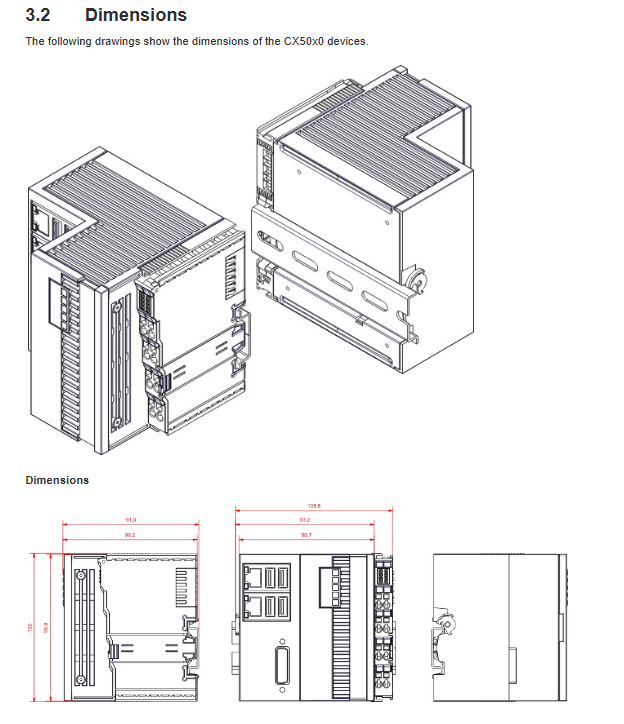
Physical dimensions: 100 × 102 × 92mm, lightweight and compatible with standard DIN rails;
Environmental parameters: working/storage temperature, vibration, and impact all comply with the EN 60068 series standards; Electromagnetic compatibility meets EN 61000-6-2 (anti-interference) and EN 61000-6-4 (emission).
Model classification rules
Model suffix distinguishes bus type, operating system, TwinCAT version:
Bus: 0=E-Bus (EtherCAT terminal), 1=K-Bus (traditional Beifu bus terminal);
System: No system/Windows Embedded CE 6/Windows Embedded Standard 2009 (Win7 requires CX5020+8GB CF+1GB memory);
Software: No TwinCAT/TwinCAT 2 PLC/TwinCAT 2 NC-PTP/TwinCAT 3 XAR.
Onboard components and consumables
Real time clock battery: standard Panasonic CR2032 (3V/225mAh), recommended to be replaced every 5 years, installed in the front cover of the device, and the positive and negative poles should be distinguished during installation. Charging, disassembly, and incineration are prohibited;
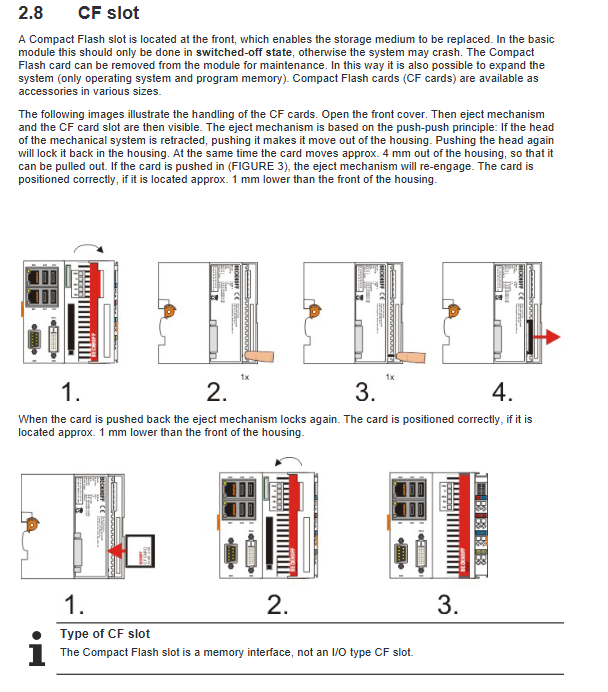
CF card slot: front push-pull slot, can only be plugged and unplugged after power failure, is a storage medium for systems, programs, and persistent data, only recommended to use Beifu industrial grade CF cards;
Onboard interface and wiring specifications
The device integrates a complete set of standard interfaces at the rear, including power supply, communication, video, and peripheral interfaces, and can also be optionally equipped with an extended serial port module.
power supply interface
Adopting spring type terminal blocks, suitable for 0.5-2.5mm ² cables, with a stripping length of 8-9mm. Distinguishing between system power supply and terminal bus power supply with two independent 24V circuits, the PE protection ground must be connected to the cabinet ground; When disconnecting the power supply, prioritize disconnecting the 24V positive pole before disconnecting the 0V to avoid potential damage to the equipment.
DVI-D video interface
Pure digital DVI interface, not compatible with VGA analog signals, requires a dedicated adapter. The default maximum length of the cable is 5m, and it can be extended up to 50m with the Beifu extension accessory. It supports a maximum resolution of 2560 × 1440 and is compatible with mainstream industrial displays.
USB port
There are a total of 4 USB 2.0 ports, with a maximum output of 500mA per port, used for connecting keyboards, mice, USB drives, peripherals, etc. The interface has overcurrent protection.
Dual Gigabit Ethernet ports (X000/X001)
Two independent Intel 82574L Gigabit Ethernet ports, without built-in switches, supporting 100/1000Mbps adaptive:
Port 1 (default): assigned for EtherCAT real-time communication;
Port 2: Assigned to the upper IT network;
Indicator light: LINK/ACT yellow light constantly on=link connected, flashing=data transmission; SPEED green light=10/100M, red light=1000M.
Optional serial interface
The equipment can be equipped with expansion modules, which are divided into two categories:
CX50x0-N030: 9-pin DSUB RS232 interface, maximum baud rate of 115kbit, complete serial port signal;
CX50x0-N031: 9-pin DSUB RS422/RS485 multiplexing interface, factory default half duplex, terminal resistance enabled, can be configured through system parameters.
Installation requirements for passive terminals
When connecting passive terminals of E/K-Bus, it is forbidden to directly mount them on the power output terminal. The specified topology must be followed, otherwise it will cause abnormal bus communication.
Installation, power on and basic operation
Transportation and installation requirements
Transportation: Use the original packaging. After transportation in a temperature difference/low temperature environment, it needs to be allowed to stand at room temperature. If condensation occurs, it must wait for more than 12 hours before powering on;
DIN rail installation: The equipment is installed with a snap fit, and a 30mm ventilation space must be reserved above and below. Only horizontal installation is allowed, and vertical/side installation may cause poor heat dissipation and equipment overheating;
Installation environment: Avoid strong interference sources such as high-power motors and frequency converters.
Power on/off specifications
Power on: Connect the 24VDC power supply, and the device will automatically start;
Power off: TwinCAT and the operating system must be turned off normally within the system before cutting off the external power supply; Direct hard power outage can easily cause data damage and program loss on CF cards.
BIOS system settings
The device is equipped with Phoenix Ward BIOS, which has been optimized at the factory. The Windows CE system prohibits modifying BIOS parameters, which can easily cause system crashes. The complete BIOS menu includes: standard CMOS, advanced BIOS, chipset, peripherals, power supply PnP、 Hardware status, frequency and voltage eight modules, support loading factory safety defaults, optimize default configurations, can set boot options, cache, virtualization, temperature control, interrupt resources and other parameters. Key features: Can turn on/off CPU virtualization, hardware temperature control (DTS), HPET high-precision timer; Support setting hard disk working mode, boot sequence, password protection, etc.
EtherCAT redundancy function
The CX50x0 dual port supports EtherCAT cable redundancy (ring network) to enhance bus communication reliability, making it suitable for high availability scenarios such as production lines and assembly lines
Hardware requirements: Install EtherCAT couplers such as EK1100 and EK1110 to form a ring network topology;
Software configuration: Install the exclusive redundant plugin of Beifu and import authorization, configure the backup network port in TwinCAT System Manager;
Fault logic: When a single cable fails, the ring network automatically switches paths and the bus equipment continues to operate; If two lines are disconnected at the same time, the equipment in the faulty section will shut down;
Diagnosis: Bus faults will prompt LNK_MIS link loss codes in the software for quick troubleshooting.
1 second UPS (instantaneous power outage protection) core function
This is the core feature of CX50x0, which is composed of onboard supercapacitors to form a 1-second power-off backup power supply. It has no external battery and is specifically designed to save critical persistent data in the event of a power outage.
working principle
After the mains/24V power is cut off, the supercapacitor can maintain short-term power supply to the device. The system automatically writes the PERSISTENT variable to the CF card and performs a quick shutdown to avoid data loss. Due to the aging of capacitors, the upper limit of reliable data storage is 1MB, and storing large capacity files is prohibited.
Configuration process
BIOS settings: Enable SUSV (1-second UPS) function in the PC Health Status menu;
System settings: Windows systems need to configure write filters (EWF/FBWF) to add exceptions to the TwinCAT boot directory, ensuring that data can be written to the CF card;
Program configuration: call FB_S_UPS function block in TwinCAT to configure power-off action, timeout and recovery time;
Data definition: Declare the variable that needs to be powered off and saved as VAR PERSISTENT.
Working mode and data verification
The function block supports four working modes: power-off data storage and shutdown, data only without shutdown, direct shutdown, and only detecting power status. The system will automatically generate *. bootdata data data files and backup files, which can be used to verify whether persistent variables are loaded properly through the SYSTEMS INFOTYPE and PlcAppSystemInfo structures; You can also set whether to automatically clear invalid backup files through the registry.
Precautions
The 1-second UPS only supplies power to the main control board and does not support E/K-Bus terminal modules. Data will immediately become invalid after the bus is powered off;
During power outages, try to minimize non essential tasks, reduce CPU load, and ensure data writing is completed.
Status indicator lights and fault diagnosis
Basic CPU module indicator light
PWR (green): The power supply is normally on;
TC: Green=TwinCAT running, blue=configuration mode, red=stop;
HDD (red): Flashing indicates CF card read and write;
FB1/FB2: Fieldbus status lights, whose functions vary with the expansion module.
Bus power indicator light (divided into K-Bus/E-Bus)
K-Bus mode:
Us/UP 24V: Two power supplies are normal and the green light is always on;
K-BUS RUN: Communication is normal and the green light is always on;
K-BUS ERR (red): Flashing fault, locate the problem through flashing codes (distinguish fault codes, parameter codes), and troubleshoot bus disconnections, terminal faults, initialization errors, etc;
E-Bus (EtherCAT) mode:
L/A light: off=bus not connected, constantly on=no data, flashing=normal data transmission.
Common faults and troubleshooting
The device is completely unresponsive: Check the power supply and fuses, and if there are still abnormalities, contact after-sales service;
Unable to boot up: Restore BIOS default settings, investigate CF card damage;
CF card read/write error: replace industrial CF card for testing;
System running but abnormal control: Investigate lower level software, external IO, and on-site devices.
Shutdown, disassembly, and scrapping
Shutdown process: Shut down the system normally → Cut off the 24V power supply → Remove all cables in sequence;
Guide rail disassembly: Release the device side buckle, remove the module as a whole, and prohibit violent disassembly of the body;
Scrap disposal: The whole machine is classified and recycled as electronic waste. The CR2032 battery on the motherboard is isolated separately and handed over to a professional battery recycling organization. The circuit board, metal, and plastic are classified and disposed of.
Accessories, certification
Optional accessories
CF card: Provides 128MB~16GB multi specification industrial grade CF cards, supporting FAT16/NTFS formatting;
Adapter: DVI to VGA adapter cable;
Spare parts: original CR203 clock battery, various wiring terminals.
Product Certification
The entire series has passed international certifications such as CE, UL, FCC, GOST-R, etc., and meets Class A industrial equipment electromagnetic standards, which can be used in global industrial scenarios.