Beckhoff CP27xx Embedded Panel PC User Manual
Product Overview
1. Hardware basic configuration
Display specifications: There are a total of 8 sizes, covering 12/12.1/15/15.6/18.5/19/21.5/24 inches, with different resolutions and screen ratios, and a standard multi touch screen.
Body structure: Aluminum alloy front panel (optional stainless steel panel, suitable for high hygiene scenarios), rear clamping wrench, supporting quick embedded installation of control cabinet; Equipped with an independent cover plate, it can facilitate the maintenance of batteries and storage media.
Core hardware: Equipped with Intel processor, 3.5-inch motherboard, dual CFast storage slots, 24VDC power supply, some models can be optionally equipped with external button expansion module.
2. Standard interface (back interface area)
All interfaces are centralized at the bottom of the device, with complete pin definitions attached:
X103 (DVI): A pure digital video interface used for external displays.
X104~X107 (4-channel USB): divided into two generations of models, with all 0010 versions using USB 2.0; 0020 version 2-channel USB 3.0+2-channel USB 2.0.
X108/X109 (Dual Gigabit RJ45 Ethernet Port): Supports 100/1000Mbps, with a maximum length of 100m for Ethernet cables; adapts to different EtherCAT cycles depending on the port controller: X109 supports ≤ 1ms cycle+distributed clock, X108 adapts>1ms cycle. The dual indicator lights on the network port display the connection status and transmission rate respectively.
X110 (8-pin power interface): Main power supply 24VDC (5-pin negative pole, 6-pin positive pole); 1/2 pins can be connected to an external UPS battery, 3 pins have a 27V UPS output, 4 pins have a protective ground, 7 pins have a PC-ON start stop input, and 8 pins have a power status output; The matching plug model C9900-P926 is compatible with cables up to 1.5mm ².
3. Optional extension configuration
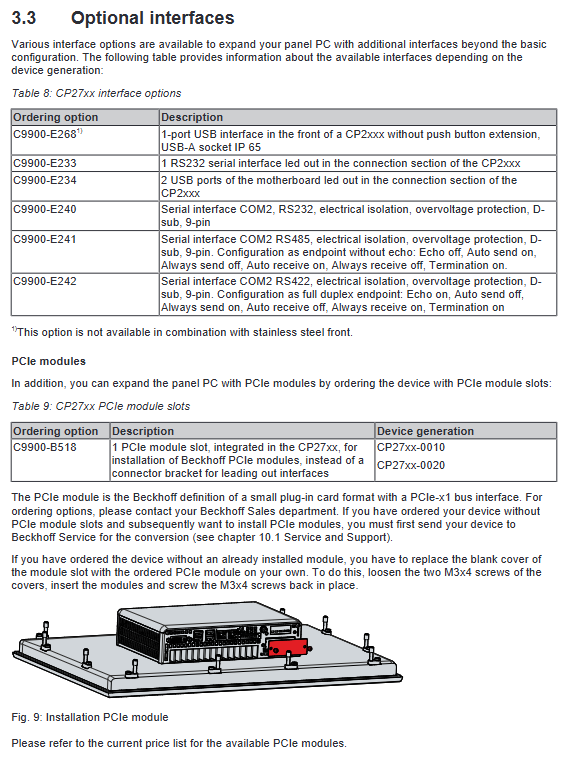
External interface: expandable front USB, RS232/RS422/RS485 serial port (with isolation and overvoltage protection).
PCIe module slot: optional for some models, used to expand functional modules.
Sealing accessories: Stainless steel panel models are equipped with silicone sealing rings, which can be ordered separately for replacement.
4. Nameplate information
The nameplate indicates the equipment model (the last four digits represent the equipment generation), serial number, production date CPU、 Complete hardware information such as memory, storage, interface MAC address, various certifications, and accessory models.
5. Software adaptation requirements
According to the equipment generation regulations, the minimum compatible version of TwinCAT is recommended to use the latest version to ensure full functionality and performance.
Equipment debugging and installation (commissioning process)
1. Transportation and unpacking
The equipment is anti vibration but not resistant to strong impacts and large temperature differences, and must be transported in its original packaging; If condensation occurs due to temperature difference, it needs to be allowed to stand for 12 hours before being powered on. After unpacking, check the goods and inspect the appearance for damage. If there are any abnormalities, immediately contact after-sales and keep the original packaging.
2. Requirements for cabinet installation
The wall thickness of the cabinet opening is 1-5mm for conventional models and 1-3mm for stainless steel panel models.
Space requirement: Reserve 5cm of ventilation space above and below the equipment to avoid overheating; Avoid strong light reflection and direct sunlight.
Installation method: Fix with a rear clamping wrench, use a 3mm hex wrench for operation, and check the sealing after installation.
3. Touch screen usage and protection
Only operate with bare hands or wearing gloves without hard particles; Optional factory protective film is available, and standard film sticking and tearing steps are provided; Brightness, screensaver, and cleaning modes can be set through the Display Control Tool.
4. Cable and plug assembly
Elaborate on the assembly and disassembly process of the 8-pin power plug and stress relief housing, and standardize the operation steps such as wire stripping, crimping, wiring, and snap fasteners.
5. Grounding specifications
Simultaneously perform protective grounding and functional grounding, with a grounding wire cross-sectional area of * * ≥ 4mm ² * *; Following the EN 60204-1 standard, the power supply is 0V and PE equipotential, and the external equipment maintains the same potential to ensure personal safety and EMC electromagnetic compatibility.
6. Wiring and power supply rules
Operation sequence: Ground first → Connect all data lines → Finally connect 24VDC power supply.
Electrical parameters: Input voltage range of 22-30VDC, equipment terminal voltage shall not be lower than 22V; maximum power supply circuit fuse 4A.
UPS configuration: Can be paired with two original factory external battery packs, C9900-U330 and C9900-U332, supporting power-off endurance and can be linked to a second monitor.
7. Power on/off specifications
It is strictly prohibited to directly cut off power during operation, which may cause data loss and premature aging of UPS batteries.
Support remote start stop of PC-ON pin: input 0V for startup and 24V for shutdown; The power status output can be linked to an external contactor, with a maximum load of 0.5A.
The new machine requires manual installation of external hardware and UPS matching drivers.
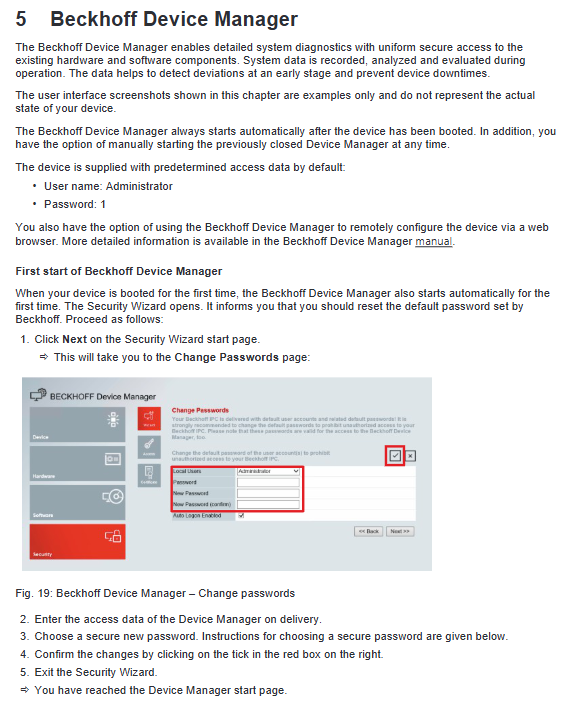
Beckhoff Device Manager (Device Management Tool)
Function: The device automatically starts when powered on, used for hardware/software diagnosis, status monitoring, remote configuration, predicting faults in advance, and reducing downtime.
Default account: username Administrator, password 1; The default password must be changed for the first startup, and it is recommended to set the BIOS password.
Startup method: Local browser can be manually invoked by entering localhost/config.
Password requirement: The length should not be less than 10 characters, combined with uppercase and lowercase letters, numbers, and special characters to ensure security.
Equipment shutdown, disassembly, and scrapping
Power off and disconnection process: Normal shutdown → Cut off 24V power supply → Remove power and data cables in sequence → Finally disconnect the grounding; Operation is prohibited during thunderstorms.
Cabinet disassembly: First, loosen and reset the clamping wrench, then remove the equipment, and ensure proper fall protection throughout the process.
Scrap disposal: After dismantling the entire machine, strictly classify and recycle it according to local electronic waste regulations; Data must be cleared or destroyed before the storage medium is scrapped.
Daily maintenance and component replacement
1. Cleaning standards
Before cleaning, use the Display Control Tool to activate the cleaning mode (adjustable for 5-120 seconds) to prevent accidental touch.
Can use glass cleaner, alcohol, gasoline; Grinding agents, steel wires, high-pressure water guns, steam equipment, and compressed air are prohibited.
The edges of the screen glass must be cleaned to avoid touch malfunctions caused by residual liquid; The working environment should be maintained at 0-55 ℃.
2. Preventive replacement cycle (recommended)
Motherboard battery, UPS battery: 5 years
Mechanical hard drive: 5 years (shortened cycle in high temperature environment)
Fan: 7 years
CFast/SSD and other flash media: 10 years
3. Anti static requirements
ES electrostatic protection (such as anti-static wristbands, anti-static countertops, etc.) must be taken into account when disassembling and replacing components to prevent electrostatic breakdown of electronic components.
4. Operation of replaceable components
Motherboard battery: model CR2032 (3V lithium manganese battery), strictly distinguish between positive and negative poles; Do not charge, disassemble, or put into fire, and recycle waste batteries separately.
CFast storage medium: With a pop-up design, use Beckhoff Service Tool (BST) to backup the system image before replacement; If there is no backup, please contact after-sales to obtain the original system.
Silicone sealing ring: Only equipped with stainless steel panel models, corresponding accessories can be ordered for replacement after aging.
Troubleshooting
Organize common faults, causes, and solutions:
Handling methods for the causes of fault phenomena
Equipment completely unresponsive, power interruption, cable failure, power supply and wiring inspection, ineffective contact with after-sales service
Unable to complete power on self-test, BIOS settings abnormal, restore BIOS default settings, still faulty, contact after-sales service
System startup but abnormal control function. Contact the device/software manufacturer for software or external device issues
Black screen, intermittent abnormal function, backlight damage, internal hardware failure. Contact after-sales maintenance for repair
Touch screen malfunction, poor grounding, operator not effectively grounded, re grounded reliably, personnel in contact with the ground
TwinCAT USB communication error default cycle 10ms, adjust cycle to 50-80ms
Note: Screen pixel defects are a normal production phenomenon and are not considered a malfunction.
Core technical parameters
Electrical: Rated 24VDC, working voltage 22-30VDC, built-in fTPM 2.0 safety chip.
Protection: IP65 front panel, IP20 back panel.
Mechanical performance: Compliant with EN 60068 standard, with corresponding anti vibration ability and anti impact 5G (continuous for 30ms).
Electromagnetic compatibility: anti-interference EN 61000-6-2, radiation emission EN 61000-6-4.
Temperature and humidity: working temperature 0~55 ℃, storage and transportation temperature -25~65 ℃; Relative humidity ≤ 95%, no condensation.
Weight: Different sizes and panel materials (aluminum/stainless steel) have different weights.