Beckhoff CP60xx Embedded Industrial Control Panel
Product Introduction
1. Product purpose and structure
CP60xx is an embedded industrial control panel for control cabinets, with an aluminum alloy shell, integrated TFT display screen, optional touch screen/touchpad, and optional thin film keyboard; Integrated control cabinet panel installation, specifically designed for mechanical and factory automation scenarios.
2. Interface and Pin Definition
The core adopts CP Link coaxial interface (BNC connector) for communication and power supply, which is divided into two paths:
CP Link A (data): pin 1 RXD, pin 2 grounded (GND);
CP Link B (data+power supply): 1 pin TXD/power supply, 2 pins grounded (GND);
Protective grounding: The rear of the aircraft is equipped with grounding bolts, which require low resistance and reliable grounding.
3. CP Link Cable Kit
Adopting dual coaxial cable transmission, a single set includes 2 BNC interface cables, with a maximum wiring distance of 100m between the panel and industrial PC. Multiple specifications of cables ranging from 3m to 100m are provided, with different lengths corresponding to different cable models and minimum bending radii (ranging from 25mm to 50mm); The cables and interfaces are marked in red for docking and positioning.
4. Product series and dimensions
It is divided into four series: CP600x, CP601x, CP602x, and CP603x, covering four display screen specifications: 6.5-inch, 10 inch, 12 inch, and 15 inch; The document specifies in detail the overall dimensions of each model, the opening size of the control cabinet, and the panel thickness (2-5mm), all in millimeters.
Installation Guide
1. Transportation and unpacking
The equipment has average vibration resistance and is not resistant to severe impacts. The original packaging must be used for transportation.
Transport in environments with large temperature differences is prone to condensation and needs to be allowed to settle at room temperature; If condensation occurs, let it stand for 12 hours before powering on.
Unboxing process: Keep the original packaging for secondary transportation; Check the list of goods; Check the appearance for transportation damage; If there is any damage or discrepancy in the goods, please contact Beifu after-sales immediately.
2. Panel installation (embedded control cabinet)
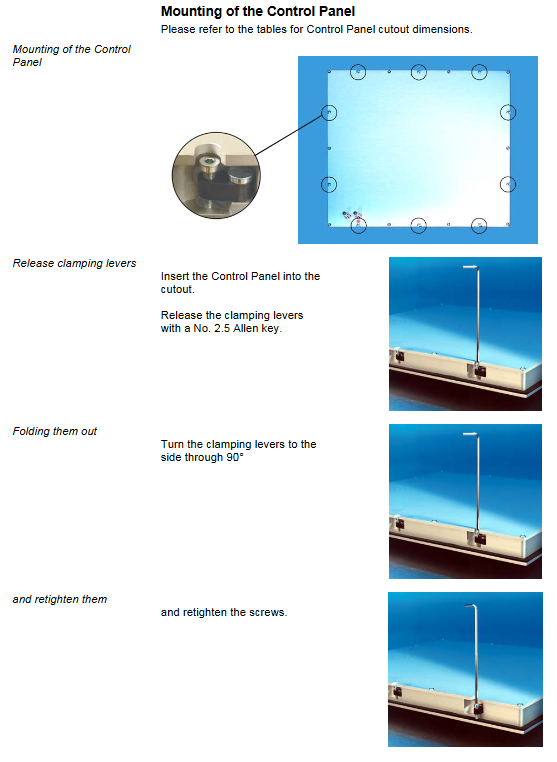
Use a 2.5mm hex wrench to loosen the clamping wrench and insert the panel into the control cabinet opening;
Rotate the clamping wrench 90 ° and tighten the screw again to complete the fixation.
3. Wiring specifications (safety requirements+operating sequence)
(1) General taboos
Do not plug or unplug cable connectors in explosive hazardous areas or during thunderstorms;
The plug and unplug connector must be held by hand, and pulling the cable is strictly prohibited.
(2) Wiring steps
Completely cut off the power supply to the control panel;
Connect all CP Link cables in sequence, align with the red markings for precise docking, and tighten all connectors;
Ensure reliable connection of protective grounding;
After all wiring is completed, restore power to the equipment.
Operation and usage instructions
1. Power on/off rules
The device does not have an independent power switch and automatically starts when powered on by CP Link.
It is strictly prohibited to cut off power during software operation: the device is equipped with CF card storage, and the software will continue to read and write data. Forcefully cutting off power can easily cause file damage and data loss; Some accounts do not have shutdown permissions, which increases the risk of unauthorized power outages.
2. Touch and button operation specifications
Thin film keyboard: Only fingertip operation is allowed, and the use of touch pens or hard objects for pressing is prohibited.
Touch screen/touchpad: can be used with fingertips or a dedicated stylus; When operating with gloves, the surface of the gloves must not contain hard particles such as metal debris and glass shards.
3. Key Function Description
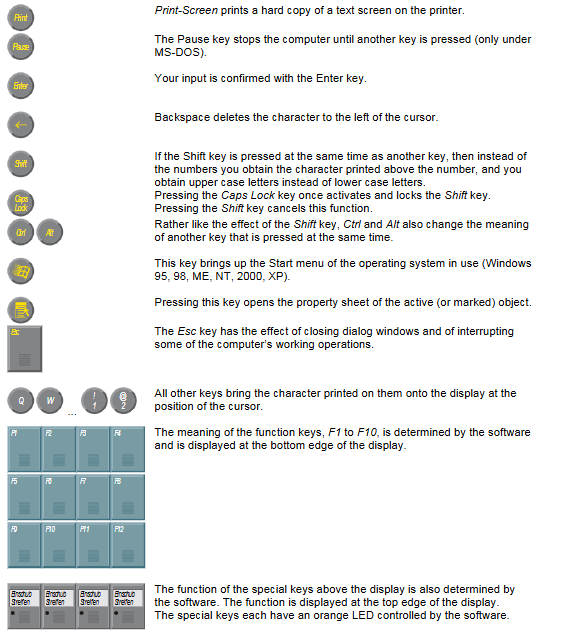
Covering a full set of standard button functions: directional keys Home/End、PgUp/PgDn、Tab、Del、Ins、Print Screen、Pause、Enter、Backspace、Shift、Caps Lock、Ctrl、Alt、Esc、F1~F12 Function keys, etc.
System shortcut keys can trigger Windows system menus and object property windows;
The function keys and panel specific special key functions are defined by the supporting software, and the special keys are equipped with software controllable orange LED indicator lights;
There are differences in the number of buttons on different models of panels.
Maintenance, emergency response, and disposal
1. Daily cleaning
First, disconnect the power supply of all devices to avoid accidentally touching the buttons; Clean the front of the panel with a soft damp cloth; Prohibit the use of corrosive cleaning agents, diluents, frosted tools, and hard objects to prevent scratching the screen and panel.
2. Equipment maintenance
The main body of the machine is designed to be maintenance free.
Replacement of display screen fluorescent tubes: The tubes are consumables, and 6.5/12/15 inch tubes can be replaced by professionals, requiring partial disassembly of the screen; The document specifies the disassembly steps by model and provides the specific lamp accessory models (C9900-L360/L364/L366).
3. Emergency response
When a fire occurs, use dry powder fire extinguishers or nitrogen gas to extinguish the fire.
4. Scrap disposal
Complete disassembly of the entire machine and metal recycling of the metal casing;
Electronic components such as lamps and circuit boards are strictly classified and disposed of in accordance with local electronic waste regulations.
Troubleshooting and technical parameters
1. Troubleshooting
Clearly identify common faults, causes, and solutions, and specifically state that pixel defects in TFT display screens are a normal production phenomenon and not a quality issue. Complaints will not be accepted.
Fault phenomenon, fault cause, and handling measures
After the industrial control computer is started, there is no response on the panel. The industrial control computer is powered off and the CP Link cable is not connected/connected incorrectly. Check the power supply; Reconnect the cable according to the red mark, but if there are still abnormalities, contact after-sales service
The industrial computer cannot start normally. There is a floppy disk in the floppy drive, the hard disk is damaged, and the BIOS settings are incorrect. The floppy disk has been removed; Detecting hard drive, restoring BIOS default settings, unable to resolve, contact after-sales service
System startup but abnormal control function, software or external device failure. Contact the equipment/software manufacturer
Soft drive read/write error, damaged floppy disk, floppy drive failure, replacement of floppy disk; Drive malfunction, contact after-sales service
The screen is black/flashing, the function is intermittent, the screen light tube is damaged, and there is a hardware failure inside the panel. Replace the fluorescent tube; Hardware malfunction, contact after-sales service
2. Core technical parameters
Operating environment: working temperature range of 0-55 ℃, storage and transportation temperature range of -20~65 ℃; The maximum relative humidity is 95%, with no condensation.
Mechanical performance: Complies with EN 60068 standard, resistant to vibration and 5G impact (continuous for 30ms).
Protection level: IP65 on the front and IP20 on the back.
Power supply method: Unified power supply through CP Link coaxial cable.
Electromagnetic compatibility: anti-interference complies with EN 61000-6-2, and radiation emission complies with EN 61000-6-4.
3. Product certification
Passed FCC certification in the United States and RF certification in Canada, it belongs to Class A industrial digital equipment; Commercial environments are compliant, while civilian environments are prone to radio frequency interference.