Beckhoff CP72xx series panel PC
Product Overview
1. Product positioning and hardware configuration
CP72xx is a cantilever mounted panel PC equipped with Intel processor, DDR4 memory, 2.5-inch hard drive/SSD, standard 3.5-inch motherboard, single bay storage, and 24VDC power supply.
Display screen specifications:
12 inches: 800 × 600 (4:3)
15 inches: 1024 × 768 (4:3)
19 inches: 1280 × 1024 (5:4)
2. Body structure
Main components: side cover plate (for battery maintenance and storage media), nameplate, interface compartment, cantilever adapter, cantilever tube, touch screen display.
3. Interface Description (Basic+Optional)
(1) Standard standard interface
The interfaces are concentrated in the interface compartment at the rear of the fuselage, and can be accessed by removing the M4 screws and plastic cover plate.
X101 12 pin circular power interface: main power supply+grounding+UPS external battery interface. Supports 8-core/12 core cable wiring, with main power supply of 5-pin (0V) and 6-pin (24V); 1/2 pin can be connected to an external UPS battery (only compatible with C9900-U330 battery pack); The 4-pin is a protective ground, and there are also PC-ON start stop input and power status output pins.
X106 RJ45 Ethernet port: Push pull IP65 socket, available in three hardware models, supporting speeds of 100/1000/2500Mbps, with a maximum network cable length of 100m, compatible with EtherCAT (cycle ≤ 1ms).
(2) Optional extension interfaces (differentiated by ordering model)
The second network port, RS232/RS422/RS485 serial port, USB 2.0/3.0 and other IP65 protection interfaces can be expanded, and different device generations support different expansion models.
4. Nameplate information
The nameplate indicates the device model (the last four digits represent the device generation), manufacturer information, certification mark, network port MAC address, touch screen, storage, power supply, memory, etc CPU、 Core parameters such as motherboard, production date, serial number, etc.
5. Button functions
Integrated standard computer key system: directional keys Home/End、PgUp/PgDn、Tab、Del、Enter、Backspace、Shift、Caps Lock、Ctrl、Alt、Esc、 Function keys F1~F12; The system button can trigger the system menu and property window; Special buttons paired with TwinCAT software, equipped with software controllable LED indicator lights.
6. Supporting cables and accessories
Cable: Provides IP65 protection power cables, network cables, USB cables of different lengths, with complete specifications (2m~50m multiple levels).
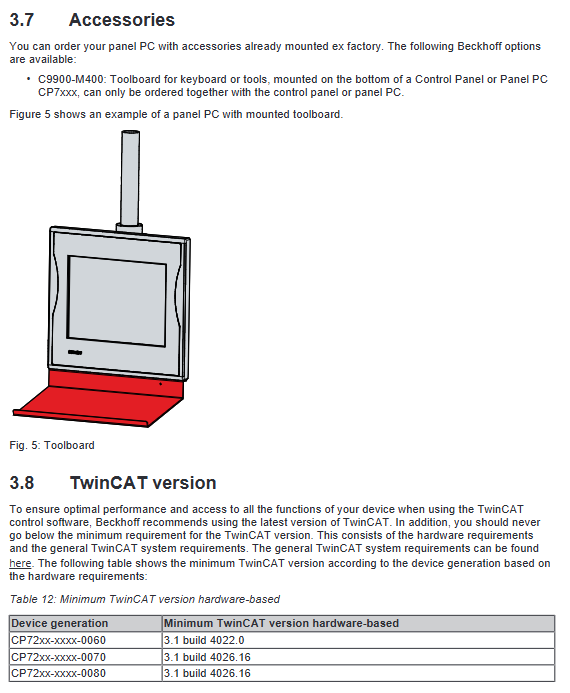
Accessories: C9900-M400 tool board, can be installed at the bottom of the panel; Multiple cantilever adapters with different installation angles and directions, compatible with 48mm cantilever pipes.
7. Software adaptation requirements
According to the device generation regulations, the minimum compatible version of TwinCAT is recommended to use the latest version of TwinCAT to ensure complete functionality and performance.
Equipment debugging and commissioning
1. Transportation and unpacking
The equipment is resistant to vibration but not to severe impact, temperature difference condensation, and must be transported in its original packaging; When condensation occurs due to a large temperature difference, it needs to be left to stand for 12 hours before being powered on.
Unpack and inspect the outer packaging, integrity of the goods, and appearance for damage. If there are any abnormalities, immediately contact Beifu after-sales service; Keep the original packaging for secondary transportation.
2. Installation specifications
The equipment is designed specifically for cantilever systems and comes standard with a rotatable adapter. Additional adapter accessories such as bottom mount and adjustable pitch can also be purchased; Installation requirements:
The screen height ensures visibility for operators and avoids direct sunlight;
The installation torque of the cantilever tube is strictly controlled at 3Nm;
Avoid harsh environments such as extreme temperature and humidity, dust, and water accumulation.
3. Wiring and Grounding (Strong Electrical Code)
Grounding requirements: Protective grounding and functional grounding must be carried out. Functional grounding should use ≥ 4mm ² wires to avoid electric shock and electromagnetic interference, and meet the EN 60204-1 standard; The PE of the entire system remains consistent with 0V potential, with no potential difference.
Wiring sequence: first complete grounding → connect all data lines → finally connect 24VDC power supply.
Power supply requirements: rated 24VDC (fluctuation range 22-30VDC), maximum power line diameter of 1.5mm ², ensuring interface voltage not lower than 22V.
UPS external: Only compatible with official C9900-U330 battery pack, strictly follow the wiring diagram for wiring.
Taboo: Do not plug or unplug cables during thunderstorms; It is strictly prohibited to use non original battery packs.
4. Power on/off and system settings
Power on/off rules: The system must be shut down normally and the software must be exited before cutting off the power; It is strictly prohibited to cut off power directly, as it may result in data loss and significantly shorten the lifespan of UPS batteries.
PC-ON control: The system can be remotely started and stopped through this pin, starting at 0V and shutting down at 24V; The power status output signal can be linked to an external contactor, with a maximum output load of 0.5A.
Network security: Protective measures must be deployed before accessing the public network.
Drivers and UPS software: After the new machine is powered on, external hardware drivers need to be installed by oneself; Models with UPS function require the installation of corresponding UPS supporting software.
5. Touch screen operation and protection
Operation method: Only operate with bare hands or wearing gloves without hard particles; Do not touch sharp or hard objects.
Optional factory protective film, with complete film application steps.
Beckhoff Device Manager (Device Management Tool)
Function: The device automatically starts when powered on, used for hardware/software diagnosis, status monitoring, remote configuration, predicting faults in advance, and reducing downtime.
Default account: username Administrator, password 1; The security wizard will pop up when starting for the first time, and the default password must be changed.
Startup method: Local browser can be manually invoked by entering localhost/config.
Password security standard: Password length ≥ 10 characters, combined with uppercase and lowercase letters, numbers, and special symbols; It is also recommended to set BIOS/UEFI password.
Equipment shutdown, disassembly, and scrapping
1. Power off and rewiring process
Shut down the system normally → disconnect the external 24V power supply → unplug the power cord → mark and remove all data cables → finally disconnect the grounding; Operation is prohibited during thunderstorms.
2. Cantilever disassembly
Before dismantling the cantilever tube, it is necessary to secure the equipment to prevent it from falling; Loosen the screws, remove the tube body, and reset the fasteners according to the steps.
3. Scrap disposal
Strictly comply with local regulations on electronic waste recycling, classify and dispose of complete machines and electronic components.
Daily maintenance and component replacement
1. Cleaning standards
Before cleaning, use the Beckhoff Control Tool to activate the cleaning mode (5-120 seconds optional) to prevent accidental touch.
Glass cleaner, alcohol, gasoline, etc. can be used; It is strictly prohibited to use abrasive cleaners, high-pressure water guns, steam cleaning machines, compressed air, and hard scraping tools.
The edges of the screen glass must be cleaned to avoid touch failure caused by residual liquid; The working environment temperature should be maintained between 0 and 45 ℃.
2. Preventive replacement cycle (recommended)
Motherboard battery, UPS battery: 5 years
2.5-inch/3.5-inch mechanical hard drive: 5 years
Fan: 7 years
SSD/CFast/flash storage: 10 years
Shorten the replacement cycle of hard drives in high temperature environments.
3. ESD anti-static requirements
Disassembling and replacing parts must be equipped with anti-static protection measures (such as anti-static wristbands, anti-static countertops, and conductive floor mats) to prevent electrostatic breakdown of electronic components.
4. Component replacement operation
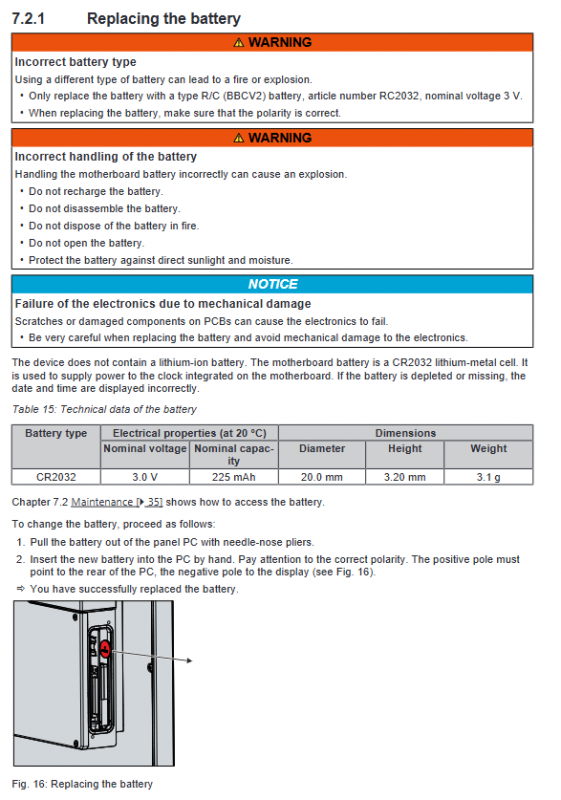
Motherboard battery: model CR2032 (3V), strictly distinguishing positive and negative poles, non rechargeable, disassembled, and put into fire; Separate recycling of waste batteries.
Storage media (hard drive/SSD/CFast): enter and remove from the side cover; Use Beckhoff Service Tool (BST) to backup the system image before replacement; Media failure can be resolved by contacting after-sales service to obtain the original system image.
Troubleshooting
Organize common faults, causes, and solutions:
The whole machine has no response: Check the power supply and cables, and if there are still abnormalities, contact Beifu after-sales service.
Unable to complete power on self-test: Restore BIOS default settings, if ineffective, contact after-sales.
System startup but abnormal control function: The fault is caused by supporting software or external devices. Contact the device/software manufacturer.
Screen black/intermittent operation: Display backlight or internal hardware damage, contact after-sales service.
TwinCAT USB communication error: Adjust the system cycle from the default 10ms to 50-80ms.
Core technical parameters
Power supply: 24VDC, operating voltage range 22-30VDC; Built in fTPM 2.0 security chip.
Protection level: IP65 for the entire machine.
Anti vibration and anti impact: Complies with EN 60068 standard, with specified vibration and 5G anti impact capability (lasting for 30ms).
Electromagnetic compatibility: anti-interference EN 61000-6-2, radiation emission EN 61000-6-4.
Temperature and humidity: working temperature 0~45 ℃, storage and transportation temperature -20~65 ℃; The maximum relative humidity is 95%, with no condensation.