ADLINK MXC-6600 series high-performance fanless extended industrial computer
Product Overview and Core Positioning
1. Product positioning
MXC-6600 is the flagship fanless embedded industrial control of Linghua Matrix, equipped with Intel 8/9 generation mobile high-performance processors, continuing the passive cooling architecture of aluminum fins, supporting multiple PCIe Gen3 extensions, targeting machine vision, high-precision testing, high-end automation of production lines, and edge AI computing; Support the optional hot swappable fan module to solve the bottleneck of high power acquisition/graphics card heat dissipation, and the whole machine is compact and compatible with the control cabinet.
2. Core Characteristics
1. Processor layer selection: Xeon E-2276ME/i7-9850HE/i5-8400H/i3-9100HL four level CPU;
2. Dual DDR4 memory slots, maximum 32GB;
3. Three independent displays (2 x DP+++1 x HDMI), single channel maximum 4K@60 ;
4. Rich front-end I/O: 6 serial ports, 8DI+8DO, dual gigabit network, multiple USB, CFast;
5. Flexible backplane: 2 slots/4 slots for expansion, PCIe x16+x4/PCI hybrid slots;
6. Multi layer storage: built-in 4-channel SATA (RAID0/1/5/10)+front-end CFast+M.2 NVMe;
7. Built in MiniPCIe+dual USIMs, supporting 4G/WiFi wireless;
8. TPM 2.0 hardware security encryption, hardware watchdog WDT;
9. Wide voltage 9-32VDC DC power supply, industrial wide temperature selection;
10. Complete development APIs for WDT and DIO under Windows/Linux.
3. Applicable scenarios
Machine vision inspection, high-precision data acquisition equipment, high-end factory automation, intelligent transportation, edge computing, multi-channel measurement and control platform.
Hardware differentiation of all series models (two major base plate specifications)
1. Naming convention for suffixes
-662X/6621/6622/6623: * * 2-slot backplane * * (PCIe x16+PCIe x4), width 165mm, weight 4.6kg
-664X/6641/6642/6643: * * 4-slot backplane * * (PCIe x16+2 x PCIe x4+1 x standard PCI), width 206mm, weight 4.9kg
2. CPU version division
1. MXC-662X/664X: Xeon E-2276ME/i7-9850HE (45W, high computing power)
2. MXC-6621/6641: Same as Xeon/i7 platform
3. MXC-6622/6642:i5-8400H
4. MXC-6623/6643: i3-9100HL (25W low power consumption)
3. Unified basic hardware (universal across the entire series)
-Chipset: CM246 mobile platform;
-Memory: standard 4GB DDR4 2400, dual SODIMM up to 32GB;
-Network port: Intel i219+i211 dual gigabit, supporting iAMT, PCIe, IEEE1588;
-Serial port: COM1/2 BIOS switch RS232/422/485, COM3~6 fixed RS232;
-USB: 2xUSB3.1 Gen2+2xUSB3.1 Gen2+4xUSB2.0+1 built-in USB;
-Digital IO: 8-channel DI, 8-channel open drain DO (non isolated 3.3V);
-Storage: 2 built-in SATA, optional expansion of 2 channels, supports RAID; Pre installed CFast Type II; M.2 2280 NVMe/SATA;
-Wireless expansion: Full height Mini PCIe, M.2 slot, each equipped with 1 way of USIM card;
-Safety: TPM2.0, 5-channel user-defined LED, hardware watchdog;
-Power supply: DC 9-32V wide voltage, optional 220W/280W industrial power adapter.
Mechanical, environmental, and power consumption parameters
1. Size and installation
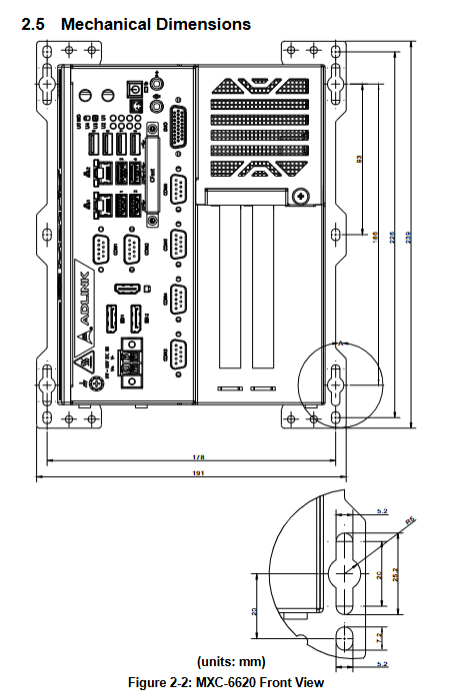
-Unified depth of 240mm, height of 210mm; 2 slots with a width of 165mm, 4 slots with a width of 206mm;
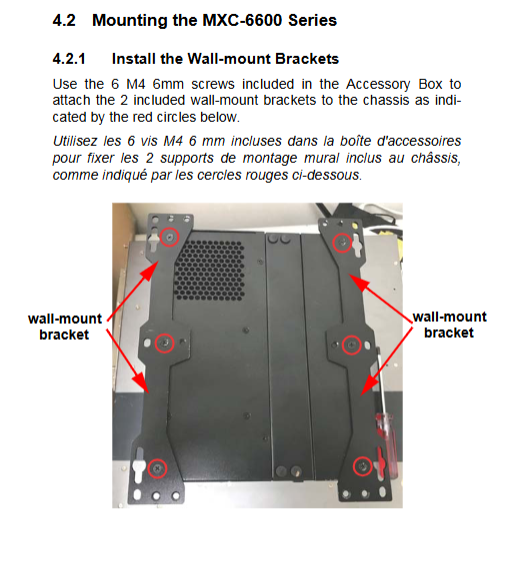
-Standard wall bracket, reserved hanging holes in the chassis, supporting wall fixation;
-Metal IP30 shell, aluminum fins for passive heat dissipation.
2. Environmental tolerance
1. Temperature
-Standard operating conditions: 0~50 ℃;
-Wide temperature options (single memory+industrial SSD): -20~70 ℃; Dual memory upper limit -20~60 ℃;
-Storage temperature: -40~85 ℃ (excluding hard drive);
2. Humidity: 95% no condensation at 40 ℃;
3. Vibration/Shock: SSD/CFast configuration with 5Grms three-axis vibration and 100G 11ms shock; Mechanical hard drive only 0.5Grms;
4. EMC: ESD contact 8kV/air 15kV, CE/FCC Class B, UL/cUL, CB safety certification.
3. Power consumption of the whole machine (measured with 24V input)
|CPU Model | Shutdown | Standby | CPU Full Load | Whole Machine Full Load | Recommended Power Supply|
| Xeon/i7 | 6.7W | 23W | 78W | 118W | 220W/280W |
| i5 | 6.8W | 23W | 77W | 117W | 220W/280W |
| i3 | 6.8W | 22W | 55W | 93W | 220W/280W |
Overall I/O layout (front panel+internal motherboard)
4.1 Front panel interface (from top to bottom)
1. DC 9-32V locking power terminal;
2. 2 x DP++, 1 x HDMI triple display output;
3. 2 x USB 3.1 Gen2, 2 x USB 3.1 Gen2, 4 x USB 2.0;
4. Dual Gigabit RJ45 Ethernet ports (with speed/link dual color lights);
5. 6-way DB9 serial ports COM1~COM6;
6. CFast storage card slot;
7. 26pin D-Sub 8DI/8DO digital terminal;
8. Audio microphone/headphone jack;
9. Power button, reset button, 5-channel custom LED+WD/HDD/diagnostic status light.
4.2 Internal motherboard connectors (complete pin definitions in the manual)
1. Hardware: DDR4 memory slots M.2、MiniPCIe、 Dual USIM, CMOS clear jumper;
2. Storage: 4-channel SATA, CFast built-in socket;
3. Two types of expansion backboards, PCIe x16, PCIe x4, and standard PCI slots, are available;
4. Peripherals: 12V fan power supply, GPS power supply, built-in USB, I2C bus, external power/reset pin;
5. Audio and DIO extension cable tray.
4.3 Electrical Description of Key Interfaces
1. COM1/2: BIOS switch RS232/422/485, support automatic flow control;
2. DIO: DI high level 2~5.25V, DO open drain output, maximum 24mA per channel;
3. Network port: Supports macro frame, WOL, PXE, IEEE1588 clock synchronization;
4. Display: DP up to 4096 × 2304@60Hz , HDMI 4K@30Hz Three screen independent output.
Unboxing, Installation, and Driver (Getting Started)
1. Packing standard: MXC-6600 host, DC power terminal, wall bracket, screw package, instruction manual;
2. Optional accessories: 220W/280W industrial power supply, hot swappable cooling fan module, industrial SSD/CFast, memory upgrade;
3. Installation steps
-Wall mounted: 4 M4 screws fixed bracket, with the chassis hanging hole on the wall;
-Wiring: Power off and connect to the DC terminal, strictly distinguish V+/V – to prevent reverse connection and burning;
-Expansion card: Remove the right cover plate and insert the PCIe/PCI board. For high-power cards, it is recommended to install an optional fan;
4. Driver installation: Download the complete set of Win10 drivers from the official website. The installation sequence is: chipset → graphics card → audio → network card → ME → DIO driver.
Appendix B: Complete BIOS Setup Manual
Press DEL to enter BIOS when booting up, and press F7 to quickly start the menu, which is divided into 6 main menus:
1. Main page: BIOS version, CPU/memory information, system time;
2. Advanced Settings
-CPU: Hyper threading, virtualization VT, turbo frequency, C-State temperature control, TCC downsampling threshold;
-Power supply: Power off to restore power on status, RTC timed startup;
-Serial port redirection, USB timing, TPM 2.0 safety switch;
-AMT remote management, hardware monitoring (CPU/board temperature, intelligent fan speed regulation);
-WDT watchdog switch (two timing modes in seconds/minutes);
-Onboard equipment: serial port mode switching, network port start stop;
3. Chipset chipset: memory timing, graphics card DVMT allocation, SATA RAID mode, PCIe link speed;
4. Security: administrator/user password, Secure Boot secure boot, TPM key management;
5. Boot boot: boot sequence, quick boot, UEFI/traditional mode switching;
6. Save&Exit: Save/Discard modifications, Factory restore, EFI Shell startup;
-Troubleshooting: Short circuiting the CMOS jumper on the motherboard for 3 seconds can clear the BIOS and restore it to default.
Appendix C: Watchdog WDT Development Library (Windows+Linux)
1. Windows C/C++ API
Provide a complete set of functions including InitWDT, SetWDT, StartWDT, ResetWDT, and StopWDT, supporting timeout of 1-255 seconds/minute and automatic restart when the program freezes; Download the header file, lib library, and demo source code.
2. DOS/Linux low-level operations
Directly operate the NCT6106D LPC register, provide complete register read and write example code, and customize timeout countdown.
Appendix D: 8DI/8DO Digital IO Development Library
1. Windows functions: ADMX \ -DIO \ _init initialization, ADMX \ -DI \ _ ReadPort read input, ADMX \ _ DO \ _ RitePort output level, LED custom light control;
2. Error code definition: Driver opening failure, IO operation exception;
3. Channel mask: DI0~DI7, DO0~DO7 correspond to bit identifiers, supporting batch reading and writing of IO status.