ADLINK IMB-M42H Industrial ATX Motherboard
Product Introduction (Hardware Specifications, Layout, I/O)
Core Product Features
Version: Standard ATX 305mm × 244mm
CPU: LGA1150 slot, 4th generation Intel i7/i5/i3/Pentium/Celeron (excluding E3800 series, 53-65W TDP)
Chipset: Intel H81
Memory: Dual DDR3 240pin slots, dual channel DDR3 1600, maximum 16GB non ECC
Expansion slots: 1 x PCIe x16 Gen2 dedicated graphics slot, 1 x PCIe x4 Gen2, 4 x standard PCI
Storage: 2 x SATA3 6Gb/s+2 x SATA2 3Gb/s, a total of 4 serial hard drives
Display: Intel HD core display, VGA+HDMI 1.4a+DP three-way independent dual display output; DP up to 2560 × 1600, HDMI 1920 × 1200
Network: Single Intel I217V Gigabit RJ45, with dual color indicator lights for link/speed
Serial port: 6-way COM (rear COM1/2 supports RS232/422/485, COM1 comes with 485 automatic flow control; Onboard 4 COM3~6 RS232 only)
USB: Rear 2 x USB 3.0+4 x USB 2.0; Motherboard 2 sets of USB 2.0 pin expansion 4 front USB ports
Peripherals: 1-channel 25 pin parallel LPT, 10 pin 4-in 4-out GPIO (jumper 5V/12V optional), TPM security pin, hardware watchdog, hardware temperature and voltage monitoring
Audio: onboard HD Audio, rear 3-color audio port+front audio pin
Environment: Standard industrial working temperature of 0-60 ℃
Complete Hardware Specification Table
(1) System Platform
CPU model support: i3-4360, i3-4330, G3420, G1820 and other 22nm fourth generation Core processors, 53~54W low-power consumption
BIOS: AMT Aptio UEFI Graphics BIOS, supports Instant Flash without DOS flashing
Dual compatibility of power supply mode: ATX (button start)/AT (power on self start)
(2) Rear I/O panel interface (from left to right)
COM1(RS232/422/485)
COM2(RS232/422/485)
4 rear USB 2.0 ports
Gigabit LAN network port
Line In (blue)
Line Out (green)
Mic In (Pink)
VGA D-Sub
PS/2 keyboard mouse composite mouth
DisplayPort
Network port indicator light description: ACT light flashing=data transmission, constant light with link; SPEED light off=10M, orange=100M, green=1000M.
(3) Key components of onboard layout
Includes: LGA1150 CPU socket, dual channel DDR3 memory slots, PCIe/PCI expansion slots, 24 pin main power supply, 8 pin CPU auxiliary power supply, 4 SATA ports, CPU/chassis fan pins, CMOS clear jumper, AT/ATX power mode jumper GPIO、TPM、 Front panel, serial/USB/audio pins.
Hardware Installation Guide
2.1 Anti static specifications for unboxing
Before disassembly, completely disconnect the power supply and wear an anti-static wristband;
Do not place the motherboard on the carpet, and only pinch the edges of the accessories;
Do not plug or unplug any boards/cables when the motherboard is powered on during standby.
2.2 motherboard chassis fixation
Standard ATX screw hole position, screws should be tightened moderately to avoid fracturing the PCB board layer.
2.3 Key points for installing DDR3 memory
Dual channels must be paired with the same capacity, frequency, and brand of memory; Single channel only;
DDR2/DDR cannot be mixed, and notch protection prohibits violent insertion;
Disassembly and assembly: Open the two end buckles outward and insert them vertically until the buckles automatically lock.
2.4 Expansion Card Installation (PCIe/PCI)
PCIe x16 is used for independent graphics cards, PCIe x4 is compatible with acquisition cards and network cards; 4 PCI compatible with traditional industrial peripherals;
Turn off the power and remove the chassis cover. Press the card vertically until it fits completely, and fix it with screws.
2.5 Definition of Three Main Function Jumpers
CLCMOS (Clear CMOS)
Power off and unplug the battery, short the jumper 1-2 (normal) for 2-3 5-10 seconds, restore the factory BIOS, and then restore the jumper.
PSON1 (AT/ATX power switch)
Default 2-3=ATX (power on button); 1-2=AT (automatic power on).
JGPIO-PWR1 (GPIO power supply selection)
Default 2-3=5V; 1-2=12V, providing power to the 4-in-4-out GPIO module.
2.6 Complete description of all onboard built-in pins
Power supply pin
24Pin ATXPWR main power supply: compatible with 20Pin old power supply;
8Pin ATX12V CPU auxiliary power supply: compatible with 4Pin power supply;
CPU_SAN: 4-pin PWM temperature controlled fan, compatible with 3Pin ordinary fans;
CHA_SAN: Chassis 3/4-pin speed measuring fan.
Storage SATA
SATA0/1 (red, 6G SATA3), SATA4/5 (black, 3G SATA2), prioritize SATA0 as the system disk.
Serial port expansion
COM3/4/5/6 9-pin pins, RS232 only, pin definition includes RXD/TXD/GND/power supply.
Front panel PANEL1
Integrate power switch, restart, power LED, hard drive activity LED, distinguish positive and negative wiring.
GPIO 10 Pin Pin Pin
4-channel digital input, 4-channel digital output, power supply pin GND, Supporting official API development routines.
Other expansion pins
USB67/USB89: Two sets of front USB 2.0 ports;
LPT1: 25 pin parallel printing expansion;
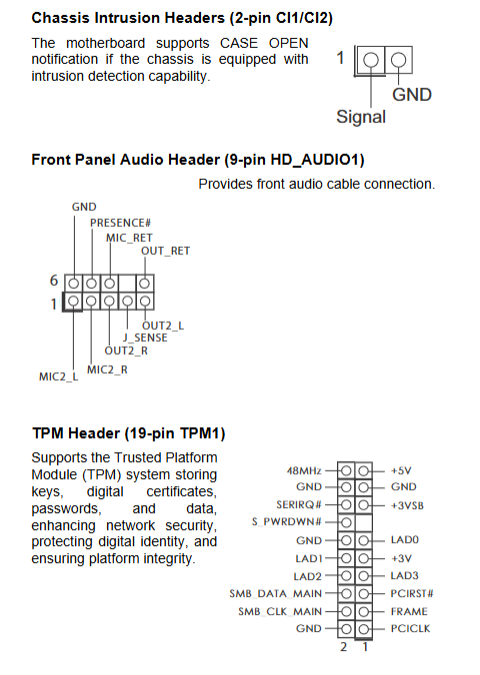
HD_SUDIO1: Front end high-definition audio;
TPM19Pin: Trusted and Secure Encryption Module;
CI1/CI2: Chassis Open Cover Intrusion Detection;
SPDIF: Digital audio output.
2.7 Driver Installation
Download the driver from the corresponding model page on the Linghua official website and match it with the Windows/Linux embedded system.
Appendix A UEFI BIOS Complete Setup (Core Operations)
Press F2 or Del to enter the graphical Aptio UEFI when booting up, which supports mouse operation and is divided into 6 main menus:
A. 1 Main
Display CPU model, memory capacity, dual channel status, system time and date, BIOS version.
A. 2 Advanced (Advanced settings, maximum functionality)
CPU Configuration
Adjustable number of cores, C1E/C3/C6/C7 energy-saving, SpeedStep, Turbo turbo frequency, virtualization VT, hardware prefetching, overheating protection, XD memory protection.
Chipset Configuration
Main graphics card priority (PCIe/core display), VT-d pass through, IGPU multi monitor on, shared video memory size, onboard network card/audio switch, power on/off recovery strategy.
Storage Configuration
SATA controller switch, AHCI/IDE mode switching, hard disk S.M.A.R.T health check, link energy-saving.
Super IO (Industrial Core)
6-way COM port protocol switching (232/422/485), parallel port mode, watchdog WDT timed restart switch.
ACPI power supply
Sleep S3, network/USB/RTC timed power on, keyboard and mouse power on, PCI wake-up settings.
USB settings
USB 3.0 mode, traditional USB compatibility support (DOS/PE recognition peripherals).
Voltage Voltage
DDR memory voltage switch between 1.35V/1.5V.
Instant Flash: DOS without USB flash drive, directly flashing new firmware in BIOS.
A. 3 H/W Monitor (Hardware Monitoring)
Real time display of CPU/motherboard temperature, CPU/chassis fan speed,+3.3V/+5V/+12V voltage; Fan automatic speed regulation, over temperature protection, and clearing of chassis opening records can be set.
A. 4 Boot (startup item)
Startup sequence, network PXE boot, NumLock boot status, CSM compatibility module (required for old systems), Fast Boot switch for quick boot.
A. 5 Security
Administrator/user boot password, Secure boot switch, TPM related security options.
A. 6 Exit
Save exit, exit without saving, load BIOS optimal default, load conservative security default.