ADLINK PCIe GIE7x series acquisition card
Product Overview and Model Differentiation
1. Product positioning
PCIe x4 generation GigE Vision PoE+image acquisition card, divided into 2-port, 4-port standard version/PRO professional version, simultaneously transmits images to industrial cameras through Ethernet cables, PoE power supply, and Ethernet synchronous triggering, greatly simplifying the wiring of the vision system.
2. Core differences among the four models
Function PCIe GIE72 PCIe GIE72 PRO PCIe GIE74 PCIe GIE74 PRO
Number of network ports 2 Gigabit 2 Gigabit 4 Gigabit 4 Gigabit
PoE+ IEEE802.3at ✔ ✔ ✔ ✔
PoE complete protection/power management ✔ ✔ ✔ ✔
Jumbo frame 9KB, IEEE1588, link aggregation ✔ ✔ ✔ ✔
ToE Ethernet synchronization trigger ❌ ✔ ❌ ✔
Onboard SHA256 software license encrypted EEPROM ❌ ✔ ❌ ✔
Maximum total PoE power (dual 12V Molex) 61.6W 61.6W 61.6W 120W (highest in the entire series)
3. Typical application scenarios
Industrial visual inspection equipment, scientific research instrument imaging, medical image acquisition equipment.
Core hardware functional characteristics
Bus and Network
PCIe x4 Gen1/Gen2 slot compatibility (can be inserted into x4/x8/x16 slots);
Independent gigabit RJ45 network port, with a single channel bandwidth of 1Gbps; Supports 9KB jumbo frames, link aggregation, and hardware IEEE1588 precise clock synchronization.
PoE+power supply system (core advantage)
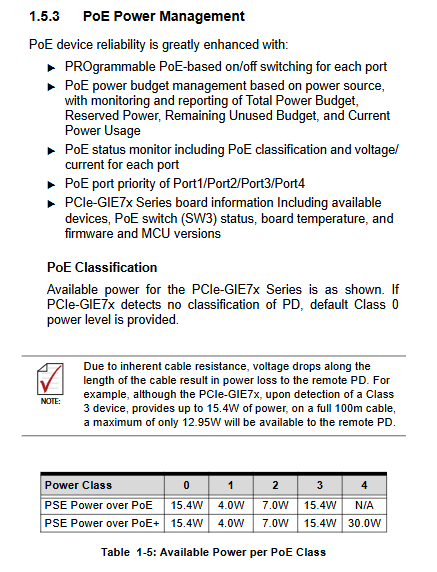
Standard IEEE802.3at PoE+, with a maximum output of 30W per network port, automatically recognizes PoE (15.4W)/PoE+(30W)/non PoE cameras;
Multiple hardware protections: undervoltage UVP (29V), overvoltage OVP (62V), graded overcurrent ICUT, customizable over temperature protection (default shutdown at 130 ℃, recovery at 90 ℃);
Intelligent allocation of power budget:
PCIe slot only power supply: total PoE limit of 20W;
Single 4Pin/6Pin 12V Molex: upper limit 61.6W;
PCIe-GIE74 PRO dual power supply simultaneously connected: up to 120W;
Port priority: 1>2>3>4. When the power is insufficient, priority is given to ensuring power supply to low numbered ports;
Software control: Single port PoE on/off, real-time voltage/current/power monitoring, device grading reading.
PRO exclusive value-added function
ToE Trigger over Ethernet Trigger: Following the GigE Vision standard, a single broadcast message synchronizes multiple cameras without the need for additional trigger cables; External edge triggers the firmware to issue action instructions, with fixed delay and no jitter. It can be configured to collect start stop, timestamp reset, and other instructions;
Built in software license encryption chip: SHA256 secure EEPROM, no encryption dongle required, supports function authorization, anti-theft version, and comes with Smart GigE SDK management authorization.
Universal IO and interrupts
Onboard isolation with 4 external trigger inputs DI, matched with front-end DB trigger terminals; Multi card and multi camera networking support.
System compatibility
Operating system: Win7/8.1/10 32/64 bit; Development languages: C #, VB.net, VC++.
Comparison of PoE/PoE+Standard Parameters
Parameter PoE 802.3af PoE+802.3at
PSE maximum output 15.4W/port 30W/port
Equipment side available power 12.95W 25.5W
Supply voltage (PSE side) 44~57V 50~57V
Maximum working current 350mA 600mA
Board hardware layout, interfaces, and dialing
1. Onboard connector
RJ45 Gigabit Ethernet port: 8-core simultaneous data transmission+PoE power supply; Dual color indicator lights distinguish speed (green 100M/yellow 1000M) and link/data flashing status; Equipped with independent PoE power supply indicator light.
12V auxiliary power supply interface
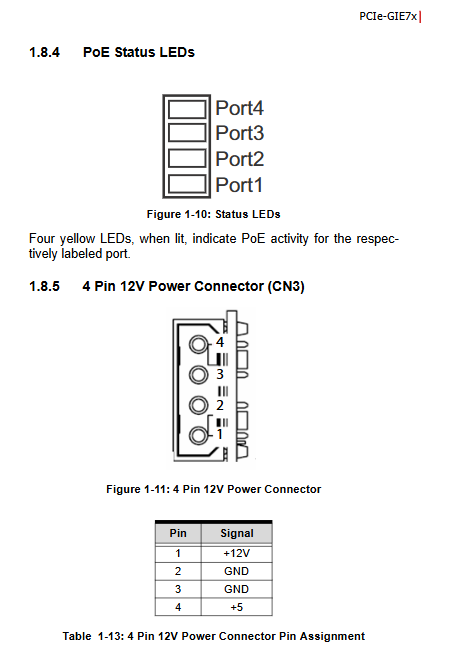
4Pin CN3:+12V、GND、+5V, Single channel maximum 61.6W;
6Pin CN4: Three channels+12V, supports dual parallel connection, and the GIE74 PRO can achieve a total power of 120W.
Trigger terminal CN6:10Pin isolated 4-channel digital trigger input DI, matched with optional chassis DB expansion trigger port.
2. Dial switch
SW1 Card ID Dialing: 4-digit DIP, 16 card numbers from 0 to 15, default all ON (15), distinguishing hardware IDs for multiple cards.
SW3 PoE hardware master switch
Bit 1: PoE global enable (default OFF on, ON off);
Bit 2: Power on PoE initial state (default: OFF when powered on, ON when powered off).
3. Onboard status LED
Network port channel LED: The PCIe exchange link is flashing normally, and it is abnormally on/off;
Power failure LED: Constant light indicates abnormal PCIe switch chip;
Independent PoE port indicator light: Yellow constant light indicates that the port is outputting PoE power.
Hardware installation process
Open the box and check the packaging accessories: collection card, quick start guide, contact the dealer immediately if there is any damage during transportation;
Power off and disassemble the device, select an idle PCIe x4/x8/x16 slot, release static electricity, hold the edge of the card and insert it, and tighten the fixing screw;
According to the camera power requirements, connect a 4/6Pin 12V external power supply;
Connect the GigE camera to a gigabit Ethernet cable, and connect the external trigger signal to the DI terminal;
Start up and install the Intel I210 compatible network card driver ADLINK Smart GigE SDK;
Configure PoE power, ToE synchronization, and software authorization through the Power Management tool.
Key points of safety regulations
Power off the entire machine before operation, and do not plug or unplug boards, cables, or power supplies with power on;
PoE system is only for indoor use and cannot be deployed outdoors;
The heat sink of the board is at high temperature, and it needs to be stopped and cooled before touching again;
Do not disassemble or repair on your own, and contact authorized engineers from the original factory for any malfunctions;
The power cable is firmly fixed to avoid compression, bending, and damage;
Storage/working temperature range: 0~70 ℃ (PoE full load condition), humidity without condensation.
Software Tools and Development Support
Smart GigE SDK: a complete set of development libraries for image capture, ToE triggering, and software licensing authorization;
PoE Power Management Utility: Visual monitoring of port power consumption, configuration of power budget, and over temperature threshold;
Supporting sample source code, supporting C #/C++/. NET for rapid development of visual programs;
The I210 Ethernet controller driver can be downloaded from the official websites of Linghua and Intel.