ADLINK PXES-2785 18 Slot PXI Express Chassis
Product Overview and Core Features
18 slots for the whole machine: Slot1 system controller slot; Slot10 system timed ST slot; 6 hybrid peripheral slots (7-9, 11-13); 10 pure PXIe peripheral slots (2-6, 14-18).
The hybrid slot is compatible with PXI-1, CompactPCI, PXIe/CPCIe-3U modules; Pure PXIe slots only support PXIe/CPCIe modules.
Core Features
PCIe Gen3 high-speed backplane
The system slot adopts a 2-link (x8+x16) Gen3 architecture, and the overall system bandwidth is 24 GB/s; All peripheral slots are independent PCIe Gen3 x8, with a maximum single slot bandwidth of 8 GB/s, doubling the bandwidth compared to PXES-2780 (Gen2).
High power pluggable modular power supply
Maximum DC output: 1170W in 0-45 ℃ environment; 990W in 45-55 ℃ environment; power module supports on-site hot replacement to reduce MTTR maintenance time; The AC input has a built-in 16A resettable circuit breaker.
Enhanced cooling system
3 rear 220CFM fans; Bottom inlet air, rear outlet air; Supports two fan modes: Normal/Boost and Auto/High speed settings; The maximum heat dissipation of a single slot is 82 W (limited condition of 0-45 ℃), and the conventional single slot is 50 W at 0-55 ℃. There are 8 temperature sensors on the back panel, and the speed control takes the highest temperature of all sensors. Idle slots must be equipped with filling/wind blocking modules.
Advanced synchronization and timing system
Clock: PXI_CLK10 (10 MHz), PXIe_CLK100 (100 MHz), clock accuracy improved to ± 1 ppm, phase jitter index significantly better than PXES-2780; Rear panel BNC 10MHz input/output; Clock priority: ST slot input>BNC external input>onboard local clock; The backplane PLL can lock external 10M to generate 100M synchronous clock.
Star trigger: Slot10 system timing slots provide single ended PXI_STAR+three sets of differential PXIe-DSTAR differential star triggers.
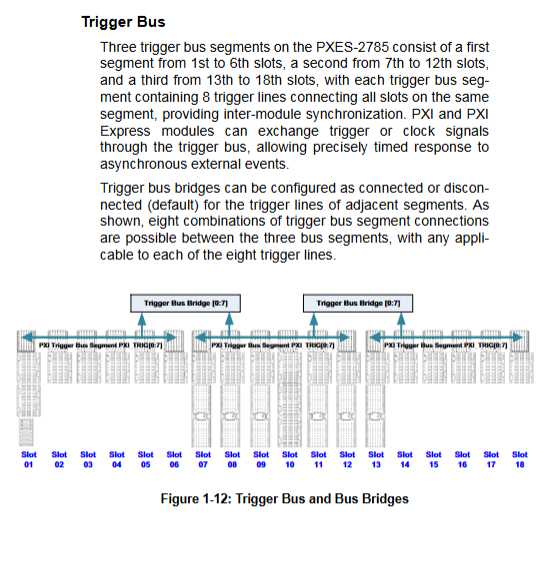
Three software bridged trigger buses: divided into A (1-6), B (7-12), and C (13-18), with 8 trigger lines that can be independently configured for inter segment connectivity/isolation, supporting multiple topologies, and saved in templates.
Local Bus: A single interconnected bus connecting adjacent slots.
Multi chassis monitoring (SMBus+Ethernet LAN)
SMBus: Paired with Linghua embedded controller, ChassisWatch provides complete read-write status, configured trigger bus, fan parameters, and alarm thresholds.
RJ45 Ethernet port web monitoring (new, PXES-2780 not available): No controller required, computer can be directly connected via Ethernet cable, and the browser can read the real-time status of the entire machine’s voltage, fan, and temperature; Default static IP: 192.168.1.10.
Rear panel DB-REMOTE terminal: remote INHIBIT shutdown, remote power button, voltage monitoring, fault alarm output.
Four color status LEDs on the front panel: Fault (red), Temperature (amber), Fan (green), Power (blue).
Form: desktop/rack dual-use; Net weight 11.9 kg; working temperature 0-55 ℃.
Hardware specification parameters
1. Power specifications
AC input: 100-240VAC, 50-60Hz; Maximum input 1300W, built-in 16A resettable circuit breaker
DC output
Output rail maximum current load regulation ripple noise
+12V 72A ±5% 120 mV
+3.3V 77A ±5% 50 mV
+5V 20A ±5% 50 mV
-12V 4A ±5% 120 mV
+5Vaux 4A ±5% 50 mV
Power derating: AC200-240V: 1170W output at 0-45 ℃; 990W output at 45-55 ℃. AC100-120V: 1000W output at 0-45 ℃; 790W output at 45-55 ℃.
2. Key clock indicators
PXI_CLK10: maximum offset between slots 280ps; accuracy ± 1ppm; RMS phase jitter 0.44ps;
PXIe_CLK100: maximum inter slot offset of 100ps; accuracy ± 1ppm; RMS phase jitter of 2.41ps.
3. Heat dissipation and noise
Fan: 3 × 220CFM; Bottom inlet and rear outlet.
Heat dissipation capability:
Normal mode: Single slot ≤ 38W, available in the full temperature range of 0-55 ℃;
Boost mode: single slot 38-50W, available in the 0-55 ℃ full temperature range;
Boost+High: The maximum power consumption for a single slot is 82W, limited to 0-45 ℃, and the power consumption of two adjacent slots on the left and right of the 82W module cannot exceed 50W.
Ventilation gap: Rear ≥ 101.6mm; Side ≥ 44.45mm; Bottom ≥ 17mm.
Noise: Normal Auto: 40.9dBA; Boost‑Auto:46.1dBA; Boost‑High:69.2dBA。
4. Mechanical parameters
Dimensions: 457.4 mm (width) × 194.8 mm (height) × 480.5 mm (depth)
Net weight: 11.9 kg; Packaging gross weight: 14.6 kg
5. Environment and EMC
Working temperature 0-55 ℃; Storage -20~70 ℃; Humidity 10-90% RH without condensation;
30G half sine 11ms impact; random vibration;
EMC:Class‑A; CE, FCC, ICES certification.
Panel interface and indicator lights
front panel
Power button; The button only takes effect when the INHIBIT switch on the rear panel is set to DEF.
Four status LED, from left to right:
Fault red: flashing=there is any one over limit alarm (temperature/fan/voltage);
Temperature Amber: Blinking=Temperature sensor exceeds default threshold of 70 ℃;
Fan green: flashing=fan speed lower than the default 800 RPM;
Power Blue: Blinking=Power rail voltage exceeds ± 5% threshold.
Rear panel interface
BNC: 10MHz REF IN external clock input; 10MHz REF OUT clock output;
RJ45 remote management LAN port: Web page monitoring, default IP 192.168.1.10;
Green terminal block Voltage Monitor/Remote Control: Multi channel voltage sampling, FAULT fault output, INHIBIT # remote shutdown, PWRBTN # remote power button;
INHIBIT switch: DEF front panel button control; MAN is remotely controlled by terminal INHIBIT # pin;
Fan Mode switch: Normal Normal; Boost enhances heat dissipation;
Fan Speed Switch: Auto Intelligent Speed Control; High forced full speed;
AC resettable 16A circuit breaker; C19 high-power AC power input; Chassis grounding pole.
Packing list, hardware, rack installation, power module replacement
4.1 Packaging List
PXES-2785 chassis, power cord;
Fill baffle kit (1 3-channel baffle, 18 single slot baffles);
The rack installation kit is an optional item, and the part number is shared with PXES-2780;
4.2 Module Hardware Installation
Slot1 system controller: Confirm that the CPU/memory/storage assembly of the controller is completed; Release the lock buckle, slide along the guide rail, fasten the lock buckle, and tighten the panel screws; Supports controllers with a maximum width of 4 slots.
Peripheral module Slot2-18: Release the lock buckle, slide into the slot, fasten the lock, and tighten the screw; Hot swappable modules are strictly prohibited, and idle slots must be equipped with baffle/windshield modules.
4.3 Rack Installation
Remove the right handle and the bottom rubber foot pad;
Install optional rack brackets, with adjustable depth support for bracket holes that can be recessed towards the inside of the cabinet to reserve space for front cables and interconnect components;
Fixed to the standard cabinet, ensuring ventilation gaps at the bottom and rear.
4.4 Replacement of pluggable power module (important maintenance function)
Completely shut down the machine and unplug the AC power cord;
Remove the 8 fixing screws on the rear panel;
Grasp the power module handle and pull out the faulty power supply;
Align the new power supply with the guide rail and smoothly push it into place;
Restore 8 screws and reconnect the AC power cord.
4.5 Startup
Confirm that the INHIBIT switch is DEF; Connect the AC power cord; Press the power button on the front panel, and the blue Power light will turn on.
Software resources and ChassisWatch functionality
Supporting software packages: ADLINK PXI Platform Services (APPS), MAPS Core.
ChassisWatch is a GUI chassis configuration tool that supports SMBus access; The chassis comes with a built-in network port for web monitoring, and no software installation is required.
ChassisWatch’s main functions
Chassis status monitoring: Read all DC power rails, backplane T1-T8 eight channel temperature, 3-channel fan speed, network port IP information, firmware version; Support logging.
Software configurable PXI trigger bus bridging: The graphical interface is configured with three A/B/C trigger buses and eight trigger line routes. The configuration can save/load templates.
Smart Fan: supports software to read/modify fan mode (Normal/Boost) and fan speed mode (Auto/High); AUTO mode speed regulation logic: all sensors<25 ℃, fan duty cycle 40%; Linear acceleration above 25 ℃, with a maximum full speed of 70 ℃.
Alarm threshold configuration: Voltage, temperature, fan speed alarm thresholds, save/load/restore to factory.
Network settings: Modify LAN port static IP/DHCP, gateway, and mask.
Web page monitoring (RJ45 network port)
Connect the network cable directly to the LAN port of the computer and chassis, and the browser accesses the default IP address http://192.168.1.10 Without the need for a PXI controller, directly view real-time data on voltage, fan, and all 8 temperature channels; The IP address can be modified through ChassisWatch.
Difference PXES-2780: PXES-2780 only has RS-232 serial port, can only read status, cannot configure trigger; Switching PXES-2785 to Ethernet, web visualization, and ChassisWatch can fully configure all functions.
Troubleshooting and Maintenance
Common Faults
The whole machine is not powered on: check if the AC circuit breaker has tripped; Power cords and sockets; Confirm that the INHIBIT switch is in DEF;
Power blue LED flashing: power rail voltage exceeds the limit; Dismantle all modules and retry; Still performing abnormal power module replacement;
Fan green LED flashing: foreign object blocking the fan or fan hardware failure;
Temperature amber LED flashing: Check the bottom/rear ventilation gap; Confirm that all empty slots are installed with baffles; Contact the service provider if there is still an alarm despite good ventilation;
Red Fault light flashing: At least one temperature/fan/voltage alarm, open ChassisWatch or web page to locate the specific fault item;
System startup failure: All peripheral modules are unplugged and the fault locating modules are inserted one by one.
Maintenance points
The net weight of the chassis is 11.9 kg, and handles should be used for handling to prevent injury;
Before maintaining or replacing the power module, the power must be disconnected and the AC power cord must be unplugged; Cleaning focuses on cleaning the dust at the air inlet;
Built in backup lithium battery, there is a risk of explosion if the wrong model is replaced;
Internal maintenance is only allowed to be carried out by authorized technicians.
Safety instructions and technical support
Indoor use only; Maximum working altitude of 2000 meters, pollution level PD2;
When disassembling or replacing modules, the AC power supply must be completely disconnected; Prohibit blocking ventilation holes; Stay away from liquids with high temperature and humidity;
After the chassis is running, the outer shell is hot. Touch it after cooling to avoid burns;
The document includes RoHS/WEEE environmental protection and California Proposition 65 warning; Provide contact information for technical support in various regions of Linghua worldwide.
Addendum: Key Differences between PXES-2780 and PXES-2785
Project PXES-2780 PXES-2785
PCIe Gen2; Maximum 4GB/s single slot Gen3; All peripheral slots are x8, with a maximum of 8GB/s per slot
Clock accuracy ± 25 ppm ± 1 ppm, low jitter
Power supply 800W fixed built-in power supply, non pluggable up to 1170W, can be plugged and replaced on site
Heat dissipation single slot 38.2W up to 82W (conditional derating); Normal/Boost dual fan mode
Remote monitoring of RS-232 serial port (read only, cannot be configured to trigger) Ethernet web page monitoring; ChassisWatch complete configuration
Front panel LED with 3 LEDs (Temp/Fan/Power) and 4 LEDs, adding independent Fault indicator light